
C#_WPF中创建二维码、识别二维码
第三方库:
WPFMediaKit.dll (WPFMediaKit摄像头处理)
zing.dll

NuGet安装这两个第三方dll
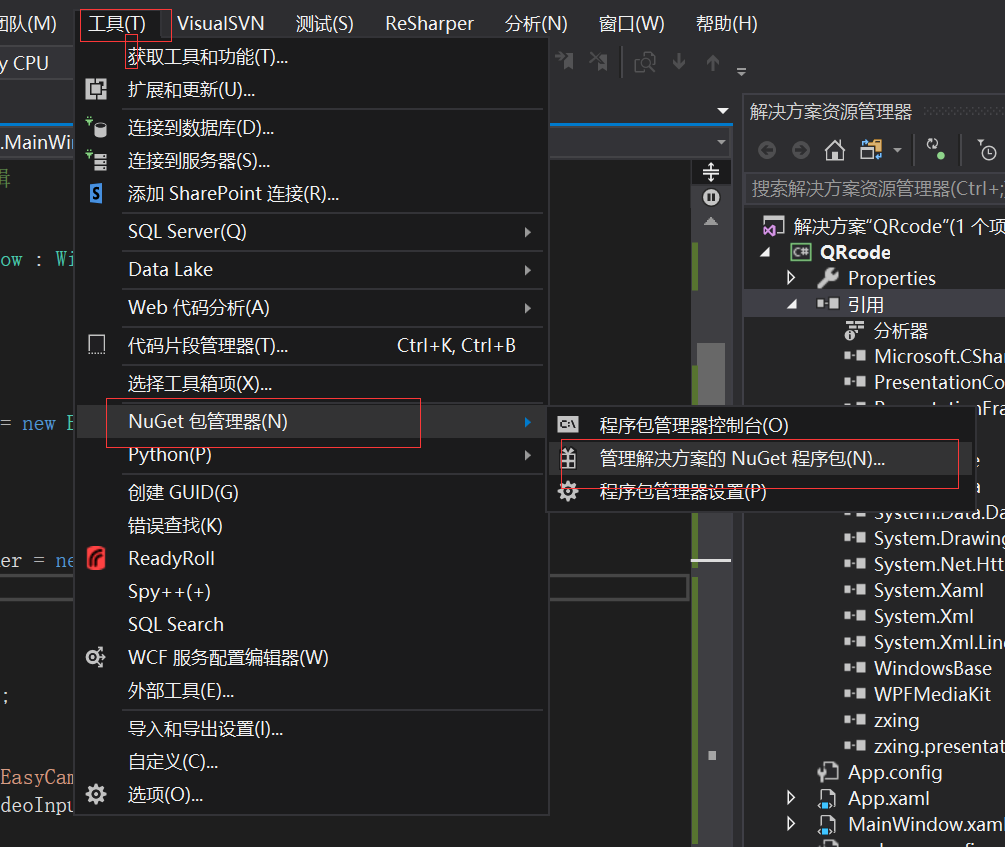
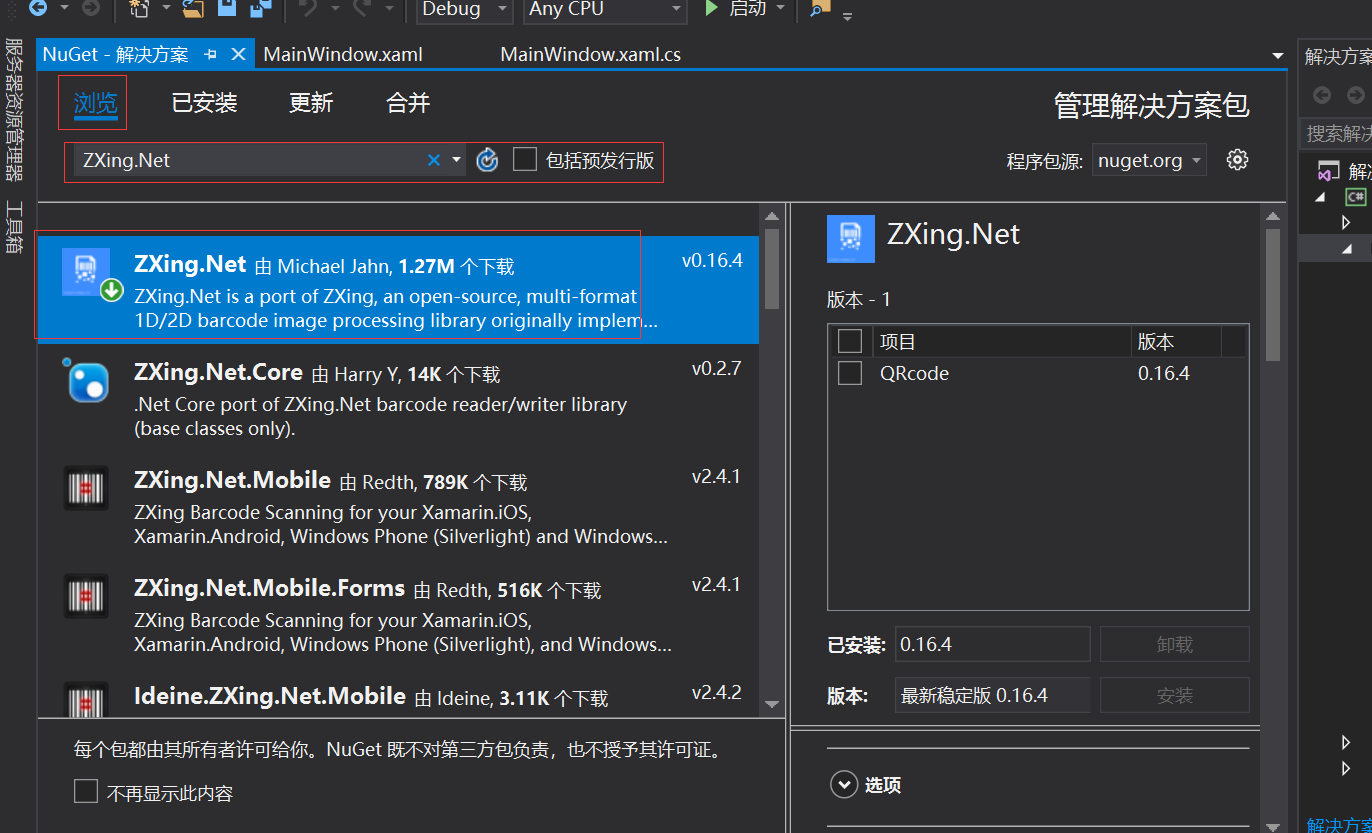
项目截图预览:
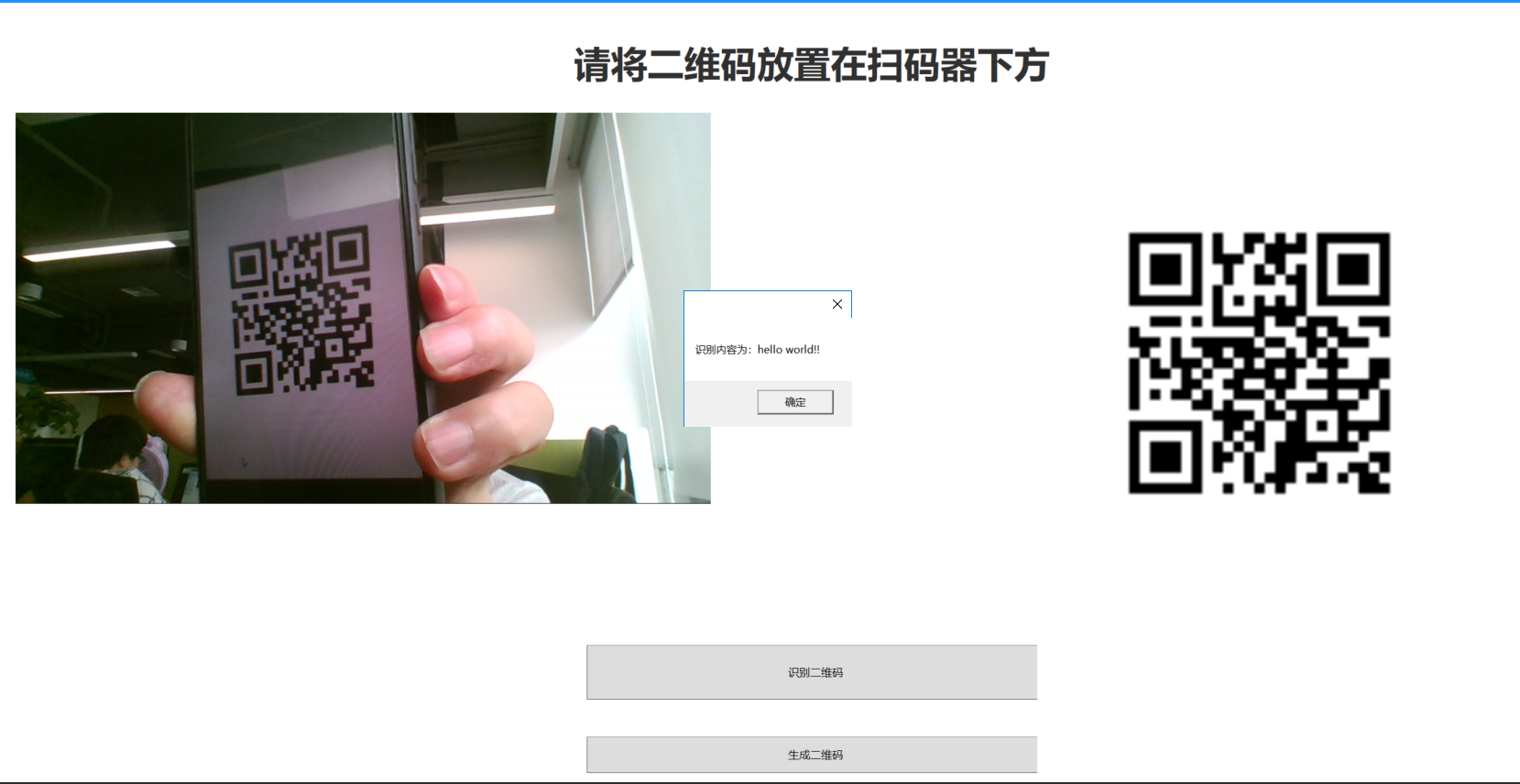
项目代码:
using System;

using System.Collections.Generic;

using System.Drawing;

using System.IO;

using System.Linq;

using System.Runtime.InteropServices;

using System.Text;

using System.Threading.Tasks;

using System.Windows;

using System.Windows.Controls;

using System.Windows.Data;

using System.Windows.Documents;

using System.Windows.Input;

using System.Windows.Media;

using System.Windows.Media.Imaging;

using System.Windows.Navigation;

using System.Windows.Shapes;

using System.Windows.Threading;

using WPFMediaKit.DirectShow.Controls;

using ZXing;

using ZXing.Common;

using ZXing.QrCode.Internal;

namespace QRcode

{

    /// <summary>

    /// MainWindow.xaml 的交互逻辑

    /// </summary>

    public partial class MainWindow : Window

    {

        /// <summary>

        /// ZXING 二维码扫描类

        /// </summary>

        BarcodeReader codeReader = new BarcodeReader();

        /// <summary>

        /// 定时器

        /// </summary>

        DispatcherTimer cameraTimer = new DispatcherTimer();

        public MainWindow()

        {

            InitializeComponent();

            // 配置的摄像头名称

            var camera = "Lenovo EasyCamera";

            if (MultimediaUtil.VideoInputNames.Contains(camera))

            {

                //控件制定摄像头

                vce.VideoCaptureSource = camera;

                cameraTimer.IsEnabled = false;

                cameraTimer.Interval = new TimeSpan(200); //执行间隔0.2秒

                cameraTimer.Tick += cameraTimer_Tick;

            }

        }

        /// <summary>

        /// 计时器方法

        /// </summary>

        /// <param name="sender"></param>

        /// <param name="e"></param>

        private void cameraTimer_Tick(object sender, EventArgs e)

        {

            RenderTargetBitmap bmp = new RenderTargetBitmap((int)vce.ActualWidth, (int)vce.ActualHeight, 96, 96, PixelFormats.Default);

            vce.Measure(vce.RenderSize);

            vce.Arrange(new Rect(vce.RenderSize));

            bmp.Render(vce);

            BitmapEncoder encoder = new JpegBitmapEncoder();

            encoder.Frames.Add(BitmapFrame.Create(bmp));

            using (MemoryStream ms = new MemoryStream())

            {

                encoder.Save(ms);

                Bitmap btiMap = new Bitmap(ms);

                var result = codeReader.Decode(btiMap);//解析条码

                if (result != null)

                {

                    // 1:停止识别

                    cameraTimer.Stop();

                    vce.Play();

                    MessageBox.Show($"识别内容为:{result}");

                }

            }

        }

        private void BtnShiBie_Click(object sender, RoutedEventArgs e)

        {

            cameraTimer.Start();

        }

        private void BtnShnegCeng_Click(object sender, RoutedEventArgs e)

        {

           var codimg= Create("hello world!!");

            imgQR.Source = ChangeBitmapToImageSource(codimg);

        }

        /// <summary>

        /// 创建二维码

        /// </summary>

        /// <param name="msg">二维码中保存的信息</param>

        /// <returns></returns>

        public static Bitmap Create(string msg)

        {

            MultiFormatWriter writer = new MultiFormatWriter();

            Dictionary<EncodeHintType, object> hint = new Dictionary<EncodeHintType, object>();

            //设置二维码为utf-8编码

            hint.Add(EncodeHintType.CHARACTER_SET, "utf-8");

            //设置纠错等级, 高

            hint.Add(EncodeHintType.ERROR_CORRECTION, ErrorCorrectionLevel.H);

            BitMatrix bm = writer.encode(msg, BarcodeFormat.QR_CODE, 200, 120, hint);

            BarcodeWriter barcodeWriter = new BarcodeWriter();

            Bitmap bitmap = barcodeWriter.Write(bm);

            string codePath = Directory.GetCurrentDirectory() + "/code.jpg";

            if (File.Exists(codePath))

                File.Delete(codePath);

            bitmap.Save(codePath);

            return bitmap;

        }

        /// <summary>

        /// 从bitmap转换成ImageSource

        /// </summary>

        /// <param name="icon"></param>

        /// <returns></returns>

        public static ImageSource ChangeBitmapToImageSource(Bitmap bitmap)

        {

            IntPtr hBitmap = bitmap.GetHbitmap();

            ImageSource wpfBitmap = System.Windows.Interop.Imaging.CreateBitmapSourceFromHBitmap(

                hBitmap,

                IntPtr.Zero,

                Int32Rect.Empty,

                BitmapSizeOptions.FromEmptyOptions());

            if (!DeleteObject(hBitmap))

            {

                throw new System.ComponentModel.Win32Exception();

            }

            return wpfBitmap;

        }

        [DllImport("gdi32.dll", SetLastError = true)]

        private static extern bool DeleteObject(IntPtr hObject);

    }

}
项目源代码地址:https://download.csdn.net/download/qingchundaima/11151083
C#_WPF中创建二维码、识别二维码的更多相关文章
- Flutter扫码识别二维码内容
前面一篇写了生成二维码图片,这篇来写使用相机扫描识别二维码 识别二维码需要用到插件 barcode_scan 首先在 pubspec.yaml 文件中添加以下依赖,添加依赖后在 pubspec.yam ...
- winform 扫码识别二维码
因为公司业务需求,需要在Windows系统下调用摄像头识别二维码需求,就有了这个功能. 我根据网上网友提供的一些资料,自己整合应用到项目中,效果还不错(就是感觉像素不是太好) 现在将调用摄像头+识别二 ...
- Opencv+Zbar二维码识别(一维码校正)
一维码由一组规则排列的黑色线条.白色线条以及对应的字符组成.对倾斜的(没有严重形变)一维码的角度校正,可以根据其黑白相间.排列规则的特点,计算傅里叶频谱,通过傅里叶频谱中直线的倾斜角度计算空间域图像一 ...
- 使用 CommandScene 类在 XNA 中创建命令场景(十二)
平方已经开发了一些 Windows Phone 上的一些游戏,算不上什么技术大牛.在这里分享一下经验,仅为了和各位朋友交流经验.平方会逐步将自己编写的类上传到托管项目中,没有什么好名字,就叫 WPXN ...
- spa(单页应用)中,使用history模式时,微信长按识别二维码在ios下失效的问题
spa(单页应用,vue)中,使用history模式时,微信长按识别二维码在ios下失效的问题. 触发条件: spa单页应用: 路由模式 history 从其他页面跳转到带有微信二维码识别的页面(不是 ...
- 微信长按识别二维码,在 vue 项目中的实现
微信长按识别二维码是 QQ 浏览器的内置功能,该功能的基础一定要使用 img 标签引入图片,其他方式的二维码无法识别. 在 vue 中使用 QrcodeVue 插件 demo1 在 template ...
- 页面中嵌套iframe,微信浏览器长按二维码识别不了
问题:在微信浏览器内,页面中嵌套iframe,iframe中用户触发事件后有个弹框会显示二维码,用户长按二维码可以识别并跳转.尝试了一下,安卓是正常的,但是ios是识别不了的. 解决过程: 1.这里客 ...
- Python 创建本地服务器环境生成二维码
一. 需求 公司要做一个H5手机端适配页面,因技术问题所以H5是外包的,每次前端给我们源码,我们把源码传到服务器让其他人访问看是否存在bug,这个不是很麻烦吗?有人说,可以让前端在他们的服务器上先托管 ...
- 使用ZXing.Net生成与识别二维码(QR Code)
Google ZXing是目前一个常用的基于Java实现的多种格式的1D/2D条码图像处理库,出于其开源的特性其现在已有多平台版本.比如今天要用到的ZXing.Net就是针对微软.Net平台的版本.使 ...
随机推荐
- vue 移动端禁用安卓手机返回键
//禁止手机返回键 下面这段代码直接复制在index.html中,可以生效// $(document).ready(function() { if (window.history &&a ...
- #C++初学记录(typedef和define)
typedef的用法 typedef关键字可以用于给数据类型定义一个别名,即可以给long long 定义成ll,也可以给结构体定义,当你定义了一个结构体时,每次创建一个结构体都要使用struct+结 ...
- SpringBoot框架 之 Druid与Swagger2
目录 Druid Druid连接池配置 Druid数据监控 集成Swagger2 Swagger2简介 1.添加依赖 2.创建Swagger2配置类 3.在控制器方法上添加对应api信息 4.启动Sp ...
- sip user Authentication and 401
https://www.vocal.com/sip-2/sip-user-authentication/ https://tools.ietf.org/html/rfc3261 SIP User Au ...
- 堆排序Heapsort的Java和C代码
Heapsort排序思路 将整个数组看作一个二叉树heap, 下标0为堆顶层, 下标1, 2为次顶层, 然后每层就是"3,4,5,6", "7, 8, 9, 10, 11 ...
- python:封装连接数据库方法
config.py # 数据库测试环境 name = '***' password = '******' host_port_sid = '10.**.*.**:1521/bidbuat' Oracl ...
- Quartus ii 设计中的差分信号在例化时的命名规则
在Quartus中做设计,如果使用了差分信号的,如DDR的IP中的mem_ck与mem_ck_n,mem_dqs与mem_dqs_n,将其引入输出端口时,对其命名有一定的规则,否则就会出现错误. 如下 ...
- 解决ViewPager与百度地图滑动冲突
一.问题描述 ViewPager中嵌套百度地图的时候会出现百度地图滑动冲突. 二.期望结果: 滑动地图的时候只有地图滑动,滑动其他区域可以切换viewpager. 三.解决方法 自定义viewpage ...
- html5+springboot+websocket的简单实现
环境 window7,IntelliJ IDEA 2019.2 x64 背景:利用IntelliJ来搭建springboot框架,之后来实现websocket的功能.websocket只是实现了画面上 ...
- spring跨重定向传递数据
spring跨重定向传递数据 为何要重定向? 作用之一:防止表单重复提交 如何重定向? // 在控制器方法返回的视图名称中,以redirect:开头的String不是用来查找视图的,而是用来指导浏览器 ...