
爬虫 1 requests 、beautifulsoup
1.requests
1.method
提交方式:post、get、put、delete、options、head、patch
2.url
访问地址
3.params
在url中传递的参数,GET
params = {'k1':'v1','k2':'v2'} params = ‘k1=v1&k2=v2’ params = [('k1','v1'),('k2,'v2')]
4.data
在请求体内传递的参数
data = {'k1':'v1','k2':'v2'} data = ‘k1=v1&k2=v2’ data = [('k1','v1'),('k2,'v2')] data = open('file','rb')
5.json
在请求体内传递的参数
JSON serializable Python object
参数经过序列化,意味着可以传递字典内嵌套字典等
6.headers
请求头
headers = { 'referer':上次浏览的页面
'user-agent':用户使用的客户端类型
...
}
7.cookies
即cookie
字典类型或CookieJar object类型,在请求头中传递
8.files
文件
files = {'file1':open('file','rb')} files = ('file1',open('file','rb')) === ('filename', fileobj, 'content_type') 或 ('filename', fileobj, 'content_type', custom_headers)
9.auth
用户名、密码加密 auth = HTTPBasicAuto(username,pwd)
10.timeout
请求和响应的超时
11.allow_redirects
是否允许重定向
.proxies
代理
13.verify
是否忽略证书
14.stream
下载方式 类型为布尔值 True,则下载能下多少下多少
15.cert
针对https,证书文件
16.session
requests.session 可以免去写cookies
2.beautifulsoup
1.markup
将一个字符串或者文件序列化(url,文件路径等)
2.features
解析器类型
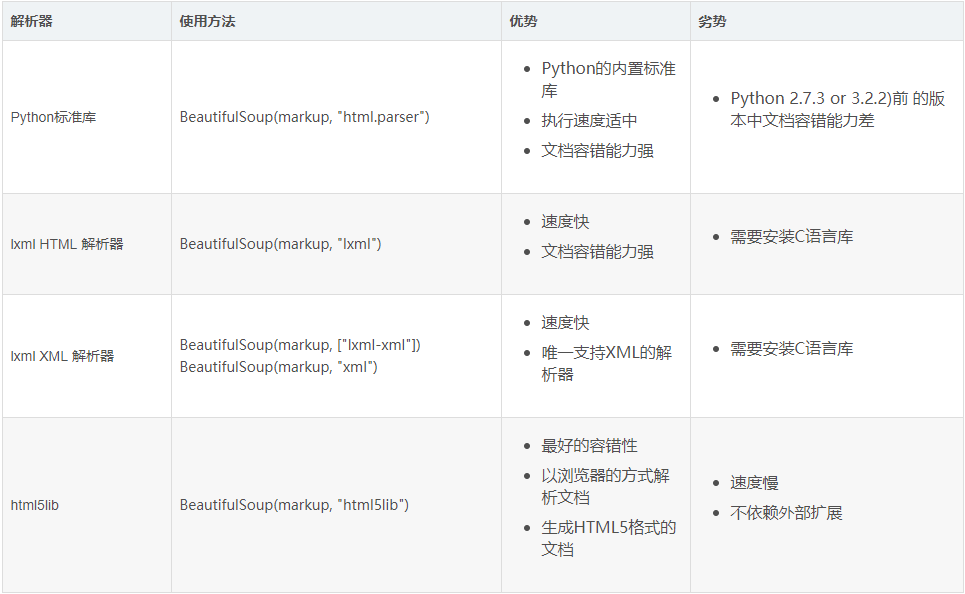
基本应用
.tag
1)name
from bs4 import BeautifulSoup

soup = BeautifulSoup('<b class="boldest">Extremely bold</b>')

tag = soup.b

print(tag.name)
通过可以通过该属性来修改标签,如果改变了tag的name,那将影响所有通过当前Beautiful Soup对象生成的HTML文档。
from bs4 import BeautifulSoup

soup = BeautifulSoup('<b class="boldest">Extremely bold</b>')

tag.name = 'a'

print(tag)
2)Attributes
一个tag可能有很多个属性. tag <b class="boldest"> 有一个 “class” 的属性,值为 “boldest” . tag的属性的操作方法与字典相同
from bs4 import BeautifulSoup

soup = BeautifulSoup('<b class="boldest">Extremely bold</b>')

print(tag['class'])
也可以使用attrs可以以字典形式返回标签的所有属性
from bs4 import BeautifulSoup

soup = BeautifulSoup('<b class="boldest">Extremely bold</b>')

print(tag.attrs)
tag的属性可以被添加,删除或修改.
tag['class'] = 'verybold'

tag['id'] = 1

del tag['class']

del tag['id']

tag['class']

print(tag.get('class'))
3)children
所有子标签
4)clear
将标签的所有子标签全部清空(保留标签名)
tag = soup.find('body')

tag.clear()

print(soup)
5)decompose
递归的删除所有的标签
body = soup.find('body')

body.decompose()

print(soup)
6)extract
递归的删除所有的标签,并获取删除的标签
body = soup.find('body')

v = body.extract()

print(soup)
7)decode 和 encode
decode转换为字符串(含当前标签);decode_contents(不含当前标签)
encode转换为字节(含当前标签);encode_contents(不含当前标签)
body = soup.find('body')

v = body.decode()

v = body.decode_contents()

print(v)
decode
body = soup.find('body')

v = body.encode()

v = body.encode_contents()

print(v)
encode
8)find 和 find_all
查找第一个和查找所有,源码中find的实现基于find_all,取[0]
tag = soup.find('a')

print(tag)

tag = soup.find(name='a', attrs={'class': 'sister'}, recursive=True, text='Lacie')

tag = soup.find(name='a', class_='sister', recursive=True, text='Lacie')

print(tag)
find
tags = soup.find_all('a')

print(tags)

tags = soup.find_all('a',limit=1)

print(tags)

tags = soup.find_all(name='a', attrs={'class': 'sister'}, recursive=True, text='Lacie')

tags = soup.find(name='a', class_='sister', recursive=True, text='Lacie')

print(tags)

####### 列表 #######

v = soup.find_all(name=['a','div'])

print(v)

v = soup.find_all(class_=['sister0', 'sister'])

print(v)

v = soup.find_all(text=['Tillie'])

print(v, type(v[0]))

v = soup.find_all(id=['link1','link2'])

print(v)

v = soup.find_all(href=['link1','link2'])

print(v)

####### 正则 #######

import re

rep = re.compile('p')

rep = re.compile('^p')

v = soup.find_all(name=rep)

print(v)

rep = re.compile('sister.*')

v = soup.find_all(class_=rep)

print(v)

rep = re.compile('http://www.oldboy.com/static/.*')

v = soup.find_all(href=rep)

print(v)

####### 方法筛选 #######

def func(tag):

return tag.has_attr('class') and tag.has_attr('id')

v = soup.find_all(name=func)

print(v)

## get,获取标签属性

tag = soup.find('a')

v = tag.get('id')

print(v)
find_all
9)has_attr
检查标签是否具有该属性
10)get_text
获取标签内部文本内容
11)index
检查标签在某标签中的索引位置
爬虫 1 requests 、beautifulsoup的更多相关文章
- 【Python】在Pycharm中安装爬虫库requests , BeautifulSoup , lxml 的解决方法
BeautifulSoup在学习Python过程中可能需要用到一些爬虫库 例如:requests BeautifulSoup和lxml库 前面的两个库,用Pychram都可以通过 File--> ...
- 爬虫之Requests&beautifulsoup
网络爬虫(又被称为网页蜘蛛,网络机器人,在FOAF社区中间,更经常的称为网页追逐者),是一种按照一定的规则,自动地抓取万维网信息的程序或者脚本.另外一些不常使用的名字还有蚂蚁.自动索引.模拟程序或者蠕 ...
- python 爬虫(一) requests+BeautifulSoup 爬取简单网页代码示例
以前搞偷偷摸摸的事,不对,是搞爬虫都是用urllib,不过真的是很麻烦,下面就使用requests + BeautifulSoup 爬爬简单的网页. 详细介绍都在代码中注释了,大家可以参阅. # -* ...
- 孤荷凌寒自学python第六十七天初步了解Python爬虫初识requests模块
孤荷凌寒自学python第六十七天初步了解Python爬虫初识requests模块 (完整学习过程屏幕记录视频地址在文末) 从今天起开始正式学习Python的爬虫. 今天已经初步了解了两个主要的模块: ...
- 利用requests, beautifulsoup包爬取股票信息网站
这是第一次用requests, beautifulsoup实现爬虫,此次爬取的是一个股票信息网站:http://www.gupiaozhishi.net.cn. 实现非常简单,只是为了demo使用的数 ...
- Python爬虫练习(requests模块)
Python爬虫练习(requests模块) 关注公众号"轻松学编程"了解更多. 一.使用正则表达式解析页面和提取数据 1.爬取动态数据(js格式) 爬取http://fund.e ...
- 爬虫入门二 beautifulsoup
title: 爬虫入门二 beautifulsoup date: 2020-03-12 14:43:00 categories: python tags: crawler 使用beautifulsou ...
- 【爬虫入门手记03】爬虫解析利器beautifulSoup模块的基本应用
[爬虫入门手记03]爬虫解析利器beautifulSoup模块的基本应用 1.引言 网络爬虫最终的目的就是过滤选取网络信息,因此最重要的就是解析器了,其性能的优劣直接决定这网络爬虫的速度和效率.Bea ...
- 【网络爬虫入门03】爬虫解析利器beautifulSoup模块的基本应用
[网络爬虫入门03]爬虫解析利器beautifulSoup模块的基本应用 1.引言 网络爬虫最终的目的就是过滤选取网络信息,因此最重要的就是解析器了,其性能的优劣直接决定这网络爬虫的速度和效率.B ...
- Python爬虫之requests
爬虫之requests 库的基本用法 基本请求: requests库提供了http所有的基本请求方式.例如 r = requests.post("http://httpbin.org/pos ...
随机推荐
- Sublime Keymap 设置
深深受 Emacs 组合键的影响,在编辑的时候使用组合键快速移动,而不比像 VIM 需要切换模式,但不得不吐槽 Emacs 的插件安装那个叫恶心,所以尝试了新生代产品 Sublime,但是还是离不开 ...
- 【EMV L2】SDA静态数据认证处理流程
[静态数据认证] 静态数据认证处理过程中,卡片没有执行任何处理,终端执行的处理流程:1.认证中心公钥的获取终端使用卡片上的认证中心公钥索引(PKI)[TAG:8F,Certification Auth ...
- 01bootstrap_基本结构和布局
01bootstrap_基本结构 学习bootstrap需要下载必要的文件:www.bootcss.com 基本结构 container page-header 布局 1.响应式布局:containe ...
- 小妖精的完美游戏教室——东方project,同人,自机
//================================================================ //// Copyright (C)// All Rights R ...
- 前端基础----CSS语法、CSS四种引入方式、CSS选择器、CSS属性操作
一.CSS语法 CSS 规则由两个主要的部分构成:选择器,以及一条或多条声明. 例如: h1 {color:red; font-size:14px;} 二.CSS四种引入方式 1,行内式 行内式是在标 ...
- js有哪些变态的语法?
JS这个语言好是好,但是很多时候写起来太丑了,每次看大牛的代码的时候,妈妈都问我为什么跪着读代码,随着 ES 2015的普及我们可以写出很多可读性强且漂亮的代码,那么接下来就带着大家一块学习一下可以把 ...
- 第二章 C#语法基础 (2.2 C#语言的运算符和表达式)
[案例]本案例通过随机数发生器随机产生三条边,要求输出三天边长(边长长度为1~20的整数),并判断是否可以构成一个三角形. 如果可以,则计算出三角形面积,否则输出信息”三条随机的边不能构成三角形“. ...
- spark submit参数调优
在开发完Spark作业之后,就该为作业配置合适的资源了.Spark的资源参数,基本都可以在spark-submit命令中作为参数设置.很多Spark初学者,通常不知道该设置哪些必要的参数,以及如何设置 ...
- @RequestParam接收解析不到 POST 提交的 数据
1.使用postman或者其他发送请求模拟器进行模拟访问,需要指定Headers为Content-Type:application/x-www-form-urlencoded;指定body类型为x-w ...
- Numpy、SciPy、MatPlotLib在Python2.7.9下的安装与配置
前言: Python安装完Numpy,SciPy和MatplotLib后,可以成为非常犀利的科研利器.网上关于这三个库的安装都写得非常不错,但是大部分人遇到的问题并不是如何安装,而是安装好后因为配置不 ...