
Quick Cocos2dx 与 EnterFrame事件
利用EnterFrame做出行走的效果,效果图如下:
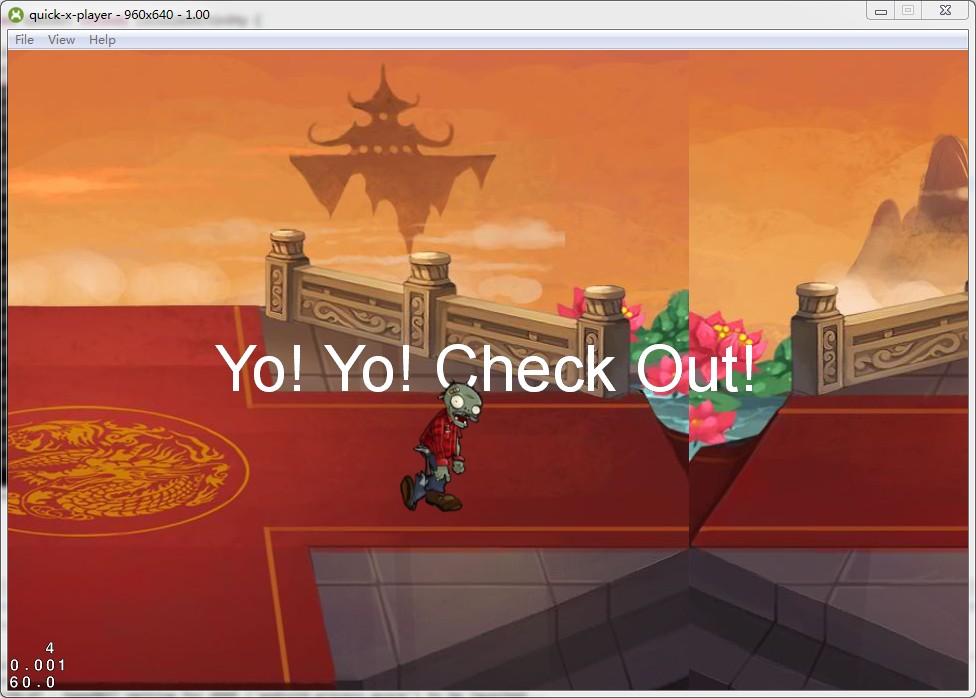
具体操作:
1 给self多加一个bg1用作与bg无限循环换位
2 在AnotherScene:onEnter方法里面新增onEnterFrame的排成
3 写了一个简单的onEnterFrame方法用作每帧去更新
完整代码如下:
 local AnotherScene = class("AnotherScene", function()

     return display.newScene("AnotherScene")

 end)

 function AnotherScene:ctor()

     self.speed = ;

     self.curBehaviorId = ;

     self.layer = display.newLayer()

     self:addChild(self.layer)

     self.layer:setTouchEnabled(true)

     self.behaviors = {"anim_walk","anim_eat","anim_placeladder","anim_idle","anim_ladderwalk","anim_laddereat","anim_death"};

     self.bg = display.newSprite("battle.png",display.cx, display.cy)

     self.bg1 = display.newSprite("battle.png",display.cx+self.bg:getContentSize().width, display.cy)

     self.layer:addChild(self.bg)

     self.layer:addChild(self.bg1)

 end

 function AnotherScene:onTouch(event, x, y)

     print("Touched at %d %d",x,y)

     self.curBehaviorId = self.curBehaviorId + ;

     if self.curBehaviorId > #self.behaviors then

         self.curBehaviorId = ;

     end

     print("Now playing ", self.curBehaviorId , #self.behaviors, self.behaviors[self.curBehaviorId])

     self.animation:play(self.behaviors[self.curBehaviorId])

 end

 function AnotherScene:onEnterFrame(dt)

     local tempX = self.bg:getPositionX();

     local tempW = self.bg:getContentSize().width;

     tempX = tempX - self.speed;

     if tempX <= display.cx - tempW then

         self.bg:setPositionX(display.cx + tempW)

     else

         self.bg:setPositionX(tempX)

     end

     tempX = self.bg1:getPositionX();

     tempW = self.bg1:getContentSize().width;

     tempX = tempX - self.speed;

     if tempX <= display.cx - tempW then

         self.bg1:setPositionX(display.cx + tempW)

     else

         self.bg1:setPositionX(tempX)

     end

 end

 function AnotherScene:onEnter()

     ui.newTTFLabel({text = "Yo! Yo! Check Out!", size = , align = ui.TEXT_ALIGN_CENTER})

         :pos(display.cx, display.cy)

         :addTo(self.layer)

     local manager = CCArmatureDataManager:sharedArmatureDataManager()

     manager:addArmatureFileInfo("Zombie.png","Zombie.plist","Zombie.xml")

     local zombie = CCNodeExtend.extend(CCArmature:create("Zombie_ladder"))

     zombie:connectMovementEventSignal(function(__evtType, __moveId)

             echoInfo("movement, evtType: %d, moveId: %s", __evtType, __moveId)

         end)

     self.animation = zombie:getAnimation()

     self.animation:setAnimationScale(0.5)

     self.animation:play("anim_walk")

     zombie:setPosition(display.cx, display.cy)

     zombie:setScaleX(-)

     self.layer:addChild(zombie)

     self.layer:addTouchEventListener(function(event,x,y)

         return self:onTouch(event, x,y)

         end)

     self.layer:setTouchEnabled(true)

     self:scheduleUpdate(function(dt)

         self:onEnterFrame(dt)

     end)

 end

 return AnotherScene
也可以去我的git里面下载源代码和资源:https://github.com/AdoBeatTheWorld/waytomobile
game003即为当前的项目,问我为啥没有把项目分出来,我只能说我.....很.....懒。
Quick Cocos2dx 与 EnterFrame事件的更多相关文章
- quick cocos2d-x 入门---井字棋
学习quick cocos2d-x 第二天 ,使用quick-x 做了一个井字棋游戏 . 我假设读者已经 http://wiki.quick-x.com/doku.php?id=zh_cn阅读了这个链 ...
- quick cocos2dx 3.x 配置win32工程
公司项目主体部分用c++,而ui部分用lua写,所以选择了用quick框架.项目先开发了ios/mac版,这两天试着配置其win32工程,遇到一些问题,记录一下(纯c++版本cocos2dx配置方法应 ...
- 【转载】Quick 中的触摸事件
原文地址 http://cn.cocos2d-x.org/article/index?type=quick_doc&url=/doc/cocos-docs-master/manual/fram ...
- cocos2d-x lua 触摸事件
cocos2d-x lua 触摸事件 version: cocos2d-x 3.6 1.监听 function GameLayer:onEnter() local eventDispatcher = ...
- Mac下搭建quick cocos2d-x编译环境
一. 我知道在你的电脑中一定已经安装好了Xcode(没有自己下载去吧),打开Xcode,开启"偏好设置"对话框(commond + ,).假设打开之后出现的是这种一个对话框,那么直 ...
- Quick Cocos2dx Http通讯
服务端:Python 通讯协议:Http 参考文章: 1 用python实现一个基本的http server服务器 http://blog.sina.com.cn/s/blog_416e3063010 ...
- 用Quick Cocos2dx做一个连连看(一)
呵呵,不知道能不能坚持下来,先写着吧. 预备知识:Quick Cocos2dx 2.2.5基本知识 或者 Cocos2dx基本知识, lua入门 开发工具:Sublime Text 2.0/3.0 原 ...
- quick cocos2d-x 2.2.4 window环境调试
BabeLua简介 BabeLua是一款基于VS2012/2013(简称VS)的免费开源的Lua集成开发环境,在Lua编辑和调试方面,具有如下功能和特性: ●Lua语法高亮 ●语法检查 ●自动补全 ● ...
- Cocos2dx之touch事件
今天看了下ccocos2dx touch事件部分的源码,从CCTouch.CCTouchHandler和CCTouchDispatcher简单的做了分析和总结,先直接看源码吧! 1.CCTouch c ...
随机推荐
- tomcat连接数设置
如何加大tomcat连接数 在tomcat配置文件server.xml中的<Connector ... />配置中,和连接数相关的参数有:minProcessors:最小空闲连接线程数,用 ...
- wget mirror
wget -r -np -c xxx-url-xxx -r: recursive-np: no-parent-c: continue -D: domains to follow, comma sepa ...
- asp的RegExp对象正则表达式功能用法
RegExp对象提供简单的正则表达式支持功能. RegExp对象的用法: 以下为引用的内容: Function RegExpTest(patrn, strng) Dim regEx, Match, M ...
- drupal7为admin/config页面添加自己开发的模块
1.实现显示模块 //admin/config配置页面添加journal块 $items['admin/config/journal'] = array(//注意格式为'admin/config/模块 ...
- Sea Battle
Sea Battle time limit per test 1 second memory limit per test 256 megabytes input standard input out ...
- OpenGL ES之glUniform函数
函数名: glUniform 功能: 为当前程序对象指定Uniform变量的值.(译者注:注意,由于OpenGL ES由C语言编写,但是C语言不支持函数的重载,所以会有很多名字相同后缀不同的函数版本存 ...
- java数组的引用
数组属于应用型变量,因此两个相投类型的数组如果具有相同的引用,它们就有完全相同的元素 如: int a[]={1,2,3},b[]={4,5} 如果a=b;则a[]={4,5} public clas ...
- HDU 2671 Can't be easier
简单的几何题目 点(a,b)关于直线Ax+By+C=1对称点的公式 #include<cstdio> #include<cstring> #include<cmath&g ...
- gnome配置
1.gome-tweak-tool gnome调校工具 2.gnome-shell插件(在gome-tweak-tool中) 可在https://extensions.gnome.org/中下载 ...
- 《Peering Inside the PE: A Tour of the Win32 Portable Executable File Format》阅读笔记二
Common Sections The .text section is where all general-purpose code emitted by the compiler or assem ...