
《DSP using MATLAB》 Problem 3.22
代码:
%% ------------------------------------------------------------------------

%%            Output Info about this m-file

fprintf('\n***********************************************************\n');

fprintf('        <DSP using MATLAB> Problem 3.22 \n\n');

banner();

%% ------------------------------------------------------------------------

%% -------------------------------------------------------------------

%%           1          xa(t)=cos(20πt+θ)  through A/D

%% -------------------------------------------------------------------

   Ts = 0.05;                        % sample interval, 0.05s

   Fs = 1/Ts;                        % Fs=20Hz

%theta = 0;

%theta = pi/6;

%theta = pi/4;

%theta = pi/3;

theta = pi/2;

n1_start = 0; n1_end = 20;

      n1 = [n1_start:1:n1_end];

     nTs = n1 * Ts;              % [0, 1]s

x1 = cos(20*pi*nTs + theta * ones(1,length(n1)));            % Digital signal

M = 500;

[X1, w] = dtft1(x1, n1, M);

magX1  = abs(X1);  angX1  = angle(X1);  realX1  = real(X1);  imagX1  = imag(X1);

%% --------------------------------------------------------------------

%%              START X(w)'s  mag ang real imag

%% --------------------------------------------------------------------

figure('NumberTitle', 'off', 'Name', sprintf('Problem 3.22 X1, theta/pi = %f', theta/pi));

set(gcf,'Color','white');

subplot(2,1,1); plot(w/pi,magX1); grid on;  %axis([-1,1,0,1.05]);

title('Magnitude Response');

xlabel('frequency in \pi units'); ylabel('Magnitude  |H|');

subplot(2,1,2); plot(w/pi, angX1/pi); grid on;  %axis([-1,1,-1.05,1.05]);

title('Phase Response');

xlabel('frequency in \pi units'); ylabel('Radians/\pi');

figure('NumberTitle', 'off', 'Name', sprintf('Problem 3.22 X1, theta/pi = %f', theta/pi));

set(gcf,'Color','white');

subplot(2,1,1); plot(w/pi, realX1); grid on;

title('Real Part');

xlabel('frequency in \pi units'); ylabel('Real');

subplot(2,1,2); plot(w/pi, imagX1); grid on;

title('Imaginary Part');

xlabel('frequency in \pi units'); ylabel('Imaginary');

%% -------------------------------------------------------------------

%%             END X's  mag ang real imag

%% -------------------------------------------------------------------

figure('NumberTitle', 'off', 'Name', sprintf('Problem 3.22 xa(n), theta/pi = %f and x1(n)', theta/pi));

na1 = 0:0.01:1;

xa1 = cos(20 * pi * na1 + theta * ones(1,length(na1)));

set(gcf, 'Color', 'white');

plot(1000*na1,xa1); grid on;  %axis([0,1,0,1.5]);

title('x1(n) and xa(n)');

xlabel('t in msec.'); ylabel('xa(t)'); hold on;

plot(1000*nTs, x1, 'o'); hold off;

%% ------------------------------------------------------------

%%                  xa(t) reconstruction from x1(n)

%% ------------------------------------------------------------

Dt = 0.001; t = 0:Dt:1;

xa = x1 * sinc(Fs*(ones(length(n1),1)*t - nTs'*ones(1,length(t)))) ;

figure('NumberTitle', 'off', 'Name', sprintf('Problem 3.22 Reconstructed From x1(n), theta/pi = %f', theta/pi));

set(gcf,'Color','white');

%subplot(2,1,1);

stairs(t*1000,xa,'r'); grid on;  %axis([0,1,0,1.5]);       % Zero-Order-Hold

title('Reconstructed Signal from x1(n) using Zero-Order-Hold');

xlabel('t in msec.'); ylabel('xa(t)'); hold on;

%stem(nTs*1000, x1); gtext('ZOH'); hold off;

plot(nTs*1000, x1, 'o'); gtext('ZOH'); hold off;

figure('NumberTitle', 'off', 'Name', sprintf('Problem 3.22 Reconstructed From x1(n), theta/pi = %f', theta/pi));

set(gcf,'Color','white');

%subplot(2,1,2);

plot(t*1000,xa,'r'); grid on;  %axis([0,1,0,1.5]);       % first-Order-Hold

title('Reconstructed Signal from x1(n) using First-Order-Hold');

xlabel('t in msec.'); ylabel('xa(t)'); hold on;

plot(nTs*1000,x1,'o'); gtext('FOH'); hold off;

xa = spline(nTs, x1, t);

figure('NumberTitle', 'off', 'Name', sprintf('Problem 3.22 Reconstructed From x1(n), theta/pi = %f', theta/pi));

set(gcf,'Color','white');

%subplot(2,1,1);

plot(1000*t, xa,'r');

xlabel('t in ms units'); ylabel('x');

title(sprintf('Reconstructed Signal from x1(n) using Spline function')); grid on; hold on;

plot(1000*nTs, x1,'o'); gtext('spline');
运行结果:
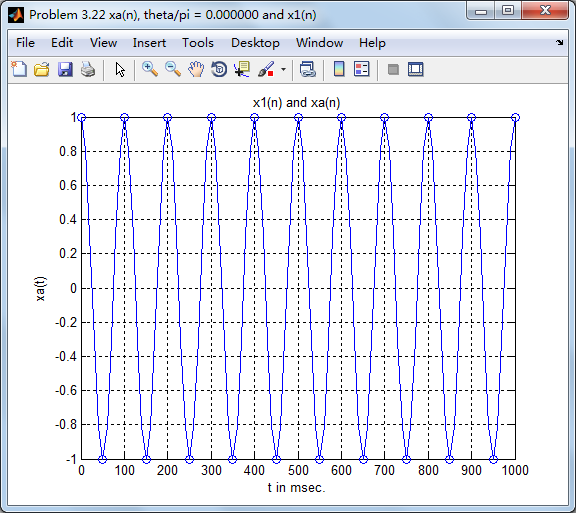
这里只看初相位为0的情况,原始模拟信号和采样信号(样点值圆圈标示):
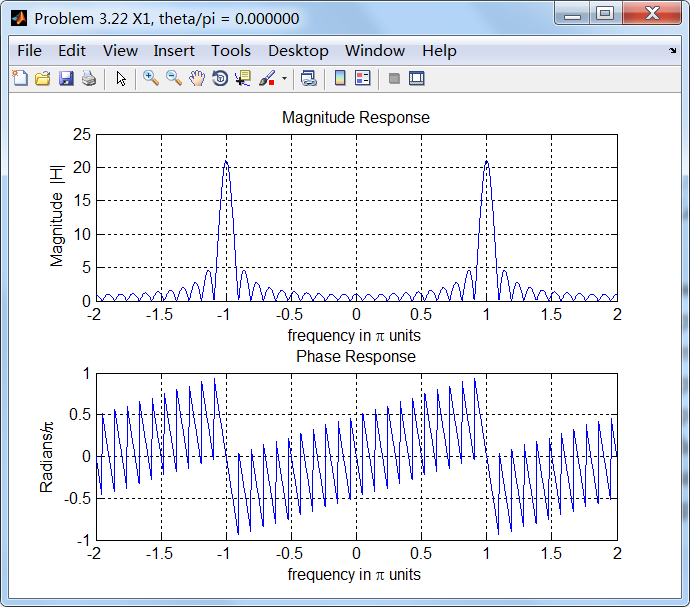
采样信号的谱,模拟角频率20π对应的数字角频率为π,如下图所示:
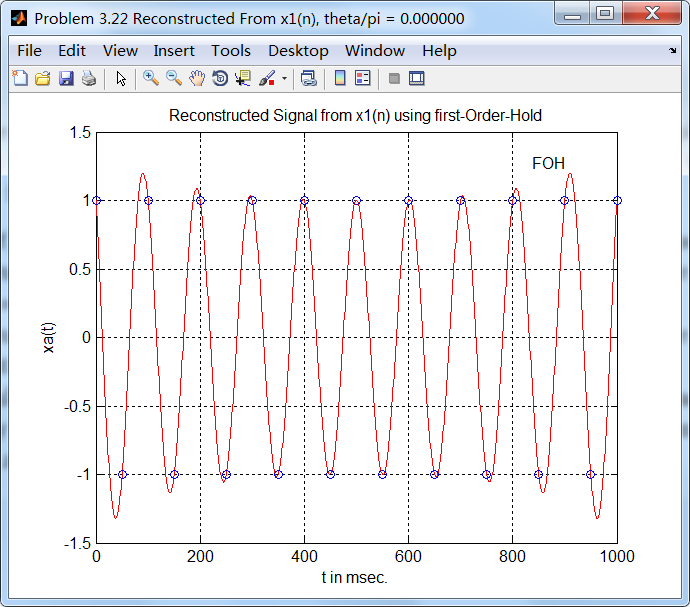
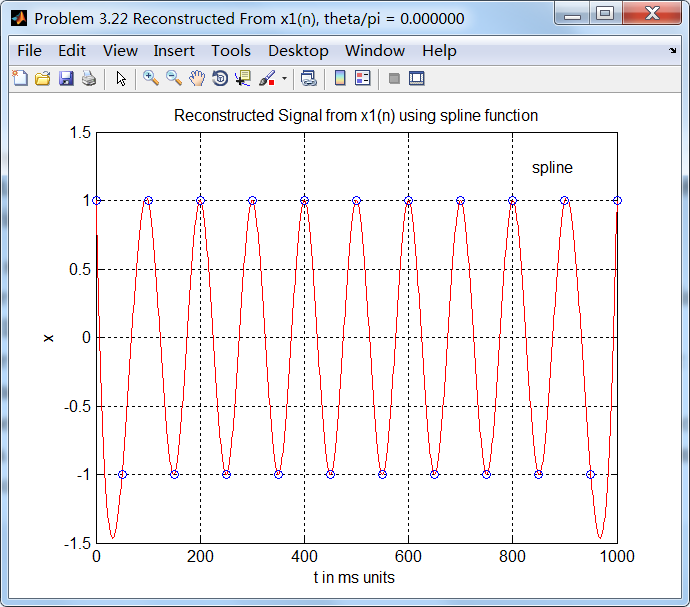
用采样信号重建原来模拟信号:
sinc方法,stairs函数画图
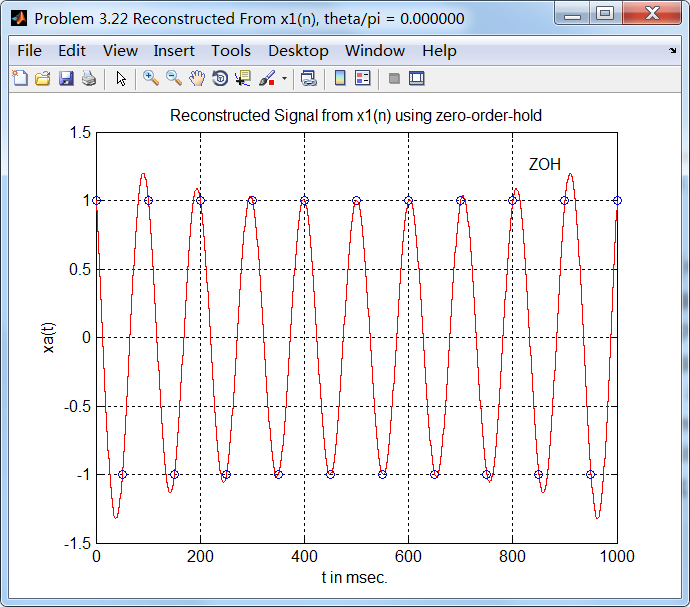
sinc方法,plot函数画图:
cubic方法
其他初相位的情况,这里不上图了。
《DSP using MATLAB》 Problem 3.22的更多相关文章
- 《DSP using MATLAB》Problem 6.22
代码: %% ++++++++++++++++++++++++++++++++++++++++++++++++++++++++++++++++++++++++++++++++ %% Output In ...
- 《DSP using MATLAB》Problem 5.22
代码: %% ++++++++++++++++++++++++++++++++++++++++++++++++++++++++++++++++++++++++++++++++++++++++ %% O ...
- 《DSP using MATLAB》Problem 8.22
时光飞逝,亲朋会一个一个离我们远去,孤独漂泊一阵子后,我们自己也要离开, 代码: %% -------------------------------------------------------- ...
- 《DSP using MATLAB》Problem 7.25
代码: %% ++++++++++++++++++++++++++++++++++++++++++++++++++++++++++++++++++++++++++++++++ %% Output In ...
- 《DSP using MATLAB》Problem 3.1
先写DTFT子函数: function [X] = dtft(x, n, w) %% --------------------------------------------------------- ...
- 《DSP using MATLAB》Problem 7.29
代码: %% ++++++++++++++++++++++++++++++++++++++++++++++++++++++++++++++++++++++++++++++++ %% Output In ...
- 《DSP using MATLAB》Problem 7.27
代码: %% ++++++++++++++++++++++++++++++++++++++++++++++++++++++++++++++++++++++++++++++++ %% Output In ...
- 《DSP using MATLAB》Problem 7.26
注意:高通的线性相位FIR滤波器,不能是第2类,所以其长度必须为奇数.这里取M=31,过渡带里采样值抄书上的. 代码: %% +++++++++++++++++++++++++++++++++++++ ...
- 《DSP using MATLAB》Problem 7.24
又到清明时节,…… 注意:带阻滤波器不能用第2类线性相位滤波器实现,我们采用第1类,长度为基数,选M=61 代码: %% +++++++++++++++++++++++++++++++++++++++ ...
随机推荐
- sql一些语句性能及开销优化
1.应用程序中,保证在实现功能的基础上,尽量减少对数据库的访问次数:通过搜索参数,尽量减少对表的访问行数,最小化结果集,从而减轻网络负担:能够分开的操作尽量分开处理,提高每次的响应速度:在数据窗口使用 ...
- python--HTTPClient接口测试踩坑
1.今天下午做接口测试的时候遇到一个奇怪的问题:原因不明 requests.exceptions.ConnectionError: ('Connection aborted.', RemoteDisc ...
- LeetCode--219--存在重复元素2
问题描述: 给定一个整数数组和一个整数 k,判断数组中是否存在两个不同的索引 i 和 j,使得 nums [i] = nums [j],并且 i 和 j 的差的绝对值最大为 k. 示例 1: 输入: ...
- codeforces 1042c// Array Product// Codeforces Round #510(Div. 2)
题意:给出一个数组,2种操作:.1:x*y然后x消失,2:除掉x(2操作最多只能进行一次).问最大的结果的一种操作方式.逻辑题,看能不能想全面. 1先数好0,正,负的数量,zero,pos,neg.如 ...
- 37mysql 表操作
创建表 #语法: create table 表名( 字段名1 类型[(宽度) 约束条件], 字段名2 类型[(宽度) 约束条件], 字段名3 类型[(宽度) 约束条件] ); #注意: 1. 在同一张 ...
- 『PyTorch』第三弹重置_Variable对象
『PyTorch』第三弹_自动求导 torch.autograd.Variable是Autograd的核心类,它封装了Tensor,并整合了反向传播的相关实现 Varibale包含三个属性: data ...
- zzuli 1484 继续双线
1484: 探 寻 宝 藏 Time Limit: 1 Sec Memory Limit: 128 MBSubmit: 94 Solved: 52 SubmitStatusWeb Board De ...
- Eclipse Indigo 3.7.0 安装GIT插件
Eclipse上安装GIT插件EGit 首先打开Eclipse,然后点击Help>Install New Software>Add. Name:EGit Location: http:// ...
- Django rest framework(2)----权限
一 添加权限 (1)API/utils文件夹下新建premission.py文件,代码如下: message是当没有权限时,提示的信息 #!/usr/bin/env python # coding:u ...
- Asterisk——part 1
Asterisk Russell Bryant Asterisk1 is an open source telephony applications platform distributed unde ...