
《DSP using MATLAB》Problem 8.22
时光飞逝,亲朋会一个一个离我们远去,孤独漂泊一阵子后,我们自己也要离开,
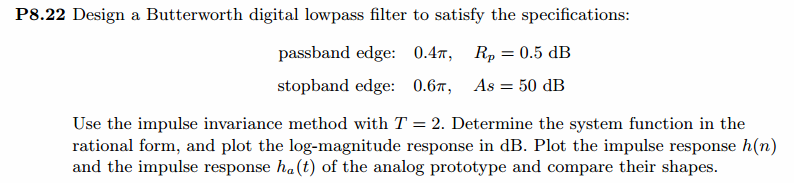
代码:
%% ------------------------------------------------------------------------

%%            Output Info about this m-file

fprintf('\n***********************************************************\n');

fprintf('        <DSP using MATLAB> Problem 8.22 \n\n');

banner();

%% ------------------------------------------------------------------------

% -------------------------------

%       ω = ΩT = 2πF/fs

% Digital Filter Specifications:

% -------------------------------

wp = 0.4*pi;                     % digital passband freq in rad/sec

ws = 0.6*pi;                     % digital stopband freq in rad/sec

Rp = 0.5;                        % passband ripple in dB

As = 50;                         % stopband attenuation in dB

Ripple = 10 ^ (-Rp/20)           % passband ripple in absolute

Attn = 10 ^ (-As/20)             % stopband attenuation in absolute

% Analog prototype specifications: Inverse Mapping for frequencies

T = 2;                       % set T = 1

Fs = 1/T;

OmegaP = wp/T;               % prototype passband freq

OmegaS = ws/T;               % prototype stopband freq

% Analog Butterworth Prototype Filter Calculation:

[cs, ds] = afd_butt(OmegaP, OmegaS, Rp, As);

% Calculation of second-order sections:

fprintf('\n***** Cascade-form in s-plane: START *****\n');

[CS, BS, AS] = sdir2cas(cs, ds)

fprintf('\n***** Cascade-form in s-plane: END *****\n');

% Calculation of Frequency Response:

[db_s, mag_s, pha_s, ww_s] = freqs_m(cs, ds, 0.5*pi);

% Calculation of Impulse Response:

[ha, x, t] = impulse(cs, ds);

% Impulse Invariance Transformation:

[b, a] = imp_invr(cs, ds, T); [C, B, A] = dir2par(b, a)

% Calculation of Frequency Response:

[db, mag, pha, grd, ww] = freqz_m(b, a);

%% -----------------------------------------------------------------

%%                             Plot

%% -----------------------------------------------------------------

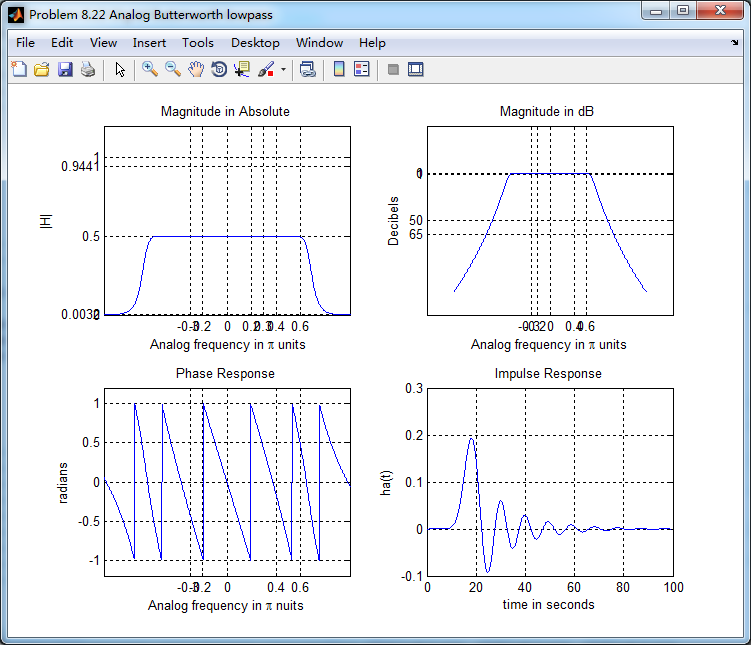
figure('NumberTitle', 'off', 'Name', 'Problem 8.22 Analog Butterworth lowpass')

set(gcf,'Color','white');

M = 1;                          % Omega max

subplot(2,2,1); plot(ww_s, mag_s/T);  grid on; axis([-M, M, 0, 1.2]);

xlabel(' Analog frequency in \pi units'); ylabel('|H|'); title('Magnitude in Absolute');

set(gca, 'XTickMode', 'manual', 'XTick', [-0.3, -0.2, 0, 0.2, 0.3, 0.4, 0.6]);

set(gca, 'YTickMode', 'manual', 'YTick', [0, 0.0032, 0.5, 0.9441, 1]);

subplot(2,2,2); plot(ww_s, db_s);  grid on; %axis([0, M, -50, 10]);

xlabel('Analog frequency in \pi units'); ylabel('Decibels'); title('Magnitude in dB ');

set(gca, 'XTickMode', 'manual', 'XTick', [-0.3, -0.2, 0, 0.4, 0.6]);

set(gca, 'YTickMode', 'manual', 'YTick', [-65, -50, -1, 0]);

set(gca,'YTickLabelMode','manual','YTickLabel',['65';'50';' 1';' 0']);

subplot(2,2,3); plot(ww_s, pha_s/pi);  grid on; axis([-M, M, -1.2, 1.2]);

xlabel('Analog frequency in \pi nuits'); ylabel('radians'); title('Phase Response');

set(gca, 'XTickMode', 'manual', 'XTick', [-0.3, -0.2, 0, 0.4, 0.6]);

set(gca, 'YTickMode', 'manual', 'YTick', [-1:0.5:1]);

subplot(2,2,4); plot(t, ha); grid on; %axis([0, 30, -0.05, 0.25]);

xlabel('time in seconds'); ylabel('ha(t)'); title('Impulse Response');

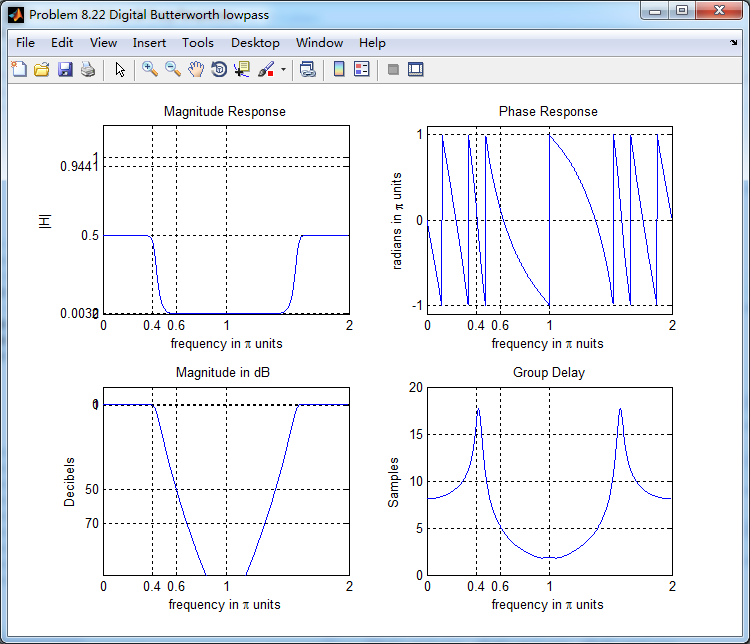
figure('NumberTitle', 'off', 'Name', 'Problem 8.22 Digital Butterworth lowpass')

set(gcf,'Color','white');

M = 2;                          % Omega max

subplot(2,2,1); plot(ww/pi, mag); axis([0, M, 0, 1.2]); grid on;

xlabel(' frequency in \pi units'); ylabel('|H|'); title('Magnitude Response');

set(gca, 'XTickMode', 'manual', 'XTick', [0, 0.4, 0.6, 1.0, M]);

set(gca, 'YTickMode', 'manual', 'YTick', [0, 0.0032, 0.5, 0.9441, 1]);

subplot(2,2,2); plot(ww/pi, pha/pi); axis([0, M, -1.1, 1.1]); grid on;

xlabel('frequency in \pi nuits'); ylabel('radians in \pi units'); title('Phase Response');

set(gca, 'XTickMode', 'manual', 'XTick', [0, 0.4, 0.6, 1.0, M]);

set(gca, 'YTickMode', 'manual', 'YTick', [-1:1:1]);

subplot(2,2,3); plot(ww/pi, db); axis([0, M, -100, 10]); grid on;

xlabel('frequency in \pi units'); ylabel('Decibels'); title('Magnitude in dB ');

set(gca, 'XTickMode', 'manual', 'XTick', [0, 0.4, 0.6, 1.0, M]);

set(gca, 'YTickMode', 'manual', 'YTick', [-70, -50, -1, 0]);

set(gca,'YTickLabelMode','manual','YTickLabel',['70';'50';' 1';' 0']);

subplot(2,2,4); plot(ww/pi, grd); grid on; %axis([0, M, 0, 35]);

xlabel('frequency in \pi units'); ylabel('Samples'); title('Group Delay');

set(gca, 'XTickMode', 'manual', 'XTick', [0, 0.4, 0.6, 1.0, M]);

%set(gca, 'YTickMode', 'manual', 'YTick', [0:5:35]);

figure('NumberTitle', 'off', 'Name', 'Problem 8.22 Pole-Zero Plot')

set(gcf,'Color','white');

zplane(b,a);

title(sprintf('Pole-Zero Plot'));

%pzplotz(b,a);

% ----------------------------------------------

%       Calculation of Impulse Response

% ----------------------------------------------

figure('NumberTitle', 'off', 'Name', 'Problem 8.22 Imp & Freq Response')

set(gcf,'Color','white');

t = [0:0.01:80]; subplot(2,1,1); impulse(cs,ds,t); grid on;   % Impulse response of the analog filter

axis([0,80,-0.2,0.3]);hold on

n = [0:1:80/T]; hn = filter(b,a,impseq(0,0,80/T));           % Impulse response of the digital filter

stem(n*T,hn); xlabel('time in sec'); title ('Impulse Responses');

hold off

% Calculation of Frequency Response:

[dbs, mags, phas, wws] = freqs_m(cs, ds, 2*pi/T);             % Analog frequency   s-domain

[dbz, magz, phaz, grdz, wwz] = freqz_m(b, a);               % Digital  z-domain

%% -----------------------------------------------------------------

%%                             Plot

%% -----------------------------------------------------------------

subplot(2,1,2); plot(wws/(2*pi),mags*Fs,'b+', wwz/(2*pi)*Fs,magz,'r'); grid on;

xlabel('frequency in Hz'); title('Magnitude Responses'); ylabel('Magnitude');

text(-0.3,0.15,'Analog filter'); text(0.4,0.55,'Digital filter');
运行结果:
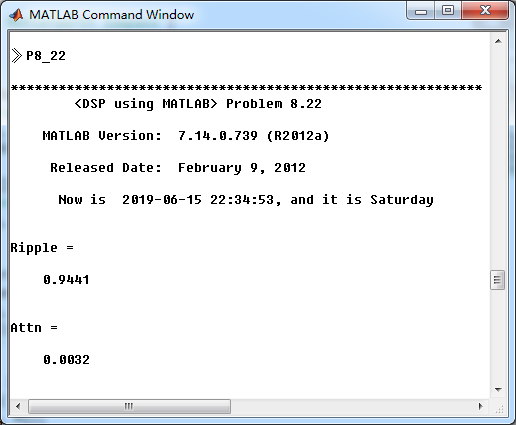
通带、阻带绝对指标
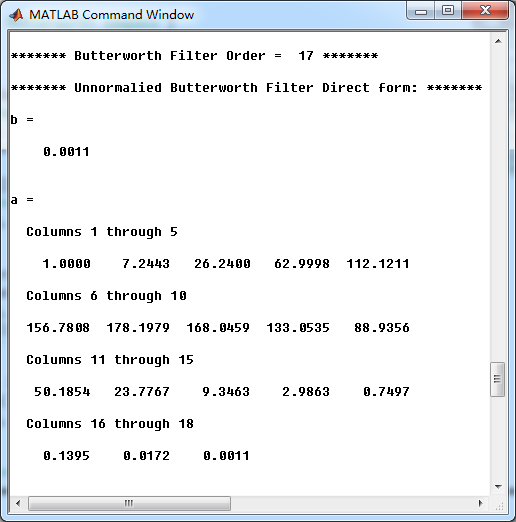
模拟原型butterworth低通滤波器直接形式系数
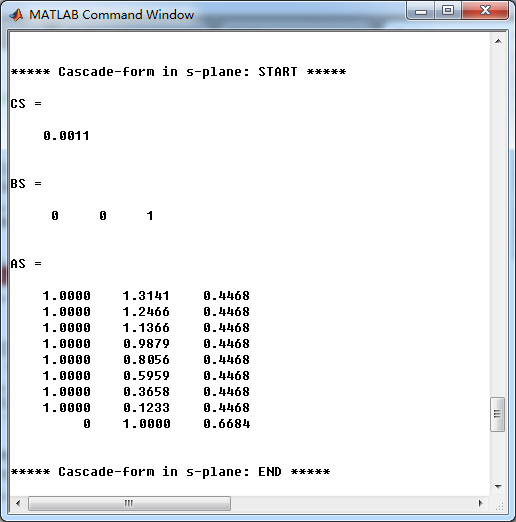
模拟原型butterworth低通滤波器串联形式系数
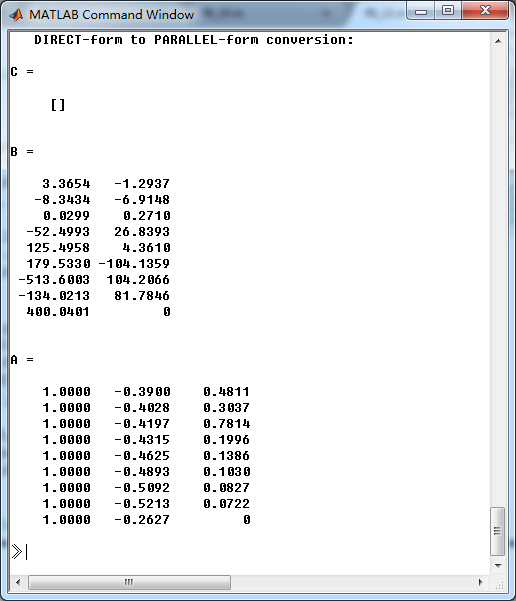
脉冲响应不变法,模拟低通转换成数字低通,并联形式系数

《DSP using MATLAB》Problem 8.22的更多相关文章
- 《DSP using MATLAB》Problem 6.22
代码: %% ++++++++++++++++++++++++++++++++++++++++++++++++++++++++++++++++++++++++++++++++ %% Output In ...
- 《DSP using MATLAB》Problem 5.22
代码: %% ++++++++++++++++++++++++++++++++++++++++++++++++++++++++++++++++++++++++++++++++++++++++ %% O ...
- 《DSP using MATLAB》 Problem 3.22
代码: %% ------------------------------------------------------------------------ %% Output Info about ...
- 《DSP using MATLAB》Problem 7.25
代码: %% ++++++++++++++++++++++++++++++++++++++++++++++++++++++++++++++++++++++++++++++++ %% Output In ...
- 《DSP using MATLAB》Problem 3.1
先写DTFT子函数: function [X] = dtft(x, n, w) %% --------------------------------------------------------- ...
- 《DSP using MATLAB》Problem 7.29
代码: %% ++++++++++++++++++++++++++++++++++++++++++++++++++++++++++++++++++++++++++++++++ %% Output In ...
- 《DSP using MATLAB》Problem 7.27
代码: %% ++++++++++++++++++++++++++++++++++++++++++++++++++++++++++++++++++++++++++++++++ %% Output In ...
- 《DSP using MATLAB》Problem 7.26
注意:高通的线性相位FIR滤波器,不能是第2类,所以其长度必须为奇数.这里取M=31,过渡带里采样值抄书上的. 代码: %% +++++++++++++++++++++++++++++++++++++ ...
- 《DSP using MATLAB》Problem 7.24
又到清明时节,…… 注意:带阻滤波器不能用第2类线性相位滤波器实现,我们采用第1类,长度为基数,选M=61 代码: %% +++++++++++++++++++++++++++++++++++++++ ...
随机推荐
- element-ui 框架中使用 NavMenu 导航菜单组件时,点击一个子菜单会出现多个子菜单同时展开或折叠?
我在使用 elment-ui 框架的导航组件时,直接粘贴复制了官网上 (http://element-ui.cn/#/zh-CN/component/menu)的例子不会出错,但是当我将他们转化为动态 ...
- Monkey 稳定性测试
学习网址: https://blog.csdn.net/lucytan01/article/details/79958727 https://blog.csdn.net/hebbely/article ...
- vue better-scroll 下拉上拉,加载刷新
_initScroll(){ this.$nextTick(() => { if (!this.scroll) { ...
- Codeforces Round #563 (Div. 2) F. Ehab and the Big Finale
后续: 点分治标程 使用father数组 比使用vis数组优秀(不需要对vis初始化) https://codeforces.com/problemset/problem/1174/F https:/ ...
- springboot+mybatis 非web项目构建
https://blog.csdn.net/wlittlefive/article/details/86157134 https://blog.csdn.net/ththcc/article/deta ...
- 【转载】opencl中设备内存
地址空间限定符 一般的内核代码中,里面的内核参数或声明变量时,都会有地址空间限定符 地址空间限定符,地址空间限定符的主要作用是指出数据应该保存在哪个地方 地址空间限定符有4个: 全局内存: 限定符:_ ...
- day31 类的组合及继承,文件目录规范
Python之路,Day18 = Python基础18-面向对象继承与组合 类的继承 def talk(): print("I am come from talk..a") cla ...
- SpringBoot2.0+ 使用Log4j2日志输出
据说Log4j2相比log4j效率有很大提升. pom.xml导入 <dependency> <groupId>org.springframework.boot</gro ...
- VC 复制移动删除重命名文件文件
说明: 1.以下封装了4个函数_CopyFile,_DeleteFile,_MoveFile,_ReNameFile 2.每个函数都先拷贝了原来的路径,保证了路径是以2个\0\0结尾.(如果不以2个\ ...
- [kuangbin带你飞]专题一 简单搜索 - C - Catch That Cow
#include<iostream> #include<cstdio> #include<string> #include<vector> #inclu ...