
vivado place30-378
AR# 60131
Vivado Placer - [Place 30-378] Input pin of input buffer has an illegal connection to a logic constant value
Description
I am adding old NGC files as sources to my Vivado project.
I am receiving the following errors when trying to place the design:
[Place 30-378] Input pin of input buffer hierarchy_path_to_cell/clk_BUFGP/IBUF has an illegal connection to a logic constant value.
[Place 30-378] Input pin of input buffer hierarchy_path_to_cell/clk_BUFGP/IBUF has an illegal connection to a logic constant value.
[Place 30-378] Input pin of input buffer hierarchy_path_to_cell/clk_BUFGP/IBUF has an illegal connection to a logic constant value.
[Place 30-378] Input pin of input buffer hierarchy_path_to_cell/CH0_CLK_BUFGP/IBUF has an illegal connection to a logic constant value.
[Place 30-99] Placer failed with error: 'Implementation Feasibility check failed, Please see the previously displayed individual error or warning messages for more details.
'Please review all ERROR, CRITICAL WARNING, and WARNING messages during placement to understand the cause for failure.
What is wrong here and how can I fix this?
Solution
These errors are pointing to BUFGP primitives in the NGC files being used.
BUFGP primitives must connect to a port.
When you view the Synthesized netlist in Vivado, it can be seen that the BUFGP primitive is transformed to an "IBUF -> BUFG", see schematic shot below.
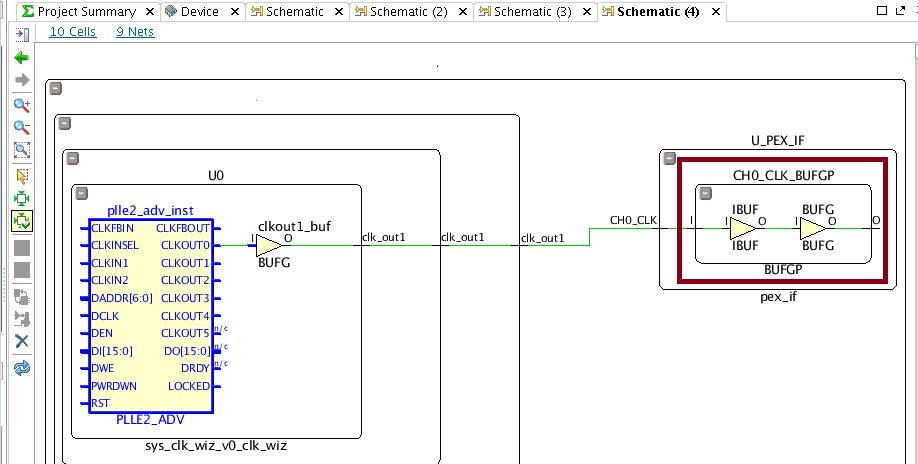
The BUFG -> IBUF -> BUFG path causes the errors reported.
Recommended Solution:
Ensure that the NGC files are created with the "-iobuf" switch set to false for XST.
This will result in this construct not being produced and if the original projects exist it is a very straight forward way to avoid this error.
vivado place30-378的更多相关文章
- Vivado SDK 2014.2 创建新工程后,BSP版本不对的解决办法
问题描述如下: 1. 使用Vivado SDK 2014.2已经创建了工程,但是此时,hdf文件增加了外设,需要重新创建工程以更新SDK中的外设描述: 2. 使用新的hdf创建工程后,发现system ...
- notepad++与vivado关联
notepad++与vivado关联 打开vivado软件,选择菜单栏“Tools——>Options…”,在弹出的对话框中,选择General选项卡,如图1所示. 图1 选择General选 ...
- [转载]Vivado轻松实现IP封装
Vivado轻松实现IP封装 1.新建一个测试工程 工程化的设计方法是离不开工程的,第一步往往都是新建工程,后面我会学习去工程化的开发方法,可能会更加高效. 2.利用向导完成IP封装 2.1.启动IP ...
- 在vivado中使用attribute
之前最常用的一个attribute就是mark_debug了,语法如下:(*mark_debug="ture"*). 今天又学到几个新的,原文在这里:http://china.xi ...
- [vivado系列]Vivado软件的下载
时间:2016.10.27 ------------------ 前言:我们知道vivado软件是用于xilinx的7系列及以上器件的FPGA开发工具. 随着版本的不断更新,也变得越来越庞大.臃肿! ...
- [vivado系列]Zynq开发常用文档
时间:2016.06.13 目的:阶段性总结学习的策略 ------------------------------------------------------------------------ ...
- [Xilinx]Modelsim独立仿真Vivado生成的PLL核
EDA Tools: 1.Vivado 2015.1(64-bit) 2.Modelsim SE-64 10.1c Time: 2016.05.26 ------------------------- ...
- modelsim仿真vivado自动化脚本
quit -sim set PATH1 C:/modeltech64_10.2c/xilinx144_lib set PATH2 C:/xilinx1/Vivado/2014.4/data/veril ...
- 基于Vivado HLS在zedboard中的Sobel滤波算法实现
基于Vivado HLS在zedboard中的Sobel滤波算法实现 平台:zedboard + Webcam 工具:g++4.6 + VIVADO HLS + XILINX EDK + ...
- 68.vivado与modelsim的关联以及器件库编译
vivado软件中也自带仿真工具,但用了几天之后感觉仿真速度有点慢,至少比modelsim慢挺多的.而modelsim是我比较熟悉的一款仿真软件,固然选它作为设计功能的验证.为了将vivado和mod ...
随机推荐
- Java_设计模式之享元模式
1.关于享元模式 享元模式有点类似于单例模式,都是只生成一个对象被共享使用.享元模式主要目的就是让多个对象实现共享,减少不会要额内存消耗,将多个对同一对象的访问集中起来,不必为每个访问者创建一个单独的 ...
- JavaScript是如何工作的:深入类和继承内部原理 + Babel和TypeScript 之间转换
这是专门探索 JavaScript 及其所构建的组件的系列文章的第 15 篇. 如果你错过了前面的章节,可以在这里找到它们: JavaScript 是如何工作的:引擎,运行时和调用堆栈的概述! Jav ...
- 浅谈"n个球"和"m个盒子"之间的乱伦关系
无视标题,从我做起 update in 2018.10.1: 补充了"至多为1的四中情况" 这玩意儿的官方名字应该是叫"Twelvefold way",共用12 ...
- 微信小程序(六) 文章详情静态页面detail
文章详情静态页面detail:
- 如何用git上传代码到github详细步骤
注册账户 这个小菜鸟带着心跳写的第一篇博客! 还请大家多多提点! 想使用github,第一步肯定是要注册github账号,有了账号就是直接登录啦 可以直接打开http://github.com页面注册 ...
- SQLServer之删除视图
删除视图注意事项 删除视图时,将从系统目录中删除视图的定义和有关视图的其他信息. 还将删除视图的所有权限. 使用 DROP TABLE 删除的表上的任何视图都必须使用 DROP VIEW 显式删除. ...
- kubernetes-整体概述和架构
1.Kubernetes是什么 Kubernetes是一个轻便的和可扩展的开源平台,用于管理容器化应用和服务.通过Kubernetes能够进行应用的自动化部署和扩缩容.在Kubernetes中,会将组 ...
- kernel笔记——内核编译与进程管理
内核与操作系统 由于一些商业操作系统设计上的缺陷以及日益庞杂,“操作系统”的概念对很多人而言变得含糊不清.在进一步讨论Linux内核的话题前,我们先区分“内核”与“操作系统”这两个概念. 操作系统:指 ...
- Node+express实现后台服务接口
一.准备工作 创建代码目录,依次执行以下操作 1.(若没有安装过)安装node 2.npm init(package.json) 3.安装express(请求)npm install express ...
- Linux删除文件夹和修改文件名
rm [选项] 文件 -f, --force 强力删除,不要求确认 -i 每删除一个文件或进入一个子目录都要求确认 -I 在删除超过三个文件或者递归删除前要求确认 -r, -R 递归删除子目录 -d, ...