
Spring-Security自定义登录页&inMemoryAuthentication验证
Spring Security是为基于Spring的应用程序提供声明式安全保护的安全性框架。框架下内容比较多,可以做到按照角色权限对请求路径进行限制。今天主要验证自定义登录页,在内存用户存储中进行请求的权限校验。闲话休提,下面直接探讨我的验证过程,如果有比较好的意见,欢迎各位指正。
1、系统使用Maven进行jar包管理,spring用的5.0版本。首先在pom文件中添加Spring Security的jar包依赖
  <dependency>

            <groupId>org.springframework.security</groupId>

            <artifactId>spring-security-core</artifactId>

            <version>${security-version}</version>

        </dependency>

        <dependency>

            <groupId>org.springframework.security</groupId>

            <artifactId>spring-security-web</artifactId>

            <version>${security-version}</version>

        </dependency>

        <dependency>

            <groupId>org.springframework.security</groupId>

            <artifactId>spring-security-config</artifactId>

            <version>${security-version}</version>

        </dependency>
2、添加SecurityConfig 文件,对WebSecurityConfigurerAdapter类进行扩展,重写configure方法。(WebSecurityConfigurerAdapter是对应用中安全框架的个性化定制)
@Configuration

@EnableWebSecurity

public class SecurityConfig extends WebSecurityConfigurerAdapter {

    /**

     * HTTP请求处理

     */

    @Override

    protected void configure(HttpSecurity http) throws Exception {

        http

         .formLogin().loginPage("/user/login.do")

         .defaultSuccessUrl("/free/list.do")//启用FORM登录

        .and().authorizeRequests().antMatchers("/user/login.do").permitAll()//登录页允许所有人访问

        .and().authorizeRequests().antMatchers("/**/*.do").authenticated()

        .and().httpBasic()

        .and().csrf().disable();  //暂时禁用CSRF

    }

    /**

     * 授权验证服务

     */

    @Override

    protected void configure(AuthenticationManagerBuilder auth) throws Exception {

        /*auth.inMemoryAuthentication()

        .withUser("simm").password("{noop}123").roles("USER").and()

        .withUser("admin").password("{noop}admin").roles("USER","ADMIN");*/

        auth.inMemoryAuthentication().passwordEncoder(NoOpPasswordEncoder.getInstance())

        .withUser("simm").password("123").roles("USER").and()

        .withUser("admin").password("admin").roles("USER","ADMIN");

    }

    //.and().requiresChannel().regexMatchers("^((?!/user/login).)*.do").requiresSecure()

    //.regexMatchers("^((?!/user/login).)*.do")

}
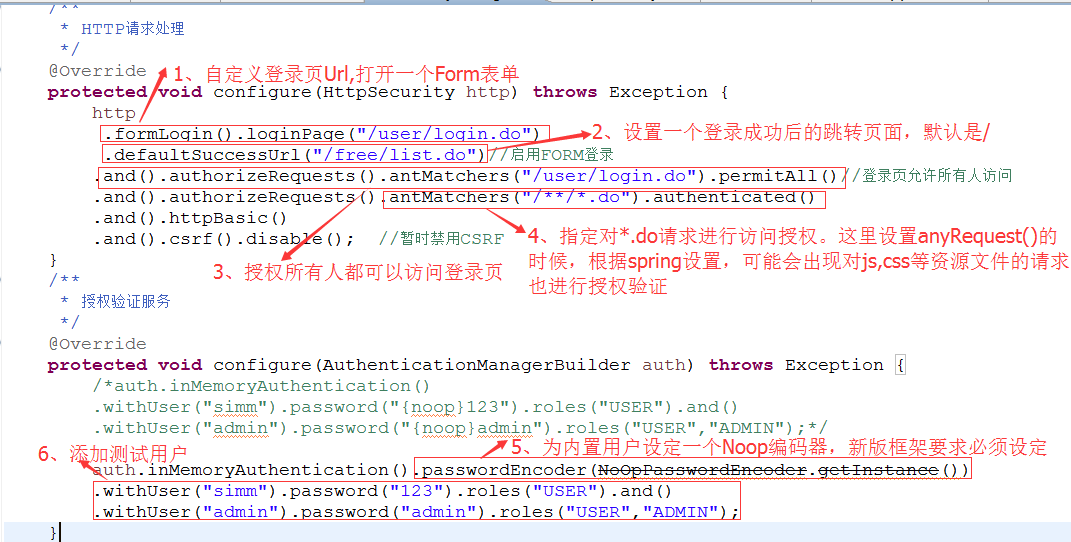
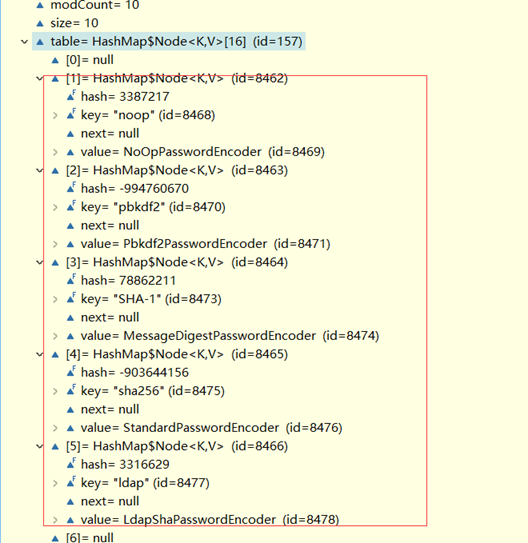
备注:新版本的Spring Security要求必须为用户配置提供编码器,否则会报找不到相应的编码器错误。这里有个不是很重要的知识点,假如我们没有调用passwordEncoder方法为用户验证指明编码器,那么有一种替代方案,就是在密码前加"{noop}"等前缀,跟踪源码发现,框架会自动解析{}中的key去匹配相应的编码器。下面提供一个调试的图,可以了解下。
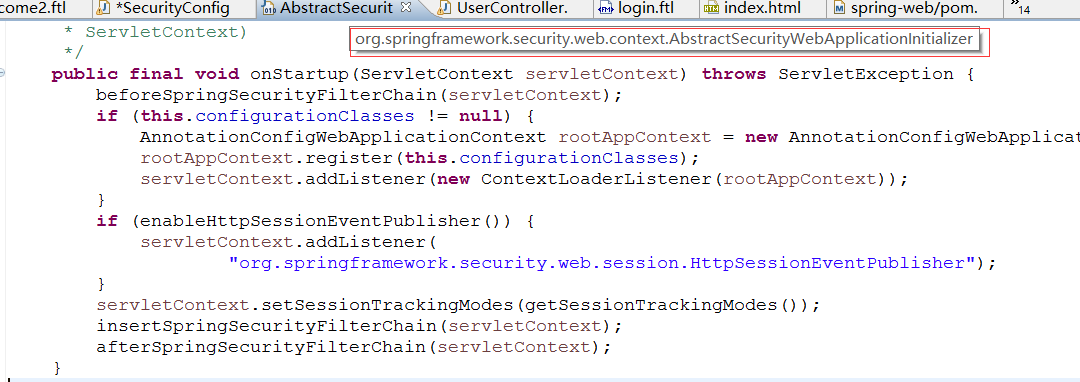
3、添加AppInitializer类,对AbstractSecurityWebApplicationInitializer进行扩展实现,系统启动会自动插入SpringSecurityFilter,完成对请求的安全性拦截。
public class AppInitializer extends AbstractSecurityWebApplicationInitializer { }
下面截图为AbstractSecurityWebApplicationInitializer中SpringSecurityFilter的启用过程,可做参考。
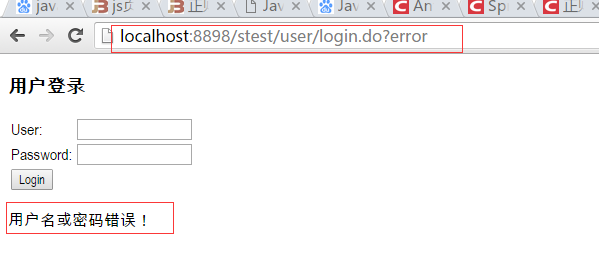
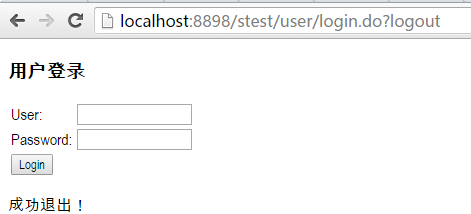
4、添加登录控制Controller。action接两个可选的请求参数error,logout。当登录失败,框架会重定向到登录页添加一个error参数。当调用/logout 退出系统时,框架在执行完退出事件,清理完身份信息后,重定向回登录页,携带一个logout参数。
@Controller

@RequestMapping("/user")

// 添加session信息的注解,可以实现 session信息与map的映射 赋值

@SessionAttributes("user")

public class UserController {

    @RequestMapping(value = "/login", method = RequestMethod.GET)

    public String login(@RequestParam(value = "error", required = false) String error,

            @RequestParam(value = "logout", required = false) String logout,Model model) {

        if (error != null) {

            model.addAttribute("msg", "用户名或密码错误!");

        }

        if (logout != null) {

            model.addAttribute("msg", "成功退出!");

        }

        return "user/login";

    }
5、接下来开始访问系统查看框架应用后的结果
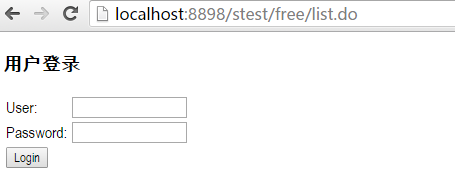
- 直接访问非登录页,由于没有登录,系统跳转至授权登录页面
- 验证登录失败,重定向回登录页并自动携带error参数
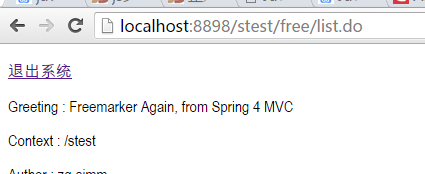
- 验证登录成功,重定向到成功页面
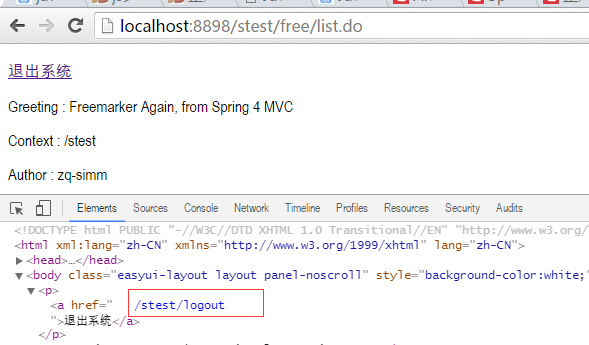
- 点击退出系统
安全性框架内容比较广泛,后面将尝试读取数据库中用户,自定义用户校验,https请求,跨站请求伪造等方面的功能。今天的内容比较简单,先作为第一波的敲门砖。
Spring-Security自定义登录页&inMemoryAuthentication验证的更多相关文章
- Spring Security 自定义登录认证(二)
一.前言 本篇文章将讲述Spring Security自定义登录认证校验用户名.密码,自定义密码加密方式,以及在前后端分离的情况下认证失败或成功处理返回json格式数据 温馨小提示:Spring Se ...
- (二)spring Security 自定义登录页面与校验用户
文章目录 配置 security 配置下 MVC 自定义登录页面 自定义一个登陆成功欢迎页面 效果图 小结: 使用 Spring Boot 的快速创建项目功能,勾选上本篇博客需要的功能:web,sec ...
- spring boot 下 spring security 自定义登录配置与form-login属性详解
package zhet.sprintBoot; import org.springframework.beans.factory.annotation.Autowired;import org.sp ...
- Spring Boot整合Spring Security自定义登录实战
本文主要介绍在Spring Boot中整合Spring Security,对于Spring Boot配置及使用不做过多介绍,还不了解的同学可以先学习下Spring Boot. 本demo所用Sprin ...
- Spring Security 自定义登录页面
SpringMVC + Spring Security,自定义登录页面登录验证 学习参考:http://www.mkyong.com/spring-security/spring-security-f ...
- spring security采用自定义登录页和退出功能
更新... 首先采用的是XML配置方式,请先查看 初识Spring security-添加security 在之前的示例中进行代码修改 项目结构如下: 一.修改spring-security.xml ...
- Spring Security笔记:自定义登录页
以下内容参考了 http://www.mkyong.com/spring-security/spring-security-form-login-example/ 接上回,在前面的Hello Worl ...
- 【认证与授权】Spring Security自定义页面
在前面的篇幅中,我们对认证和授权流程大致梳理了一遍.在这个过程中我们一直都是使用系统生成的默认页面,登录成功后也是直接调转到根路径页面.而在实际的开发过程中,我们是需要自定义登录页面的,有时还会添加各 ...
- 【JavaEE】SSH+Spring Security自定义Security的部分处理策略
本文建立在 SSH与Spring Security整合 一文的基础上,从这篇文章的example上做修改,或者从 配置了AOP 的example上做修改皆可.这里主要补充我在实际使用Spring Se ...
随机推荐
- Java数据持久层框架 MyBatis之背景知识一
对于MyBatis的学习而言,最好去MyBatis的官方文档:http://www.mybatis.org/mybatis-3/zh/index.html 对于语言的学习而言,马上上手去编程,多多练习 ...
- myeclipse编码
window --->perferences
- RAC某节点v$asm_disk查询hang分析处理
主题:RAC某节点v$asm_disk查询hang分析处理 环境:Oracle 11.2.0.3 RAC 故障描述:RAC环境2个节点,节点1查询v$asm_disk正常返回结果,节点2查询v$asm ...
- 2017年 JavaScript 框架回顾 -- 后端框架
本文是2017年 JavaScript 框架回顾系列的最后的一篇文章,主要介绍 JavaScript 的后端框架情况. 从上图中可以看到,Express 作为用 JavaScript 编写的后端服务的 ...
- python装饰器实现对异常代码出现进行监控
异常,不应该存在,但是我们有时候会遇到这样的情况,比如我们监控服务器的时候,每一秒去采集一次信息,那么有一秒没有采集到我们想要的信息,但是下一秒采集到了, 而后每次的采集都能采集到,就那么一次采集不到 ...
- RocketMQ-广播模式消费
Rocketmq 消费者默认是集群的方式消费的,消费者还可以用广播的模式进行消费.广播模式消费就是所有订阅同一个主题的消费者都会收到消息.代码实现上其实很简单,就是在消费端添加 consumer.se ...
- C#、Java之比较
很多人说C#是微软用来和Java抗衡的武器,因为二者在很大程度上有着惊人的相似,尽管如此,两者不同的地方也很多,所谓"于细微处见差异".那么两者的相似和区别都在什么地方呢?我们从今 ...
- SVN中服务器地址变更
SVN中服务器地址变更后不需要重新导项目,只要修改下SVN的服务器地址,更新一下即可.有两种方法: 方法一:通过MyEclipse中SVN插件 1.选择window→show view→other→S ...
- MS SQL 批量给存储过程/函数授权
在工作当中遇到一个类似这样的问题:要对数据库账户的权限进行清理.设置,其中有一个用户Test,只能拥有数据库MyAssistant的DML(更新.插入.删除等)操作权限,另外拥有执行数据库存储过程.函 ...
- 【转】Linux从入门到精通——运维工程师成长路线图——CTO马哥Linux视频教学
加油! http://edu.51cto.com/roadmap/view/id-2.html#6853467-sqq-1-36881-57ccc7d95ea58df839decd91bd220170