
浅谈辄止WCF:完成最基本的WCF项目(1)
Windows Communication Foundation(WCF)是由微软开发的一系列支持数据通信的应用程序框架,可以翻译为Windows 通讯开发平台。
WCF的所有服务都会公开契约。契约包含以下四种类型
1.服务契约
2.数据契约
3.错误契约
4.消息契约
今天主要介绍服务契约实现WCF项目,服务契约描述了客户端能够执行的服务操作。
项目结构截图:

1.定义和实现服务契约
通过将ServiceContractAttribute属性标记到接口或者类型上。遵循了面向服务的原则,所有的契约必须要明确要求:只有接口和类可以标记为Servicecontract属性,从而为WCF服务,即便标记了ServiceContract属性,类的所有成员也不一定就是契约的一部分,我们必须使用OperationContract属性表明哪些方法需要暴露为WCF契约中的一部分。
using System;

using System.Collections.Generic;

using System.Linq;

using System.ServiceModel;

using System.Text;

using System.Threading.Tasks;

namespace WCFServiceHosting

{

    [ServiceContract]//标记为服务,不标记则客户端无法访问

    public interface IDataExChangeService

    {

        [OperationContract]

        void ShowMsg(string str);

        //不标记不会成为契约一部分

        void ShowMsg1(string str);

    }

}
需要一个类去实现这个接口,表明方法的实际作用,我们只需要去将暴露为服务的方法实现。这里只是简单的将传入的参数写入了文件
using System;

using System.Collections.Generic;

using System.IO;

using System.Linq;

using System.ServiceModel;

using System.Text;

using System.Threading.Tasks;

namespace WCFServiceHosting

{

    [ServiceBehavior(InstanceContextMode = InstanceContextMode.PerCall)]

    public class DataExChangeService : IDataExChangeService

    {

        private FileStream fs;

        public void ShowMsg(string str)

        {

            fs = new FileStream("c://Warrenwell.log//log.txt",FileMode.Create,FileAccess.ReadWrite);

            byte[] messages = System.Text.Encoding.Default.GetBytes(str);

            fs.Write(messages, , messages.Length);

            fs.Close();

        }

        public void ShowMsg1(string str)

        {

            throw new NotImplementedException();

        }

    }

}
2.托管
wcf服务不能凭空存在,每个服务都必须托管到windows进程中,该进程叫做宿主进程。
我们这里使用自托管,我们托管到windows窗体应用程序中,托管应用程序配置文件通常会列出所有希望托管和公开的服务类型
      <services>

         <service name="WCFServiceHosting.DataExChangeService">

           <host>

              <baseAddresses>

                  <add baseAddress="http://192.168.0.44:8002/ReceiveMessage/"/>

              </baseAddresses>

           </host>

           <endpoint address="" binding="basicHttpBinding" contract="WCFServiceHosting.IDataExChangeService" />

           <endpoint contract="IMetadataExchange" binding="mexHttpBinding" address="mex" />

         </service>

     </services>
在windows窗体应用程序中托管服务的代码为
using System;

using System.Collections.Generic;

using System.ComponentModel;

using System.Data;

using System.Drawing;

using System.Linq;

using System.ServiceModel;

using System.ServiceProcess;

using System.Text;

using System.Threading.Tasks;

using System.Windows.Forms;

namespace WCFServiceHosting

{

    public partial class ServiceHostHandler:ServiceBase

    {

        private ServiceHost host;

        private System.Timers.Timer timer = new System.Timers.Timer();

        private const int timerInterval = ;

        public ServiceHostHandler()

        {

            InitializeComponent();

        }

        protected override void OnStart(string[] args)

        {

            try

            {

                if (host != null)

                {

                    host.Close();

                }

                host = new ServiceHost(typeof(DataExChangeService));

                host.Open();

                timer.Interval = timerInterval;

                timer.Start();

            }

            catch(Exception ex)

            {

                throw;

            }

        }

        protected override void OnStop()

        {

            try

            {

                if (timer.Enabled)

                {

                    timer.Close();

                    timer.Dispose();

                }

                if (host != null)

                {

                    host.Close();

                    host = null;

                }

            }

            catch (Exception ex)

            {

                throw;

            }

        }

    }

}
最后在窗体程序的program.cs文件中设置为启动这个窗体程序,由于服务托管于此窗体程序中,所以相当于启动了服务
using System;

using System.Collections.Generic;

using System.Linq;

using System.ServiceProcess;

using System.Threading.Tasks;

using System.Windows.Forms;

namespace WCFServiceHosting

{

    static class Program

    {

        /// <summary>

        /// 应用程序的主入口点。

        /// </summary>

        [STAThread]

        static void Main()

        {

            ServiceBase[] serviceToRun;

            serviceToRun = new ServiceBase[]

            {

                new ServiceHostHandler()

            };

            ServiceBase.Run(serviceToRun);

        }

    }

}
3.将程序做成服务安装到服务器中
using System;

using System.Collections.Generic;

using System.ComponentModel;

using System.Configuration.Install;

using System.Data;

using System.Drawing;

using System.Linq;

using System.Text;

using System.Threading.Tasks;

using System.Windows.Forms;

namespace WCFServiceHosting

{

    [RunInstaller(true)]

    public partial class ProjectInstaller : System.Configuration.Install.Installer

    {

        public ProjectInstaller()

        {

            InitializeComponent();

        }

    }

}
namespace WCFServiceHosting

{

    partial class ProjectInstaller

    {

        /// <summary>

        /// Required designer variable.

        /// </summary>

        private System.ComponentModel.IContainer components = null;

        /// <summary>

        /// Clean up any resources being used.

        /// </summary>

        /// <param name="disposing">true if managed resources should be disposed; otherwise, false.</param>

        protected override void Dispose(bool disposing)

        {

            if (disposing && (components != null))

            {

                components.Dispose();

            }

            base.Dispose(disposing);

        }

        #region Windows Form Designer generated code

        /// <summary>

        /// Required method for Designer support - do not modify

        /// the contents of this method with the code editor.

        /// </summary>

        private void InitializeComponent()

        {

            this.serviceProcessInstaller = new System.ServiceProcess.ServiceProcessInstaller();

            this.serviceInstaller = new System.ServiceProcess.ServiceInstaller();

            //

            // serviceProcessInstaller

            //

            this.serviceProcessInstaller.Account = System.ServiceProcess.ServiceAccount.LocalSystem;

            this.serviceProcessInstaller.Password = null;

            this.serviceProcessInstaller.Username = null;

            //

            // serviceInstaller

            //

            this.serviceInstaller.Description = "Exchange data with Hospital Information System.";

            this.serviceInstaller.DisplayName = "";//服务名字

            this.serviceInstaller.ServiceName = "ReceiveMessage";

            this.serviceInstaller.StartType = System.ServiceProcess.ServiceStartMode.Automatic;

            //

            // ProjectInstaller

            //

            this.Installers.AddRange(new System.Configuration.Install.Installer[] {

            this.serviceProcessInstaller,

            this.serviceInstaller});

        }

        #endregion

        private System.ServiceProcess.ServiceProcessInstaller serviceProcessInstaller;

        private System.ServiceProcess.ServiceInstaller serviceInstaller;

    }

}
4.安装我们的WCF服务到服务器上
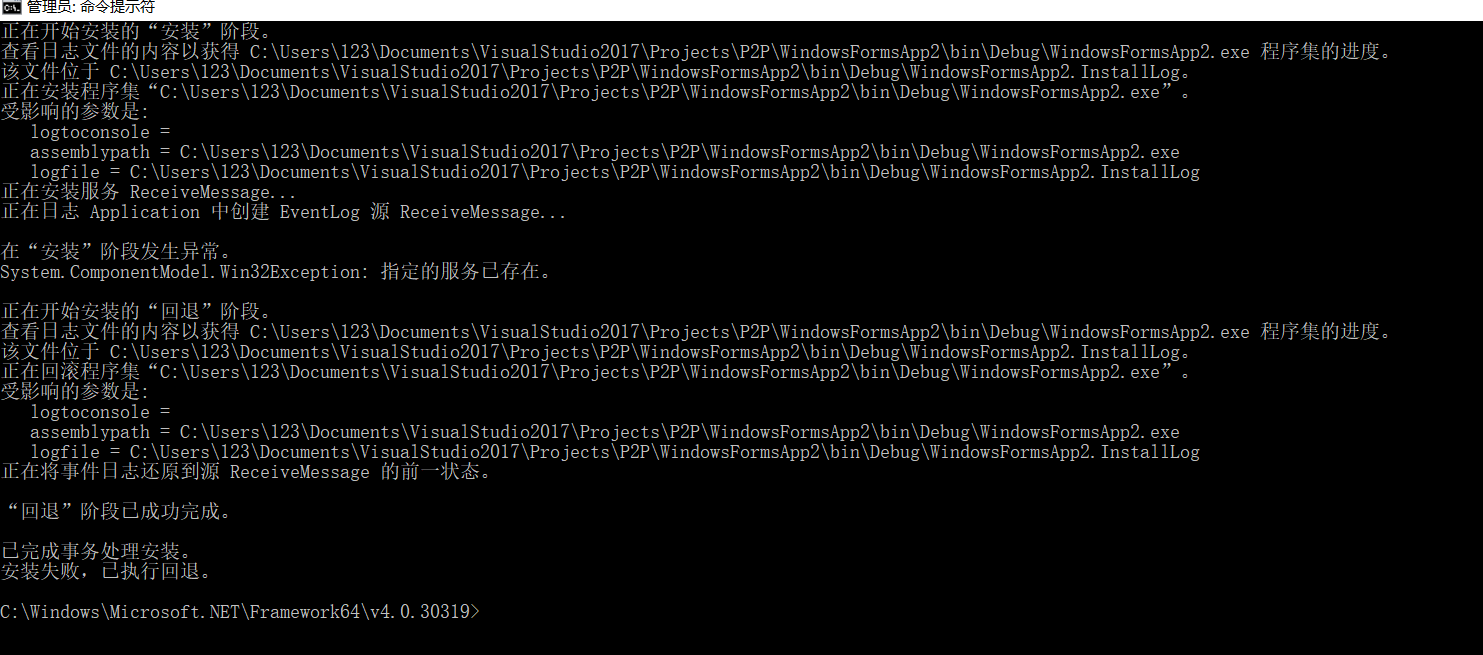
打开命令提示符,右击管理员身份运行,输入cd C:\Windows\Microsoft.NET\Framework64\v4.0.30319
继续输入InstallUtil.exe C:\Users\123\Documents\VisualStudio2017\Projects\P2P\WindowsFormsApp2\bin\Debug\WindowsFormsApp2.exe
由于我的服务已经存在了所以就提示我已经存在。
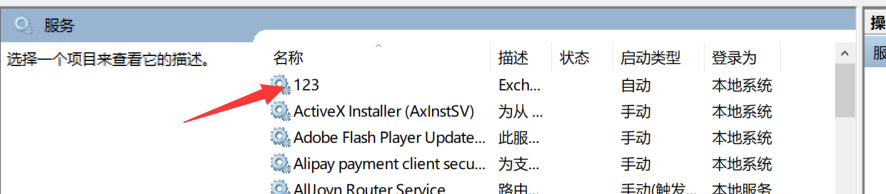
之后就能在计算机管理——服务里面看到我们的123服务了,打开123服务后,别人就能够调用了,关于调用方法,下章继续,拜拜=V=。
项目整体源码下载地址 http://download.csdn.net/download/china_zhangdapao/10255850
浅谈辄止WCF:完成最基本的WCF项目(1)的更多相关文章
- 浅谈WebService的版本兼容性设计
在现在大型的项目或者软件开发中,一般都会有很多种终端, PC端比如Winform.WebForm,移动端,比如各种Native客户端(iOS, Android, WP),Html5等,我们要满足以上所 ...
- 浅谈线程池(中):独立线程池的作用及IO线程池
原文地址:http://blog.zhaojie.me/2009/07/thread-pool-2-dedicate-pool-and-io-pool.html 在上一篇文章中,我们简单讨论了线程池的 ...
- 浅谈 Fragment 生命周期
版权声明:本文为博主原创文章,未经博主允许不得转载. 微博:厉圣杰 源码:AndroidDemo/Fragment 文中如有纰漏,欢迎大家留言指出. Fragment 是在 Android 3.0 中 ...
- 浅谈 LayoutInflater
浅谈 LayoutInflater 版权声明:本文为博主原创文章,未经博主允许不得转载. 微博:厉圣杰 源码:AndroidDemo/View 文中如有纰漏,欢迎大家留言指出. 在 Android 的 ...
- 浅谈Java的throw与throws
转载:http://blog.csdn.net/luoweifu/article/details/10721543 我进行了一些加工,不是本人原创但比原博主要更完善~ 浅谈Java异常 以前虽然知道一 ...
- 浅谈SQL注入风险 - 一个Login拿下Server
前两天,带着学生们学习了简单的ASP.NET MVC,通过ADO.NET方式连接数据库,实现增删改查. 可能有一部分学生提前预习过,在我写登录SQL的时候,他们鄙视我说:“老师你这SQL有注入,随便都 ...
- 浅谈angular2+ionic2
浅谈angular2+ionic2 前言: 不要用angular的语法去写angular2,有人说二者就像Java和JavaScript的区别. 1. 项目所用:angular2+ionic2 ...
- iOS开发之浅谈MVVM的架构设计与团队协作
今天写这篇博客是想达到抛砖引玉的作用,想与大家交流一下思想,相互学习,博文中有不足之处还望大家批评指正.本篇博客的内容沿袭以往博客的风格,也是以干货为主,偶尔扯扯咸蛋(哈哈~不好好工作又开始发表博客啦 ...
- Linux特殊符号浅谈
Linux特殊字符浅谈 我们经常跟键盘上面那些特殊符号比如(?.!.~...)打交道,其实在Linux有其独特的含义,大致可以分为三类:Linux特殊符号.通配符.正则表达式. Linux特殊符号又可 ...
随机推荐
- Android ActionBar仿微信界面
ActionBar仿微信界面 1.学习了别人的两篇关于ActionBar博客,在结合别人的文章来仿造一下微信的界面: 思路如下:1).利用ActionBar生成界面的头部,在用ActionBar的Ac ...
- 操作文件方法简单总结(File,Directory,StreamReader,StreamWrite ) - Zery-zhang
一 基本介绍 操作文档,文件夹,需要用到的类 1 Directory (静态类) : 用于创建.移动和删除等操作通过 目录 和子 目录 DirectoryInfo (非静态): 2 File ...
- vs2017安装后自动应用许可证
Vs2017专业版 "C:\Program Files (x86)\Microsoft Visual Studio\2017\Professional\Common7\IDE\StorePI ...
- C#设计模式系列:适配器模式(Adapter Pattern)
一.引言 在软件系统中,由于应用环境的变化,常常需要将“一些现存的对象”放在新的环境中应用.但是新环境要求的接口是这些现存对象所不满足的.如何应对这种“迁移的变化”?如何既能利用现有对象的良好实现,同 ...
- Java高质量代码之 — 泛型与反射
在Java5后推出了泛型,使我们在编译期间操作集合或类时更加的安全,更方便代码的阅读,而让身为编译性语言的Java提供动态性的反射技术,更是在框架开发中大行其道,从而让Java活起来,下面看一下在使用 ...
- react-native自定义原生组件
此文已由作者王翔授权网易云社区发布. 欢迎访问网易云社区,了解更多网易技术产品运营经验. 使用react-native的时候能够看到不少函数调用式的组件,像LinkIOS用来呼起url请求 Link ...
- CPU 和 GPU 的区别
作者:知乎用户链接:https://www.zhihu.com/question/19903344/answer/96081382来源:知乎著作权归作者所有.商业转载请联系作者获得授权,非商业转载请注 ...
- 多线程《七》信号量,Event,定时器
一 信号量 信号量也是一把锁,可以指定信号量为5,对比互斥锁同一时间只能有一个任务抢到锁去执行,信号量同一时间可以有5个任务拿到锁去执行,如果说互斥锁是合租房屋的人去抢一个厕所,那么信号量就相当于一群 ...
- Weekly Contest 117
965. Univalued Binary Tree A binary tree is univalued if every node in the tree has the same value. ...
- [SinGuLaRiTy] 高级搜索算法
[SinGuLaRiTy-1039] Copyright (c) SinGuLaRiTy 2017. All Rights Reserved. 迭代加深搜索(ID) 迭代加深搜索,实质上就是限定下界的 ...