
Mininet实验 基于Mininet测量路径的损耗率
实验原理
在SDN环境中,控制器可以通过对交换机下发流表操作来控制交换机的转发行为,此外,还可以利用控制器测量路径的损耗率。在本实验中,基于Mininet脚本,设置特定的交换机间的路径损耗速率,然后编写POX脚本,实现对路径的损耗率的测量。
拓扑图:

在该环境下,h0向h1发送数据包,由于在mininet脚本中设置了连接损耗率,在传输过程中会丢失一些包,本次实验的目的是展示如何通过控制器计算路径损耗速率(h0-s0-s1-h1)。这里假设控制器预先知道网络拓扑,所以我没有显示发现网络的代码以及其他相关代码。控制器将向s0和s1发送flowstatsrequest,当控制器接收到来自s0的response时,将特定流的数据包数保存在inputpkts中,当控制器接收到来自s1的response时,将接收到特定流的数据包数保存在outputpkts中,差值就是丢失的数据包数量。
实验操作
编写mininet脚本
 #!/usr/bin/python

 from mininet.net import Mininet

 from mininet.node import Node

 from mininet.link import TCLink

 from mininet.log import  setLogLevel, info

 from threading import Timer

 from mininet.util import quietRun

 from time import sleep

 def myNet(cname='controller', cargs='-v ptcp:'):

     "Create network from scratch using Open vSwitch."

     info( "*** Creating nodes\n" )

     controller = Node( 'c0', inNamespace=False )

     switch = Node( 's0', inNamespace=False )

     switch1 = Node( 's1', inNamespace=False )

     h0 = Node( 'h0' )

     h1 = Node( 'h1' )

     info( "*** Creating links\n" )

     linkopts0=dict(bw=100, delay='1ms', loss=0)

     linkopts1=dict(bw=100, delay='1ms', loss=10)

     link0=TCLink( h0, switch, **linkopts0)

     link1 = TCLink( switch, switch1, **linkopts1)

     link2 = TCLink( h1, switch1, **linkopts0)

     #print link0.intf1, link0.intf2

     link0.intf2.setMAC("0:0:0:0:0:1")

     link1.intf1.setMAC("0:0:0:0:0:2")

     link1.intf2.setMAC("0:1:0:0:0:1")

     link2.intf2.setMAC("0:1:0:0:0:2")

     info( "*** Configuring hosts\n" )

     h0.setIP( '192.168.123.1/24' )

     h1.setIP( '192.168.123.2/24' )

     info( "*** Starting network using Open vSwitch\n" )

     switch.cmd( 'ovs-vsctl del-br dp0' )

     switch.cmd( 'ovs-vsctl add-br dp0' )

     switch1.cmd( 'ovs-vsctl del-br dp1' )

     switch1.cmd( 'ovs-vsctl add-br dp1' )

     controller.cmd( cname + ' ' + cargs + '&' )

     for intf in switch.intfs.values():

         print intf

         print switch.cmd( 'ovs-vsctl add-port dp0 %s' % intf )

     for intf in switch1.intfs.values():

         print intf

         print switch1.cmd( 'ovs-vsctl add-port dp1 %s' % intf )

     # Note: controller and switch are in root namespace, and we

     # can connect via loopback interface

     switch.cmd( 'ovs-vsctl set-controller dp0 tcp:127.0.0.1:6633' )

     switch1.cmd( 'ovs-vsctl set-controller dp1 tcp:127.0.0.1:6633' )

     info( '*** Waiting for switch to connect to controller' )

     while 'is_connected' not in quietRun( 'ovs-vsctl show' ):

         sleep( 1 )

         info( '.' )

     info( '\n' )

     #info( "*** Running test\n" )

     h0.cmdPrint( 'ping -Q 0x64 -c 20 ' + h1.IP() )

     sleep( 1 )

     info( "*** Stopping network\n" )

     controller.cmd( 'kill %' + cname )

     switch.cmd( 'ovs-vsctl del-br dp0' )

     switch.deleteIntfs()

     switch1.cmd( 'ovs-vsctl del-br dp1' )

     switch1.deleteIntfs()

     info( '\n' )

 if __name__ == '__main__':

     setLogLevel( 'info' )

     info( '*** Scratch network demo (kernel datapath)\n' )

     Mininet.init()

     myNet()
PS:52,53行的地址是pox所在的ip地址,根据实际修改。不然会链接不上控制器。
编写POX脚本
 # standard includes

 from pox.core import core

 from pox.lib.util import dpidToStr

 import pox.openflow.libopenflow_01 as of

 from pox.lib.addresses import IPAddr, EthAddr

 # include as part of the betta branch

 from pox.openflow.of_json import *

 from pox.lib.recoco import Timer

 import time

 log = core.getLogger()

 src_dpid = 0

 dst_dpid = 0

 input_pkts = 0

 output_pkts = 0

 def getTheTime():  #fuction to create a timestamp

   flock = time.localtime()

   then = "[%s-%s-%s" %(str(flock.tm_year),str(flock.tm_mon),str(flock.tm_mday))

   if int(flock.tm_hour)<10:

     hrs = "0%s" % (str(flock.tm_hour))

   else:

     hrs = str(flock.tm_hour)

   if int(flock.tm_min)<10:

     mins = "0%s" % (str(flock.tm_min))

   else:

     mins = str(flock.tm_min)

   if int(flock.tm_sec)<10:

     secs = "0%s" % (str(flock.tm_sec))

   else:

     secs = str(flock.tm_sec)

   then +="]%s.%s.%s" % (hrs,mins,secs)

   return then

 # handler for timer function that sends the requests to all the

 # switches connected to the controller.

 def _timer_func ():

   for connection in core.openflow._connections.values():

     connection.send(of.ofp_stats_request(body=of.ofp_flow_stats_request()))

     connection.send(of.ofp_stats_request(body=of.ofp_port_stats_request()))

   log.debug("Sent %i flow/port stats request(s)", len(core.openflow._connections))

 # handler to display flow statistics received in JSON format

 # structure of event.stats is defined by ofp_flow_stats()

 def _handle_flowstats_received (event):

    #stats = flow_stats_to_list(event.stats)

    #log.debug("FlowStatsReceived from %s: %s", dpidToStr(event.connection.dpid), stats)

    global src_dpid, dst_dpid, input_pkts, output_pkts

    #print "src_dpid=", dpidToStr(src_dpid), "dst_dpid=", dpidToStr(dst_dpid)

    for f in event.stats:

      if f.match.dl_type==0x0800 and f.match.nw_dst==IPAddr("192.168.123.2") and f.match.nw_tos==0x64 and event.connection.dpid==src_dpid:

        #print "input: ", f.byte_count, f.packet_count

        input_pkts = f.packet_count

      if f.match.dl_type==0x0800 and f.match.nw_dst==IPAddr("192.168.123.2") and f.match.nw_tos==0x64 and event.connection.dpid==dst_dpid:

        #print "output: ", f.byte_count, f.packet_count

        output_pkts = f.packet_count

        if input_pkts !=0:

          print getTheTime(), "Path Loss Rate =", (input_pkts-output_pkts)*1.0/input_pkts*100, "%"

 # handler to display port statistics received in JSON format

 def _handle_portstats_received (event):

    #print "\n<<<STATS-REPLY: Return PORT stats for Switch", event.connection.dpid,"at ",getTheTime()

    #for f in event.stats:

       #if int(f.port_no)<65534:

         #print "   PortNo:", f.port_no, " Fwd's Pkts:", f.tx_packets, " Fwd's Bytes:", f.tx_bytes, " Rc'd Pkts:", f.rx_packets, " Rc's Bytes:", f.rx_bytes

         #print "   PortNo:", f.port_no,  " TxDrop:", f.tx_dropped, " RxDrop:", f.rx_dropped, " TxErr:", f.tx_errors, " RxErr:", f.rx_errors, " CRC:", f.rx_crc_err, " Coll:", f.collisions

   stats = flow_stats_to_list(event.stats)

   log.debug("PortStatsReceived from %s: %s", dpidToStr(event.connection.dpid), stats)

 def _handle_ConnectionUp (event):

   global src_dpid, dst_dpid

   print "ConnectionUp: ", dpidToStr(event.connection.dpid)

   for m in event.connection.features.ports:

     if m.name == "s0-eth0":

       src_dpid = event.connection.dpid

     elif m.name == "s1-eth0":

       dst_dpid = event.connection.dpid

   msg = of.ofp_flow_mod()

   msg.priority =1

   msg.idle_timeout = 0

   msg.match.in_port =1

   msg.actions.append(of.ofp_action_output(port = of.OFPP_ALL))

   event.connection.send(msg)

   msg = of.ofp_flow_mod()

   msg.priority =1

   msg.idle_timeout = 0

   msg.match.in_port =2

   msg.actions.append(of.ofp_action_output(port = of.OFPP_ALL))

   event.connection.send(msg)

   msg = of.ofp_flow_mod()

   msg.priority =10

   msg.idle_timeout = 0

   msg.hard_timeout = 0

   msg.match.dl_type = 0x0800

   msg.match.nw_tos = 0x64

   msg.match.in_port=1

   msg.match.nw_dst = "192.168.123.2"

   msg.actions.append(of.ofp_action_output(port = 2))

   event.connection.send(msg)

   msg = of.ofp_flow_mod()

   msg.priority =10

   msg.idle_timeout = 0

   msg.hard_timeout = 0

   msg.match.dl_type = 0x0800

   msg.match.nw_tos = 0x64

   msg.match.nw_dst = "192.168.123.1"

   msg.actions.append(of.ofp_action_output(port = 1))

   event.connection.send(msg)

 # main functiont to launch the module

 def launch ():

   # attach handsers to listners

   core.openflow.addListenerByName("FlowStatsReceived",

     _handle_flowstats_received)

   core.openflow.addListenerByName("PortStatsReceived",

     _handle_portstats_received)

   core.openflow.addListenerByName("ConnectionUp", _handle_ConnectionUp)

   # timer set to execute every five seconds

   Timer(1, _timer_func, recurring=True)
运行POX脚本flow_stats.py
./pox.py flow_stats

运行mininet脚本
sudo ./sckmininet.py
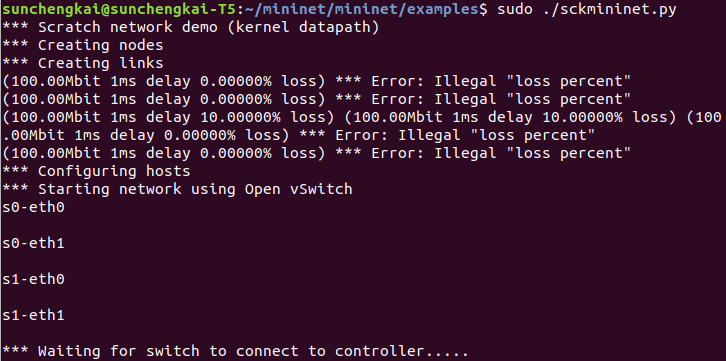
mininet信息:
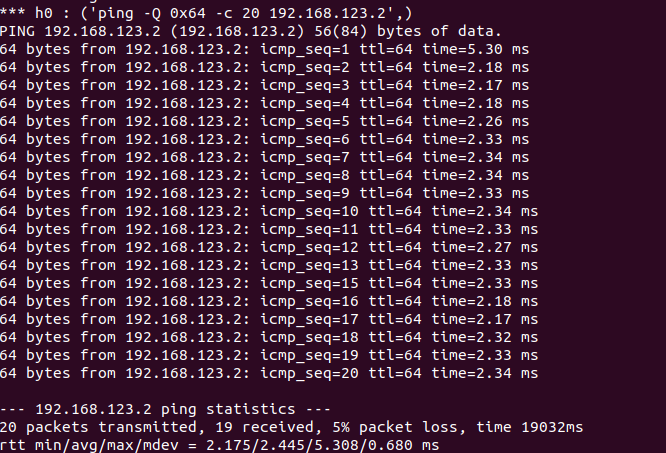
pox信息:

结果符合预期。
Mininet实验 基于Mininet测量路径的损耗率的更多相关文章
- Mininet系列实验(四):基于Mininet测量路径的损耗率
1 实验目的 熟悉Mininet自定义拓扑脚本的编写与损耗率的设定: 熟悉编写POX脚本,测量路径损耗速率 2 实验原理 在SDN环境中,控制器可以通过对交换机下发流表操作来控制交换机的转发行为,此外 ...
- 实验 3:Mininet 实验——测量路径的损耗率
实验目的 在实验 2 的基础上进一步熟悉 Mininet 自定义拓扑脚本,以及与损耗率相关的设 定:初步了解 Mininet 安装时自带的 POX 控制器脚本编写,测试路径损耗率. 实验任务 h0 向 ...
- SDN实验 3: Mininet 实验——测量路径的损耗率
验 3:Mininet 实验--测量路径的损耗率 一.实验目的 在实验 2 的基础上进一步熟悉 Mininet 自定义拓扑脚本,以及与损耗率相关的设定:初步了解 Mininet 安装时自带的 POX ...
- 基于Mininet测量路径的损耗率
基于Mininet测量路径的损耗率 控制器采用POX,基于OVS仿真 Mininet脚本 创建Node mininet.node Node 创建链路连接 mininet.link TCLink 设置i ...
- 软件定义网络实验记录③--Mininet 实验——测量路径的损耗率
一.实验目的 在实验 2 的基础上进一步熟悉 Mininet 自定义拓扑脚本,以及与损耗率相关的设定: 初步了解 Mininet 安装时自带的 POX 控制器脚本编写,测试路径损耗率. 二.实验任务 ...
- 实验 3:Mininet 实验——测量路径的损耗率
一.实验目的 在实验 2 的基础上进一步熟悉 Mininet 自定义拓扑脚本,以及与损耗率相关的设定;初步了解 Mininet 安装时自带的 POX 控制器脚本编写,测试路径损耗率. 二.实验任务 h ...
- Mininet实验 基于Mininet实现BGP路径挟持攻击实验
参考:基于Mininet实现BGP路径挟持攻击实验 实验目的: 掌握如何mininet内模拟AS. 掌握BGP路径挟持的原理和分析过程. 实验原理: 互联网是由相互连接的自治系统AS组成的,通过一个通 ...
- Mininet实验 测量路径损耗率
参照:基于Mininet测量路径的损耗率 在SDN环境中,可以利用控制器来测量特定路径的损耗率,在本实验中,基于Mininet脚本,设置特定的交换机间的路径损耗速率,然后编写POX脚本,实现对路径的损 ...
- Mininet实验 OpenFlow1.3协议基于Mininet部署与验证
参照:OpenFlow1.3协议基于Mininet部署与验证 安装过程,参考原文. 实验 使用ifconfig查看本机IP地址:192.168.1.101 进入OpenDayLight界面,cd到bi ...
随机推荐
- Python 学习笔记(三)数字
Python 数字 int 整型 是正或负整数 2 long 长整型 整数最后是一个大写或小写的L 2L float 浮点型 由整数部分和小数部分组成 2.0 complex 复数 小 ...
- Python基础—14-邮件与短信
邮件与短信 邮件发送 简介: 邮件服务器.账户.密码 相关协议:SMTP.POP3.IMAP 默认TCP协议端口:25 用途:经常用在一个网站的注册激活.通知.找回密码等场景 库:smtplib 示例 ...
- Java的内存--存储(1)
有次去面试,面试官突然问我这个问题,当时我只知道怎么写最优化,但是具体不知道为什么那样写,身价立马下降哦 1. 以下开发习惯,你怎么看? for(int i=0;i<2;i++){ Person ...
- js中FormData+XMLHttpRequest数据传输
前言: 首先我们需要了解,前后端进行数据传输依赖于浏览器的XMLHttpRequest对象 一.什么是XMLHttpRequest对象? XMLHttpRequest 是DOM对象,提供了对于http ...
- oracle调度中使用schedule管理调度
开始前,先说一句:作为dba应该禁止所有应用使用dbms_job. dbms_scheduler非常复杂,oracle在两本书中专门花费不少章节描述,这两本书分别是: Oracle® Database ...
- linux运维、架构之路-shell编程(二)
一.流程控制语句 1.if语句 ①if单分支:一个条件一个结果 1 2 3 4 if 条件 then 命令 fi ②if双分支:一个条件两个结果 1 2 3 4 5 6 if 条件 ...
- 序列化serialize()与反序列化unserialize()的实例
在写序列化serialize与反序列化unserialize()时,我们先来看看: serialize - 产生一个可存储的值的表示 描述 string serialize ( mixed $valu ...
- JDK7 新特性
JDK7新特性的目录导航: 二进制字面值 switch 语句支持 String try-with-resources catch 多个类型异常 字面值中使用下划线 类型推断 改进泛型类型可变参数 其它 ...
- vi/vim连续注释
知识点: 1-可视块模式方法 2-替换方法 3-自定义快捷键方式 今天刚好重新在linux上手工搭建完Lamp环境,用来下vi操作,一段时间不用就有些生疏了,正好经常要注释,回顾下自己会的方法,小结一 ...
- 模块的使用与orm简介
目录 1 django中app的概念: 2 模板路径配置: 3 静态文件配置: 4 完整版登录功能 5 get请求和post请求 6 新手三件套总结 7 pycharm连接mysql 8 orm介绍 ...