
unity 加载资源
Unity3D中的资源的处理种类
Unity中的资源资源的处理种类大致分为:Resources、StreamingAssets、AssetBundle
Resources
是作为一个Unity的保留文件夹出现的,也就是如果你新建的文件夹的名字叫Resources,那么里面的内容在打包时都会被无条件的打到发布包中。
特点:
- 只读,即不能动态修改。所以想要动态更新的资源不要放在这里。
- 会将文件夹内的资源打包集成到.asset文件里面。因此建议可以放一些Prefab,因为Prefab在打包时会自动过滤掉不需要的资源,有利于减小资源包的大小。
- 资源读取使用Resources.Load()。
StreamingAssets
StreamingAssets和Resources很像。同样作为一个只读的Unity3D的保留文件夹出现。不过两者也有很大的区别,那就是Resources文件夹中的内容在打包时会被压缩和加密。而StreamingAsset文件夹中的内容则会原封不动的打入包中,因此StreamingAssets主要用来存放一些二进制文件。
特点:
只读不可写。
主要用来存放二进制文件。
只能用过WWW类来读取。
AssetBundle
AssetBundle就是把prefab或者二进制文件封装成AssetBundle文件。
特点:
- 是Unity3D定义的一种二进制类型。
- 使用WWW类来下载。
Resources
首先我们新建一个Resources目录,并且并将资源放在这目录中。
 using UnityEngine;

 using System.Collections;

 using UnityEngine.UI;

 public class LoadResources : MonoBehaviour {

     public Image image;

     // Use this for initialization

     void Start () {

         image.overrideSprite = Resources.Load ("animotiong_2", typeof(Sprite)) as Sprite;

     }

 }
Resources
StreamingAssets
首先我们新建一个StreamingAssets目录,并且并将资源放在这目录中。
 using UnityEngine;

 using System.Collections;

 public class LoadResources : MonoBehaviour {

     string _result;

     // Use this for initialization

     void Start () {

         StartCoroutine(LoadXML());

     }

     IEnumerator LoadXML() {

         string sPath= Application.streamingAssetsPath + "/test.xml";

         WWW www = new WWW(sPath);

         yield return www;

         _result = www.text;

     }

 }
streamingAssetsPath
读取配置表
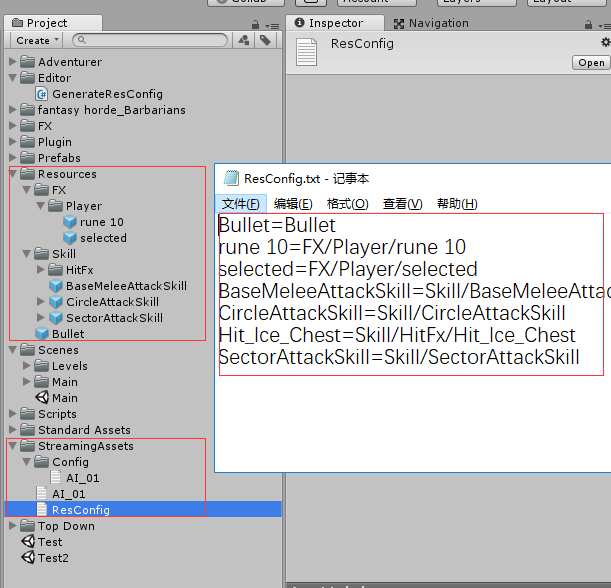
 using System.Collections;

 using System.Collections.Generic;

 using UnityEngine;

 using System.IO;

 namespace  Commom

 {

     ///<summary>

     ///资源加载管理类 提供Resources加载资源相关的功能

     ///</summary>

     public class ResourcesManager

     {

         private static  Dictionary<string, string> resMap;

         //1.获取配置文件 形成数据结构Dictionary<string,string>

         private static   string  GetConfigFile()

         {

             string configPath = Application.

                 streamingAssetsPath + "/ResConfig.txt";

             //当前路径只适应于安卓平台

             if (Application.platform != RuntimePlatform.Android)

                 configPath = "file://" + configPath;

             WWW www = new WWW(configPath);

             //有可能文件比较大  读完

             while (true)

             {

                 if (www.isDone)

                 {

                     return www.text;

                 }

             }

         }

         //2形成数据结构Dictionary<string,string>

         public static   void  BuildMap()

         {

             string strConfig=  GetConfigFile();

             //获取配置文件

             resMap = new Dictionary<string, string>();

             //字符串读取器

             StringReader reader=   new StringReader(strConfig);

             //一行一行读

             string line = null;

             while ((line=reader.ReadLine())!=null)

             {

                 string[] keyvalue = line.Split('=');

                 resMap.Add(keyvalue[], keyvalue[]);

             }

             //foreach (var item in resMap.Keys)

             //{

             //    Debug.Log(resMap[item]);

             //}

         }

         static ResourcesManager()

         {

             BuildMap();

         }

         //3.根据资源名称  获取完整路径.加载资源

         public static  T Load<T>(string resName) where T : Object

         {

             //根据资源名称  查找路径

             string path = resMap[resName];

             //加载资源

             return Resources.Load<T>(path);

         }

     }

 }
ResourcesManager
WWW 加载资源
从网络网址加载资源
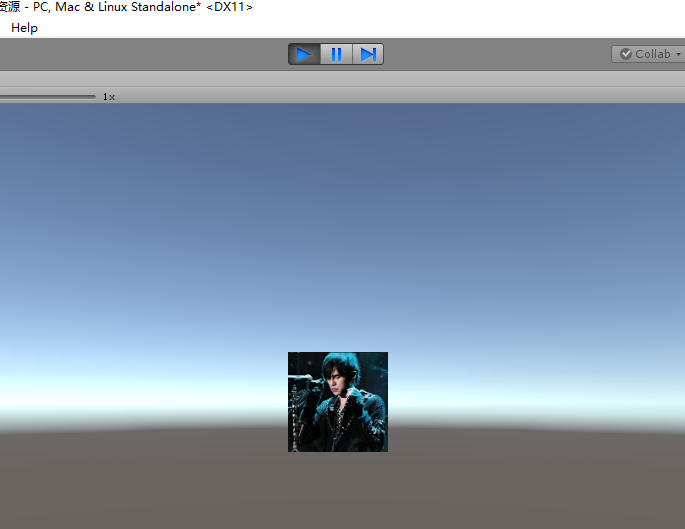
 using System.Collections;

 using System.Collections.Generic;

 using UnityEngine;

 using UnityEngine.UI;

 public class WWWTest : MonoBehaviour

 {

     string url = "https://timgsa.baidu.com/timg?image&quality=80&size=b9999_10000&sec=1551776540985&di=fe944512c8b2d0e80313bdc488acc4ac&imgtype=0&src=http%3A%2F%2Fimage13.m1905.cn%2Fuploadfile%2Fs2010%2F0127%2F20100127083234166.jpg";

     private void Start()

     {

         StartCoroutine(WWW());

     }

     private IEnumerator WWW()

     {

         WWW www = new WWW(url);

         yield return www;  // 等待直至异步下载完成,才继续往下执行

         if (!string.IsNullOrEmpty(www.error)) //检测是否www.有错误 如果不为空则终止

         {

             yield break;

         }

         if (www.isDone) //检测是否加载完成

         {

             transform.Find("RawImage").GetComponent<RawImage>().texture = www.texture;

         }

     }

 }
WWWTest
unity 加载资源的更多相关文章
- 升级MAC OS到10.13, 10.14系统后UNITY工程无法加载资源的解决办法
升级MAC OS到10.13, 10.14系统后,出现UNITY工程无法加载资源的情况: Unity项目中Asset目录显示为空! 解决办法一: 打开Launchpad中的磁盘工具 (也就是实用工具下 ...
- Unity加载模块深度解析(纹理篇)
在游戏和VR项目的研发过程中,加载模块所带来的效率开销和内存占用(即“加载效率”.“场景切换速度”等)经常是开发团队非常头疼的问题,它不仅包括资源的加载耗时,同时也包含场景物件的实例化和资源卸载等.在 ...
- Unity加载模块深度解析(Shader)
作者:张鑫链接:https://zhuanlan.zhihu.com/p/21949663来源:知乎著作权归作者所有.商业转载请联系作者获得授权,非商业转载请注明出处. 接上一篇 加载模块深度解析(二 ...
- [转]全面理解Unity加载和内存管理
[转]全面理解Unity加载和内存管理 最近一直在和这些内容纠缠,把心得和大家共享一下: Unity里有两种动态加载机制:一是Resources.Load,一是通过AssetBundle,其实两者本质 ...
- 【Unity3D】Unity3D之 Resources.Load 动态加载资源
[Unity3D]Unity3D之 Resources.Load 动态加载资源 1.Resources.Load:使用这种方式加载资源,首先需要下Asset目录下创建一个名为Resources的文件夹 ...
- AssetBundle——外部加载资源Asset
几篇很不错的文章 AssetBundle创建到使用入门 全面理解Unity加载和内存管理 实用的创建AssetBundle的脚本 相关资源 相关的共享资源下载 本共享包括创建assetbund ...
- UE4中资源加载资源的方式
在UNITY中,我们加载资源一般是通过Resources.Load(path).即可完成.该方法返回的是Object类型.如果你想要的是材质或者贴图等等,只要价格类型转换的关键字就可以了例如 as M ...
- unity3d Resources.Load动态加载资源
初步整理并且学习unity3d资源加载方法,预计用时两天完成入门学习Unity3d常用两种加载资源方案:Resources.Load和AssetBundle Resources.Load就是从一个缺省 ...
- Unity加载AssetBundle的方法
using System.Collections; using System.Collections.Generic; using UnityEngine; using System.IO; usin ...
随机推荐
- MongoDB内嵌文档操作
实体定义: [BsonIgnoreExtraElements] public class Person : BaseEntity { public string FirstName { get; se ...
- 给iOS开发新手送点福利,简述UISlide的属性和用法
UISlide属性 1. minimumValue : 当值可以改变时,滑块可以滑动到最小位置的值,默认为0.0 _slider.minimumValue = 10.0; 2. maximu ...
- var和let示例
声明后未赋值,表现相同 (function() { var varTest; let letTest; console.log(varTest); //输出undefined console.log( ...
- linux nginx安装以及配置
一.Nginx简介 Nginx (“engine x”) 是一个高性能的HTTP和反向代理服务器,也是一个IMAP/POP3/SMTP服务器.Nginx是由Igor Sysoev为俄罗斯访问量第二的R ...
- ADO.Net学习总结
一.讲述6个ADO.NET中的常用对象: Connection对象Command对象DataReader对象DataAdapter对象DataSet对象DataTable对象DataRow对象Data ...
- DevExpress之XtraReport 学习
XtraReport 一.基本概念: XtraReports 中的每个报表都由 XtraRepot 类的一个实例表示,或者由该类的子类来表示(这种情况更常见). 因此,每个报表都作为带区的容器使用,而 ...
- Richview 首页 奇偶页 不同页眉页脚
首页 奇偶页 不同页眉页脚 ScaleRichView v6.0 Different headers and footers for the first page, for odd and even ...
- sqlserver 开窗函数Over()的使用
利用over(),将统计信息计算出来,然后直接筛选结果集 declare @t table(ProductID int,ProductName varchar(20),ProductType varc ...
- NormalMap原理详细解析
NormalMap的实现标志着对渲染流水线的各个环节以及矩阵变化有了正确和深入的认识.这里记录一下学习过程,以及关于NormalMap的诸多细节. 刚开始想要实现NormalMap程序的时候,查阅的是 ...
- etl业务说明图