
《DSP using MATLAB》示例Example4.15
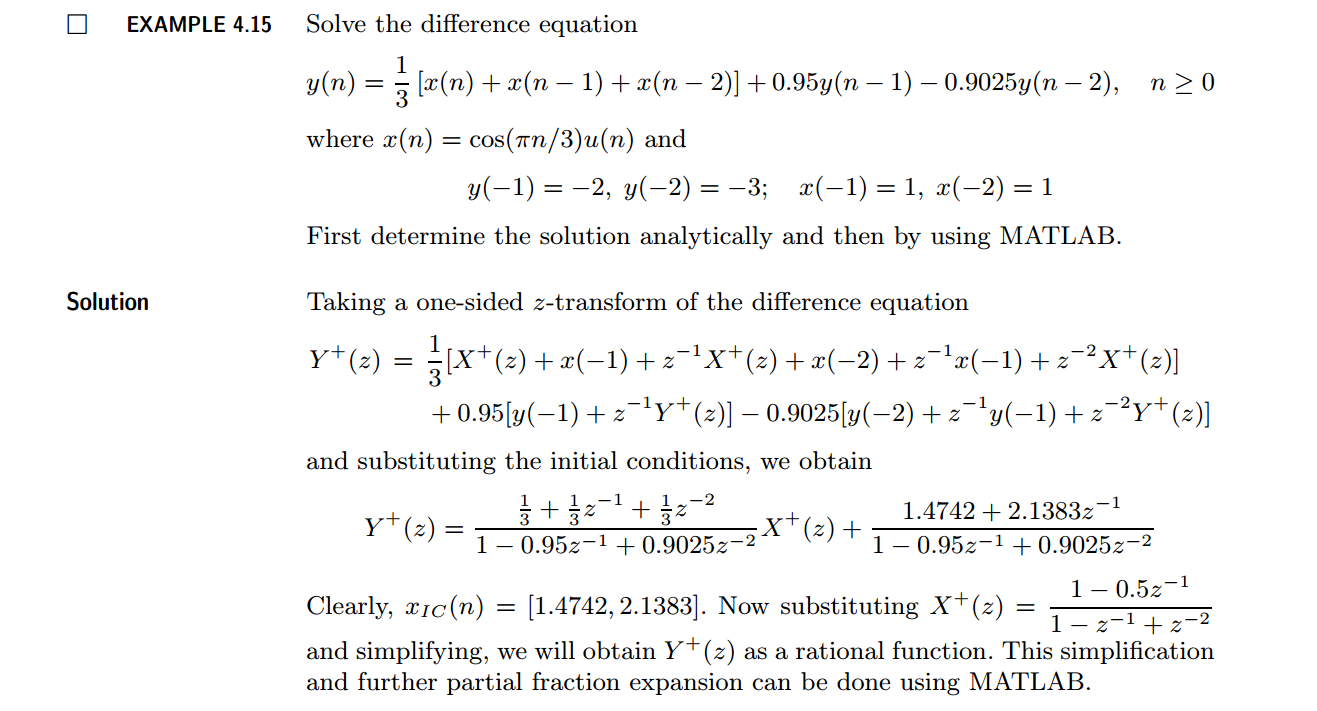
代码:
b = [1/3, 1/3, 1/3]; a = [1, -0.95, 0.9025];               % x(n)  y(n)   coefficient

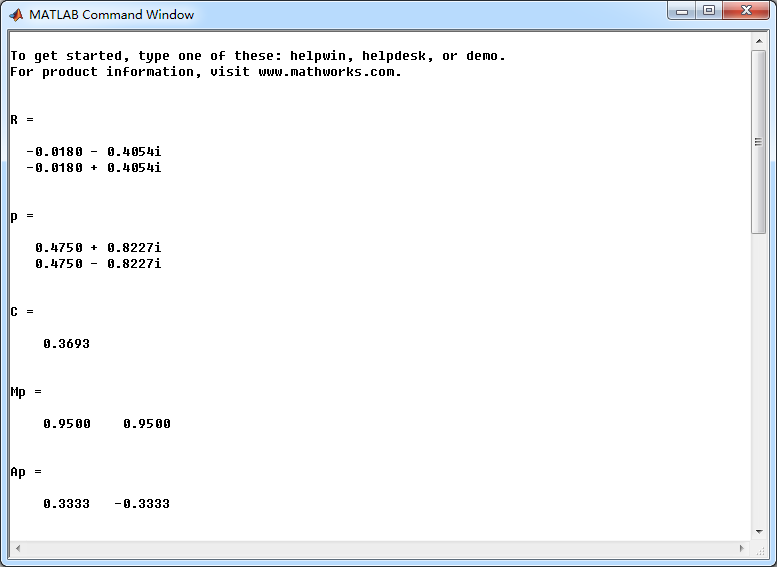
[R, p, C] = residuez(b,a)

Mp = (abs(p))', Ap = (angle(p))'/pi                        % polar form

Y = [-2, -3]; X =[1, 1]; xic = filtic(b,a,Y,X);

%% ----------------------------------------------

%%   START a    determine H(z) and sketch

%% ----------------------------------------------

figure('NumberTitle', 'off', 'Name', 'Example4.15 H(z) its pole-zero plot')

set(gcf,'Color','white');

zplane(b,a);

title('pole-zero plot'); grid on;

%% ----------------------------------------------

%%    END

%% ----------------------------------------------

bxplus = [1, -0.5]; axplus = [1, -1, 1];          % X(z) transform coeff

ayplus = conv(a, axplus)                          % Denominator of Yplus(z)

byplus = conv(b,bxplus) + conv(xic,axplus)        % Numerator of Yplus(z)

[R, p, C] = residuez(byplus, ayplus)

Mp = (abs(p))' , Ap = (angle(p))'/pi              % polar form

%% --------------------------------------------------------------

%%    START    b   |H|   <H

%%    1st form of freqz

%% --------------------------------------------------------------

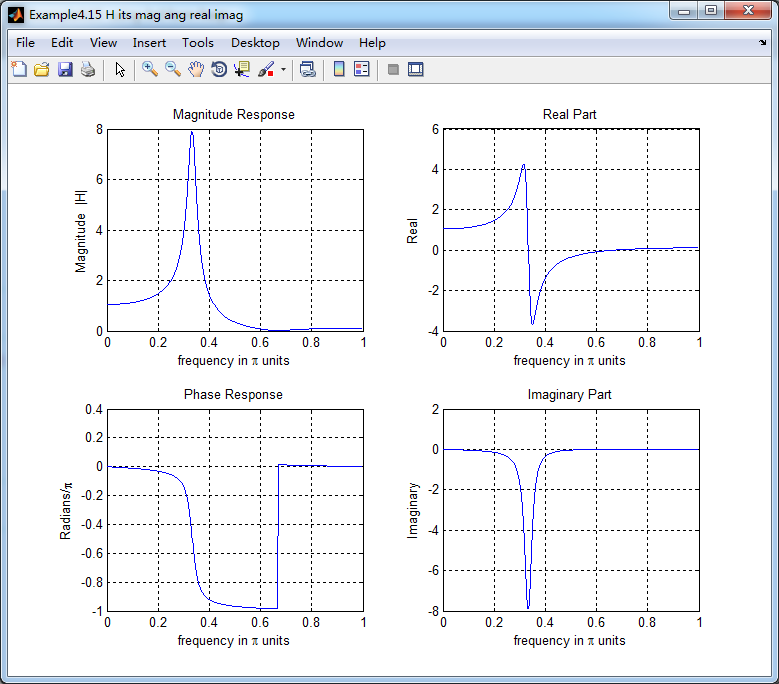
[H,w] = freqz(b,a,500);                 % 1st form of freqz

magH  = abs(H);  angH  = angle(H);  realH  = real(H);  imagH  = imag(H);

%% ================================================

%%              START H's  mag ang real imag

%% ================================================

figure('NumberTitle', 'off', 'Name', 'Example4.15 H its mag ang real imag');

set(gcf,'Color','white');

subplot(2,2,1); plot(w/pi,magH); grid on;  %axis([0,1,0,1.5]);

title('Magnitude Response');

xlabel('frequency in \pi units'); ylabel('Magnitude  |H|');

subplot(2,2,3); plot(w/pi, angH/pi); grid on; % axis([-1,1,-1,1]);

title('Phase Response');

xlabel('frequency in \pi units'); ylabel('Radians/\pi');

subplot('2,2,2'); plot(w/pi, realH); grid on;

title('Real Part');

xlabel('frequency in \pi units'); ylabel('Real');

subplot('2,2,4'); plot(w/pi, imagH); grid on;

title('Imaginary Part');

xlabel('frequency in \pi units'); ylabel('Imaginary');

%% ==================================================

%%             END H's  mag ang real imag

%% ==================================================

%% ---------------------------------------------------------------

%%    END    b   |H|   <H

%% ---------------------------------------------------------------

%% --------------------------------------------------------------

%%    START    b   |H|   <H

%%    3rd form of freqz

%% --------------------------------------------------------------

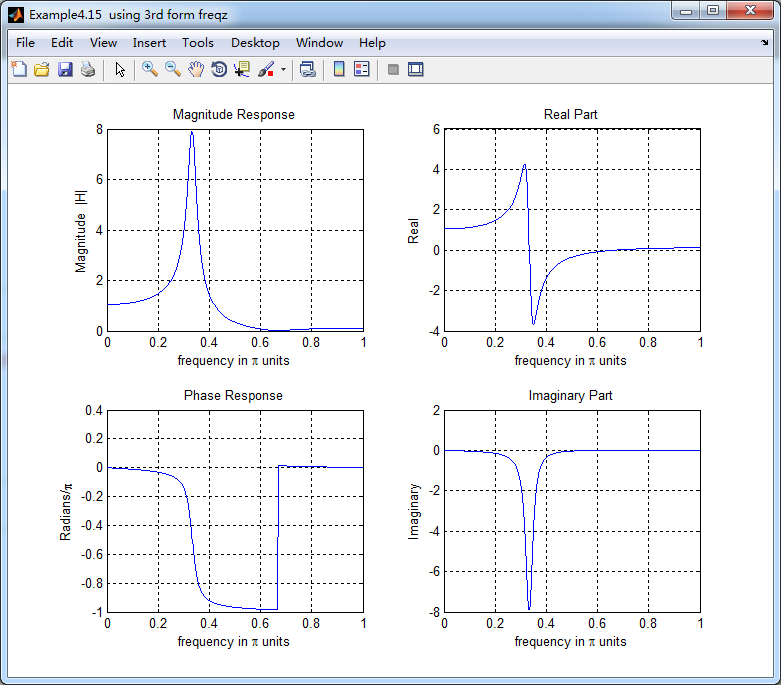
w = [0:1:500]*pi/500;     H = freqz(b,a,w);

%[H,w] = freqz(b,a,200,'whole');                 % 3rd form of freqz

magH  = abs(H);  angH  = angle(H);  realH  = real(H);  imagH  = imag(H);

%% ================================================

%%              START H's  mag ang real imag

%% ================================================

figure('NumberTitle', 'off', 'Name', 'Example4.15  using 3rd form freqz ');

set(gcf,'Color','white');

subplot(2,2,1); plot(w/pi,magH); grid on;  %axis([0,1,0,1.5]);

title('Magnitude Response');

xlabel('frequency in \pi units'); ylabel('Magnitude  |H|');

subplot(2,2,3); plot(w/pi, angH/pi); grid on; % axis([-1,1,-1,1]);

title('Phase Response');

xlabel('frequency in \pi units'); ylabel('Radians/\pi');

subplot('2,2,2'); plot(w/pi, realH); grid on;

title('Real Part');

xlabel('frequency in \pi units'); ylabel('Real');

subplot('2,2,4'); plot(w/pi, imagH); grid on;

title('Imaginary Part');

xlabel('frequency in \pi units'); ylabel('Imaginary');

%% ==================================================

%%             END H's  mag ang real imag

%% ==================================================

%% ---------------------------------------------------------------

%%    END    b   |H|   <H

%% ---------------------------------------------------------------

%%  START Check

n = [0:7]; x = cos(pi*n/3); y_ori = filter(b,a,x,xic)

%% MATLAB verification

A = real(2*R(1)); B = imag(2*R(1)); C = real(2*R(3)); D = imag(2*R(4));

y_check = A*cos(pi*n/3) + B *sin(pi*n/3) + ((0.95).^n) .* (C*cos(pi*n/3) + D*sin(pi*n/3))
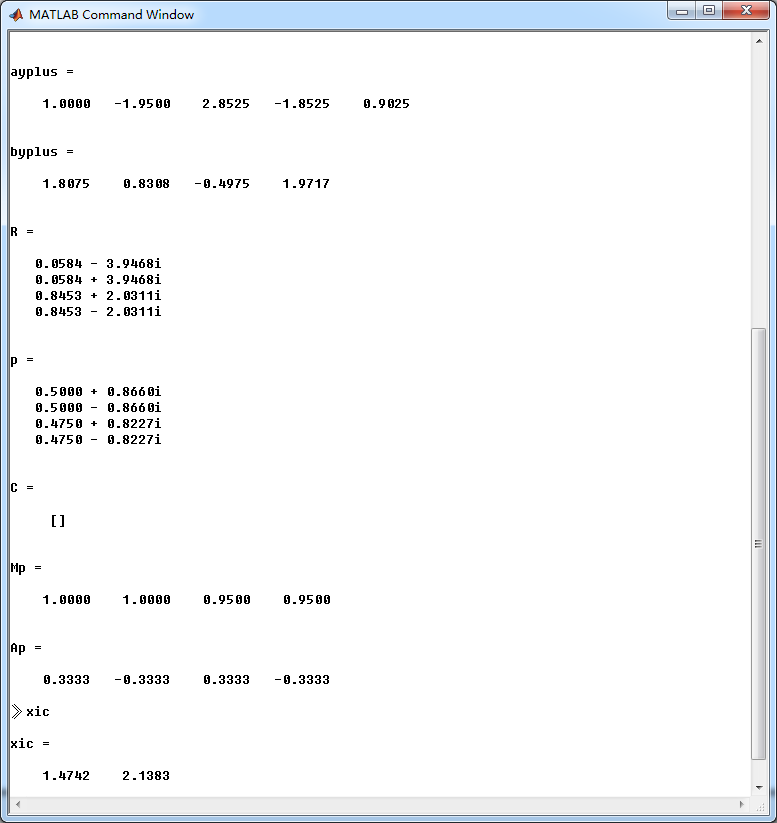
结果:
《DSP using MATLAB》示例Example4.15的更多相关文章
- DSP using MATLAB 示例 Example3.15
上代码: subplot(1,1,1); b = 1; a = [1, -0.8]; n = [0:100]; x = cos(0.05*pi*n); y = filter(b,a,x); figur ...
- DSP using MATLAB 示例Example3.21
代码: % Discrete-time Signal x1(n) % Ts = 0.0002; n = -25:1:25; nTs = n*Ts; Fs = 1/Ts; x = exp(-1000*a ...
- DSP using MATLAB 示例 Example3.19
代码: % Analog Signal Dt = 0.00005; t = -0.005:Dt:0.005; xa = exp(-1000*abs(t)); % Discrete-time Signa ...
- DSP using MATLAB示例Example3.18
代码: % Analog Signal Dt = 0.00005; t = -0.005:Dt:0.005; xa = exp(-1000*abs(t)); % Continuous-time Fou ...
- DSP using MATLAB 示例 Example3.11
用到的性质 上代码: n = -5:10; x = rand(1,length(n)); k = -100:100; w = (pi/100)*k; % freqency between -pi an ...
- DSP using MATLAB 示例Example3.9
用到的性质 上代码: n = 0:100; x = cos(pi*n/2); k = -100:100; w = (pi/100)*k; % freqency between -pi and +pi ...
- DSP using MATLAB 示例Example3.8
代码: x = rand(1,11); n = 0:10; k = 0:500; w = (pi/500)*k; % [0,pi] axis divided into 501 points. X = ...
- DSP using MATLAB 示例Example3.7
上代码: x1 = rand(1,11); x2 = rand(1,11); n = 0:10; alpha = 2; beta = 3; k = 0:500; w = (pi/500)*k; % [ ...
- DSP using MATLAB示例Example3.6
代码: n = [-5:5]; x = (-0.9).^n; % x(n) = k = -200:200; w = (pi/100)*k; % [0,pi] axis divided into 101 ...
随机推荐
- NEFU 1112 粉刷栅栏算法
题目链接 中文题 简单搜索题 例数据 输入 6 1 1 1 1 9 9 输出 3 注意是每一个递归搜索都返回一个min 而不是只有总的返回min #include <cstdio> #in ...
- HTML简历表格
效果图 <!DOCTYPE > <html> <head> <meta charset="utf-8" /> </head&g ...
- Python简易聊天工具-基于异步Socket通信
继续学习Python中,最近看书<Python基础教程>中的虚拟茶话会项目,觉得很有意思,自己敲了一遍,受益匪浅,同时记录一下. 主要用到异步socket服务客户端和服务器模块asynco ...
- NPOI 1.2.4教程 –日期函数
//Excel中有非常丰富的日期处理函数,在NPOI中同样得到了很好的支持.如下图: using NPOI.HSSF.UserModel; using NPOI.HPSF; using NPOI.PO ...
- Linux(Ubuntu)之设定开机自启动
分两种:对自建脚本,对已安装服务 对已安装服务, 只需在/etc/rc.local中添加相应的启动命令,如: 重启后,即可自启动服务. 对自建脚本自启动: 创建脚本test,修改其权限为755,如: ...
- Mysql Condition /Handler(异常处理)
关于介绍,可参见:http://www.cnblogs.com/end/archive/2011/04/01/2001946.html. http://blog.csdn.net/rdarda/art ...
- 避免产生僵尸进程的N种方法(zombie process)
http://blog.csdn.net/duyiwuer2009/article/details/7964795 认识僵尸进程 1.如果父进程先退出 子进程自动被 init 进程收养,不会产生僵尸进 ...
- Index on DB2 for z/OS: DB2 for z/OS 的索引
可以创建在任何表上的索引: Unique Index:An index that ensures that the value in a particular column or set of col ...
- 1.3 迭代器 - iterator
A 1)概述 要访问顺序容器,关联容器中的元素就要通过迭代器进行.迭代器是个变量,类似于指针 2)分类 按照定义方式不同可分为四种(iterator, const_iterator, reverse_ ...
- 关于android的单位dp与px
原文:Android中dp和px之间进行转换 官方文档:http://developer.android.com/guide/practices/screens_support.html The de ...