
APP-计算器
在网课上学习了计算器的制作方法,并自己做了小常识,看完一便后,感觉自己会了,思想也明白了,但是当关掉视频真正开始做的时候会发向许多的问题,自己在前的好多语法用的并不是很熟练,但是反复的查阅资料,观看教程,还是可以完成完成这个项目的开发。
activity_main.xml:
<?xml version="1.0" encoding="utf-8"?>

<LinearLayout xmlns:android="http://schemas.android.com/apk/res/android"

    xmlns:app="http://schemas.android.com/apk/res-auto"

    xmlns:tools="http://schemas.android.com/tools"

    android:layout_width="match_parent"

    android:layout_height="match_parent"

    android:orientation="vertical"

    tools:context=".MainActivity">

    <TextView

        android:id="@+id/tvScreen"

        android:layout_width="match_parent"

        android:layout_height="wrap_content"

        android:text=""

        android:gravity="right"

        android:textAppearance="?android:attr/textAppearanceLarge"/>

    <TableLayout

        android:layout_width="fill_parent"

        android:layout_height="wrap_content"

        android:layout_weight="1">

        <TableRow

            android:layout_width="fill_parent"

            android:layout_height="wrap_content">

            <Button

                android:id="@+id/btn1"

                android:layout_width="wrap_content"

                android:layout_height="match_parent"

                android:layout_weight="1"

                android:text="1" />

            <Button

                android:id="@+id/btn2"

                android:layout_width="wrap_content"

                android:layout_height="wrap_content"

                android:text="2"

                android:layout_weight="1"/>

            <Button

                android:id="@+id/btn3"

                android:layout_width="wrap_content"

                android:layout_height="wrap_content"

                android:text="3"

                android:layout_weight="1"/>

            <Button

                android:id="@+id/btnAdd"

                android:layout_width="wrap_content"

                android:layout_height="wrap_content"

                android:text="+"

                android:layout_weight="1"/>

        </TableRow>

        <TableRow

            android:layout_width="fill_parent"

            android:layout_height="wrap_content">

            <Button

                android:id="@+id/btn4"

                android:layout_width="wrap_content"

                android:layout_height="wrap_content"

                android:text="4"

                android:layout_weight="1"/>

            <Button

                android:id="@+id/btn5"

                android:layout_width="wrap_content"

                android:layout_height="wrap_content"

                android:text="5"

                android:layout_weight="1"/>

            <Button

                android:id="@+id/btn6"

                android:layout_width="wrap_content"

                android:layout_height="wrap_content"

                android:text="6"

                android:layout_weight="1"/>

            <Button

                android:id="@+id/btnSub"

                android:layout_width="wrap_content"

                android:layout_height="wrap_content"

                android:text="-"

                android:layout_weight="1"/>

        </TableRow>

        <TableRow

            android:layout_width="fill_parent"

            android:layout_height="wrap_content">

            <Button

                android:id="@+id/btn7"

                android:layout_width="wrap_content"

                android:layout_height="wrap_content"

                android:text="7"

                android:layout_weight="1"/>

            <Button

                android:id="@+id/btn8"

                android:layout_width="wrap_content"

                android:layout_height="wrap_content"

                android:text="8"

                android:layout_weight="1"/>

            <Button

                android:id="@+id/btn9"

                android:layout_width="wrap_content"

                android:layout_height="wrap_content"

                android:text="9"

                android:layout_weight="1"/>

            <Button

                android:id="@+id/btnX"

                android:layout_width="wrap_content"

                android:layout_height="wrap_content"

                android:text="*"

                android:layout_weight="1"/>

        </TableRow>

        <TableRow

            android:layout_width="fill_parent"

            android:layout_height="wrap_content">

            <Button

                android:id="@+id/btnClear"

                android:layout_width="wrap_content"

                android:layout_height="wrap_content"

                android:text="C"

                android:layout_weight="1"/>

            <Button

                android:id="@+id/btn0"

                android:layout_width="wrap_content"

                android:layout_height="wrap_content"

                android:text="0"

                android:layout_weight="1"/>

            <Button

                android:id="@+id/btnResult"

                android:layout_width="wrap_content"

                android:layout_height="wrap_content"

                android:text="="

                android:layout_weight="1"/>

            <Button

                android:id="@+id/btnDiv"

                android:layout_width="wrap_content"

                android:layout_height="wrap_content"

                android:text="/"

                android:layout_weight="1"/>

        </TableRow>

    </TableLayout>

</LinearLayout>
MainActivity.java:
package com.example.counte;

import androidx.appcompat.app.AppCompatActivity;

import android.os.Bundle;

import android.view.Menu;

import android.view.View;

import android.widget.Button;

import android.widget.TextView;

import java.util.ArrayList;

import java.util.List;

public class MainActivity extends AppCompatActivity {

    private TextView tvScrean;

    private List<item> items=new ArrayList<item>();

    @Override

    protected void onCreate(Bundle savedInstanceState) {

        super.onCreate(savedInstanceState);

        setContentView(R.layout.activity_main);

        tvScrean=(TextView)findViewById((R.id.tvScreen));

        findViewById(R.id.btn0).setOnClickListener((View.OnClickListener) this);

        findViewById(R.id.btn1).setOnClickListener((View.OnClickListener) this);

        findViewById(R.id.btn2).setOnClickListener((View.OnClickListener) this);

        findViewById(R.id.btn3).setOnClickListener((View.OnClickListener) this);

        findViewById(R.id.btn4).setOnClickListener((View.OnClickListener) this);

        findViewById(R.id.btn5).setOnClickListener((View.OnClickListener) this);

        findViewById(R.id.btn6).setOnClickListener((View.OnClickListener) this);

        findViewById(R.id.btn7).setOnClickListener((View.OnClickListener) this);

        findViewById(R.id.btn8).setOnClickListener((View.OnClickListener) this);

        findViewById(R.id.btn9).setOnClickListener((View.OnClickListener) this);

        findViewById(R.id.btnAdd).setOnClickListener((View.OnClickListener) this);

        findViewById(R.id.btnSub).setOnClickListener((View.OnClickListener) this);

        findViewById(R.id.btnX).setOnClickListener((View.OnClickListener) this);

        findViewById(R.id.btnDiv).setOnClickListener((View.OnClickListener) this);

        findViewById(R.id.btnClear).setOnClickListener((View.OnClickListener) this);

        findViewById(R.id.btnResult).setOnClickListener((View.OnClickListener) this);

    }

    public void onClick(View v){

        switch (v.getId()){

            case R.id.btn0:

                tvScrean.append("0");

                break;

            case R.id.btn1:

                tvScrean.append("1");

                break;

            case R.id.btn2:

                tvScrean.append("2");

                break;

            case R.id.btn3:

                tvScrean.append("3");

                break;

            case R.id.btn4:

                tvScrean.append("4");

                break;

            case R.id.btn5:

                tvScrean.append("5");

                break;

            case R.id.btn6:

                tvScrean.append("6");

                break;

            case R.id.btn7:

                tvScrean.append("7");

                break;

            case R.id.btn8:

                tvScrean.append("8");

                break;

            case R.id.btn9:

                tvScrean.append("9");

                break;

            case R.id.btnAdd:

                items.add(new item(Double.parseDouble(tvScrean.getText().toString()),Types.Num));

                check();

                items.add(new item(0,Types.Add));

                tvScrean.setText("");//清空文本

                break;

            case R.id.btnSub:

                items.add(new item(Double.parseDouble(tvScrean.getText().toString()),Types.Num));

                check();

                items.add(new item(0,Types.Sub));

                tvScrean.setText("");//清空文本

                break;

            case R.id.btnX:

                items.add(new item(Double.parseDouble(tvScrean.getText().toString()),Types.Num));

                check();

                items.add(new item(0,Types.X));

                tvScrean.setText("");//清空文本

                break;

            case R.id.btnDiv:

                items.add(new item(Double.parseDouble(tvScrean.getText().toString()),Types.Num));

                check();

                items.add(new item(0,Types.Div));

                tvScrean.setText("");//清空文本

                break;

            case R.id.btnClear:

                tvScrean.setText("");

                items.clear();//数组清空

                break;

            case R.id.btnResult:

                items.add(new item(Double.parseDouble(tvScrean.getText().toString()),Types.Num));

                check();

                tvScrean.setText(items.get(0).value+"");

                items.clear();//清空数组

                break;

        }

    }

    public void check(){

        if(items.size()>=3){

            double a=items.get(0).value;

            double b=items.get(2).value;

            int opt=items.get(1).type;

            items.clear();

            switch (opt){

                case Types.Add:

                    items.add(new item(a+b,Types.Num));

                    break;

                case Types.Sub:

                    items.add(new item(a-b,Types.Num));

                    break;

                case Types.X:

                    items.add(new item(a*b,Types.Num));

                    break;

                case Types.Div:

                    items.add(new item(a/b,Types.Num));

                    break;

            }

        }

    }

}
item.java:
package com.example.counte;

public class item {

    public item(double value,int type){

        this.value=value;

        this.type=type;

    }

    public double value=0;

    public int type=0;

}
Types.java:
package com.example.counte;

public class Types {

    public static final int Add=1;

    public static final int Sub=2;

    public static final int X=3;

    public static final int Div=4;

    public static final int Num=5;

}
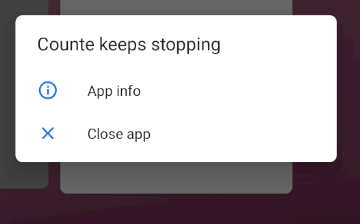
但其中出现的最为明显的问题:
APP-计算器的更多相关文章
- 第一个安卓app——计算器
几天前,我花了一天时间,结合这段时间所学知识开发出了一个简单的计算器,它由两个TextView和23个Button组成,代码会放在文章结尾. TextView TextView:上面一个TextVie ...
- 复利计算器app发布
复利计算器app发布 抱歉:由于无法实现服务端的持续开启,发布的app仅为简单的单机版,暂时舍弃了c/s版本的一些功能,如:投资动态管理功能. 应用详情博客:请点击这里 apk下载地址1(百度手机助手 ...
- ★房贷计算器 APP
一.目的 1. 这是一个蛮有用的小工具 2. 之前看了很多demo,第一次来完全的自己实现一个APP 3. 完成之后提交 App Store 4. 作为Good Coder的提交审核材料 二.排期 周 ...
- app自动化测试之实战应用(魅族计算器)
模拟魅族计算器加法计算: from appium import webdriver desired_caps = {} desired_caps['deviceName'] = '621QECQ23D ...
- 第一个APP:IOS做简单运算的计算器
步骤: 1.打开Xcode,单机Creat a new Xcode project 2.左边选择ios下Application,右边选择single view Application 3.填写项目名称 ...
- 【IOS开发笔记03-视图相关】简单计算器的实现
UIView 经过前几天的快速学习,我们初步了解的IOS开发的一些知识,中间因为拉的太急,忽略了很多基础知识点,这些知识点单独拿出来学习太过枯燥,我们在今后的项目中再逐步补齐,今天我们来学习APP视图 ...
- App测试
(1)App独特测试点: 客户端兼容性测试:系统版本.不同深度定制的rom.屏幕分辨率.中断测试.安装.卸载.升级.对其他程序的干扰等 需要的一些工具: appnium / lr / jmeter ...
- WWDC 后苹果最新 App Store 审核条款!
WWDC 2016 大会之后,苹果公司发布了四个全新平台:iOS,macOS,watchOS 和 tvOS.并且在此之后,苹果应用商店审核条款也同时进行了更新——貌似不算进行了更新,简直就是重 ...
- Windows下部署Appium教程(Android App自动化测试框架搭建)
摘要: 1,appium是开源的移动端自动化测试框架: 2,appium可以测试原生的.混合的.以及移动端的web项目: 3,appium可以测试ios.android.firefox os: 4,a ...
- 菜鸟学Android编程——简单计算器《一》
菜鸟瞎搞,高手莫进 本人菜鸟一枚,最近在学Android编程,网上看了一些视频教程,于是想着平时手机上的计算器应该很简单,自己何不尝试着做一个呢? 于是就冒冒失失的开撸了. 简单计算器嘛,功能当然很少 ...
随机推荐
- 剑指offer自学系列(二)
题目描述: 在一个长度为n的数组里的所有数字都在0到n-1的范围内,数组中某些数字是重复的,但不知道有几个数字是重复的,也不知道每个数字重复几次,请找出数组中任一个重复的数字,例如,如果输入长度为7的 ...
- JVM探秘:JVM的参数类型
本系列笔记主要基于<深入理解Java虚拟机:JVM高级特性与最佳实践 第2版>,是这本书的读书笔记. JVM的参数类型,大致可以分为标准参数.X参数.XX参数,而XX参数又可以分为Bool ...
- 八十五、SAP中的ALV创建之四,去掉主键背景色
一.我们执行程序之后,发现表格中所有的内容都是有底色的 二.这个是因为我们在代码中规定了主键 三.我们去掉处理第一个之外的主键 四.运行程序,发现还是所有字段都有背景色 五.这是因为在每次ls_fie ...
- vue学习(六)异步组件加载
异步组件加载 首先准备-----简单的框架搭出来 <!DOCTYPE html> <html lang="zh-CN"> <head> < ...
- Day 15:缓冲输入输出常用方法和小练习
以拷贝图片为例子,演示异常处理的代码: 拷贝一张图片 import java.io.File;import java.io.FileInputStream;import java.io.FileOut ...
- word 2007 文档中添加文件
1. "插入"->"对象",出现的下拉框中选择"对象" 2.弹出界面 3.切换至"由文件创建",点击"浏 ...
- Python pip设置为清华镜像
设置为默认镜像 pip config set global.index-url https://pypi.tuna.tsinghua.edu.cn/simple
- 在Mac上如何运行jar文件
操作一:编译,打包. 操作二: 运行jar文件,提示:jar中没有主清单属性. 解决办法: 使用解压工具解压HelloWorld.jar文件,往MANIFEST.MF中添加Main-Class. 1. ...
- Linux基础学习准备
Linux 基础学习准备 工欲善其事必先利其器,还是买个服务器折腾比较好. 虚拟机和镜像 推荐吾爱的:吾爱虚拟机2.0 CentOS镜像: Centos国内下载源 http://man.linuxde ...
- 小程序实现倒计时:解决ios倒计时失效(setInterval失效)
在使用之前需要先在page页引入wxTimer.js文件(这里我将文件放在/utils) let timer = require('../../utils/wxTimer.js'); 然后就可以使用啦 ...