
Spring boot Sample 007之spring-boot-log4j2
一、环境
1.1、Idea 2020.1
1.2、JDK 1.8
二、目的
三、步骤
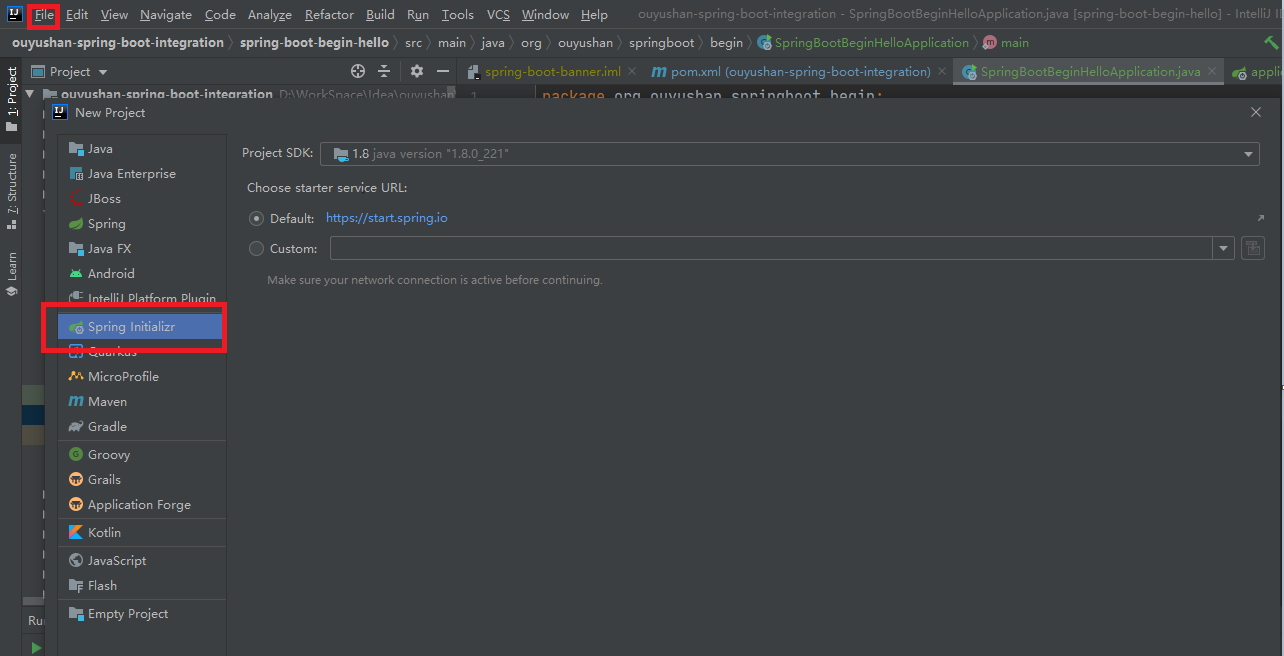
3.1、点击File -> New Project -> Spring Initializer,点击next
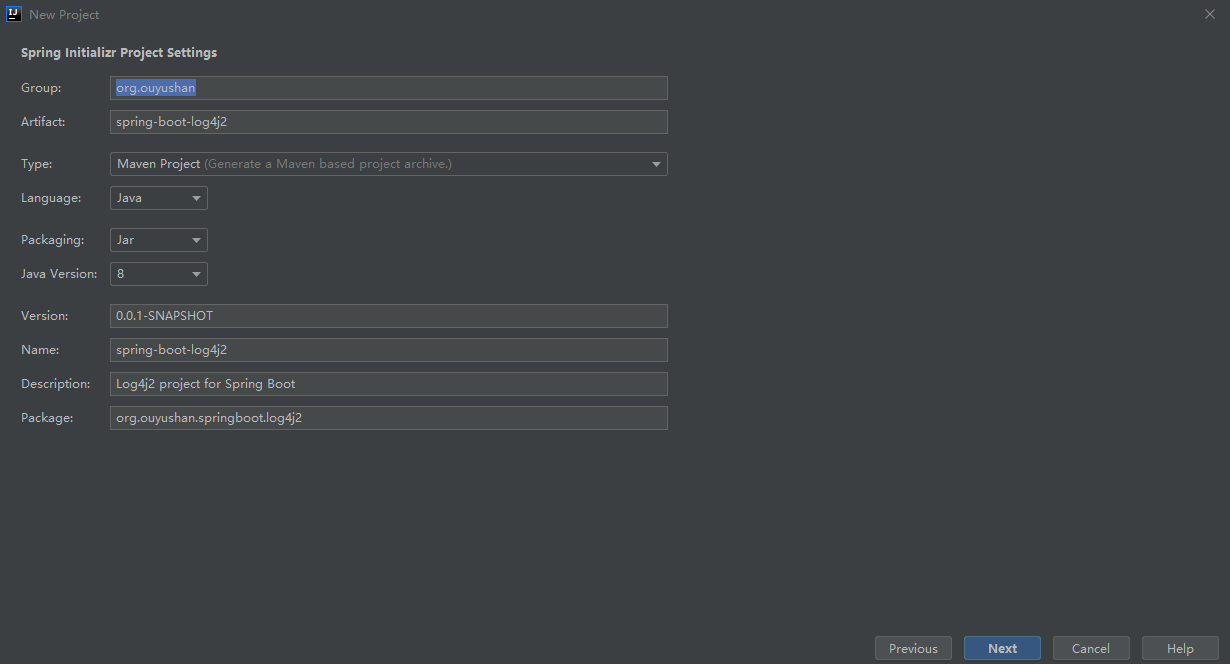
3.2、在对应地方修改自己的项目信息
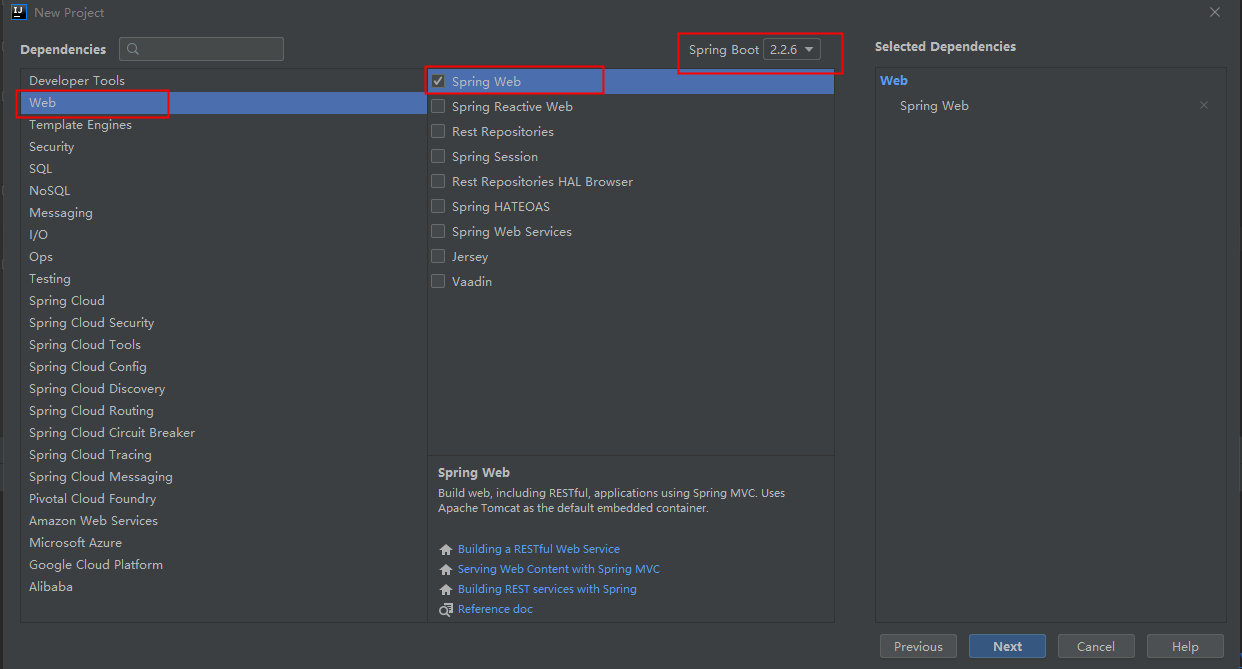
3.3、选择Web依赖,选中Spring Web。可以选择Spring Boot版本,本次默认为2.2.6,点击Next
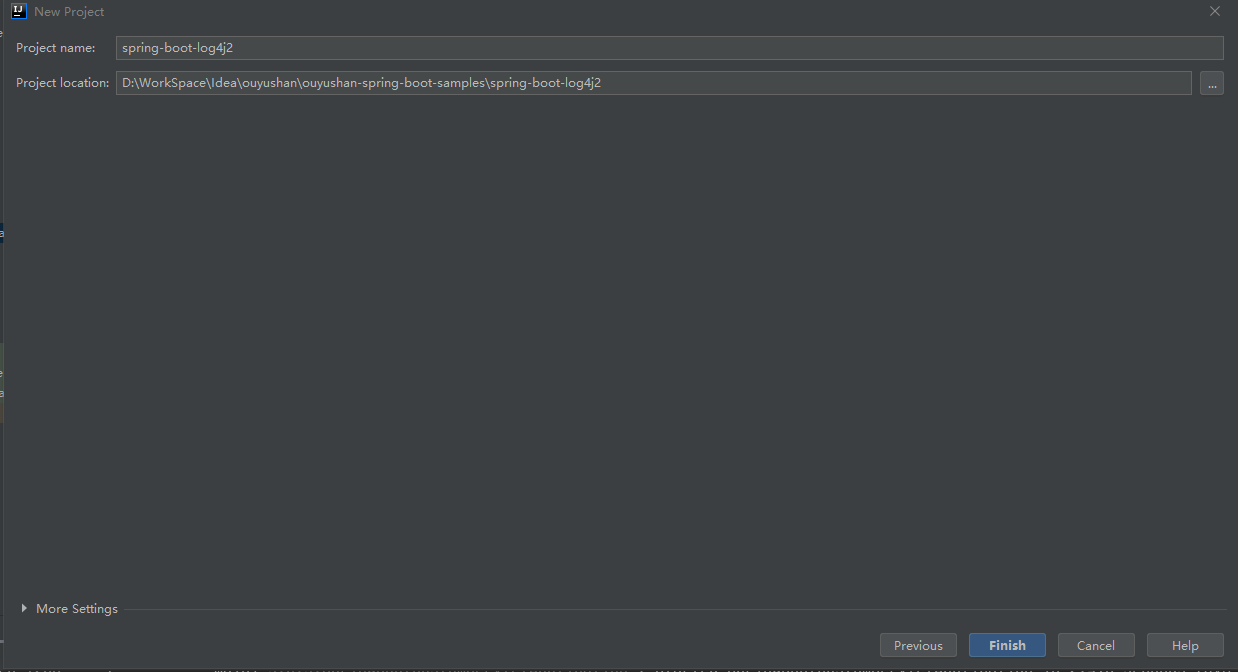
3.4、编辑工程名和项目路径,确定后点击Finish完成
3.5、项目结构
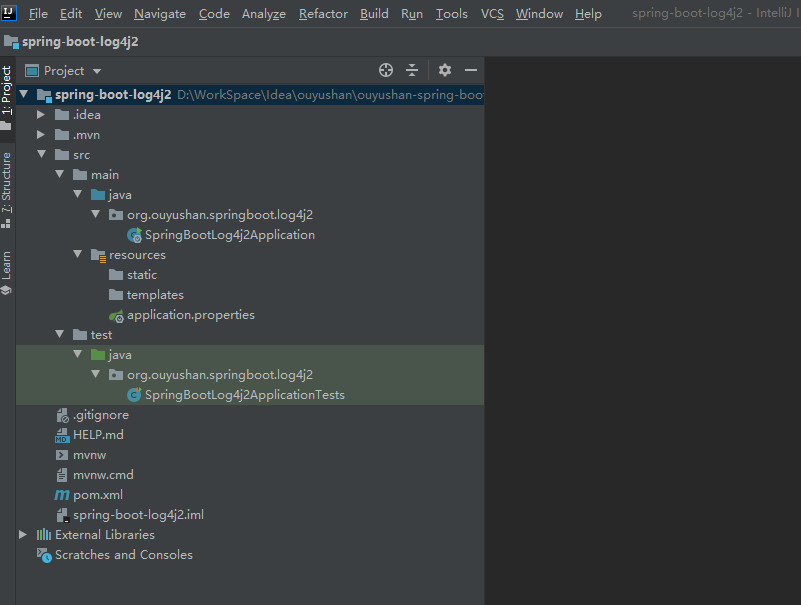
四、添加测试文件
<?xml version="1.0" encoding="UTF-8"?>

<project xmlns="http://maven.apache.org/POM/4.0.0" xmlns:xsi="http://www.w3.org/2001/XMLSchema-instance"

         xsi:schemaLocation="http://maven.apache.org/POM/4.0.0 https://maven.apache.org/xsd/maven-4.0.0.xsd">

    <modelVersion>4.0.0</modelVersion>

    <parent>

        <groupId>org.springframework.boot</groupId>

        <artifactId>spring-boot-starter-parent</artifactId>

        <version>2.2.6.RELEASE</version>

        <relativePath/> <!-- lookup parent from repository -->

    </parent>

    <groupId>org.ouyushan</groupId>

    <artifactId>spring-boot-log4j2</artifactId>

    <version>0.0.1-SNAPSHOT</version>

    <name>spring-boot-log4j2</name>

    <description>Log4j2 project for Spring Boot</description>

    <properties>

        <java.version>1.8</java.version>

    </properties>

    <dependencies>

        <dependency>

            <groupId>org.springframework.boot</groupId>

            <artifactId>spring-boot-starter-web</artifactId>

            <exclusions>

                <!--排除默认的日志-->

                <exclusion>

                    <groupId>org.springframework.boot</groupId>

                    <artifactId>spring-boot-starter-logging</artifactId>

                </exclusion>

                <exclusion>

                    <groupId>ch.qos.logback</groupId>

                    <artifactId>logback-access</artifactId>

                </exclusion>

                <exclusion>

                    <groupId>ch.qos.logback</groupId>

                    <artifactId>logback-core</artifactId>

                </exclusion>

                <exclusion>

                    <groupId>ch.qos.logback</groupId>

                    <artifactId>logback-classic</artifactId>

                </exclusion>

            </exclusions>

        </dependency>

        <!-- 使用log4j2 -->

        <dependency>

            <groupId>org.springframework.boot</groupId>

            <artifactId>spring-boot-starter-log4j2</artifactId>

        </dependency>

        <dependency>

            <groupId>org.springframework.boot</groupId>

            <artifactId>spring-boot-starter-test</artifactId>

            <scope>test</scope>

            <exclusions>

                <exclusion>

                    <groupId>org.junit.vintage</groupId>

                    <artifactId>junit-vintage-engine</artifactId>

                </exclusion>

            </exclusions>

        </dependency>

    </dependencies>

    <build>

        <plugins>

            <plugin>

                <groupId>org.springframework.boot</groupId>

                <artifactId>spring-boot-maven-plugin</artifactId>

            </plugin>

        </plugins>

    </build>

</project>

<?xml version="1.0" encoding="UTF-8"?>

<Configuration status="WARN" monitorInterval="30">

    <Properties>

        <Property name="PID">????</Property>

        <Property name="LOG_PATTERN">%clr{%d{yyyy-MM-dd HH:mm:ss.SSS}}{faint} %clr{%5p} %clr{${sys:PID}}{magenta} %clr{---}{faint} %clr{[%15.15t]}{faint} %clr{%-40.40c{1.}}{cyan} %clr{:}{faint} %m%n%xwEx</Property>

    </Properties>

    <Appenders>

        <Console name="Console" target="SYSTEM_OUT" follow="true">

            <PatternLayout pattern="${LOG_PATTERN}"/>

        </Console>

    </Appenders>

    <Loggers>

        <Logger name="org.hibernate.validator.internal.util.Version" level="warn" />

        <Logger name="org.apache.coyote.http11.Http11NioProtocol" level="warn" />

        <Logger name="org.apache.tomcat.util.net.NioSelectorPool" level="warn" />

        <Root level="info">

            <AppenderRef ref="Console"/>

        </Root>

    </Loggers>

</Configuration>
<?xml version="1.0" encoding="UTF-8"?>

<Configuration status="WARN" monitorInterval="30">

    <Properties>

        <Property name="PID">????</Property>

        <Property name="LOG_PATTERN">%clr{%d{yyyy-MM-dd HH:mm:ss}}{faint} %clr{%5p} %clr{${sys:PID}}{magenta} %clr{---}{faint} %clr{[%15.15t]}{faint} %clr{%-40.40c{1.}}{cyan} %clr{:}{faint} %m%n%xwEx</Property>

    </Properties>

    <Appenders>

        <Console name="Console" target="SYSTEM_OUT" follow="true">

            <PatternLayout pattern="${LOG_PATTERN}"/>

        </Console>

    </Appenders>

    <Loggers>

        <Logger name="org.hibernate.validator.internal.util.Version" level="warn" />

        <Logger name="org.apache.coyote.http11.Http11NioProtocol" level="warn" />

        <Logger name="org.apache.tomcat.util.net.NioSelectorPool" level="warn" />

        <Root level="info">

            <AppenderRef ref="Console"/>

        </Root>

    </Loggers>

</Configuration>
spring:

  profiles:

    active: uat

  jackson:

    date-format: yyyy-MM-dd HH:mm:ss

    time-zone: Asia/Chongqing
logging:

  config: classpath:log4j2-dat.xml
logging:

  config: classpath:log4j2-uat.xml
<?xml version="1.0" encoding="UTF-8"?>

<!--日志级别以及优先级排序: OFF > FATAL > ERROR > WARN > INFO > DEBUG > TRACE > ALL -->

<!--status="WARN" :用于设置log4j2自身内部日志的信息输出级别,默认是OFF-->

<!--monitorInterval="30"  :间隔秒数,自动检测配置文件的变更和重新配置本身-->

<configuration status="warn" monitorInterval="60" strict="true">

  <properties>

    <!--自定义一些常量,之后使用${变量名}引用-->

    <property name="logpath">./logs</property>

    <property name="charset">UTF-8</property>

    <!--自定义的输出格式-->

    <property name="pattern">%-d{yyyy-MM-dd HH:mm:ss.SSS}@@%p@@%X{ip}@@%t %C@@%X{requestId} %M %m %n </property>

  </properties>

  <!--appenders:定义输出内容,输出格式,输出方式,日志保存策略等,常用其下三种标签[console,File,RollingFile]-->

  <!--Appender可以理解为日志的输出目的地-->

  <appenders>

    <!--console :控制台输出的配置-->

    <Console name="console" target="SYSTEM_OUT">

      <PatternLayout pattern="${pattern}" charset="${charset}"/>

    </Console>

    <!--RollingRandomAccessFile性能比RollingFile提升官网宣称是20-200%-->

    <RollingRandomAccessFile name="YZY.TRACE" immediateFlush="true" bufferSize="1024"

      fileName="${logpath}/trace.log"

      filePattern="${logpath}/trace.log.%d{yyyy-MM-dd}.gz">

      <PatternLayout pattern="${pattern}" charset="${charset}"/>

      <TimeBasedTriggeringPolicy/>

      <DefaultRolloverStrategy>

        <Delete basePath="${logpath}" maxDepth="2" followLinks="true">

          <IfFileName glob="trace.log.*.gz"/>

          <IfLastModified age="3d"/>

        </Delete>

      </DefaultRolloverStrategy>

    </RollingRandomAccessFile>

    <RollingRandomAccessFile name="YZY.SYSTEM" immediateFlush="true" bufferSize="4096"

      fileName="${logpath}/system.log"

      filePattern="${logpath}/system.log.%d{yyyy-MM-dd}.gz"

      ignoreExceptions="false">

      <!--引用上面自定义的输出格式-->

      <PatternLayout pattern="${pattern}" charset="${charset}"/>

      <Filters>

        <!--ThresholdFilter :日志输出过滤-->

        <!--level="info" :日志级别,onMatch="ACCEPT" :级别在info之上则接受,onMismatch="DENY" :级别在info之下则拒绝-->

        <!--与logger、root中定义的日志级别相配合,相当于两个闸门,先判断logger、root的级别,符合了才会用到该filter中的level,此时再进行一次筛选-->

        <ThresholdFilter level="TRACE" onMatch="ACCEPT" onMismatch="DENY"/>

        <!--<ThresholdFilter level="DEBUG" onMatch="ACCEPT" onMismatch="DENY"/>-->

        <!--<ThresholdFilter level="INFO" onMatch="ACCEPT" onMismatch="DENY"/>-->

      </Filters>

      <!-- Policies :日志滚动策略-->

      <Policies>

        <!--<TimeBasedTriggeringPolicy interval="1" modulate="true"/>-->

        <CronTriggeringPolicy schedule="0 0 2 * * ?" evaluateOnStartup="true"/>

      </Policies>

      <!-- DefaultRolloverStrategy属性如不设置,则默认为最多同一文件夹下7个文件-->

      <DefaultRolloverStrategy>

        <Delete basePath="${logpath}" maxDepth="2" followLinks="true">

          <IfFileName glob="system.log.*.gz"/>

      <!--只保留7天,超过则删除-->

          <IfLastModified age="7d"/>

        </Delete>

      </DefaultRolloverStrategy>

    </RollingRandomAccessFile>

    <RollingRandomAccessFile name="YZY.ERROR" immediateFlush="true" bufferSize="4096"

      fileName="${logpath}/error.log"

      filePattern="${logpath}/error.log.%d{yyyy-MM-dd}.gz"

      ignoreExceptions="false">

      <PatternLayout pattern="${pattern}" charset="${charset}"/>

      <Filters>

        <ThresholdFilter level="ERROR" onMatch="ACCEPT" onMismatch="DENY"/>

      </Filters>

      <TimeBasedTriggeringPolicy/>

      <DefaultRolloverStrategy>

        <Delete basePath="${logpath}" maxDepth="2" followLinks="true">

          <IfFileName glob="error.log.*.gz"/>

          <IfLastModified age="7d"/>

        </Delete>

      </DefaultRolloverStrategy>

    </RollingRandomAccessFile>

    <RollingRandomAccessFile name="YZY.AUDIT" immediateFlush="false" bufferSize="8192"

      fileName="${logpath}/audit.log"

      filePattern="${logpath}/audit.log.%d{yyyy-MM-dd}.gz"

      ignoreExceptions="false">

      <PatternLayout pattern="${pattern}" charset="${charset}"/>

      <Filters>

        <ThresholdFilter level="WARN" onMatch="ACCEPT" onMismatch="DENY"/>

      </Filters>

      <TimeBasedTriggeringPolicy/>

      <DefaultRolloverStrategy>

        <Delete basePath="${logpath}" maxDepth="2" followLinks="true">

          <IfFileName glob="audit.log.*.gz"/>

          <IfLastModified age="7d"/>

        </Delete>

      </DefaultRolloverStrategy>

    </RollingRandomAccessFile>

    <RollingRandomAccessFile name="YZY.POOL" immediateFlush="true" bufferSize="1024"

      fileName="${logpath}/pool.log"

      filePattern="${logpath}/pool.log.%d{yyyy-MM-dd}.gz"

      ignoreExceptions="false">

      <PatternLayout pattern="${pattern}" charset="${charset}"/>

      <TimeBasedTriggeringPolicy/>

      <DefaultRolloverStrategy>

        <Delete basePath="${logpath}" maxDepth="2" followLinks="true">

          <IfFileName glob="pool.log.*.gz"/>

          <IfLastModified age="3d"/>

        </Delete>

      </DefaultRolloverStrategy>

    </RollingRandomAccessFile>

    <RollingRandomAccessFile name="YZY.MONITOR" immediateFlush="true" bufferSize="1024"

      fileName="${logpath}/monitor.log"

      filePattern="${logpath}/pool.log.%d{yyyy-MM-dd}.gz"

      ignoreExceptions="false">

      <PatternLayout pattern="${pattern}" charset="${charset}"/>

      <TimeBasedTriggeringPolicy/>

      <DefaultRolloverStrategy>

        <Delete basePath="${logpath}" maxDepth="2" followLinks="true">

          <IfFileName glob="pool.log.*.gz"/>

          <IfLastModified age="3d"/>

        </Delete>

      </DefaultRolloverStrategy>

    </RollingRandomAccessFile>

    <RollingRandomAccessFile name="YZY.BIZ" immediateFlush="true"

      fileName="${logpath}/biz.log"

      filePattern="${logpath}/biz.log.%d{yyyy-MM-dd}.gz"

      ignoreExceptions="false">

      <PatternLayout pattern="${pattern}" charset="${charset}"/>

      <TimeBasedTriggeringPolicy/>

      <DefaultRolloverStrategy>

        <Delete basePath="${logpath}" maxDepth="2" followLinks="true">

          <IfFileName glob="biz.log.*.gz"/>

          <IfLastModified age="7d"/>

        </Delete>

      </DefaultRolloverStrategy>

    </RollingRandomAccessFile>

  </appenders>

  <!--然后定义logger,只有定义了logger并引入的appender,appender才会生效-->

  <loggers>

    <!--additivity="false"表示在该logger中输出的日志不会再延伸到父层logger。这里如果改为true,则会延伸到Root Logger,遵循Root Logger的配置也输出一次。-->

    <Logger additivity="false" name="YZY.TRACE" level="INFO">

      <AppenderRef ref="YZY.TRACE"/>

    </Logger>

    <Logger additivity="false" name="YZY.SYSTEM" level="INFO">

      <AppenderRef ref="YZY.SYSTEM"/>

      <AppenderRef ref="YZY.ERROR"/>

    </Logger>

    <Logger additivity="false" name="YZY.BIZ" level="INFO">

      <AppenderRef ref="YZY.BIZ"/>

    </Logger>

    <!--Logger节点用来单独指定日志的形式,name为包路径,比如要为org.apache包下所有日志指定为INFO级别等。 -->

    <Logger additivity="false" name="org.apache" level="INFO">

      <AppenderRef ref="console"/>

    </Logger>

    <Logger additivity="false"

      name="com.alibaba.dubbo.common.threadpool.monitor.MonitorPoolRunnable" level="INFO">

      <AppenderRef ref="YZY.POOL"/>

    </Logger>

    <Logger additivity="false" name="com.alibaba.dubbo.monitor.dubbo.sfextend.SfMonitorExtend"

      level="INFO">

      <AppenderRef ref="YZY.MONITOR"/>

    </Logger>

    <!--针对,request以及reponse的信息配置输出级别,生产线请配置为error-->

    <Logger additivity="true" name="com.alibaba.dubbo.rpc.protocol.rest.support" level="INFO">

      <AppenderRef ref="console"/>

    </Logger>

    <!-- 在开发和测试环境启用,输出sql -->

    <Logger additivity="true" name="com.YZY.mapper" level="DEBUG">

    </Logger>

    <!-- Root节点用来指定项目的根日志,如果没有单独指定Logger,那么就会默认使用该Root日志输出 -->

    <Root level="DEBUG" includeLocation="true">

      <AppenderRef ref="console"/>

      <AppenderRef ref="YZY.SYSTEM"/>

      <AppenderRef ref="YZY.ERROR"/>

      <AppenderRef ref="YZY.AUDIT"/>

    </Root>

  </loggers>

</configuration>
Spring boot Sample 007之spring-boot-log4j2的更多相关文章
- Spring Boot(十)Logback和Log4j2集成与日志发展史
一.简介 Java知名的日志有很多,比如:JUL.Log4j.JCL.SLF4J.Logback.Log4j2,那么这些日志框架之间有着怎样的关系?诞生的原因又是解决什么问题?下面一起来看. 1.1 ...
- Spring Boot 应用系列 4 -- Spring Boot 2 整合log4j2
一.背景 1. log4j2传承于log4j和logback,它是目前性能最好的日志处理工具,有关它们的性能对比请看: 2. 除了性能好之外,log4j2有这么几个重要的新features: (1) ...
- Spring boot Sample 012之spring-boot-web-upload
一.环境 1.1.Idea 2020.1 1.2.JDK 1.8 二.目的 spring boot 整合web实现文件上传下载 三.步骤 3.1.点击File -> New Project -& ...
- Spring boot Sample 0010之spring-boot-web-freemarker
一.环境 1.1.Idea 2020.1 1.2.JDK 1.8 二.目的 spring boot 整合freemarker模板开发web项目 三.步骤 3.1.点击File -> New Pr ...
- Spring boot Sample 009之spring-boot-web-thymeleaf
一.环境 1.1.Idea 2020.1 1.2.JDK 1.8 二.目的 spring boot 整合thymeleaf模板开发web项目 三.步骤 3.1.点击File -> New Pro ...
- Spring boot Sample 006之spring-boot-custom-servlet
一.环境 1.1.Idea 2020.1 1.2.JDK 1.8 二.步骤 2.1.点击File -> New Project -> Spring Initializer,点击next 2 ...
- Spring boot Sample 005之spring-boot-profile
一.环境 1.1.Idea 2020.1 1.2.JDK 1.8 二.目的 通过yaml文件配置spring boot 属性文件 三.步骤 3.1.点击File -> New Project - ...
- Spring Boot (五)Spring Data JPA 操作 MySQL 8
一.Spring Data JPA 介绍 JPA(Java Persistence API)Java持久化API,是 Java 持久化的标准规范,Hibernate是持久化规范的技术实现,而Sprin ...
- Spring 5.x 、Spring Boot 2.x 、Spring Cloud 与常用技术栈整合
项目 GitHub 地址:https://github.com/heibaiying/spring-samples-for-all 版本说明: Spring: 5.1.3.RELEASE Spring ...
随机推荐
- Node.js中模块加载机制
1.模块查找规则-当模块拥有路径但没有后缀时:(require(‘./find’)) require方法根据模块路径查找模块,如果是完整路径,直接引入模块: 如果模块后缀省略,先找同名JS文件,再找同 ...
- 微软关于LINQ的101个例子
记录,备查. 101 LINQ Sqmples
- [hdu5372 Segment Game]树状数组
题意:有两种操作:(1)插入线段,第i次插入的线段左边界为Li,长度为i (2)删除线段,删除第x次插入的线段.每次插入线段之前询问有多少条线段被它覆盖. 思路:由于插入的线段长度是递增的,所以第i次 ...
- js前端获取当前日期,日期格式为yyyy-mm-dd HH:MM
var date = new Date(); var year = date.getFullYear(); var month = date.getMonth()+1; var day = date. ...
- Mysql 常用函数(11)- trim 函数
Mysql常用函数的汇总,可看下面系列文章 https://www.cnblogs.com/poloyy/category/1765164.html trim 的作用 删除字符串左右两侧的空格 tri ...
- 让写作省心一点——Markdown和CSS实践
1 引言 今天这篇推送和以往不太一样,乍一看就能发现格式有了变化.没错,这是我专门设计的品牌模板,也就是本公众号以后创作的文章可直接套用,获得一致的风格样式. 除此以外,文章里的全部元素(包括标题.表 ...
- 复变函数-MINDMAPS-continuous updating
- spark机器学习从0到1特征抽取–CountVectorizer(十三)
一.概念 CountVectorizer 旨在通过计数来将一个文档转换为向量.当不存在先验字典时,Countvectorizer作为Estimator提取词汇进行训练,并生成一个CountVe ...
- spark机器学习从0到1主成分分析-PCA (八)
PCA 一.概念 主成分分析(Principal Component Analysis)是指将多个变量通过线性变换以选出较少数重要变量的一种多元统计分析方法,又称为主成分分析.在实际应用场合中,为 ...
- 终于明白了vue使用axios发送post请求时的坑及解决原理
前言:在做项目的时候正好同事碰到了这个问题,问为什么用axios在发送请求的时候没有成功,请求不到数据,反而是报错了,下图就是报错请求本尊 vue里代码如下: this.$http.post('/ge ...