
Salesforce LWC学习(四十七) 标准页面更新以后自定义页面如何捕捉?
本篇参考:
https://developer.salesforce.com/docs/component-library/bundle/lightning-emp-api/documentation
salesforce零基础学习(九十六)Platform Event浅谈
Salesforce LWC学习(五) LDS & Wire Service 实现和后台数据交互 & meta xml配置
背景: 我们在记录的详情页面,除标准的layout以外,实际工作中也会添加各种各样的component来满足实际业务的需要,有一些是标准组件,有一些是自定义组件。自定义组件间的修改和交互很好弄,我们可以通过 notifyRecordUpdateAvailable搞定(Lighting Data Service)LDS的缓存问题,通过 refreshApex搞定 call apex方法的问题,通过 dispatchEvent / handler方式来搞定父子组件通信的事情,通过pub / sub事件模型来搞定跨组件通讯问题,通过 lightning message service或者 dynamic interaction也可以搞定跨组件通讯问题。如上的内容都是自定义组件之间或者自定义组件的行为渲染到标准组件。那我们如何针对标准组件的更新作用到自定义页面,然后自定义页面捕捉到这些事件操作呢? 本篇提供两种思路。
需求: 当用户在Account详情页面更新数据时,不管使用 quick action的Edit还是 Inline Edit,当Account的Name包含Test的字样,显示一个toast信息。
一. 基于Lightning Data Service(LDS)
这个demo可以基于getRecord的这个wire adapter来实现。因为 getRecord以及标准UI都共用同一个version的数据,所以当标准UI因为用户修改以后,我们通过 getRecord也同样可以自动收到最新的version的数据,所以我们可以基于 getRecord的这个wire adapter来实现。
import { LightningElement, api, wire } from 'lwc';

import { ShowToastEvent } from 'lightning/platformShowToastEvent';

import { getRecord } from 'lightning/uiRecordApi';

import NAME_FIELD from "@salesforce/schema/Account.Name";

export default class toastDemo extends LightningElement {

    @api recordId;

    @wire(getRecord, { recordId: '$recordId', fields: [NAME_FIELD]})

    // eslint-disable-next-line no-unused-vars

    wiredAccount(data, error) {

      if (data.data && data.data.fields && data.data.fields.Name) {

          if(data.data.fields.Name.value.includes('test')) {

              this.showToast();

          }

      } else if(error) {

          console.log('error');

      }

    }

    showToast() {

        const evt = new ShowToastEvent({

            message: 'Name contains test',

            variant: 'info',

        });

        this.dispatchEvent(evt);

    }

}
效果演示:将这个组件放在 lightning record page中

二. 基于Platform Event 订阅实现
如果对Platform Event不了解的,欢迎查看以前的博客内容。思路为当Account Name变动以后,发布一个Account的Platform Event,lwc端用来订阅这个Platform Event,对订阅的结果进行解析,如果满足了预期,则进行逻辑处理。
1. 创建Platform Event的表以及字段。
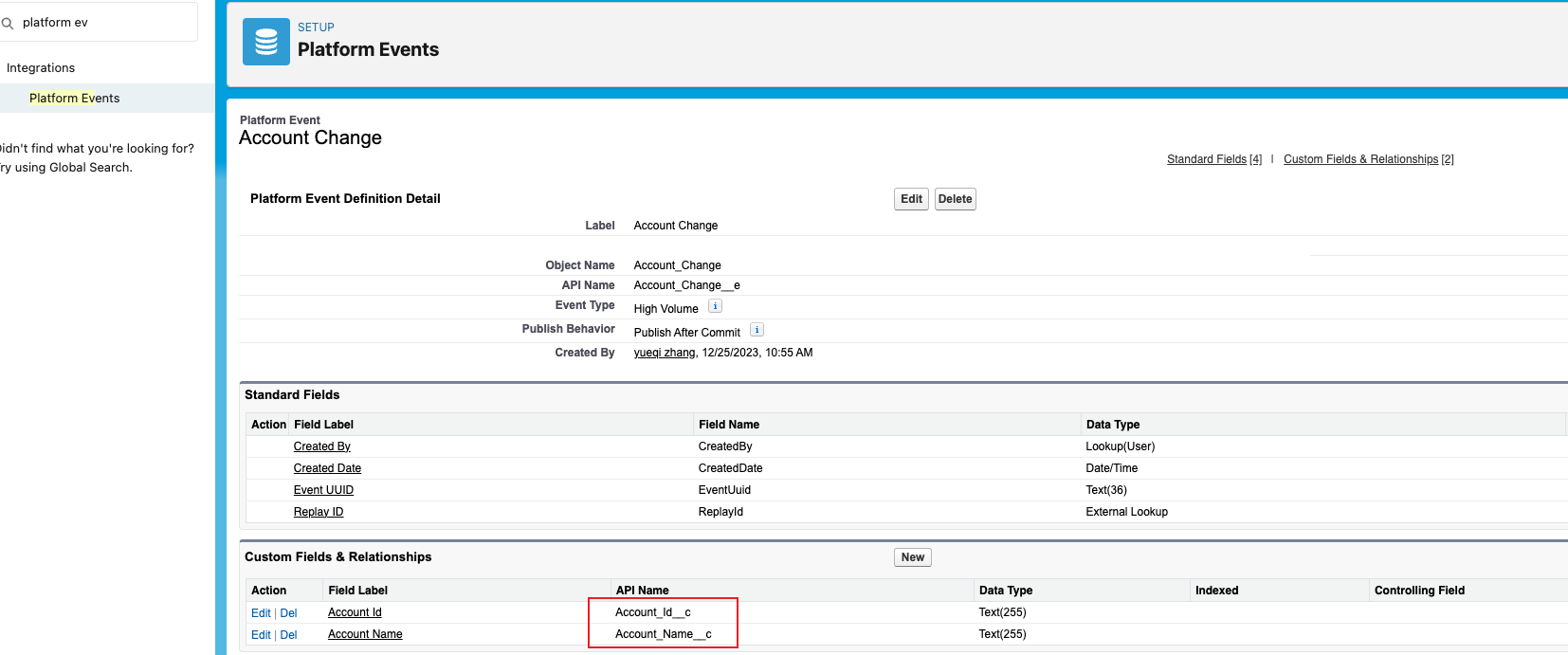
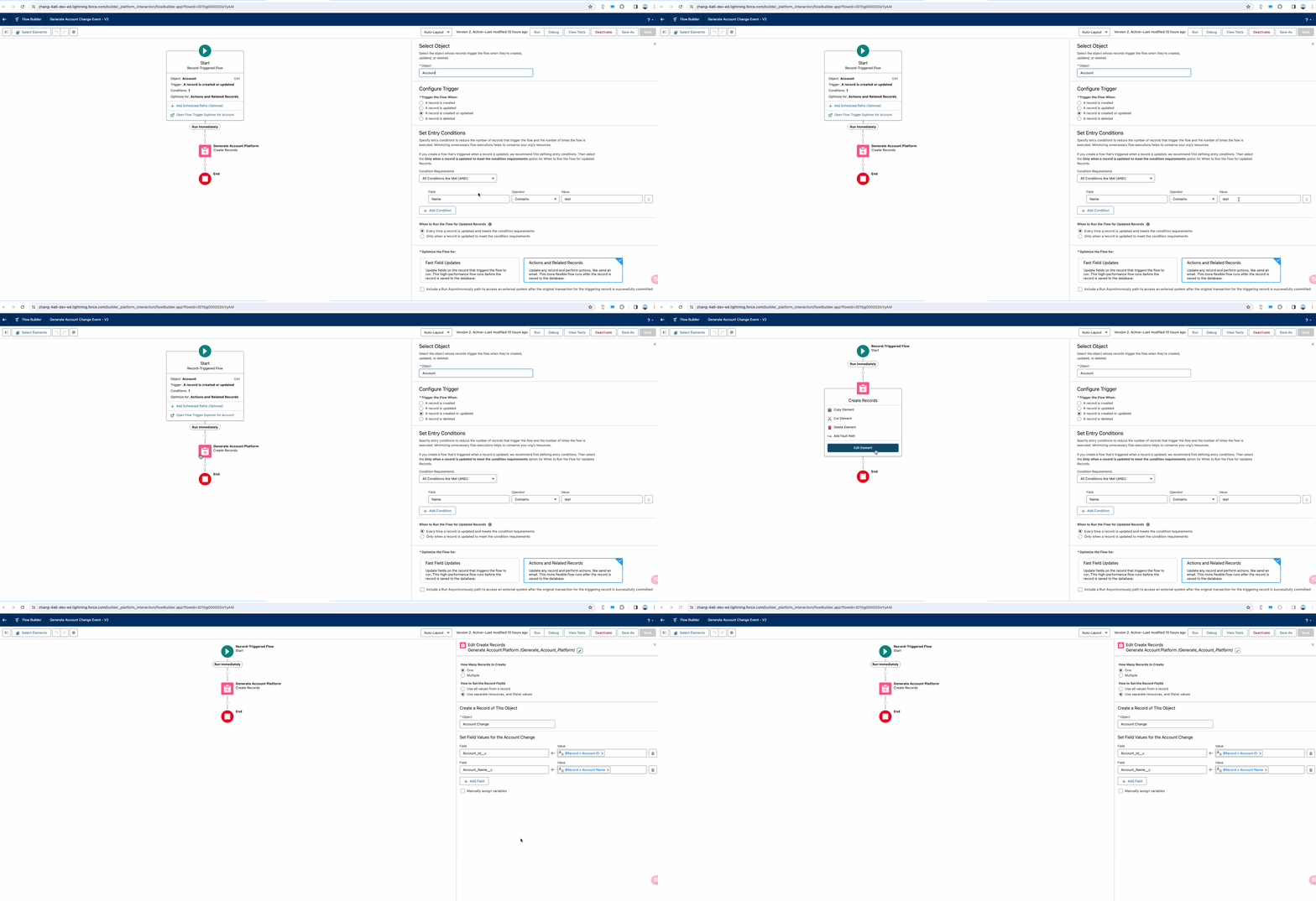
2. 通过Flow或者Trigger,Account Name包含test情况下,发布Platform Event.
3. lwc进行订阅:这里看一下加粗的两行,messageCallback函数看上去有自己的上下文,如果不传递进去,获取的recordId则为 undefined, context也相同。
import { LightningElement, api, wire } from "lwc";

import { ShowToastEvent } from "lightning/platformShowToastEvent";

import { subscribe, unsubscribe, onError, setDebugFlag, isEmpEnabled } from "lightning/empApi";

export default class toastDemo extends LightningElement {

  channelName = "/event/Account_Change__e";

  @api recordId;

  get changedRecordId() {

    return this.targetedRecordId;

  }

  subscription = {};

  // Initializes the component

  connectedCallback() {

    // Register error listener

    this.registerErrorListener();

    const currentRecordId = this.recordId;

    const context = this;

    const messageCallback = function (response) {

      // Response contains the payload of the new message received

      let event = response.data.payload;

      if (event.Account_Id__c == currentRecordId) {

        const evt = new ShowToastEvent({

          message: "Name contains test",

          variant: "info"

        });

        context.dispatchEvent(evt);

      }

    };

    // Invoke subscribe method of empApi. Pass reference to messageCallback

    subscribe(this.channelName, -1, messageCallback).then((response) => {

      // Response contains the subscription information on subscribe call

      console.log("Subscription request sent to: ", JSON.stringify(response.channel));

      this.subscription = response;

    });

  }

  disconnectedCallback() {

    unsubscribe(this.subscription, (unsubResp) => {

      console.log("unsubscribe() response: ", JSON.stringify(unsubResp));

    });

  }

  registerErrorListener() {

    // Invoke onError empApi method

    onError((error) => {

      console.log("Received error from server: ", JSON.stringify(error));

      // Error contains the server-side error

    });

  }

}
效果:
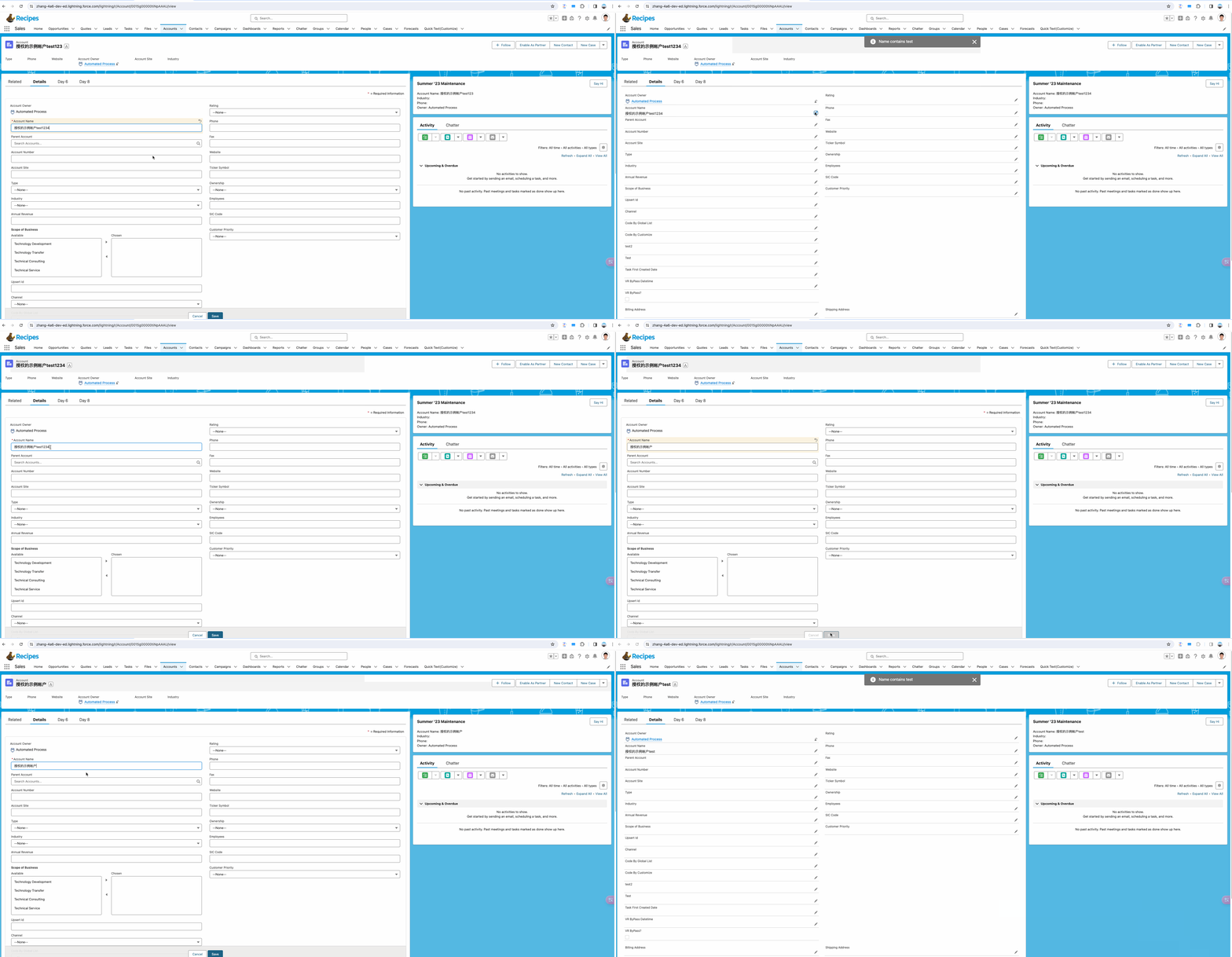
总结:本篇主要介绍的是标准页面编辑数据情况下自定义的lwc页面如何进行捕捉然后做一些逻辑,其中LDS方式固然好用,但是没有那么灵活,如果需求简单,推荐使用LDS方式,否则可以考虑订阅Platform Event来实现。篇中有错误地方欢迎指出,有不懂欢迎留言。
Salesforce LWC学习(四十七) 标准页面更新以后自定义页面如何捕捉?的更多相关文章
- Salesforce LWC学习(四十) dynamic interaction 浅入浅出
本篇参考: Configure a Component for Dynamic Interactions in the Lightning App Builder - Salesforce Light ...
- Salesforce LWC学习(四十二) getRecordNotifyChange已弃用
本篇参考: https://developer.salesforce.com/docs/component-library/documentation/en/lwc/lwc.reference_get ...
- Salesforce LWC学习(四) 父子component交互 / component声明周期管理 / 事件处理
我们在上篇介绍了 @track / @api的区别.在父子 component中,针对api类型的变量,如果声明以后就只允许在parent修改,son component修改便会导致报错. sonIt ...
- Salesforce LWC学习(二十七) File Upload
本篇参考: https://developer.salesforce.com/docs/component-library/bundle/lightning-file-upload/documenta ...
- Salesforce LWC学习(三十七) Promise解决progress-indicator的小问题
本篇参考:https://developer.salesforce.com/docs/component-library/bundle/lightning-progress-indicator/exa ...
- Salesforce LWC学习(四十) datatable的dynamic action的小坑浅谈
本篇参考:https://developer.salesforce.com/docs/component-library/bundle/lightning-datatable/documentatio ...
- Salesforce LWC学习(四十一) If:true 即将弃用?
本篇参考: https://developer.salesforce.com/docs/component-library/documentation/en/lwc/lwc.reference_dir ...
- Salesforce LWC学习(三十) lwc superbadge项目实现
本篇参考:https://trailhead.salesforce.com/content/learn/superbadges/superbadge_lwc_specialist 我们做lwc的学习时 ...
- Salesforce LWC学习(十七) 前端知识之 onclick & onblur & onmousedown
在Salesforce LWC学习(八) Look Up组件实现篇中,我们实现了公用的lookup组件,使用的过程中,会发现当我们输入内容以后,搜索出来的列表便无法被清空. 针对此种情况我们打算优化一 ...
- Salesforce LWC学习(三十九) lwc下quick action的recordId的问题和解决方案
本篇参考: https://developer.salesforce.com/docs/component-library/bundle/force:hasRecordId/documentation ...
随机推荐
- 【matplotlib基础】--绘图配置
Matplotlib 提供了大量配置参数,这些参数可以但不限于让我们从整体上调整通过 Matplotlib 绘制的图形样式,这里面的参数还有很多是功能性的,和其他工具结合时需要用的配置. 通过plt. ...
- Linux挂载新磁盘
Linux挂载新磁盘 1. 查看磁盘 # df -lh # 查看磁盘占用情况,同时可以查看已挂载的磁盘及其挂载位置 # fdisk -l # 查看所有的磁盘分区 图中 /dev/sdb 下无分区信息, ...
- Go语言常用标准库——json、文件操作、template、依赖管理及Go_module使用
文章目录 Go语言之json Marshal函数 Unmarshal函数 Go语言之文件操作 打开和关闭文件 读取文件 file.Read() 基本使用 循环读取 bufio读取文件 ioutil读取 ...
- win11系统无法解决的死结
如果需要使用网上银行.win11一定不能使用. win11已经取消了,对于IE浏览器的支持和安装. 但是大部分网银都是要求IE浏览器.或者IE内核.实际过程当中.虽然所有的浏览器都说兼容IE有IE内核 ...
- Spring扩展接口(4):InstantiationAwareBeanPostProcessor
在此系列文章中,我总结了Spring几乎所有的扩展接口,以及各个扩展点的使用场景.并整理出一个bean在spring中从被加载到最终初始化的所有可扩展点的顺序调用图.这样,我们也可以看到bean是如何 ...
- 深入解析css-笔记
前言 本文章是根据<深入解析CSS>一书所作的学习笔记,书中的知识点基本都概括在这.希望对您有帮助,另外本博客是通过word笔记文档导入,虽然后续对内容和代码相关进行了一些格式处理,但还是 ...
- 数据结构-线性表-双向链表(c++)
与单循环链表类似,但析构函数需要注意 析构函数: 因为while循环的条件是p->next!=front,所以不能直接delete front: template<class T> ...
- 记录jdk17相对于jdk8增加的一下主要语法糖和新特性
jdk17 发布已经好久了,作为java的长期支持版本,引入了许多有趣且实用的新特性.这些特性不仅提高了开发效率,还增强了语言的表现力和安全性.并且是SpringBoot 3.0以后版本的硬性要求,之 ...
- STL multimap容器
multimap容器 multimap容器保存的是有序的键/值对,但是可以保存重复的元素.multimap中会出现具有相同键值的元素序列.multimap大部分成员函数的使用方式和map相同.因为重复 ...
- C语言编写一个程序,从键盘读入一个矩形的两个边的值(整数),输出矩形面积。
#include<stdio.h> int main() { int i, j, s;//定义矩形的长,宽,面积变量 scanf_s("%d,%d", &i, ...