
[转]Cross-type joins in Elasticsearch
Cross-type joins in Elasticsearch
http://rore.im/posts/elasticsearch-joins
December 31, 2014
When modeling data in Elasticsearch, a common question is how to design the data to capture relationships between entities, to allow at least some level of “joins”.
Elasticsearch has a good guide about data modeling. One of the options provided for expressing relationships is the parent-child model.
A parent-child relationship in Elasticsearch is a way to express a one-to-many relationship (a parent with many children). The parent and child are separate Elasticsearch types, bounded only by specifying the parent type on the child mapping, and by giving the parent ID for every child index operation (this is used for routing the child to the shard of the parent).
It’s a useful model when a parent has many children and when the child update pattern is different from that of the parent. (Since every child is a separate document, updating the child does not require re-indexing the parent).
But this model also provides an interesting (if limited) way to capture relationships between sibling types.
Lets consider the following data:
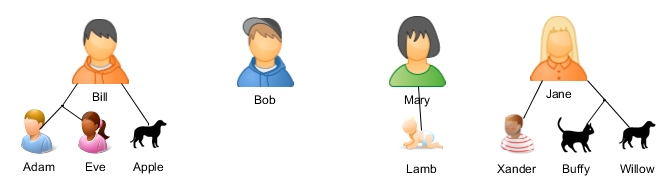
Bill has two children - Adam and Eve, and a Dog (Apple).
Bob has no children or pets (ah, freedom!).
Mary has a little newborn child called Lamb.
Jane has a boy named Xander, a cat (Buffy) and a dog (Willow).
Lets create this data in Elasticsearch.
We will have a parent type - “person”, and two child types - “children” and “pets”.
First we’ll create the mapping for the child types.
    #!/bin/bash

    export ELASTICSEARCH_ENDPOINT="http://localhost:9200"

    # Create indexes

    curl -XPUT "$ELASTICSEARCH_ENDPOINT/es-joins" -d '{

        "mappings": {

            "children": {

                "_parent": {

                    "type": "person"

                }

            },

            "pets": {

                "_parent": {

                    "type": "person"

                }

            }

        }

    }'
Next, index all the documents - parents, children and pets.
    # Index documents

    curl -XPOST "$ELASTICSEARCH_ENDPOINT/_bulk?refresh=true" -d '

    {"index":{"_index":"es-joins","_type":"person","_id":1}}

    {"name":"Bill","gender":"male"}

    {"index":{"_index":"es-joins","_type":"person","_id":2}}

    {"name":"Bob","gender":"male"}

    {"index":{"_index":"es-joins","_type":"person","_id":3}}

    {"name":"Mary","gender":"female"}

    {"index":{"_index":"es-joins","_type":"person","_id":4}}

    {"name":"Jane","gender":"female"}

    {"index":{"_index":"es-joins","_type":"children","_parent":1,"_id":1}}

    {"name":"Adam","gender":"male"}

    {"index":{"_index":"es-joins","_type":"children","_parent":1,"_id":2}}

    {"name":"Eve","gender":"female"}

    {"index":{"_index":"es-joins","_type":"children","_parent":3,"_id":3}}

    {"name":"Lamb","gender":"male"}

    {"index":{"_index":"es-joins","_type":"children","_parent":4,"_id":4}}

    {"name":"Xander","gender":"male"}

    {"index":{"_index":"es-joins","_type":"pets","_parent":1,"_id":1}}

    {"name":"Apple","type":"dog"}

    {"index":{"_index":"es-joins","_type":"pets","_parent":4,"_id":2}}

    {"name":"Buffy","type":"cat"}

    {"index":{"_index":"es-joins","_type":"pets","_parent":4,"_id":3}}

    {"name":"Willow","type":"dog"}

    '
Now we can do some searches on it.
The usual example will be searching a parent by its children. Lets find
all the parents that has a girl. We expect to get back only Bill.
    curl -XPOST "$ELASTICSEARCH_ENDPOINT/es-joins/person/_search?pretty" -d '

    {

        "query": {

            "filtered": {

                "filter": {

                    "and": [

                        {

                            "has_child": {

                                "type": "children",

                                "query": {

                                    "term": {

                                        "gender": "female"

                                    }

                                }

                            }

                        }

                    ]

                }

            }

        }

    }

    '
We can also combine conditions on multiple child types.
Lets find parents that have a boy and a dog. This time we expect to get back both Bill and Jane.
    curl -XPOST "$ELASTICSEARCH_ENDPOINT/es-joins/person/_search?pretty" -d '

    {

        "query": {

            "filtered": {

                "filter": {

                    "and": [

                        {

                            "has_child": {

                                "type": "children",

                                "query": {

                                    "term": {

                                        "gender": "male"

                                    }

                                }

                            }

                        },

                        {

                            "has_child": {

                                "type": "pets",

                                "query": {

                                    "term": {

                                        "type": "dog"

                                    }

                                }

                            }

                        }

                    ]

                }

            }

        }

    }

    '
Another commonly used option is finding children by their parents.
But a more interesting possibility is finding children by their siblings.
Lets lookup all boys that have a dog. To do that we’re searching on the
“children” type, and doing a has_parent filter that contains a has_child
filter on the “pets” type.
This time we expect to get back the children - Adam and Xander.
    curl -XPOST "$ELASTICSEARCH_ENDPOINT/es-joins/children/_search?pretty" -d '

    {

        "query": {

            "filtered": {

                "filter": {

                    "and": [

                        {

                            "has_parent": {

                                "parent_type": "person",

                                "filter": {

                                    "has_child": {

                                        "type": "pets",

                                        "query": {

                                            "term": {

                                                "type": "dog"

                                            }

                                        }

                                    }

                                }

                            }

                        },

                        {

                            "term": {

                                "gender": "male"

                            }

                        }

                    ]

                }

            }

        }

    }

    '
Of course, our data model here is a bit simplified as it allows only a single parent. If we were to extend it, we would create a “family” parent type, with child types - “parents”, “children” and “pets”.
Currently, in order to get the details of the “joined” entity, another query is needed. For example, when searching “all boys that have a dog”, if we want the details of the dogs we need a second search for “all dogs with parents that have children with _id=…” (and the _ids of the children from the first search).
This will change with the new upcoming inner hits feature that will allow getting the data of the inner entities in a single query.
One should note that this method is not exactly recommended by
Elasticsearch. Because of the memory requirements and performance hit,
the official recommendation is: “Avoid using multiple parent-child joins in a single query”. So as always, test, measure and choose your modeling wisely.
[转]Cross-type joins in Elasticsearch的更多相关文章
- 自己写的数据交换工具——从Oracle到Elasticsearch
先说说需求的背景,由于业务数据都在Oracle数据库中,想要对它进行数据的分析会非常非常慢,用传统的数据仓库-->数据集市这种方式,集市层表会非常大,查询的时候如果再做一些group的操作,一个 ...
- ElasticSearch+NLog+Elmah实现Asp.Net分布式日志管理
本文将介绍使用NLOG.Elmah结合ElasticSearch实现分布式日志管理. 一.ElasticSearch简介 ElasticSearch是一个基于Lucene的搜索服务器.它提供了一个分布 ...
- Elasticsearch: Indexing SQL databases. The easy way
Elasticsearchis a great search engine, flexible, fast and fun. So how can I get started with it? Thi ...
- elasticsearch插件大全
Elasticsearch扩展性非常好,有很多官方和第三方开发的插件,下面以分词.同步.数据传输.脚本支持.站点.其它这几个类别进行划分. 分词插件 Combo Analysis Plugin (作者 ...
- 安装elasticsearch
安装elasticsearch 来自:http://www.cnblogs.com/huangfox/p/3541300.html 一)安装elasticsearch 1)下载elasticsea ...
- ElasticSearch中文分词(IK)
ElasticSearch常用的很受欢迎的是IK,这里稍微介绍下安装过程及测试过程. 1.ElasticSearch官方分词 自带的中文分词器很弱,可以体检下: [zsz@VS-zsz ~]$ c ...
- Elasticsearch和mysql数据同步(elasticsearch-jdbc)
1.介绍 对mysql.oracle等数据库数据进行同步到ES有三种做法:一个是通过elasticsearch提供的API进行增删改查,一个就是通过中间件进行数据全量.增量的数据同步,另一个是通过收集 ...
- Logstash同步Oracle数据到ElasticSearch
最近在项目上应用到了ElasticSearch和Logstash,在此主要记录了Logstash-input-jdbc同步Oracle数据库到ElasticSearch的主要步骤,本文是对环境进行简单 ...
- ELK( ElasticSearch+ Logstash+ Kibana)分布式日志系统部署文档
开始在公司实施的小应用,慢慢完善之~~~~~~~~文档制作 了好作运维同事之间的前期普及.. ~~~~~~~~~~~~~~~~~~~~~~~~~~~~~~~ 软件下载地址: https://www.e ...
随机推荐
- R12 查询EBS用户相关SQL(转)
https://www.cnblogs.com/quanweiru/p/4869697.html http://hutianci.iteye.com/blog/934921 --R12查询EBS在线用 ...
- Spring Boot系列之配置日志输出等级
我们都知道Spring boot 默认使用 logback作进行日志输出,那么 在配置Spring boot日志输出时有两种方式: 通过application.properties 配置文件的方式来配 ...
- [contest 781] 9.6
[contest 781] 9.6 - XJOI czx的温暖题... T1 军训
- ASP.NET MVC命名空间时引起错误的解决方法
使用VS2012新建了一个Asp.net mvc5的项目,并把项目的命名空间名称更改了(Src更改为UXXXXX),然后就导致了以下错误 刚开始以后是项目的属性中的命名空间没有更改过来的问题,但我在重 ...
- Python获取时间戳
import datetime as dt dt.datetime.now().microsecond
- linux用户管理 用户和用户组信息
用户管理配置文件 用户信息文件 /etc/passwd 密码文件 /etc/shadow 用户配置文件 /etc/login.defs /etc/default/useradd 新用户信息文件 /e ...
- jquery ready&&load用法
ready和load那一个先执行 DOM文档加载的步骤 (1) 解析HTML结构 (2) 加载外部脚本和样式表文件 (3) 解析并执行脚本代码 (4) 构造HTML DOM模型 //ready (5) ...
- centos6.5 安装PHP7.0支持nginx
1.安装PHP所需要的扩展 yum -y install libxml2 libxml2-devel openssl openssl-devel bzip2 bzip2-devel ...
- Linux电源管理-Linux regulator framework概述
前言 1. 什么是regulator? regulator翻译为"调节器",分为voltage regulator(电压调节器)和current(电流调节器).一般电源 ...
- Linux运维工程师需要掌握什么才能胜任工作呢
万丈高楼平地起,所有一切的高深的技术都离不开最基本的技术,那么作为运维工程师的你,什么是最基本的技术呢,毫无疑问是Linux,Linux 是你所有一切技术的根源,试想一下如果你连基础的操作命令都不知道 ...