
python 图像处理中二值化方法归纳总结
python图像处理二值化方法
在用python进行图像处理时,二值化是非常重要的一步,现总结了自己遇到过的 6种 图像二值化的方法(当然这个绝对不是全部的二值化方法,若发现新的方法会继续新增)。
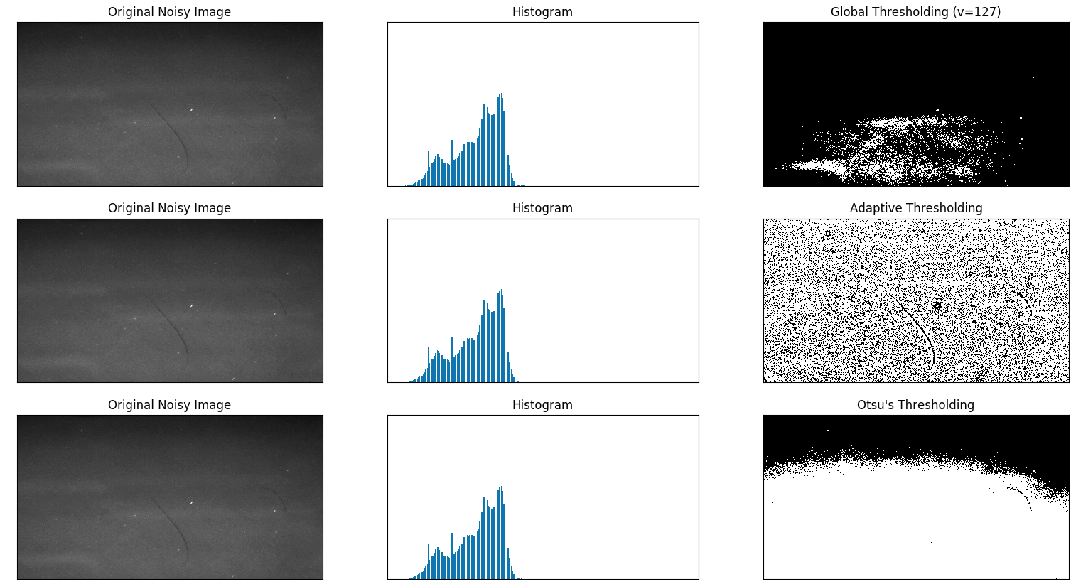
1. opencv 简单阈值 cv2.threshold
2. opencv 自适应阈值 cv2.adaptiveThreshold (自适应阈值中计算阈值的方法有两种:mean_c 和 guassian_c ,可以尝试用下哪种效果好)
3. Otsu's 二值化
例子:
来自 : OpenCV-Python 中文教程
 import cv2

 import numpy as np

 from matplotlib import pyplot as plt

 img = cv2.imread('scratch.png', 0)

 # global thresholding

 ret1, th1 = cv2.threshold(img, 127, 255, cv2.THRESH_BINARY)

 # Otsu's thresholding

 th2 = cv2.adaptiveThreshold(img, 255, cv2.ADAPTIVE_THRESH_MEAN_C, cv2.THRESH_BINARY, 11, 2)

 # Otsu's thresholding

 # 阈值一定要设为 0 !

 ret3, th3 = cv2.threshold(img, 0, 255, cv2.THRESH_BINARY + cv2.THRESH_OTSU)

 # plot all the images and their histograms

 images = [img, 0, th1, img, 0, th2, img, 0, th3]

 titles = [

     'Original Noisy Image', 'Histogram', 'Global Thresholding (v=127)',

     'Original Noisy Image', 'Histogram', "Adaptive Thresholding",

     'Original Noisy Image', 'Histogram', "Otsu's Thresholding"

 ]

 # 这里使用了 pyplot 中画直方图的方法, plt.hist, 要注意的是它的参数是一维数组

 # 所以这里使用了( numpy ) ravel 方法,将多维数组转换成一维,也可以使用 flatten 方法

 # ndarray.flat 1-D iterator over an array.

 # ndarray.flatten 1-D array copy of the elements of an array in row-major order.

 for i in range(3):

     plt.subplot(3, 3, i * 3 + 1), plt.imshow(images[i * 3], 'gray')

     plt.title(titles[i * 3]), plt.xticks([]), plt.yticks([])

     plt.subplot(3, 3, i * 3 + 2), plt.hist(images[i * 3].ravel(), 256)

     plt.title(titles[i * 3 + 1]), plt.xticks([]), plt.yticks([])

     plt.subplot(3, 3, i * 3 + 3), plt.imshow(images[i * 3 + 2], 'gray')

     plt.title(titles[i * 3 + 2]), plt.xticks([]), plt.yticks([])

 plt.show()
结果图:
4. skimage niblack阈值
5. skimage sauvola阈值 (主要用于文本检测)
例子:
https://scikit-image.org/docs/dev/auto_examples/segmentation/plot_niblack_sauvola.html
 import matplotlib

 import matplotlib.pyplot as plt

 from skimage.data import page

 from skimage.filters import (threshold_otsu, threshold_niblack,

                              threshold_sauvola)

 matplotlib.rcParams['font.size'] = 9

 image = page()

 binary_global = image > threshold_otsu(image)

 window_size = 25

 thresh_niblack = threshold_niblack(image, window_size=window_size, k=0.8)

 thresh_sauvola = threshold_sauvola(image, window_size=window_size)

 binary_niblack = image > thresh_niblack

 binary_sauvola = image > thresh_sauvola

 plt.figure(figsize=(8, 7))

 plt.subplot(2, 2, 1)

 plt.imshow(image, cmap=plt.cm.gray)

 plt.title('Original')

 plt.axis('off')

 plt.subplot(2, 2, 2)

 plt.title('Global Threshold')

 plt.imshow(binary_global, cmap=plt.cm.gray)

 plt.axis('off')

 plt.subplot(2, 2, 3)

 plt.imshow(binary_niblack, cmap=plt.cm.gray)

 plt.title('Niblack Threshold')

 plt.axis('off')

 plt.subplot(2, 2, 4)

 plt.imshow(binary_sauvola, cmap=plt.cm.gray)

 plt.title('Sauvola Threshold')

 plt.axis('off')

 plt.show()
结果图:

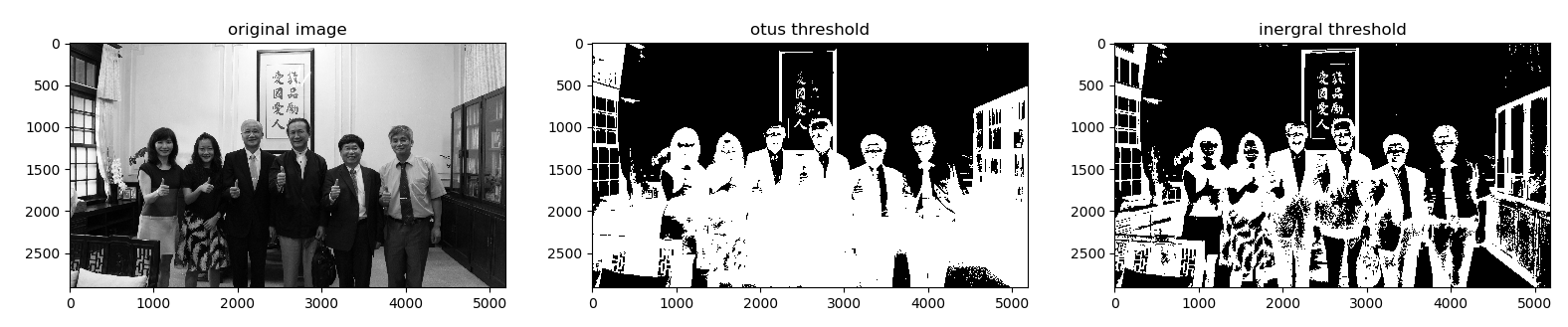
6. IntegralThreshold (主要用于文本检测)
使用方法: 运行下面网址的util.py文件
https://github.com/Liang-yc/IntegralThreshold
结果图:
7.
python 图像处理中二值化方法归纳总结的更多相关文章
- Python实现熵值法确定权重
本文从以下四个方面,介绍用Python实现熵值法确定权重: 一. 熵值法介绍 二. 熵值法实现 三. Python实现熵值法示例1 四. Python实现熵值法示例2 一. 熵值法介绍 熵值法是计算指 ...
- 深度学习最全优化方法总结比较(SGD,Adagrad,Adadelta,Adam,Adamax,Nadam)(转)
转自: https://zhuanlan.zhihu.com/p/22252270 ycszen 另可参考: https://blog.csdn.net/llx1990rl/article/de ...
- 《零压力学Python》 之 第二章知识点归纳
第二章(数字)知识点归纳 要生成非常大的数字,最简单的办法是使用幂运算符,它由两个星号( ** )组成. 如: 在Python中,整数是绝对精确的,这意味着不管它多大,加上1后都将得到一个新的值.你将 ...
- python排序之二冒泡排序法
python排序之二冒泡排序法 如果你理解之前的插入排序法那冒泡排序法就很容易理解,冒泡排序是两个两个以向后位移的方式比较大小在互换的过程好了不多了先上代码吧如下: 首先还是一个无序列表lis,老规矩 ...
- Python图像处理库:Pillow 初级教程
Python图像处理库:Pillow 初级教程 2014-09-14 翻译 http://pillow.readthedocs.org/en/latest/handbook/tutorial.html ...
- 使用Python,字标注及最大熵法进行中文分词
使用Python,字标注及最大熵法进行中文分词 在前面的博文中使用python实现了基于词典及匹配的中文分词,这里介绍另外一种方法, 这种方法基于字标注法,并且基于最大熵法,使用机器学习方法进行训练, ...
- Python图像处理之验证码识别
在上一篇博客Python图像处理之图片文字识别(OCR)中我们介绍了在Python中如何利用Tesseract软件来识别图片中的英文与中文,本文将具体介绍如何在Python中利用Tesseract ...
- Python的生成器进阶玩法
Python的生成器进阶玩法 作者:尹正杰 版权声明:原创作品,谢绝转载!否则将追究法律责任. 一.yield的表达式形式 #!/usr/bin/env python #_*_coding:utf-8 ...
- Python字典按值排序的方法
Python字典按值排序的方法: 法1: (默认升序排序,加 reverse = True 指定为降序排序) # sorted的结果是一个list dic1SortList = sorted( di ...
随机推荐
- FastDFS的安装及上传下载(二)
百度云:所有附件的地址 一 安装前的检查 检查Linux上是否安装了 gcc.libevent.libevent-devel,执行如下yum命令检查: [root@node02 ~]# yum lis ...
- 29 基于PCL的点云平面分割拟合算法技术路线(针对有噪声的点云数据)
0 引言 最近项目中用到了基于PCL开发的基于平面的点云和CAD模型的配准算法,点云平面提取采用的算法如下. 1 基于PCL的点云平面分割拟合算法 2 参数及其意义介绍 (1)点云下采样 1. 参数: ...
- 洛谷P1441 砝码称重(搜索,dfs+bitset优化)
洛谷P1441 砝码称重 \(n\) 的范围为 \(n \le 20\) ,\(m\) 的范围为 \(m \le 4\) . 暴力遍历每一种砝码去除情况,共有 \(n^m\) 种情况. 对于剩余砝码求 ...
- Vagrant 手册之 Vagrantfile - 最低版本
原文地址 可以在 Vagrantfile 中指定一组 Vagrant 的版本,以强制人们使用带有 Vagrantfile 的特定版本的 Vagrant.这可以帮助解决使用带有 Vagrantfile ...
- Nginx 转写功能和Apache .htaccess 对应
之前一直使用apache 服务器,现有一项目想转到Nginx 服务器运行.. 发现Apache 的撰写功能和 Nginx的不一样.无法通用.hataccess 文件 查阅网上资料,nginx 配置转写 ...
- sql 优化建议
1.对查询进行优化,要尽量避免全表扫描,首先应考虑在 where 及 order by 涉及的列上建立索引. 2.应尽量避免在 where 子句中对字段进行 null 值判断,否则将导致引擎放弃使用索 ...
- 笨方法学Python 错误记录
ex8:忘记输入“空格”ex9:忘记输入“冒号”ex14:%前后要空格,否则errorex21:多个函数嵌套,漏写括号)ex24:%d,漏写d,导致程序错误:"""之间的 ...
- 05 | 基础篇:某个应用的CPU使用率居然达到100%,我该怎么办?
通过前两节对平均负载和 CPU 上下文切换的学习,我相信你对 CPU 的性能已经有了初步了解.不过我还是想问一下,在学这个专栏前,你最常用什么指标来描述系统的 CPU 性能呢?我想你的答案,可能不是平 ...
- python3.7.0 安装与配置
python 3.7.0 X64下载地址: https://www.python.org/ftp/python/3.7.0/python-3.7.0-amd64.exe 更多版本下载请移步到:http ...
- jq 与原生js 方法互相转换
最近在用mui写页面,当然了在移动App里引入jq或zepto这些框架,肯定是极不理性的.虽然jq很简单,但是也有兼容问题,js基础是很重要的,jq的成功当时是因为ie6.7.8.9.10.chrom ...