
(四十九)c#Winform自定义控件-下拉框(表格)
官网
前提
入行已经7,8年了,一直想做一套漂亮点的自定义控件,于是就有了本系列文章。
GitHub:https://github.com/kwwwvagaa/NetWinformControl
码云:https://gitee.com/kwwwvagaa/net_winform_custom_control.git
如果觉得写的还行,请点个 star 支持一下吧
欢迎前来交流探讨: 企鹅群568015492 
麻烦博客下方点个【推荐】,谢谢
NuGet
Install-Package HZH_Controls
目录
https://www.cnblogs.com/bfyx/p/11364884.html
用处及效果
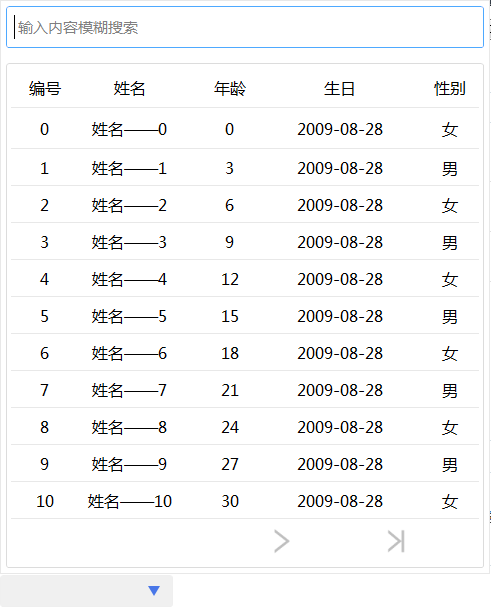
   List<DataGridViewColumnEntity> lstCulumns = new List<DataGridViewColumnEntity>();

             lstCulumns.Add(new DataGridViewColumnEntity() { DataField = "ID", HeadText = "编号", Width = , WidthType = SizeType.Absolute });

             lstCulumns.Add(new DataGridViewColumnEntity() { DataField = "Name", HeadText = "姓名", Width = , WidthType = SizeType.Absolute });

             lstCulumns.Add(new DataGridViewColumnEntity() { DataField = "Age", HeadText = "年龄", Width = , WidthType = SizeType.Absolute });

             lstCulumns.Add(new DataGridViewColumnEntity() { DataField = "Birthday", HeadText = "生日", Width = , WidthType = SizeType.Absolute, Format = (a) => { return ((DateTime)a).ToString("yyyy-MM-dd"); } });

             lstCulumns.Add(new DataGridViewColumnEntity() { DataField = "Sex", HeadText = "性别", Width = , WidthType = SizeType.Absolute, Format = (a) => { return ((int)a) ==  ? "女" : "男"; } });

             this.ucComboxGrid1.GridColumns = lstCulumns;

             List<object> lstSourceGrid = new List<object>();

             for (int i = ; i < ; i++)

             {

                 TestModel model = new TestModel()

                 {

                     ID = i.ToString(),

                     Age =  * i,

                     Name = "姓名——" + i,

                     Birthday = DateTime.Now.AddYears(-),

                     Sex = i %

                 };

                 lstSourceGrid.Add(model);

             }

             this.ucComboxGrid1.GridDataSource = lstSourceGrid;
准备工作
此控件继承自UCCombox,并且需要表格控件UCDataGridView,如果不了解请移步查看
如果你想显示树形结构,请移步查看
(四十七)c#Winform自定义控件-树表格(treeGrid)
开始
我们首先需要一个弹出的面板,那么我们先添加一个用户控件UCComboxGridPanel,在这个用户控件上添加一个文本框进行搜索,添加一个表格展示数据
一些属性
  [Description("项点击事件"), Category("自定义")]

         public event DataGridViewEventHandler ItemClick;

         private Type m_rowType = typeof(UCDataGridViewRow);

         public Type RowType

         {

             get { return m_rowType; }

             set

             {

                 m_rowType = value;

                 this.ucDataGridView1.RowType = m_rowType;

             }

         }

         private List<DataGridViewColumnEntity> m_columns = null;

         public List<DataGridViewColumnEntity> Columns

         {

             get { return m_columns; }

             set

             {

                 m_columns = value;

                 this.ucDataGridView1.Columns = value;

             }

         }

         private List<object> m_dataSource = null;

         public List<object> DataSource

         {

             get { return m_dataSource; }

             set { m_dataSource = value; }

         }

         private string strLastSearchText = string.Empty;

         UCPagerControl m_page = new UCPagerControl();
一些事件,处理数据绑定
  void ucDataGridView1_ItemClick(object sender, DataGridViewEventArgs e)

         {

             if (ItemClick != null)

             {

                 ItemClick((sender as IDataGridViewRow).DataSource, null);

             }

         }

         void txtInput_TextChanged(object sender, EventArgs e)

         {

             timer1.Enabled = false;

             timer1.Enabled = true;

         }

         private void UCComboxGridPanel_Load(object sender, EventArgs e)

         {

             m_page.DataSource = m_dataSource;

             this.ucDataGridView1.DataSource = m_page.GetCurrentSource();

         }

         private void timer1_Tick(object sender, EventArgs e)

         {

             if (strLastSearchText == txtSearch.InputText)

             {

                 timer1.Enabled = false;

             }

             else

             {

                 strLastSearchText = txtSearch.InputText;

                 Search(txtSearch.InputText);

             }

         }

         private void Search(string strText)

         {

             m_page.StartIndex = ;

             if (!string.IsNullOrEmpty(strText))

             {

                 strText = strText.ToLower();

                 List<object> lst = m_dataSource.FindAll(p => m_columns.Any(c => (c.Format == null ? (p.GetType().GetProperty(c.DataField).GetValue(p, null).ToStringExt()) : c.Format(p.GetType().GetProperty(c.DataField).GetValue(p, null))).ToLower().Contains(strText)));

                 m_page.DataSource = lst;

             }

             else

             {

                 m_page.DataSource = m_dataSource;

             }

             m_page.Reload();

         }
完整代码
 using System;

 using System.Collections.Generic;

 using System.ComponentModel;

 using System.Drawing;

 using System.Data;

 using System.Linq;

 using System.Text;

 using System.Windows.Forms;

 namespace HZH_Controls.Controls.ComboBox

 {

     [ToolboxItem(false)]

     public partial class UCComboxGridPanel : UserControl

     {

         [Description("项点击事件"), Category("自定义")]

         public event DataGridViewEventHandler ItemClick;

         private Type m_rowType = typeof(UCDataGridViewRow);

         public Type RowType

         {

             get { return m_rowType; }

             set

             {

                 m_rowType = value;

                 this.ucDataGridView1.RowType = m_rowType;

             }

         }

         private List<DataGridViewColumnEntity> m_columns = null;

         public List<DataGridViewColumnEntity> Columns

         {

             get { return m_columns; }

             set

             {

                 m_columns = value;

                 this.ucDataGridView1.Columns = value;

             }

         }

         private List<object> m_dataSource = null;

         public List<object> DataSource

         {

             get { return m_dataSource; }

             set { m_dataSource = value; }

         }

         private string strLastSearchText = string.Empty;

         UCPagerControl m_page = new UCPagerControl();

         public UCComboxGridPanel()

         {

             InitializeComponent();

             this.ucDataGridView1.Page = m_page;

             this.ucDataGridView1.IsAutoHeight = false;

             this.txtSearch.txtInput.TextChanged += txtInput_TextChanged;

             this.ucDataGridView1.ItemClick += ucDataGridView1_ItemClick;

         }

         void ucDataGridView1_ItemClick(object sender, DataGridViewEventArgs e)

         {

             if (ItemClick != null)

             {

                 ItemClick((sender as IDataGridViewRow).DataSource, null);

             }

         }

         void txtInput_TextChanged(object sender, EventArgs e)

         {

             timer1.Enabled = false;

             timer1.Enabled = true;

         }

         private void UCComboxGridPanel_Load(object sender, EventArgs e)

         {

             m_page.DataSource = m_dataSource;

             this.ucDataGridView1.DataSource = m_page.GetCurrentSource();

         }

         private void timer1_Tick(object sender, EventArgs e)

         {

             if (strLastSearchText == txtSearch.InputText)

             {

                 timer1.Enabled = false;

             }

             else

             {

                 strLastSearchText = txtSearch.InputText;

                 Search(txtSearch.InputText);

             }

         }

         private void Search(string strText)

         {

             m_page.StartIndex = ;

             if (!string.IsNullOrEmpty(strText))

             {

                 strText = strText.ToLower();

                 List<object> lst = m_dataSource.FindAll(p => m_columns.Any(c => (c.Format == null ? (p.GetType().GetProperty(c.DataField).GetValue(p, null).ToStringExt()) : c.Format(p.GetType().GetProperty(c.DataField).GetValue(p, null))).ToLower().Contains(strText)));

                 m_page.DataSource = lst;

             }

             else

             {

                 m_page.DataSource = m_dataSource;

             }

             m_page.Reload();

         }

     }

 }
 namespace HZH_Controls.Controls.ComboBox

 {

     partial class UCComboxGridPanel

     {

         /// <summary>

         /// 必需的设计器变量。

         /// </summary>

         private System.ComponentModel.IContainer components = null;

         /// <summary>

         /// 清理所有正在使用的资源。

         /// </summary>

         /// <param name="disposing">如果应释放托管资源,为 true;否则为 false。</param>

         protected override void Dispose(bool disposing)

         {

             if (disposing && (components != null))

             {

                 components.Dispose();

             }

             base.Dispose(disposing);

         }

         #region 组件设计器生成的代码

         /// <summary>

         /// 设计器支持所需的方法 - 不要

         /// 使用代码编辑器修改此方法的内容。

         /// </summary>

         private void InitializeComponent()

         {

             this.components = new System.ComponentModel.Container();

             this.panel1 = new System.Windows.Forms.Panel();

             this.panel2 = new System.Windows.Forms.Panel();

             this.timer1 = new System.Windows.Forms.Timer(this.components);

             this.ucControlBase1 = new HZH_Controls.Controls.UCControlBase();

             this.ucDataGridView1 = new HZH_Controls.Controls.UCDataGridView();

             this.txtSearch = new HZH_Controls.Controls.UCTextBoxEx();

             this.ucSplitLine_V2 = new HZH_Controls.Controls.UCSplitLine_V();

             this.ucSplitLine_V1 = new HZH_Controls.Controls.UCSplitLine_V();

             this.ucSplitLine_H2 = new HZH_Controls.Controls.UCSplitLine_H();

             this.ucSplitLine_H1 = new HZH_Controls.Controls.UCSplitLine_H();

             this.panel1.SuspendLayout();

             this.ucControlBase1.SuspendLayout();

             this.SuspendLayout();

             //

             // panel1

             //

             this.panel1.Controls.Add(this.ucControlBase1);

             this.panel1.Controls.Add(this.panel2);

             this.panel1.Controls.Add(this.txtSearch);

             this.panel1.Dock = System.Windows.Forms.DockStyle.Fill;

             this.panel1.Location = new System.Drawing.Point(, );

             this.panel1.Name = "panel1";

             this.panel1.Padding = new System.Windows.Forms.Padding();

             this.panel1.Size = new System.Drawing.Size(, );

             this.panel1.TabIndex = ;

             //

             // panel2

             //

             this.panel2.Dock = System.Windows.Forms.DockStyle.Top;

             this.panel2.Location = new System.Drawing.Point(, );

             this.panel2.Name = "panel2";

             this.panel2.Size = new System.Drawing.Size(, );

             this.panel2.TabIndex = ;

             //

             // timer1

             //

             this.timer1.Interval = ;

             this.timer1.Tick += new System.EventHandler(this.timer1_Tick);

             //

             // ucControlBase1

             //

             this.ucControlBase1.ConerRadius = ;

             this.ucControlBase1.Controls.Add(this.ucDataGridView1);

             this.ucControlBase1.Dock = System.Windows.Forms.DockStyle.Fill;

             this.ucControlBase1.FillColor = System.Drawing.Color.Transparent;

             this.ucControlBase1.Font = new System.Drawing.Font("微软雅黑", 15F, System.Drawing.FontStyle.Regular, System.Drawing.GraphicsUnit.Pixel);

             this.ucControlBase1.IsRadius = false;

             this.ucControlBase1.IsShowRect = true;

             this.ucControlBase1.Location = new System.Drawing.Point(, );

             this.ucControlBase1.Margin = new System.Windows.Forms.Padding(, , , );

             this.ucControlBase1.Name = "ucControlBase1";

             this.ucControlBase1.Padding = new System.Windows.Forms.Padding();

             this.ucControlBase1.RectColor = System.Drawing.Color.FromArgb(((int)(((byte)()))), ((int)(((byte)()))), ((int)(((byte)()))));

             this.ucControlBase1.RectWidth = ;

             this.ucControlBase1.Size = new System.Drawing.Size(, );

             this.ucControlBase1.TabIndex = ;

             this.ucControlBase1.TabStop = false;

             //

             // ucDataGridView1

             //

             this.ucDataGridView1.BackColor = System.Drawing.Color.White;

             this.ucDataGridView1.Columns = null;

             this.ucDataGridView1.DataSource = null;

             this.ucDataGridView1.Dock = System.Windows.Forms.DockStyle.Fill;

             this.ucDataGridView1.HeadFont = new System.Drawing.Font("微软雅黑", 12F);

             this.ucDataGridView1.HeadHeight = ;

             this.ucDataGridView1.HeadPadingLeft = ;

             this.ucDataGridView1.HeadTextColor = System.Drawing.Color.Black;

             this.ucDataGridView1.IsAutoHeight = false;

             this.ucDataGridView1.IsShowCheckBox = false;

             this.ucDataGridView1.IsShowHead = true;

             this.ucDataGridView1.Location = new System.Drawing.Point(, );

             this.ucDataGridView1.Name = "ucDataGridView1";

             this.ucDataGridView1.Page = null;

             this.ucDataGridView1.RowHeight = ;

             this.ucDataGridView1.RowType = typeof(HZH_Controls.Controls.UCDataGridViewRow);

             this.ucDataGridView1.Size = new System.Drawing.Size(, );

             this.ucDataGridView1.TabIndex = ;

             this.ucDataGridView1.TabStop = false;

             //

             // txtSearch

             //

             this.txtSearch.BackColor = System.Drawing.Color.Transparent;

             this.txtSearch.ConerRadius = ;

             this.txtSearch.Cursor = System.Windows.Forms.Cursors.IBeam;

             this.txtSearch.DecLength = ;

             this.txtSearch.Dock = System.Windows.Forms.DockStyle.Top;

             this.txtSearch.FillColor = System.Drawing.Color.Empty;

             this.txtSearch.Font = new System.Drawing.Font("微软雅黑", 18F, System.Drawing.FontStyle.Regular, System.Drawing.GraphicsUnit.Pixel);

             this.txtSearch.InputText = "";

             this.txtSearch.InputType = HZH_Controls.TextInputType.NotControl;

             this.txtSearch.IsFocusColor = true;

             this.txtSearch.IsRadius = true;

             this.txtSearch.IsShowClearBtn = true;

             this.txtSearch.IsShowKeyboard = false;

             this.txtSearch.IsShowRect = true;

             this.txtSearch.IsShowSearchBtn = false;

             this.txtSearch.KeyBoardType = HZH_Controls.Controls.KeyBoardType.UCKeyBorderAll_EN;

             this.txtSearch.Location = new System.Drawing.Point(, );

             this.txtSearch.Margin = new System.Windows.Forms.Padding(, , , );

             this.txtSearch.MaxValue = new decimal(new int[] {

             ,

             ,

             ,

             });

             this.txtSearch.MinValue = new decimal(new int[] {

             ,

             ,

             ,

             -});

             this.txtSearch.Name = "txtSearch";

             this.txtSearch.Padding = new System.Windows.Forms.Padding();

             this.txtSearch.PromptColor = System.Drawing.Color.Gray;

             this.txtSearch.PromptFont = new System.Drawing.Font("微软雅黑", 15F, System.Drawing.FontStyle.Regular, System.Drawing.GraphicsUnit.Pixel);

             this.txtSearch.PromptText = "输入内容模糊搜索";

             this.txtSearch.RectColor = System.Drawing.Color.FromArgb(((int)(((byte)()))), ((int)(((byte)()))), ((int)(((byte)()))));

             this.txtSearch.RectWidth = ;

             this.txtSearch.RegexPattern = "";

             this.txtSearch.Size = new System.Drawing.Size(, );

             this.txtSearch.TabIndex = ;

             //

             // ucSplitLine_V2

             //

             this.ucSplitLine_V2.BackColor = System.Drawing.Color.FromArgb(((int)(((byte)()))), ((int)(((byte)()))), ((int)(((byte)()))));

             this.ucSplitLine_V2.Dock = System.Windows.Forms.DockStyle.Right;

             this.ucSplitLine_V2.Location = new System.Drawing.Point(, );

             this.ucSplitLine_V2.Name = "ucSplitLine_V2";

             this.ucSplitLine_V2.Size = new System.Drawing.Size(, );

             this.ucSplitLine_V2.TabIndex = ;

             this.ucSplitLine_V2.TabStop = false;

             //

             // ucSplitLine_V1

             //

             this.ucSplitLine_V1.BackColor = System.Drawing.Color.FromArgb(((int)(((byte)()))), ((int)(((byte)()))), ((int)(((byte)()))));

             this.ucSplitLine_V1.Dock = System.Windows.Forms.DockStyle.Left;

             this.ucSplitLine_V1.Location = new System.Drawing.Point(, );

             this.ucSplitLine_V1.Name = "ucSplitLine_V1";

             this.ucSplitLine_V1.Size = new System.Drawing.Size(, );

             this.ucSplitLine_V1.TabIndex = ;

             this.ucSplitLine_V1.TabStop = false;

             //

             // ucSplitLine_H2

             //

             this.ucSplitLine_H2.BackColor = System.Drawing.Color.FromArgb(((int)(((byte)()))), ((int)(((byte)()))), ((int)(((byte)()))));

             this.ucSplitLine_H2.Dock = System.Windows.Forms.DockStyle.Bottom;

             this.ucSplitLine_H2.Location = new System.Drawing.Point(, );

             this.ucSplitLine_H2.Name = "ucSplitLine_H2";

             this.ucSplitLine_H2.Size = new System.Drawing.Size(, );

             this.ucSplitLine_H2.TabIndex = ;

             this.ucSplitLine_H2.TabStop = false;

             //

             // ucSplitLine_H1

             //

             this.ucSplitLine_H1.BackColor = System.Drawing.Color.FromArgb(((int)(((byte)()))), ((int)(((byte)()))), ((int)(((byte)()))));

             this.ucSplitLine_H1.Dock = System.Windows.Forms.DockStyle.Top;

             this.ucSplitLine_H1.Location = new System.Drawing.Point(, );

             this.ucSplitLine_H1.Name = "ucSplitLine_H1";

             this.ucSplitLine_H1.Size = new System.Drawing.Size(, );

             this.ucSplitLine_H1.TabIndex = ;

             this.ucSplitLine_H1.TabStop = false;

             //

             // UCComboxGridPanel

             //

             this.AutoScaleMode = System.Windows.Forms.AutoScaleMode.None;

             this.BackColor = System.Drawing.Color.White;

             this.Controls.Add(this.panel1);

             this.Controls.Add(this.ucSplitLine_V2);

             this.Controls.Add(this.ucSplitLine_V1);

             this.Controls.Add(this.ucSplitLine_H2);

             this.Controls.Add(this.ucSplitLine_H1);

             this.Name = "UCComboxGridPanel";

             this.Size = new System.Drawing.Size(, );

             this.Load += new System.EventHandler(this.UCComboxGridPanel_Load);

             this.panel1.ResumeLayout(false);

             this.ucControlBase1.ResumeLayout(false);

             this.ResumeLayout(false);

         }

         #endregion

         private UCSplitLine_H ucSplitLine_H1;

         private UCSplitLine_H ucSplitLine_H2;

         private UCSplitLine_V ucSplitLine_V1;

         private UCSplitLine_V ucSplitLine_V2;

         private System.Windows.Forms.Panel panel1;

         private UCControlBase ucControlBase1;

         private UCDataGridView ucDataGridView1;

         private System.Windows.Forms.Panel panel2;

         private System.Windows.Forms.Timer timer1;

         private UCTextBoxEx txtSearch;

     }

 }
以上,弹出面板完成,下面就是下拉控件了
添加一个用户控件UCComboxGrid,继承UCCombox
一些属性
  private Type m_rowType = typeof(UCDataGridViewRow);

         [Description("表格行类型"), Category("自定义")]

         public Type GridRowType

         {

             get { return m_rowType; }

             set

             {

                 m_rowType = value;

             }

         }

         int intWidth = ;

         private List<DataGridViewColumnEntity> m_columns = null;

         [Description("表格列"), Category("自定义")]

         public List<DataGridViewColumnEntity> GridColumns

         {

             get { return m_columns; }

             set

             {

                 m_columns = value;

                 if (value != null)

                     intWidth = value.Sum(p => p.WidthType == SizeType.Absolute ? p.Width : (p.Width <  ?  : p.Width));

             }

         }

         private List<object> m_dataSource = null;

         [Description("表格数据源"), Category("自定义")]

         public List<object> GridDataSource

         {

             get { return m_dataSource; }

             set { m_dataSource = value; }

         }

         private string m_textField;

         [Description("显示值字段名称"), Category("自定义")]

         public string TextField

         {

             get { return m_textField; }

             set

             {

                 m_textField = value;

                 SetText();

             }

         }

         [Obsolete("不再可用的属性")]

         [Browsable(false), EditorBrowsable(EditorBrowsableState.Never)]

         private new ComboBoxStyle BoxStyle

         {

             get;

             set;

         }

         private object selectSource = null;

         [Description("选中的数据源"), Category("自定义")]

         public object SelectSource

         {

             get { return selectSource; }

             set

             {

                 selectSource = value;

                 SetText();

                 if (SelectedChangedEvent != null)

                 {

                     SelectedChangedEvent(value, null);

                 }

             }

         }

  [Description("选中数据源改变事件"), Category("自定义")]

         public new event EventHandler SelectedChangedEvent;
重写点击事件来处理弹出
  protected override void click_MouseDown(object sender, MouseEventArgs e)

         {

             if (m_columns == null || m_columns.Count <= )

                 return;

             if (m_ucPanel == null)

             {

                 var p = this.Parent.PointToScreen(this.Location);

                 int intScreenHeight = Screen.PrimaryScreen.Bounds.Height;

                 int intHeight = Math.Max(p.Y, intScreenHeight - p.Y - this.Height);

                 intHeight -= ;

                 m_ucPanel = new UCComboxGridPanel();

                 m_ucPanel.ItemClick += m_ucPanel_ItemClick;

                 m_ucPanel.Height = intHeight;

                 m_ucPanel.Width = intWidth;

                 m_ucPanel.Columns = m_columns;

                 m_ucPanel.RowType = m_rowType;

                 if (m_dataSource != null && m_dataSource.Count > )

                 {

                     int _intHeight = Math.Min( + m_dataSource.Count * , m_ucPanel.Height);

                     m_ucPanel.Height = _intHeight;

                 }

             }

             m_ucPanel.DataSource = m_dataSource;

             if (_frmAnchor == null || _frmAnchor.IsDisposed || _frmAnchor.Visible == false)

             {

                 _frmAnchor = new Forms.FrmAnchor(this, m_ucPanel);

                 _frmAnchor.Show(this.FindForm());

             }

         }

         void m_ucPanel_ItemClick(object sender, DataGridViewEventArgs e)

         {

             _frmAnchor.Hide();

             SelectSource = sender;

         }

         private void SetText()

         {

             if (!string.IsNullOrEmpty(m_textField) && selectSource != null)

             {

                 var pro = selectSource.GetType().GetProperty(m_textField);

                 if (pro != null)

                 {

                     TextValue = pro.GetValue(selectSource, null).ToStringExt();

                 }

             }

         }
完整代码
 using System;

 using System.Collections.Generic;

 using System.ComponentModel;

 using System.Drawing;

 using System.Data;

 using System.Linq;

 using System.Text;

 using System.Windows.Forms;

 using HZH_Controls.Controls;

 namespace HZH_Controls.Controls.ComboBox

 {

     public partial class UCComboxGrid : UCCombox

     {

         private Type m_rowType = typeof(UCDataGridViewRow);

         [Description("表格行类型"), Category("自定义")]

         public Type GridRowType

         {

             get { return m_rowType; }

             set

             {

                 m_rowType = value;

             }

         }

         int intWidth = ;

         private List<DataGridViewColumnEntity> m_columns = null;

         [Description("表格列"), Category("自定义")]

         public List<DataGridViewColumnEntity> GridColumns

         {

             get { return m_columns; }

             set

             {

                 m_columns = value;

                 if (value != null)

                     intWidth = value.Sum(p => p.WidthType == SizeType.Absolute ? p.Width : (p.Width <  ?  : p.Width));

             }

         }

         private List<object> m_dataSource = null;

         [Description("表格数据源"), Category("自定义")]

         public List<object> GridDataSource

         {

             get { return m_dataSource; }

             set { m_dataSource = value; }

         }

         private string m_textField;

         [Description("显示值字段名称"), Category("自定义")]

         public string TextField

         {

             get { return m_textField; }

             set

             {

                 m_textField = value;

                 SetText();

             }

         }

         [Obsolete("不再可用的属性")]

         [Browsable(false), EditorBrowsable(EditorBrowsableState.Never)]

         private new ComboBoxStyle BoxStyle

         {

             get;

             set;

         }

         private object selectSource = null;

         [Description("选中的数据源"), Category("自定义")]

         public object SelectSource

         {

             get { return selectSource; }

             set

             {

                 selectSource = value;

                 SetText();

                 if (SelectedChangedEvent != null)

                 {

                     SelectedChangedEvent(value, null);

                 }

             }

         }

         [Description("选中数据源改变事件"), Category("自定义")]

         public new event EventHandler SelectedChangedEvent;

         public UCComboxGrid()

         {

             InitializeComponent();

         }

         UCComboxGridPanel m_ucPanel = null;

         Forms.FrmAnchor _frmAnchor;

         protected override void click_MouseDown(object sender, MouseEventArgs e)

         {

             if (m_columns == null || m_columns.Count <= )

                 return;

             if (m_ucPanel == null)

             {

                 var p = this.Parent.PointToScreen(this.Location);

                 int intScreenHeight = Screen.PrimaryScreen.Bounds.Height;

                 int intHeight = Math.Max(p.Y, intScreenHeight - p.Y - this.Height);

                 intHeight -= ;

                 m_ucPanel = new UCComboxGridPanel();

                 m_ucPanel.ItemClick += m_ucPanel_ItemClick;

                 m_ucPanel.Height = intHeight;

                 m_ucPanel.Width = intWidth;

                 m_ucPanel.Columns = m_columns;

                 m_ucPanel.RowType = m_rowType;

                 if (m_dataSource != null && m_dataSource.Count > )

                 {

                     int _intHeight = Math.Min( + m_dataSource.Count * , m_ucPanel.Height);

                     m_ucPanel.Height = _intHeight;

                 }

             }

             m_ucPanel.DataSource = m_dataSource;

             if (_frmAnchor == null || _frmAnchor.IsDisposed || _frmAnchor.Visible == false)

             {

                 _frmAnchor = new Forms.FrmAnchor(this, m_ucPanel);

                 _frmAnchor.Show(this.FindForm());

             }

         }

         void m_ucPanel_ItemClick(object sender, DataGridViewEventArgs e)

         {

             _frmAnchor.Hide();

             SelectSource = sender;

         }

         private void SetText()

         {

             if (!string.IsNullOrEmpty(m_textField) && selectSource != null)

             {

                 var pro = selectSource.GetType().GetProperty(m_textField);

                 if (pro != null)

                 {

                     TextValue = pro.GetValue(selectSource, null).ToStringExt();

                 }

             }

         }

     }

 }
 namespace HZH_Controls.Controls.ComboBox

 {

     partial class UCComboxGrid

     {

         /// <summary>

         /// 必需的设计器变量。

         /// </summary>

         private System.ComponentModel.IContainer components = null;

         /// <summary>

         /// 清理所有正在使用的资源。

         /// </summary>

         /// <param name="disposing">如果应释放托管资源,为 true;否则为 false。</param>

         protected override void Dispose(bool disposing)

         {

             if (disposing && (components != null))

             {

                 components.Dispose();

             }

             base.Dispose(disposing);

         }

         #region 组件设计器生成的代码

         /// <summary>

         /// 设计器支持所需的方法 - 不要

         /// 使用代码编辑器修改此方法的内容。

         /// </summary>

         private void InitializeComponent()

         {

             this.SuspendLayout();

             //

             // txtInput

             //

             this.txtInput.BackColor = System.Drawing.Color.FromArgb(((int)(((byte)()))), ((int)(((byte)()))), ((int)(((byte)()))));

             //

             // UCComboxGrid

             //

             this.AutoScaleMode = System.Windows.Forms.AutoScaleMode.None;

             this.BackColor = System.Drawing.Color.Transparent;

             this.BoxStyle = System.Windows.Forms.ComboBoxStyle.DropDownList;

             this.FillColor = System.Drawing.Color.FromArgb(((int)(((byte)()))), ((int)(((byte)()))), ((int)(((byte)()))));

             this.Name = "UCComboxGrid";

             this.RectColor = System.Drawing.Color.FromArgb(((int)(((byte)()))), ((int)(((byte)()))), ((int)(((byte)()))));

             this.ResumeLayout(false);

             this.PerformLayout();

         }

         #endregion

     }

 }
以上就是全部东西了
最后的话
如果你喜欢的话,请到 https://gitee.com/kwwwvagaa/net_winform_custom_control 点个星星吧
(四十九)c#Winform自定义控件-下拉框(表格)的更多相关文章
- (三十五)c#Winform自定义控件-下拉框
前提 入行已经7,8年了,一直想做一套漂亮点的自定义控件,于是就有了本系列文章. GitHub:https://github.com/kwwwvagaa/NetWinformControl 码云:ht ...
- (四十八)c#Winform自定义控件-下拉按钮
前提 入行已经7,8年了,一直想做一套漂亮点的自定义控件,于是就有了本系列文章. GitHub:https://github.com/kwwwvagaa/NetWinformControl 码云:ht ...
- android+myeclipse+mysql自定义控件下拉框的数据绑定
原创作品,允许转载,转载时请务必声明作者信息和本声明.http://www.cnblogs.com/zhu520/p/8031936.html 本人小白,那个大神看到有问题可指出,谢谢.... 这个是 ...
- C# Winform 获得下拉框 选中的值
string PrintName = cmbPrinter.SelectedIndex.ToString(); PrintName = cmbPrinter.SelectedItem.ToString ...
- LigerUI ligerComboBox 下拉框 表格 多选无效
$("#txt1").ligerComboBox({ width: 250, slide: false, selectBoxWidth: 500, selectBoxHeight: ...
- (四十九)Quartz2D自定义控件
利用Quartz2D来自定义UIImageView: 模仿UIImageView: 设置frame,设置图片. 注意一个细节,自定义的imageView,应该通过重写set方法来设置图片并且重绘,否则 ...
- (四十)c#Winform自定义控件-开关-HZHControls
官网 http://www.hzhcontrols.com 前提 入行已经7,8年了,一直想做一套漂亮点的自定义控件,于是就有了本系列文章. GitHub:https://github.com/kww ...
- 第二百二十四节,jQuery EasyUI,ComboGrid(数据表格下拉框)组件
jQuery EasyUI,ComboGrid(数据表格下拉框)组件 学习要点: 1.加载方式 2.属性列表 3.方法列表 本节课重点了解 EasyUI 中 ComboGrid(数据表格下拉框)组件的 ...
- “全栈2019”Java第四十九章:重载与重写对比详解
难度 初级 学习时间 10分钟 适合人群 零基础 开发语言 Java 开发环境 JDK v11 IntelliJ IDEA v2018.3 文章原文链接 "全栈2019"Java第 ...
随机推荐
- session对象和cookie对象的区别
1.cookie数据存放在客户的浏览器上,session数据放在服务器上2.cookie不是很安全,别人可以分析存放在本地的COOKIE并进行COOKIE欺骗考虑到安全应当使用session3.ses ...
- bean的创建(五)第二部分 寻找bean的工厂方法实例化
instanceWrapper = createBeanInstance(beanName, mbd, args); AbstractAutowireCapableBeanFactory.create ...
- 关于写自定义的SQL接口出现的问题
1.<if test=" as != ' ' "></if> 与 <if test=' as != " " ' ...
- 显示Mac隐藏文件的命令:
设置查看隐藏文件的方法如下:打开终端,输入命名 显示Mac隐藏文件的命令:defaults write com.apple.finder AppleShowAllFiles -bool true 隐藏 ...
- 微信小程序中悬浮窗功能的实现(主要探讨和解决在原生组件上的拖动)
问题场景 所谓悬浮窗就是图中微信图标的按钮,采用fixed定位,可拖动和点击. 这算是一个比较常见的实现场景了. 为什么要用cover-view做悬浮窗?原生组件出来背锅了~ 最初我做悬浮窗用的不是c ...
- 中国地区表SQL语句
/* Navicat MySQL Data Transfer Source Server : 本机 Source Server Version : 50553 Source Host : localh ...
- Java----面向对象(继承&多态)
一.继承 什么是继承 ? 让类与类之间产生了子父类关系 ; 继承的好处是: 提高代码的复用性和维护性 java中继承的特点是: 只支持单继承.不支持多继承,但是可以多层继承; 四种权限修饰符是 : p ...
- java高并发系列 - 第23天:JUC中原子类,一篇就够了
这是java高并发系列第23篇文章,环境:jdk1.8. 本文主要内容 JUC中的原子类介绍 介绍基本类型原子类 介绍数组类型原子类 介绍引用类型原子类 介绍对象属性修改相关原子类 预备知识 JUC中 ...
- 图像反转(一些基本的灰度变换函数)基本原理及Python实现
1. 基本原理 获取像素值在[0, L]范围内的图像的反转图像,即为负片.适用于增强图像中白色或者灰色的区域,尤其当黑色在图片中占主地位时候 $$T(r) = L-r$$ 2. 运行结果 图源自ski ...
- React之动画实现
React之动画实现 一,介绍与需求 1.1,介绍 1,Ant Motion Ant Motion能够快速在 React 框架中使用动画.在 React 框架下,只需要一段简单的代码就可以实现动画效果 ...