
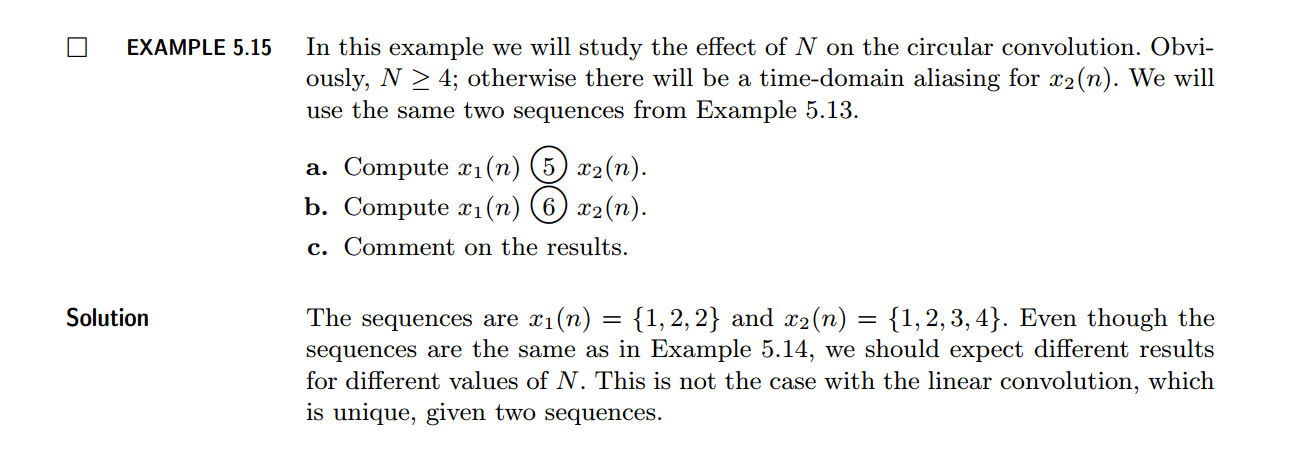
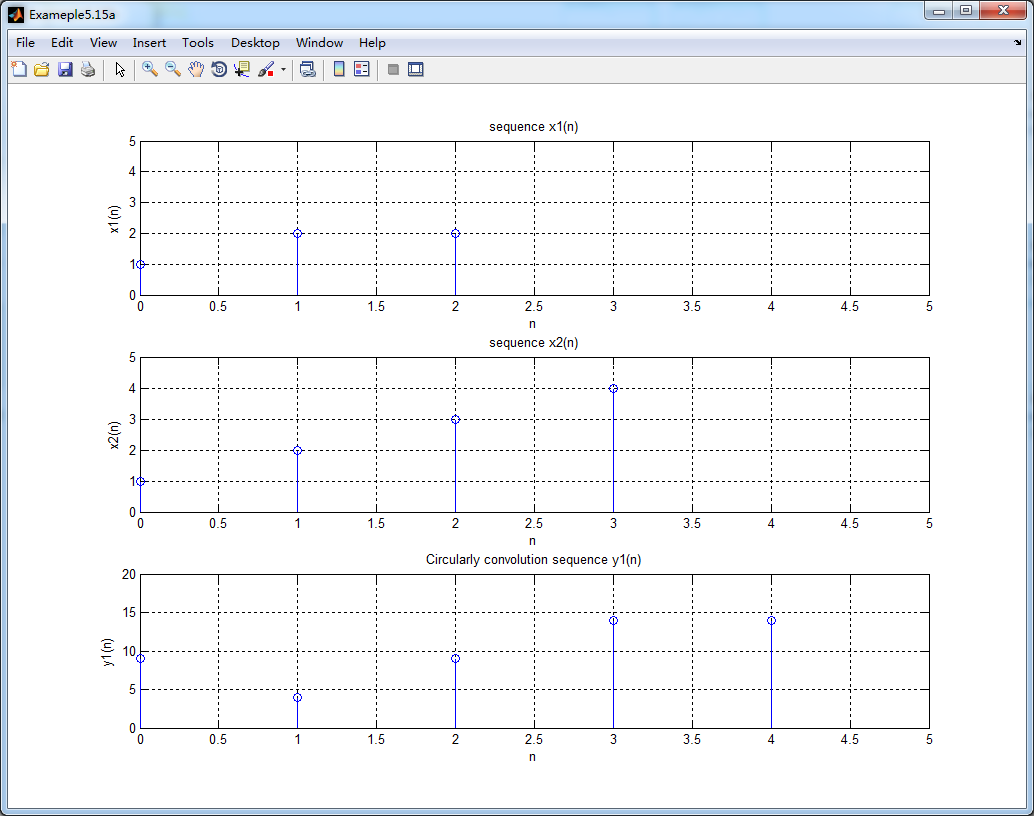
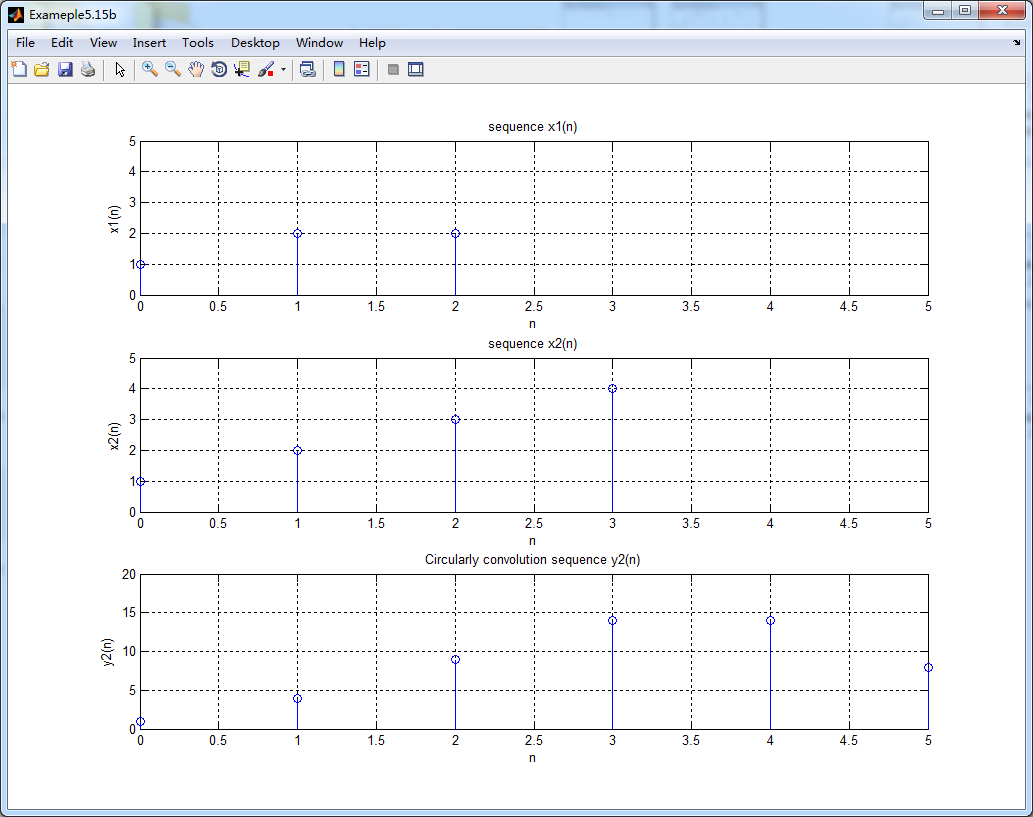
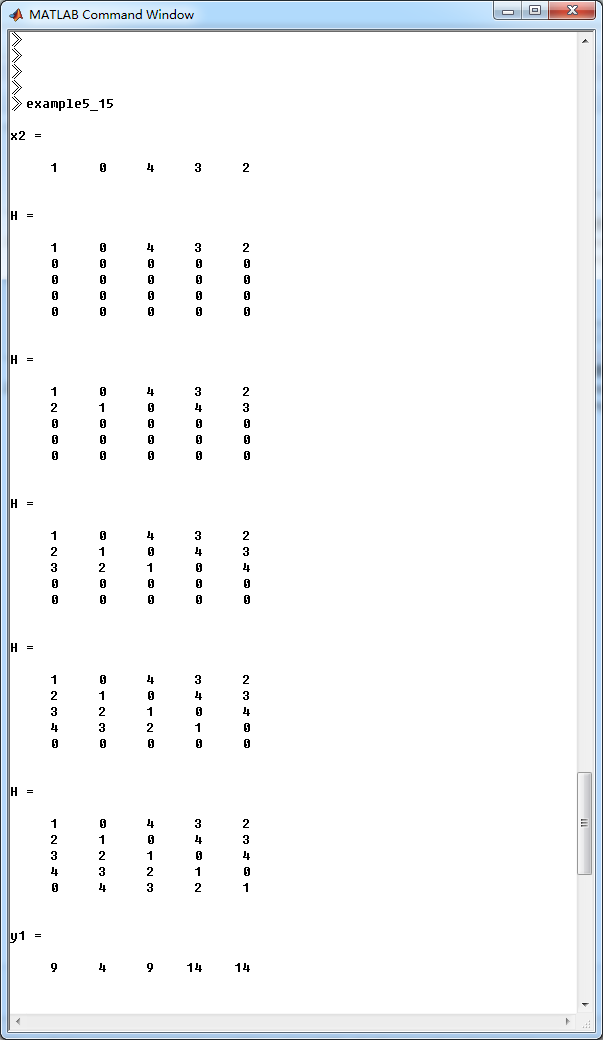
《DSP using MATLAB》示例Example5.15

代码:
x1 = [1,2,2]; x2 = [1,2,3,4]; y1 = circonvt(x1,x2,5);            % N = 5

n1 = 0:1:length(x1)-1;

n2 = 0:1:length(x2)-1;

ny1 = 0:1:length(y1)-1;

%% -----------------------------------------------------------------

%%                  START   a

%% -----------------------------------------------------------------

figure('NumberTitle', 'off', 'Name', 'Exameple5.15a ')

set(gcf,'Color','white');

subplot(3,1,1); stem(n1,x1); title('sequence x1(n)'); axis([0,5,0,5]);

xlabel('n'); ylabel('x1(n)'); grid on;

subplot(3,1,2); stem(n2,x2); title('sequence x2(n)'); axis([0,5,0,5]);

xlabel('n'); ylabel('x2(n)'); grid on;

subplot(3,1,3); stem(ny1,y1); title('Circularly convolution sequence y1(n)'); axis([0,5,0,20]);

xlabel('n'); ylabel('y1(n)'); grid on;

%% -----------------------------------------------------------------

%%                  END   a

%% -----------------------------------------------------------------

y2 = circonvt(x1,x2,6);            % N = 6

ny2 = 0:1:length(y2)-1;

%% -----------------------------------------------------------------

%%                  START   b

%% -----------------------------------------------------------------

figure('NumberTitle', 'off', 'Name', 'Exameple5.15b ')

set(gcf,'Color','white');

subplot(3,1,1); stem(n1,x1); title('sequence x1(n)'); axis([0,5,0,5]);

xlabel('n'); ylabel('x1(n)'); grid on;

subplot(3,1,2); stem(n2,x2); title('sequence x2(n)'); axis([0,5,0,5]);

xlabel('n'); ylabel('x2(n)'); grid on;

subplot(3,1,3); stem(ny2,y2); title('Circularly convolution sequence y2(n)'); axis([0,5,0,20]);

xlabel('n'); ylabel('y2(n)'); grid on;

%% -----------------------------------------------------------------

%%                  END   b

%% -----------------------------------------------------------------
结果:



《DSP using MATLAB》示例Example5.15的更多相关文章
- DSP using MATLAB 示例 Example3.15
上代码: subplot(1,1,1); b = 1; a = [1, -0.8]; n = [0:100]; x = cos(0.05*pi*n); y = filter(b,a,x); figur ...
- DSP using MATLAB 示例Example3.21
代码: % Discrete-time Signal x1(n) % Ts = 0.0002; n = -25:1:25; nTs = n*Ts; Fs = 1/Ts; x = exp(-1000*a ...
- DSP using MATLAB 示例 Example3.19
代码: % Analog Signal Dt = 0.00005; t = -0.005:Dt:0.005; xa = exp(-1000*abs(t)); % Discrete-time Signa ...
- DSP using MATLAB示例Example3.18
代码: % Analog Signal Dt = 0.00005; t = -0.005:Dt:0.005; xa = exp(-1000*abs(t)); % Continuous-time Fou ...
- DSP using MATLAB 示例 Example3.11
用到的性质 上代码: n = -5:10; x = rand(1,length(n)); k = -100:100; w = (pi/100)*k; % freqency between -pi an ...
- DSP using MATLAB 示例Example3.9
用到的性质 上代码: n = 0:100; x = cos(pi*n/2); k = -100:100; w = (pi/100)*k; % freqency between -pi and +pi ...
- DSP using MATLAB 示例Example3.8
代码: x = rand(1,11); n = 0:10; k = 0:500; w = (pi/500)*k; % [0,pi] axis divided into 501 points. X = ...
- DSP using MATLAB 示例Example3.7
上代码: x1 = rand(1,11); x2 = rand(1,11); n = 0:10; alpha = 2; beta = 3; k = 0:500; w = (pi/500)*k; % [ ...
- DSP using MATLAB示例Example3.6
代码: n = [-5:5]; x = (-0.9).^n; % x(n) = k = -200:200; w = (pi/100)*k; % [0,pi] axis divided into 101 ...
随机推荐
- 【Unity3D】AR应用中,关于东南西北方位的判断。
这篇文章的应用场景是这样子的: 首先我们要做的是一个带有LBS定位服务(比如高德地图.百度地图等)AR功能,在这个场景中,会有一些地图上的”点“(如派出所.学校)是我们需要显示在我们的AR镜头上的,如 ...
- CSS-学习笔记一
CSS(层叠样式表)做网页的外观 四种样式: 权重: 行内样式>内嵌式>链接式 1. 行内样式 <div style="color:red;font-size:30px&q ...
- 《Python核心编程》18.多线程编程(三)
18.6使用threading模块 #!/usr/bin/env python # -*- coding:utf-8 -*- """从Thread类中派生出一个子例,创建 ...
- 11月8日下午Jquery取属性值(复选框、下拉列表、单选按钮)、做全选按钮、JSON存储、去空格
1.jquery取复选框的值 <!DOCTYPE html PUBLIC "-//W3C//DTD XHTML 1.0 Transitional//EN" "htt ...
- .net core 跨平台实践
本人采用Ubuntu 14.04 来实现.net core 的跨平台实践. 首先安装Ubuntu14.04系统.安装细节问百度. 1..net core console程序的跨平台 首先新建一个con ...
- 大熊君JavaScript插件化开发------(第二季)
一,开篇分析 Hi,大家好!大熊君又和大家见面了,还记得昨天的那篇文章吗------这个系列的开篇(第一季).主要讲述了以“jQuery的方式如何开发插件”, 那么今天我们带着昨天的疑问来继续我们的插 ...
- 【译文】 GC 安全点 和安全区域
原文链接 : here 根引用 Root references 一个实例死了,意味着它变得无用.只用程序员知道一个实例是否已经无用.为了让程序知道一个实例是否已经无用,我们可以使用编译器分析,引用 ...
- 今天在学习NTP时发现了2个网站
NTP 调整系统时间 一个网站是:http://chrony.tuxfamily.org/doc/1.31/manual.html 这个是专门介绍chrony的,做的很详细. 另外一个是:http: ...
- C和指针 第十章 结构和联合 习题
1. 记账信息结构联合 typedef struct { unsigned int areaNum; unsigned int transNum; unsigned int station; } ph ...
- 使用Notepad++实现批量将ANSI转成为UTF-8编码
http://blog.sina.com.cn/s/blog_5f4150730101b3ok.html 使用Trados2011翻译英文html后,如果是单个文件,可在另存译文时选择Encoding ...