
PowerDesigner通过SQL语句生成PDM文件并将name和comment进行互相转换
本篇文章主要介绍了PowerDesigner通过SQL语句生成PDM文件并将name和comment进行互相转换 超详细过程(图文),具有一定的参考价值,感兴趣的小伙伴们可以参考一下
1.软件准备
软件:Navicat 11.1,Powerdesigner 15
2.安装步骤
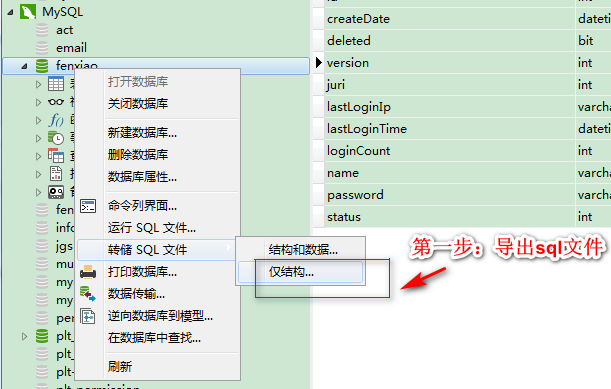
第一步:将要生成的数据库导出为sql文件
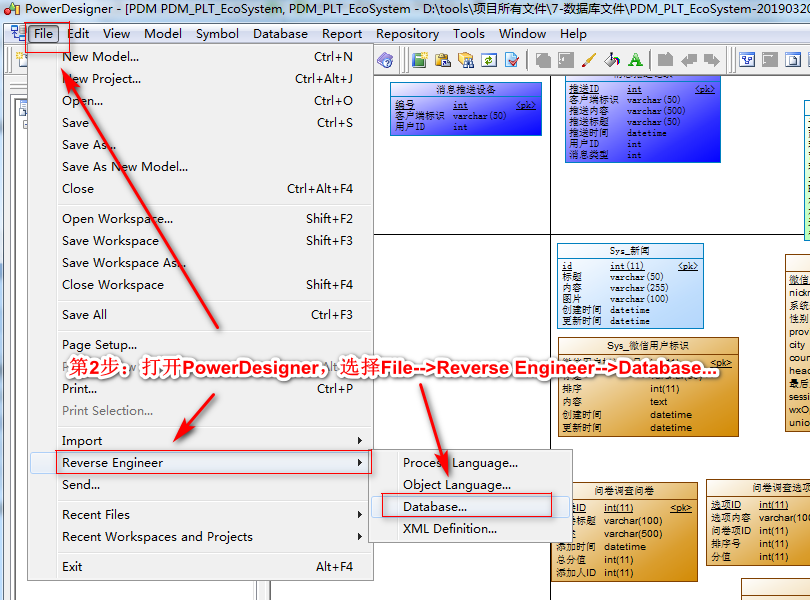
第二步:打开PowerDesigner选择File-->Reverse Engineer --> Database...
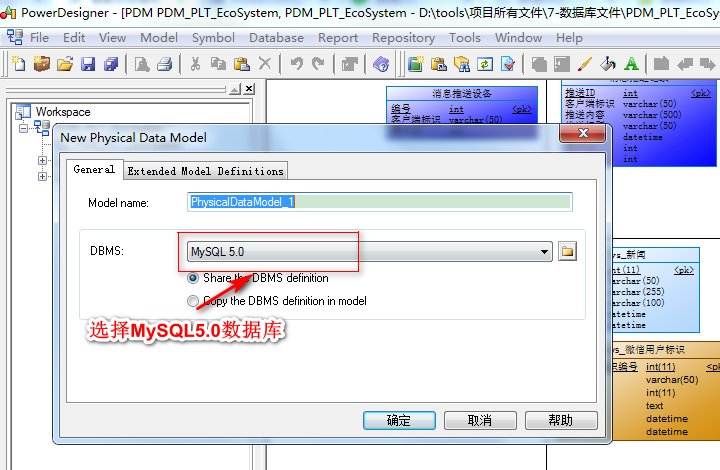
第三步:选择MySQL5.0数据库
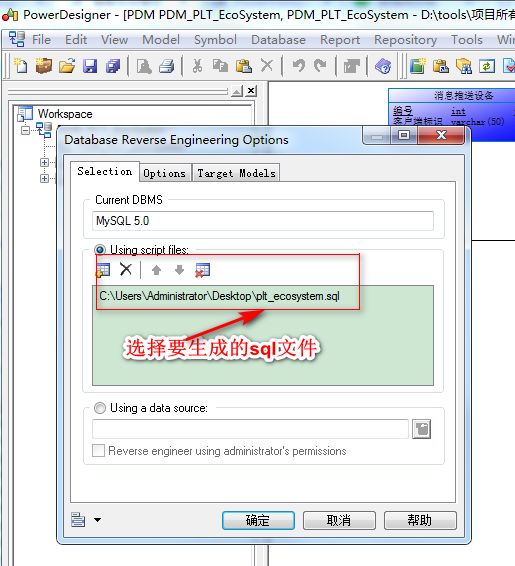
第四步:找到第一步生成的Sql文件,点击确定即可
PowerDesigner中NAME和COMMENT的互相转换,需要执行语句
由于PDM 的表中 Name 会默认=Code 所以很不方便, 所以需要将 StereoType 显示到表的外面来
打开[工具]->[显示属性](英文:Display Preferences) ->Content->Table->右边面板Columns框中 勾选: StereoType ,这样再在 StereoType中填入code字段相同内容就会显示在图形界面上了
使用说明: 在【Tools】-【Execute Commands】-【Edit/Run Script】 下。输入下面你要选择的语句即可,也可以保存起来,以便下次使用,后缀为.vbs。
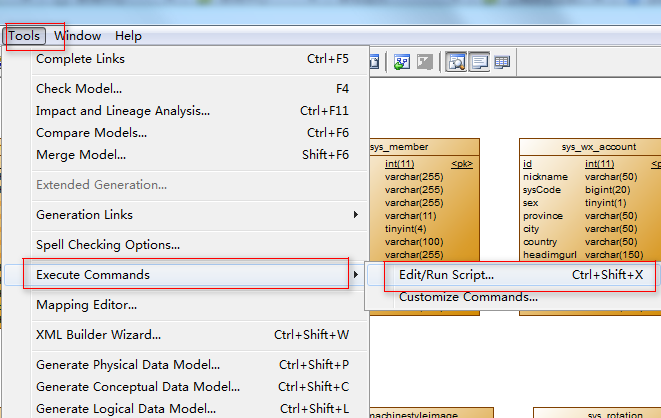
需要注意的问题是:运行语句时必须在Module模式下,如果是导出报表时执行会出现错误提示。
1.Name转到Comment注释字段。一般情况下只填写NAME,COMMENT可以运行语句自动生成。
将该语句保存为name2comment.vbs
'把pd中那么name想自动添加到comment里面

'如果comment为空,则填入name;如果不为空,则保留不变,这样可以避免已有的注释丢失.

Option   Explicit

ValidationMode   =   True

InteractiveMode   =   im_Batch

Dim   mdl   '   the   current   model

'   get   the   current   active   model

Set   mdl   =   ActiveModel

If   (mdl   Is   Nothing)   Then

      MsgBox   "There   is   no   current   Model "

ElseIf   Not   mdl.IsKindOf(PdPDM.cls_Model)   Then

      MsgBox   "The   current   model   is   not   an   Physical   Data   model. "

Else

      ProcessFolder   mdl

End   If

'   This   routine   copy   name   into   comment   for   each   table,   each   column   and   each   view

'   of   the   current   folder

Private   sub   ProcessFolder(folder)

      Dim   Tab   'running     table

      for   each   Tab   in   folder.tables

            if   not   tab.isShortcut then

                     if  trim(tab.comment)="" then'如果有表的注释,则不改变它.如果没有表注释.则把name添加到注释里面.

                        tab.comment   =   tab.name

                     end if

                  Dim   col   '   running   column

                  for   each   col   in   tab.columns

                        if trim(col.comment)="" then '如果col的comment为空,则填入name,如果已有注释,则不添加;这样可以避免已有注释丢失.

                           col.comment=   col.name

                        end if

                  next

            end   if

      next

      Dim   view   'running   view

      for   each   view   in   folder.Views

            if   not   view.isShortcut and trim(view.comment)=""  then

                  view.comment   =   view.name

            end   if

      next

      '   go   into   the   sub-packages

      Dim   f   '   running   folder

      For   Each   f   In   folder.Packages

            if   not   f.IsShortcut   then

                  ProcessFolder   f

            end   if

      Next

end   sub
2.将Comment内容保存到NAME中,comment2name.vbs 实习互换。语句为:
Option   Explicit

ValidationMode   =   True

InteractiveMode   =   im_Batch

Dim   mdl   '   the   current   model

'   get   the   current   active   model

Set   mdl   =   ActiveModel

If   (mdl   Is   Nothing)   Then

      MsgBox   "There   is   no   current   Model "

ElseIf   Not   mdl.IsKindOf(PdPDM.cls_Model)   Then

      MsgBox   "The   current   model   is   not   an   Physical   Data   model. "

Else

      ProcessFolder   mdl

End   If

Private   sub   ProcessFolder(folder)

On Error Resume Next

      Dim   Tab   'running     table

      for   each   Tab   in   folder.tables

            if   not   tab.isShortcut   then

                  tab.name   =   tab.comment

                  Dim   col   '   running   column

                  for   each   col   in   tab.columns

                  if col.comment="" then

                  else

                        col.name=   col.comment

                  end if

                  next

            end   if

      next

      Dim   view   'running   view

      for   each   view   in   folder.Views

            if   not   view.isShortcut   then

                  view.name   =   view.comment

            end   if

      next

      '   go   into   the   sub-packages

      Dim   f   '   running   folder

      For   Each   f   In   folder.Packages

            if   not   f.IsShortcut   then

                  ProcessFolder   f

            end   if

      Next

end   sub
PowerDesigner通过SQL语句生成PDM文件并将name和comment进行互相转换的更多相关文章
- PowerDesigner通过SQL语句生成PDM文件
前提: 我用的是PowerDesigner15 数据库为Mysql5.5 步骤如下: 第一步:File->New Model 点击OK创建模板就行了 备注:在创建物理模型时DBMS下拉框是空的, ...
- 使用SQL逆向生成PDM文件
首先导出表结构,可以使用Navicat 或者DataGrip 生成SQL文件后使用PowerDesigner 指定数据库类型,选择SQL文件即可
- 用PowerDesigner将SQL语句生成实体类
1.首先打开PowerDesigner,点击左上角“File”—>"Reverse Engineer"—>"Database..." 2.选择数据库 ...
- powerdesigner连接数据库 导出数据 生成PDM文件 傻瓜试教程
也可下载文档:http://download.csdn.net/detail/shutingwang/6378665
- 如何将数据库中已有表导入到powerDesigner生成pdm文件
1.create new PDM: 2.select database menu; 3.click Reverse Engineer database :4.then choose your scr ...
- powerdesigner连接postgresql数据库生成pdm及word文档
1.准备软件: powerdesigner165与postgresql的驱动:psqlodbc_11_01_0000 2.安装并破解完成powerdesigner165 参看链接:https://ww ...
- PD 之 连接数据库并导出数据及生成PDM文件
使用PowerDesigner工具,连接数据库并导出数据及生成PDM文件. 1.建立连接 “以管理员身份运行”打开PowerDesigner,右键“Workspace”→“New”→“Physical ...
- 使用pd从数据库逆向生成pdm文件
使用pd从数据库逆向生成pdm文件 好久没更新博客了,最近忙着各种事,捞了点老本行java的一些东西,浑浑噩噩,花了几天时间用java搭建了一个小项目的restful接口,深深觉得这东西论效率被nod ...
- PowerDesigner连接mysql逆向生成pdm
常用的建模工具有:PowerDesigner和ERWin,后者已快被淘汰,但前者依然活跃.相信大家都遇到过项目组已经运营很很久,但是竟然连一个ER图都没有,今天就讲解一下PowerDesigner连接 ...
随机推荐
- Codeforces Round #591 (Div. 2, based on Technocup 2020 Elimination Round 1) A. CME
链接: https://codeforces.com/contest/1241/problem/A 题意: Let's denote correct match equation (we will d ...
- MFC 树形控件
Tree Control属性:Has Buttons.Has Lines.Lines At Root这三个设为True 常用的事件:SelectChanged() ico图片放到项目的res文件夹中( ...
- 最大的矩形(CCF)
问题描述 在横轴上放了n个相邻的矩形,每个矩形的宽度是1,而第i(1 ≤ i ≤ n)个矩形的高度是hi.这n个矩形构成了一个直方图.例如,下图中六个矩形的高度就分别是3, 1, 6, 5, 2, 3 ...
- JS 定时器-setInterval、clearInterval、setTimeout
在微信小程序里写的: // pages/splash/splash.js const app = getApp() Page({ data: { remainSecond: }, // 页面渲染完成后 ...
- 路由器配置——OSPF协议(1)
一.实验目的:用OSPF协议使全网互通 二.拓扑图 三.具体步骤配置 (1)R1路由器配置 Router>enableRouter#configure terminalEnter configu ...
- c/c++读取一行可以包含空格的字符串(getline,fgets用法)
1.char[]型 char buf[1000005]; cin.getline(buf,sizeof(buf)); 多行文件输入的情况: while(cin.getline(buf,sizeof(b ...
- 括号序列的dp问题模型
括号序列的dp问题模型 Codeforces314E ◦给定一个长度为n的仅包含左括号和问号的字符串,将问号变成左括号或 右括号使得该括号序列合法,求方案总数. ◦例如(())与()()都是合法的括号 ...
- 用python来抓取“煎蛋网”上面的美女图片,尺度很大哦!哈哈
所用Python环境为:python 3.3.2 用到的库为:urllib.request re 废话不多说,先上代码: import urllib.request import re #获 ...
- INNER JOIN连接两个表、三个表、五个表的SQL语句
1.连接两个数据表的用法: FROM Member INNER JOIN MemberSort ON Member.MemberSort=MemberSort.MemberSort 语法格式可以概括为 ...
- K - Kia's Calculation(贪心)
Kia's Calculation Time Limit: 2000/1000 MS (Java/Others) Memory Limit: 32768/32768 K (Java/Others ...