
项目笔记---C#异步Socket示例
概要
在C#领域或者说.net通信领域中有着众多的解决方案,WCF,HttpRequest,WebAPI,Remoting,socket等技术。这些技术都有着自己擅长的领域,或者被合并或者仍然应用于某些场合。本文主要介绍Socket通讯,因其有着跨平台、跨语言、高性能等优势,适合某些情况的应用以及性能优越的解决方案。
本文是基于一个小项目中的应用,使用了异步方式的Socket通讯,性能上达到多客户端多点通讯,大文件(M-G级别)的文件传输,异步长连接上的性能优势,但此项目也有些不足:未进行大量的外网长时间传输测试,对不稳定的网络状况未做很好的处理,例如加入断点续传功能,对Socket传输错误(其中微软提供了大量的Socket通讯错误代码指示错误类型,请参考http://www.cnblogs.com/Aricc/archive/2010/01/29/1659134.html)未做一个很好的分类处理,只简单的统一为一个类型的错误。所以,此项目介绍只是想抛砖引玉介绍异步Socket通讯,如果有不足或改进之处,还请各位不吝指出。
同步和异步区别
这里的同步和异步指的是服务端Accept接受客户端连接请求的方式。在同步模式下,服务端要开启一个Thread线程循环监听可能来自客户端的服务,如果没有则阻塞,如果有连接则接受连接并存入Connection Pool连接池,这样一个连接(或者说一个连接线程,一般占用系统内存约为2M,具体原因请参考《CLR via C#》中线程章节),这样32位系统下单一应用程序最大内存不超过2G,也就是说,单一连接服务端所能接受客户端最大的请求数为1000(实测下为700+);而异步连接则应用非阻塞式异步连接机制(http://www.cnblogs.com/2018/archive/2011/05/10/2040333.html)BeginAccept异步接受客户端请求并执行相应请求逻辑,在执行完毕后系统能自动优化,并当再次应用时唤醒,从而达到可接受大量的客户端请求,但也限于“同时”执行的客户端数量,对于某些长连接客户端巨大,但并发性小的情景适用。
自定义协议
众所周知,在Socket通讯中传输的普通的字符串或者二进制数据流,不适用于一些复杂的情况,例如约定一个可扩展的协议,可变长协议等,所以本项目采用自定义协议类型来满足可扩展需求:
|
Header |
协议头 |
命令 |
流1长度 |
流2长度 |
|
2字节 |
4字节 |
4字节 |
4字节 |
|
|
Body |
流1 |
流2 |
||
|
N字节 |
N字节 |
|||
说明:
协议头为:FF 7E ,2字节固定值
命令为:命令编号,如1001
流1长度:Int32型指示Body中的流1的长度
流2长度:Int32型指示Body中的流2的长度
流1:字节流
流2:字节流
这样,基于上述协议可自定义流1、流2的长度分别存放不同数据,基于协议还可以对数据协议进行封装,提供公共的解析方式。
     /// <summary>

     /// 通讯二进制协议,此协议基于变长的流传输。

     /// 注:扩展此方法成员时,请重写相关方法。

     /// </summary>

     /// <remarks>

     /// Create By CYS

     /// </remarks>

     public class CommunicateProtocol : IDisposable

     {

         #region Public Properties

         /// <summary>

         /// Byte array length of flag

         /// </summary>

         public const int ByteLength_HeaderFlag = ;

         /// <summary>

         /// Byte array length of command

         /// </summary>

         public const int ByteLength_HeaderCmd = ;

         /// <summary>

         /// Byte array length of header stream1

         /// </summary>

         public const int ByteLength_HeaderStream1Len = ;

         /// <summary>

         /// Byte array length of header stream2

         /// </summary>

         public const int ByteLength_HeaderStream2Len = ;

         /// <summary>

         /// 协议头长度

         /// </summary>

         public static int FlagLen

         {

             get { return ByteLength_HeaderFlag; }

         }

         /// <summary>

         /// 命令(Int32)

         /// </summary>

         public int Command

         {

             get

             {

                 return BitConverter.ToInt32(header_Cmd, );

             }

             set

             {

                 BitConverter.GetBytes(value).CopyTo(header_Cmd, );

             }

         }

         /// <summary>

         /// 流1长度

         /// </summary>

         /// <returns></returns>

         public int Stream1Len

         {

             get

             {

                 return BitConverter.ToInt32(header_Stream1Len, );

             }

             set

             {

                 BitConverter.GetBytes(value).CopyTo(header_Stream1Len, );

             }

         }

         /// <summary>

         /// 流2长度

         /// </summary>

         /// <returns></returns>

         public int Stream2Len

         {

             get

             {

                 return BitConverter.ToInt32(header_Stream2Len, );

             }

             set

             {

                 BitConverter.GetBytes(value).CopyTo(header_Stream2Len, );

             }

         }

         #endregion Public Properties

         #region Private Properties

         private static byte[] header_Flag = new byte[ByteLength_HeaderFlag];

         private byte[] header_Cmd = new byte[ByteLength_HeaderCmd];

         private byte[] header_Stream1Len = new byte[ByteLength_HeaderStream1Len];

         private byte[] header_Stream2Len = new byte[ByteLength_HeaderStream1Len];

         private byte[] body_Stream1 = new byte[];

         private Stream body_Stream2;

         #endregion Private Properties

         #region Constructor

         /// <summary>

         /// Static constructor

         /// </summary>

         static CommunicateProtocol()

         {

             header_Flag = new byte[ByteLength_HeaderFlag] { 0xFF, 0x7E };

         }

         #endregion Constructor

         #region Public Method

         /// <summary>

         /// 判断是否是协议头标志

         /// </summary>

         /// <param name="bytes"></param>

         /// <returns></returns>

         public static bool CheckFlag(byte[] bytes)

         {

             if (bytes.Length != header_Flag.Length)

                 return false;

             if (bytes.Length != )

                 return false;

             if (!bytes[].Equals(header_Flag[]) || !bytes[].Equals(header_Flag[]))

                 return false;

             return true;

         }

         /// <summary>

         /// SetStream1

         /// </summary>

         /// <param name="sm"></param>

         public void SetStream1(byte[] sm)

         {

             body_Stream1 = sm;

         }

         /// <summary>

         /// GetStream1

         /// </summary>

         /// <returns></returns>

         public byte[] GetStream1()

         {

             return body_Stream1;

         }

         /// <summary>

         /// SetStream2

         /// </summary>

         /// <param name="sm"></param>

         public void SetStream2(Stream sm)

         {

             body_Stream2 = sm;

         }

         /// <summary>

         /// body_Stream2

         /// </summary>

         /// <returns></returns>

         public Stream GetStream2()

         {

             return body_Stream2;

         }

         /// <summary>

         /// GetHeaderBytes

         /// </summary>

         /// <returns></returns>

         public byte[] GetHeaderBytes()

         {

             int offset = ;

             byte[] bytes = new byte[ByteLength_HeaderFlag + ByteLength_HeaderCmd + ByteLength_HeaderStream1Len + ByteLength_HeaderStream2Len];

             Array.Copy(header_Flag, , bytes, , ByteLength_HeaderFlag); offset += ByteLength_HeaderFlag;

             Array.Copy(header_Cmd, , bytes, offset, ByteLength_HeaderCmd); offset += ByteLength_HeaderCmd;

             Array.Copy(header_Stream1Len, , bytes, offset, ByteLength_HeaderStream1Len); offset += ByteLength_HeaderStream1Len;

             Array.Copy(header_Stream2Len, , bytes, offset, ByteLength_HeaderStream2Len); offset += ByteLength_HeaderStream2Len;

             return bytes;

         }

         /// <summary>

         /// InitProtocolHeader

         /// </summary>

         /// <returns></returns>

         public static CommunicateProtocol InitProtocolHeader(byte[] source)

         {

             if (source.Length < ByteLength_HeaderCmd + ByteLength_HeaderStream1Len + ByteLength_HeaderStream2Len)

             {

                 throw new Exception("byte length is illegal");

             }

             byte[] header_cmd = new byte[ByteLength_HeaderCmd];

             byte[] header_stream1len = new byte[ByteLength_HeaderStream1Len];

             byte[] header_stream2len = new byte[ByteLength_HeaderStream2Len];

             Array.Copy(source, , header_cmd, , ByteLength_HeaderCmd);

             Array.Copy(source, ByteLength_HeaderCmd, header_stream1len, , ByteLength_HeaderStream1Len);

             Array.Copy(source, ByteLength_HeaderCmd + ByteLength_HeaderStream1Len, header_stream2len, , ByteLength_HeaderStream2Len);

             return new CommunicateProtocol

             {

                 Command = BitConverter.ToInt32(header_cmd, ),

                 Stream1Len = BitConverter.ToInt32(header_stream1len, ),

                 Stream2Len = BitConverter.ToInt32(header_stream2len, ),

             };

         }

         #endregion Public Method

         #region Private Method

         #endregion Private Method

         #region IDisposable 成员

         /// <summary>

         /// Dispose

         /// </summary>

         public void Dispose()

         {

             header_Cmd = null;

             header_Stream1Len = null;

             header_Stream2Len = null;

             body_Stream1 = null;

             body_Stream2 = null;

         }

         #endregion

     }
通讯机制
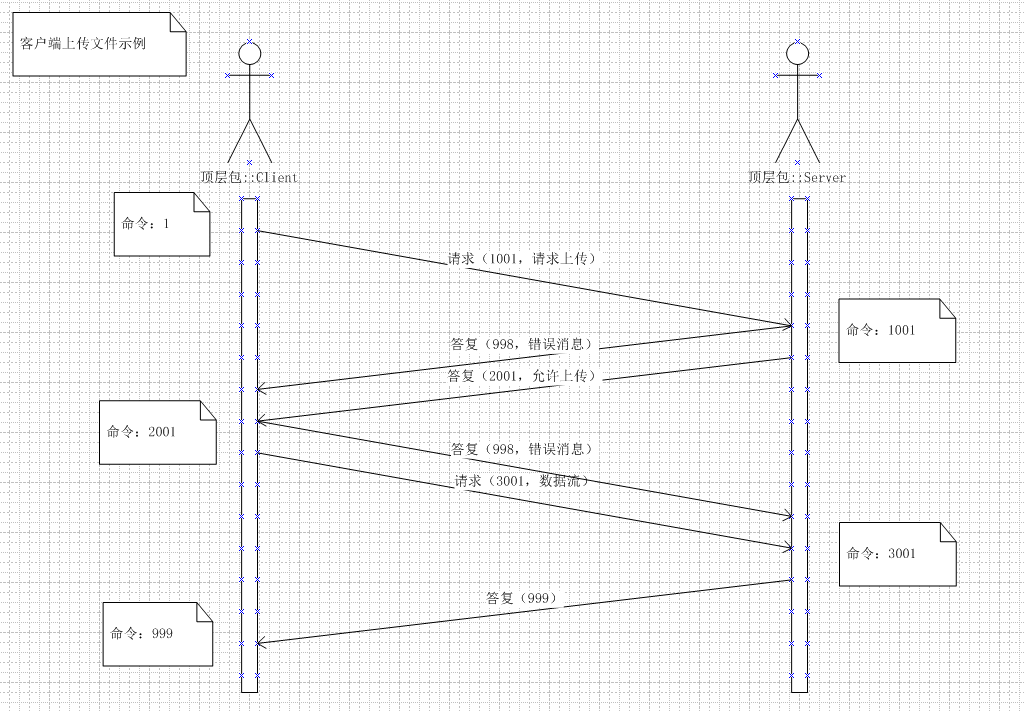
传统意义上的上传与下载请求就是,一端发起Request请求,另一端接受并答复请求内容,这样就完成了一次请求应答。然而,如果要实现更多的控制功能,就要在这“一去一回”上增加通信应答次数,类似于TCP的三次握手请求。
其中,当请求被拒绝时,应向请求端发送错误答复998,这样就可以在这个过程中建立一个完善的请求答复机制。
     public abstract class ContractAdapter

     {

         #region Public Method

         /// <summary>

         ///

         /// </summary>

         /// <param name="p"></param>

         /// <param name="s"></param>

         protected void ExecuteProtocolCommand(CommunicateProtocol p, SocketState s)

         {

             if (p == null) throw new ArgumentNullException("CommunicateProtocol is null");

             switch (p.Command)

             {

                 case : CommandWrapper(((ICommandFunc)new Command0()), p, s); break;

                 case : CommandWrapper(((ICommandFunc)new Command1()), p, s); break;

                 case : CommandWrapper(((ICommandFunc)new Command2()), p, s); break;

                 case : CommandWrapper(((ICommandFunc)new Command998()), p, s); break;

                 case : CommandWrapper(((ICommandFunc)new Command999()), p, s); break;

                 //

                 case : CommandWrapper(((ICommandFunc)new Command1001()), p, s); break;

                 case : CommandWrapper(((ICommandFunc)new Command1002()), p, s); break;

                 //

                 case : CommandWrapper(((ICommandFunc)new Command2001()), p, s); break;

                 case : CommandWrapper(((ICommandFunc)new Command2002()), p, s); break;

                 //

                 case : CommandWrapper(((ICommandFunc)new Command3001()), p, s); break;

                 default: throw new Exception("Protocol type does not exist.");

             }

         }

         /// <summary>

         ///

         /// </summary>

         /// <param name="func"></param>

         /// <param name="p"></param>

         /// <param name="s"></param>

         protected abstract void CommandWrapper(ICommandFunc func, CommunicateProtocol p, SocketState s);

         #endregion Public Method

     }
以及在“命令”中封装,下一个命令。
     /// <summary>

     ///

     /// </summary>

     public class Command1002 : ICommandFunc

     {

         #region ICommandFunc 成员

         public CommandProfile profile { get; set; }

         /// <summary>

         ///

         /// </summary>

         /// <param name="protocol"></param>

         /// <param name="state"></param>

         /// <param name="sobj"></param>

         /// <returns></returns>

         public SocketState Execute(CommunicateProtocol protocol, SocketState state, IHSSocket sobj)

         {

             state.IsReceiveThreadAlive = false;

             // Check File

             if (!FileHelper.IsFileExist(profile.UpLoadPath + profile.UpLoadFName))

             {

                 var p = ProtocolMgmt.InitProtocolHeader(, System.Text.Encoding.UTF8.GetBytes("服务端文件不存在"), null);

                 ProtocolMgmt.SendProtocol(state, p, sobj);

                 state.OutPutMsg = string.Format("Command 1002 :服务端文件不存在");

                 return state;

             }

             if (!FileHelper.CanRead(profile.UpLoadPath + profile.UpLoadFName))

             {

                 var p = ProtocolMgmt.InitProtocolHeader(, System.Text.Encoding.UTF8.GetBytes("文件已被打开或占用,请稍后重试"), null);

                 ProtocolMgmt.SendProtocol(state, p, sobj);

                 state.OutPutMsg = string.Format("Command 1002 :文件已被打开或占用");

                 return state;

             }

             FileInfo fi = new FileInfo(profile.UpLoadPath + profile.UpLoadFName);

             using (FileStream fs = new FileStream(profile.UpLoadPath + profile.UpLoadFName, FileMode.Open))

             {

                 var p = ProtocolMgmt.InitProtocolHeader(, System.Text.Encoding.UTF8.GetBytes(fi.Name), fs);

                 ProtocolMgmt.SendProtocol(state, p, sobj);

                 state.OutPutMsg = string.Format("Command 1002 :发送文件 {0} 成功。", fi.FullName);

             }

             return state;

         }

         #endregion

     }
代码结构
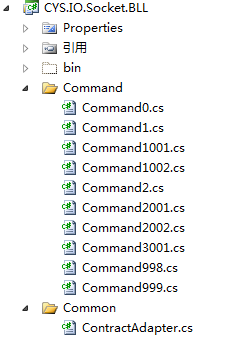
项目分为客户端和服务端,其中都依赖于BLL和Core核心类库,Core中封装的是协议头的解析方式、抽象/接口方法、Socket缓冲读取、枚举委托、异步调用基类等,BLL中主要封装的是协议命令,如Command1、Command2001等的具体实现方式。
Core:

BLL:
UI.Client:

UI.Server:
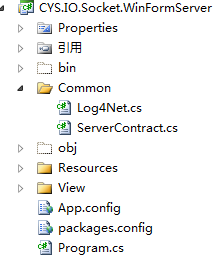
核心思想是将Command的业务需求整合进BLL层次中,而Socket基本的通讯方式等公用功能整合进Core,将UI层释放开,在UI层用Log4net等开源插件进行组合。
总结
基于文字限制,不能讲代码中的每个细节都将到,分析到,还请各位谅解,其中如有不妥之处还请不吝赐教。没有质疑,就没有进步;只有不断的思考才能更好的掌握知识。
最后将程序的源码奉上,希望对您有帮助。
GitHub Project: Here
之前做项目时,项目参考的很多引用没有记住,希望以后有时间补上。
项目中的IP地址,需要根据您的本机IP进行配置,请在WinformServer和WinformClient的Setting文件中更改,同时,还要更改其默认的上传和下载文件,这里没有写成基于OpenFile的方式只是为了演示异步Socket通讯。
引用
Socket通信错误码:http://www.cnblogs.com/Aricc/archive/2010/01/29/1659134.html
异步通讯:http://www.cnblogs.com/2018/archive/2011/05/10/2040333.html
项目笔记---C#异步Socket示例的更多相关文章
- C#异步Socket示例
C#异步Socket示例 概要 在C#领域或者说.net通信领域中有着众多的解决方案,WCF,HttpRequest,WebAPI,Remoting,socket等技术.这些技术都有着自己擅长的领域, ...
- Django商城项目笔记No.6用户部分-注册接口-短信验证码实现celery异步
Django商城项目笔记No.4用户部分-注册接口-短信验证码实现celery异步 接上一篇,如何解决前后端请求跨域问题? 首先想一下,为什么图片验证码请求的也是后端的api.meiduo.site: ...
- 异步Socket服务器与客户端
本文灵感来自Andre Azevedo 在CodeProject上面的一片文章,An Asynchronous Socket Server and Client,讲的是异步的Socket通信. S ...
- 转 网络编程学习笔记一:Socket编程
题外话 前几天和朋友聊天,朋友问我怎么最近不写博客了,一个是因为最近在忙着公司使用的一些控件的开发,浏览器兼容性搞死人:但主要是因为这段时间一直在看html5的东西,看到web socket时觉得很有 ...
- Python简易聊天工具-基于异步Socket通信
继续学习Python中,最近看书<Python基础教程>中的虚拟茶话会项目,觉得很有意思,自己敲了一遍,受益匪浅,同时记录一下. 主要用到异步socket服务客户端和服务器模块asynco ...
- AndroidAsync :异步Socket,http(client+server),websocket和socket.io的Android类库
AndroidAsync是一个用于Android应用的异步Socket,http(client+server),websocket和socket.io的类库.基于NIO,没有线程.它使用java.ni ...
- 可扩展多线程异步Socket服务器框架EMTASS 2.0 续
转载自Csdn:http://blog.csdn.net/hulihui/article/details/3158613 (原创文章,转载请注明来源:http://blog.csdn.net/huli ...
- C# 实现的多线程异步Socket数据包接收器框架
转载自Csdn : http://blog.csdn.net/jubao_liang/article/details/4005438 几天前在博问中看到一个C# Socket问题,就想到笔者2004年 ...
- C# 异步Socket
C# 异步Socket (BeginXXXX)服务器代码 前言: 1.最近维护公司的一个旧项目,是Socket通讯的,主要用于接收IPC(客户端)发送上来的抓拍图像,期间要保持通讯,监测数据包并进行处 ...
随机推荐
- nyoj 284 坦克大战 简单搜索
题目链接:http://acm.nyist.net/JudgeOnline/problem.php?pid=284 题意:在一个给定图中,铁墙,河流不可走,砖墙走的话,多花费时间1,问从起点到终点至少 ...
- input输入框focus获得焦点边缘发亮
从某个插件上摘下来的代码 <html> <head> <title> New Document </title> <style> texta ...
- 探索 OpenStack 之(14):OpenStack 中 RabbitMQ 的使用
本文是 OpenStack 中的 RabbitMQ 使用研究 两部分中的第一部分,将介绍 RabbitMQ 的基本概念,即 RabbitMQ 是什么.第二部分将介绍其在 OpenStack 中的使用. ...
- 【ASP.NET 基础】表单和控件
1.HTML表单的提交方式 对于一个普通HTML表单来说,它有两个重要的属性:action 和 method.action属性指明当前表单提交之后由哪个程序来处理,这个处理程序可以是任何动态网页或者 ...
- select2取值报错,Failed to read the 'selectionDirection' property from 'HTMLInputElement': The input element's type ('hidden') does not support selection.
用到了 select2 组件来多选收件人,用搜狗浏览器(6.2版高速模式)在执行到如下这句时报错(Uncaught InvalidStateError: Failed to read the 'sel ...
- codeforces 442B B. Andrey and Problem(贪心)
题目链接: B. Andrey and Problem time limit per test 2 seconds memory limit per test 256 megabytes input ...
- codeforces 616E Sum of Remainders (数论,找规律)
E. Sum of Remainders time limit per test 2 seconds memory limit per test 256 megabytes input standar ...
- HDU 2189 悼念512汶川大地震遇难同胞――来生一起走 --生成函数
这题跟上两题也差不多. 把150以内的素数找出来,把素数的值看做硬币的面值,每个硬币的个数即ceil(150/prime[i]),因为再多也没用,最多组成n=150就行了,所以又回到了找硬币问题.用生 ...
- 最常用的DOS命令
ping:利用它可以检查网络是否能够连通,用好它可以很好地帮助我们分析判定网络故障,如ping 127.0.0.1tracert:跟踪路由,查询到相应网站的服务器之间所需经过的路由器个数,如trace ...
- canvas仿屏幕保护运动线条
canvas是H5中及其重要的一个新标签,它得出现不仅让前端做图形图表功能变得异常强大,还用极强的性能丰富前端渲染页面的能力. Life is not a problem to be solved, ...