
基于OWIN WebAPI 使用OAuth授权服务【客户端模式(Client Credentials Grant)】
适应范围
采用Client Credentials方式,即应用公钥、密钥方式获取Access Token,适用于任何类型应用,但通过它所获取的Access Token只能用于访问与用户无关的Open API,并且需要开发者提前向开放平台申请,成功对接后方能使用。认证服务器不提供像用户数据这样的重要资源,仅仅是有限的只读资源或者一些开放的 API。例如使用了第三方的静态文件服务,如Google Storage或Amazon S3。这样,你的应用需要通过外部API调用并以应用本身而不是单个用户的身份来读取或修改这些资源。这样的场景就很适合使用客户端证书授权,通过此授权方式获取Access Token仅可访问平台授权类的接口。
比如获取App首页最新闻列表,由于这个数据与用户无关,所以不涉及用户登录与授权,但又不想任何人都可以调用这个WebAPI,这样场景就适用[例:比如微信公众平台授权]。
Client Credentials Grant:http://tools.ietf.org/html/rfc6749#section-4.4
     +---------+                                  +---------------+

     |         |                                  |               |

     |         |>--(A)- Client Authentication --->| Authorization |

     | Client  |                                  |     Server    |

     |         |<--(B)---- Access Token ---------<|               |

     |         |                                  |               |

     +---------+                                  +---------------+

                     Figure 6: Client Credentials Flow
基本流程

A.客户端提供用户名和密码交换令牌
B.认证服务器验证通过,发放令牌,后面根据这个令牌获取资源即可
服务实现
使用WEBAPI基于Microsoft.Owin.Security.OAuth实现,源码:http://katanaproject.codeplex.com/SourceControl/latest#src ;新建一个不启用身份验证空的WEBAPI项目
安装包
Install-Package Microsoft.AspNet.Identity.Owin
Install-Package Microsoft.Owin.Security.OAuthInstall-Package Microsoft.AspNet.WebApi.Owin
Install-Package Microsoft.AspNet.WebApi.WebHost
Install-Package Microsoft.Owin.Host.SystemWeb
OWIN WEBAPI
[assembly: OwinStartup(typeof(Startup))]

namespace OAuth2.App_Start

{

    public partial class Startup

    {

        public void Configuration(IAppBuilder app)

        {

            ConfigureAuth(app);

        }

    }

}

    public partial class Startup

    {

        public void ConfigureAuth(IAppBuilder app)

        {

            /*

              app.UseOAuthAuthorizationServer(new OAuthAuthorizationServerOptions

             {

                 TokenEndpointPath = new PathString("/token"),

                 Provider = new ApplicationOAuthProvider(),

                 AccessTokenExpireTimeSpan = TimeSpan.FromHours(2),

                 AuthenticationMode = AuthenticationMode.Active,

                 //HTTPS is allowed only AllowInsecureHttp = false

                 AllowInsecureHttp = true

                 //ApplicationCanDisplayErrors = false

             });

             app.UseOAuthBearerAuthentication(new OAuthBearerAuthenticationOptions());

             */

            app.UseOAuthBearerTokens(new OAuthAuthorizationServerOptions

            {

                TokenEndpointPath = new PathString("/token"),

                Provider = new ApplicationOAuthProvider(),

                //RefreshTokenProvider = new ApplicationRefreshTokenProvider(),

                AccessTokenExpireTimeSpan = TimeSpan.FromHours(2),

                AuthenticationMode = AuthenticationMode.Active,

                //HTTPS is allowed only AllowInsecureHttp = false

                AllowInsecureHttp = true

                //ApplicationCanDisplayErrors = false

            });

        }

    }

    public class ApplicationOAuthProvider : OAuthAuthorizationServerProvider

    {

        /*

         private OAuth2ClientService _oauthClientService;

         public ApplicationOAuthProvider()

         {

             this.OAuth2ClientService = new OAuth2ClientService();

         }

         */

        /// <summary>

        /// 验证客户[client_id与client_secret验证]

        /// </summary>

        /// <param name="context"></param>

        /// <returns></returns>

        public override Task ValidateClientAuthentication(OAuthValidateClientAuthenticationContext context)

        {

            //http://localhost:48339/token

            //grant_type=client_credentials&client_id=irving&client_secret=123456

            string client_id;

            string client_secret;

            context.TryGetFormCredentials(out client_id, out client_secret);

            if (client_id == "irving" && client_secret == "123456")

            {

                context.Validated(client_id);

            }

            else

            {

                //context.Response.StatusCode = Convert.ToInt32(HttpStatusCode.OK);

                context.SetError("invalid_client", "client is not valid");

            }

            return base.ValidateClientAuthentication(context);

        }

        /// <summary>

        /// 客户端授权[生成access token]

        /// </summary>

        /// <param name="context"></param>

        /// <returns></returns>

        public override Task GrantClientCredentials(OAuthGrantClientCredentialsContext context)

        {

            /*

                 var client = _oauthClientService.GetClient(context.ClientId);

                 oAuthIdentity.AddClaim(new Claim(ClaimTypes.Name, client.ClientName));

             */

            var oAuthIdentity = new ClaimsIdentity(context.Options.AuthenticationType);

            oAuthIdentity.AddClaim(new Claim(ClaimTypes.Name, "iphone"));

            var ticket = new AuthenticationTicket(oAuthIdentity, new AuthenticationProperties() { AllowRefresh = true });

            context.Validated(ticket);

            return base.GrantClientCredentials(context);

        }

        /// <summary>

        /// 刷新Token[刷新refresh_token]

        /// </summary>

        /// <param name="context"></param>

        /// <returns></returns>

        public override Task GrantRefreshToken(OAuthGrantRefreshTokenContext context)

        {

            //enforce client binding of refresh token

            if (context.Ticket == null || context.Ticket.Identity == null || !context.Ticket.Identity.IsAuthenticated)

            {

                context.SetError("invalid_grant", "Refresh token is not valid");

            }

            else

            {

                //Additional claim is needed to separate access token updating from authentication

                //requests in RefreshTokenProvider.CreateAsync() method

            }

            return base.GrantRefreshToken(context);

        }

        public override Task ValidateClientRedirectUri(OAuthValidateClientRedirectUriContext context)

        {

            if (context.ClientId == "irving")

            {

                var expectedRootUri = new Uri(context.Request.Uri, "/");

                if (expectedRootUri.AbsoluteUri == context.RedirectUri)

                {

                    context.Validated();

                }

            }

            return Task.FromResult<object>(null);

        }

    }
资源服务
    /// <summary>

    ///客户端模式【Client Credentials Grant】

    ///http://www.asp.net/web-api/overview/security/individual-accounts-in-web-api

    /// </summary>

    [RoutePrefix("api/v1/oauth2")]

    public class OAuth2Controller : ApiController

    {

        /// <summary>

        /// 获得资讯

        /// </summary>

        /// <returns></returns>

        [Authorize]

        [Route("news")]

        public async Task<IHttpActionResult> GetNewsAsync()

        {

            var authentication = HttpContext.Current.GetOwinContext().Authentication;

            var ticket = authentication.AuthenticateAsync("Bearer").Result;

            var claimsIdentity = User.Identity as ClaimsIdentity;

            var data = claimsIdentity.Claims.Where(c => c.Type == "urn:oauth:scope").ToList();

            var claims = ((ClaimsIdentity)Thread.CurrentPrincipal.Identity).Claims;

            return Ok(new { IsError = true, Msg = string.Empty, Data = Thread.CurrentPrincipal.Identity.Name + " It's about news !!! token expires: " + ticket.Properties.Dictionary.ToJson() });

        }

    }
启用授权验证[WebApiConfig]
在ASP.NET Web API中启用Token验证,需要加上[Authorize]标记,并且配置默认启用验证不记名授权方式
            // Web API configuration and services

            // Configure Web API to use only bearer token authentication.

            config.SuppressDefaultHostAuthentication();

            config.Filters.Add(new HostAuthenticationFilter(OAuthDefaults.AuthenticationType));
客户端
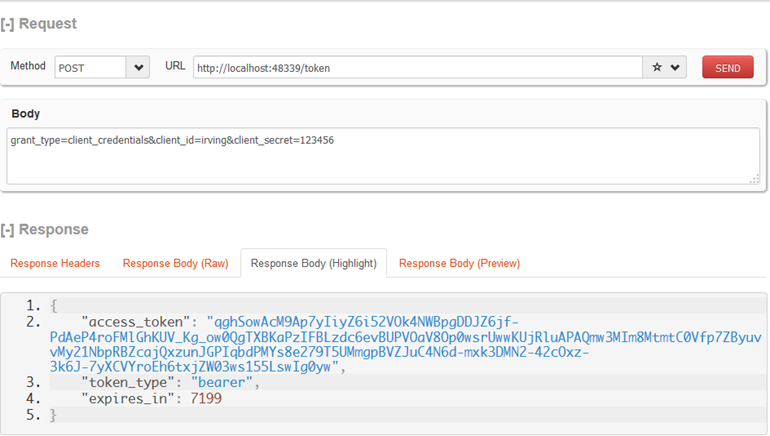
获得票据
服务端[/token]获取token需要三个参数
POST https://domain.com/token HTTP/1.1
Content-type:application/json;charset=UTF-8grant_type=client_credentials&client_id=irving&client_secret=123456
{"access_token":"qghSowAcM9Ap7yIiyZ6i52VOk4NWBpgDDJZ6jf-PdAeP4roFMlGhKUV_Kg_ow0QgTXBKaPzIFBLzdc6evBUPVOaV8Op0wsrUwwKUjRluAPAQmw3MIm8MtmtC0Vfp7ZByuvvMy21NbpRBZcajQxzunJGPIqbdPMYs8e279T5UMmgpBVZJuC4N6d-mxk3DMN2-42cOxz-3k6J-7yXCVYroEh6txjZW03ws155LswIg0yw","token_type":"bearer","expires_in":7199}
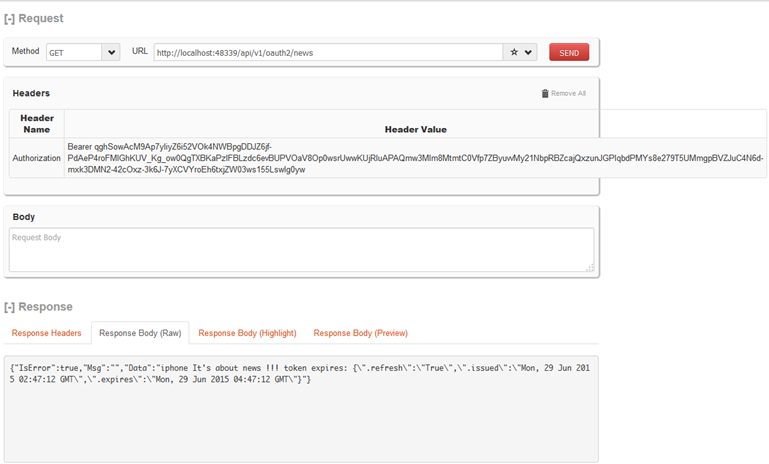
请求资源
设置HTTP头 Authorization: Bearer {THE TOKEN}
GET http://localhost:48339/api/v1/oauth2/news HTTP/1.1
Authorization: Bearer qghSowAcM9Ap7yIiyZ6i52VOk4NWBpgDDJZ6jf-PdAeP4roFMlGhKUV_Kg_ow0QgTXBKaPzIFBLzdc6evBUPVOaV8Op0wsrUwwKUjRluAPAQmw3MIm8MtmtC0Vfp7ZByuvvMy21NbpRBZcajQxzunJGPIqbdPMYs8e279T5UMmgpBVZJuC4N6d-mxk3DMN2-42cOxz-3k6J-7yXCVYroEh6txjZW03ws155LswIg0ywgrant_type=client_credentials&client_id=irving&client_secret=123456
{"IsError":true,"Msg":"","Data":"iphone It's about news !!! token expires: {\".refresh\":\"True\",\".issued\":\"Mon, 29 Jun 2015 02:47:12 GMT\",\".expires\":\"Mon, 29 Jun 2015 04:47:12 GMT\"}"}
客户端测试
    /// <summary>

    ///客户端模式【Client Credentials Grant】

    ///http://www.asp.net/web-api/overview/security/individual-accounts-in-web-api

    /// </summary>

    [RoutePrefix("api/v1/oauth2")]

    public class OAuth2Controller : ApiController

    {

        /// <summary>

        /// 获取token

        /// </summary>

        /// <returns></returns>

        [Route("token")]

        public async Task<IHttpActionResult> GetTokenAsync()

        {

            //获得token

            var dict = new SortedDictionary<string, string>();

            dict.Add("client_id", "irving");

            dict.Add("client_secret", "123456");

            dict.Add("grant_type", "client_credentials");

            var data = await (@"http://" + Request.RequestUri.Authority + @"/token").PostUrlEncodedAsync(dict).ReceiveJson<Token>();

            //根据token获得咨询信息 [Authorization: Bearer {THE TOKEN}]

            //var news = await (@"http://" + Request.RequestUri.Authority + @"/api/v1/oauth2/news").WithHeader("Authorization", "Bearer " + data.access_token).GetAsync().ReceiveString();

            var news = await (@"http://" + Request.RequestUri.Authority + @"/api/v1/oauth2/news").WithOAuthBearerToken(data.access_token).GetAsync().ReceiveString();

            return Ok(new { IsError = true, Msg = data, Data = news });

        }

    }

    public class Token

    {

        public string access_token { get; set; }

        public string token_type { get; set; }

        public string expires_in { get; set; }

    }
REFER:
Secure a Web API with Individual Accounts and Local Login in ASP.NET Web API 2.2www.asp.net/web-api/overview/security/individual-accounts-in-web-api
Use OWIN to Self-Host ASP.NET Web API 2http://www.asp.net/web-api/overview/hosting-aspnet-web-api/use-owin-to-self-host-web-api
OWIN OAuth 2.0 Authorization Serverhttp://www.asp.net/aspnet/overview/owin-and-katana/owin-oauth-20-authorization-server
ASP.Net MVC: Creating an OAuth client credentials grant type token endpointhttp://www.hackered.co.uk/articles/asp-net-mvc-creating-an-oauth-client-credentials-grant-type-token-endpoint
OwinStartup not Starting … Why?http://stackoverflow.com/questions/19760545/owinstartup-not-starting-why
[OAuth]基于DotNetOpenAuth实现Client Credentials Grant
http://www.cnblogs.com/dudu/p/oauth-dotnetopenauth-client-credentials-grant.html一些例子
http://open.koudaitong.com/doc/oauthhttp://developer.baidu.com/wiki/index.php?title=docs/oauth/client
https://wakatime.com/developers
基于OWIN WebAPI 使用OAuth授权服务【客户端模式(Client Credentials Grant)】的更多相关文章
- (转)基于OWIN WebAPI 使用OAuth授权服务【客户端模式(Client Credentials Grant)】
适应范围 采用Client Credentials方式,即应用公钥.密钥方式获取Access Token,适用于任何类型应用,但通过它所获取的Access Token只能用于访问与用户无关的Open ...
- 基于OWIN WebAPI 使用OAuth授权服务【客户端验证授权(Resource Owner Password Credentials Grant)】
适用范围 前面介绍了Client Credentials Grant ,只适合客户端的模式来使用,不涉及用户相关.而Resource Owner Password Credentials Grant模 ...
- 基于 IdentityServer3 实现 OAuth 2.0 授权服务【客户端模式(Client Credentials Grant)】
github:https://github.com/IdentityServer/IdentityServer3/ documentation:https://identityserver.githu ...
- 基于OWIN WebAPI 使用OAUTH2授权服务【授权码模式(Authorization Code)】
之前已经简单实现了OAUTH2的授权码模式(Authorization Code),但是基于JAVA的,今天花了点时间调试了OWIN的实现,基本就把基于OWIN的OAUHT2的四种模式实现完了.官方推 ...
- 基于OWIN ASP.NET WebAPI 使用OAUTH2授权服务的几点优化
前面在ASP.NET WEBAPI中集成了Client Credentials Grant与Resource Owner Password Credentials Grant两种OAUTH2模式,今天 ...
- 在ASP.NET中基于Owin OAuth使用Client Credentials Grant授权发放Token
OAuth真是一个复杂的东东,即使你把OAuth规范倒背如流,在具体实现时也会无从下手.因此,Microsoft.Owin.Security.OAuth应运而生(它的实现代码在Katana项目中),帮 ...
- .Net Core身份认证:IdentityServer4实现OAuth 2.0 客户端模式 - 简书
原文:.Net Core身份认证:IdentityServer4实现OAuth 2.0 客户端模式 - 简书 一.客户端模式介绍 客户端模式(Client Credentials Grant)是指客户 ...
- [OAuth]基于DotNetOpenAuth实现Client Credentials Grant
Client Credentials Grant是指直接由Client向Authorization Server请求access token,无需用户(Resource Owner)的授权.比如我们提 ...
- .Net Core身份认证:IdentityServer4实现OAuth 2.0 客户端模式
一.客户端模式介绍 客户端模式(Client Credentials Grant)是指客户端直接向认证服务(Authorization Server)发送认证请求,获取token,进行认证,一般适用于 ...
随机推荐
- Python自动化 【第五篇】:Python基础-常用模块
目录 模块介绍 time和datetime模块 random os sys shutil json和pickle shelve xml处理 yaml处理 configparser hashlib re ...
- [cocos2d-js]cc.RenderTexture几种用法(数字图片、刮刮乐效果)
[转]http://blog.csdn.net/realcrazysun1/article/details/42393629 本文基于cocos2d-js 3.0版本引擎开发 RenderTextur ...
- 重新认识Android
首先我们来看下源码中源于Activity的定义: public class Activity extends ContextThemeWrapper implements LayoutInflater ...
- Xshell
http://baike.baidu.com/link?url=5lc5IxVVauitYSbqlOXJBvrvM3qVfMhzz6x_xu2cOMb108Ln9Wk7iJ3f46vG0kBninKw ...
- servletconfig和servletContext的区别
1.servletConfig: 在Servlet的配置文件中,可以使用一个或多个<init-param>标签为servlet配置一些初始化参数.(配置在某个servlet标签或者整个we ...
- sublimetext
下载地址:http://www.sublimetext.com/ 详情:http://baike.baidu.com/link?url=uoObJWXyy_-zu52HuOKzfKuwHEpL2JQn ...
- poj 2446 Chessboard (二分匹配)
Chessboard Time Limit: 2000MS Memory Limit: 65536K Total Submissions: 12800 Accepted: 4000 Descr ...
- 一个简单的SNTP客户端
借鉴于python网络编程攻略 #/usr/local/bin/python3.5 #coding:utf-8 import socket, struct, time NTP_server = &qu ...
- C# 程序间通信的各种途径及解析
一.开篇 程序间通信的主要目的是实现多台计算机(也可以是同一台)中应用程序之间的数据共享与信息交换.在不同的计算机系统中,它们之间要通过网络之间的协议才能 实现数据共享与信息交换:在同一台计算机系统中 ...
- ios开发 通讯录
一.通信录开发 通信录开发主要是获取用户手机中的联系人 通过获取用户的通信录,可以在应用中添加好友等 二.如何访问用户的通讯录 在iOS9之前,有2个框架可以访问用户的通讯录 目前需要适配iOS8,所 ...