
Web从入门到放弃<2>
<添加debug-toolbar>
django现在1.11是必须这么做:
pip install django-debug-toolbar
设置1:
INSTALLED_APPS = [

    'django.contrib.admin',

    'django.contrib.auth',

    'django.contrib.contenttypes',

    'django.contrib.sessions',

    'django.contrib.messages',

    'django.contrib.staticfiles',

    'polls',

    'debug_toolbar',

]
设置2:
INTERNAL_IPS = ('127.0.0.1',)

MIDDLEWARE = [

    'django.middleware.security.SecurityMiddleware',

    'django.contrib.sessions.middleware.SessionMiddleware',

    'django.middleware.common.CommonMiddleware',

    'django.middleware.csrf.CsrfViewMiddleware',

    'django.contrib.auth.middleware.AuthenticationMiddleware',

    'django.contrib.messages.middleware.MessageMiddleware',

    'django.middleware.clickjacking.XFrameOptionsMiddleware',

    'debug_toolbar.middleware.DebugToolbarMiddleware',

]
主要的urls.py里添加:
import debug_toolbar

url(r'^__debug__/', include(debug_toolbar.urls)),
如果还没显示出来,我通过f12看了下,一个jquery-min.js没加载,是要翻墙吗!!!!!!!!!果然翻墙好了。。。。CNM的天朝,CNM的天朝CNM的天朝CNM的天朝CNM的天朝CNM的天朝CNM的天朝
实现:
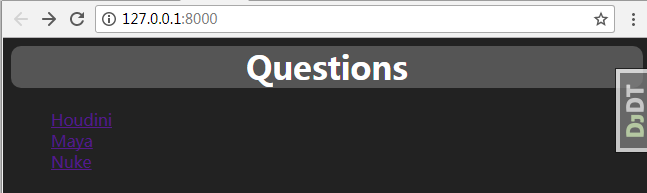
<body style="background-color: #222222">

<h1 style="text-align: center;background-color: #555555;

color:white;font-family: Source Code Pro;border-radius: 10px"> Questions </h1>

{% if latest_question_list %}

    <ul type="none">

    {% for question in latest_question_list %}

        <li style="color: white;;font-family: Source Code Pro">

            <a href="/polls/{{ question.id }}/">{{ question.question_text }}</a>

        </li>

    {% endfor %}

    </ul>

{% else %}

    <p>No polls are available.</p>

{% endif %}

</body>
index.html
对应的polls/views.py 里的index函数:
# -*- coding: utf-8 -*-

from __future__ import unicode_literals

from django.shortcuts import render

from django.http import HttpResponse,Http404

from .models import Question

from django.template import loader

from django.shortcuts import render,get_object_or_404

"""

def index(request):

    latest_question_list = Question.objects.order_by('-pub_date')[:5]

    output = ', '.join([q.question_text for q in latest_question_list])

    return HttpResponse(output)

"""

"""

def index(request):

    latest_question_list = Question.objects.order_by('-pub_date')[:5]

    print latest_question_list

    template = loader.get_template('polls/index.html')

    context = {

        'latest_question_list': latest_question_list,

    }

    return HttpResponse(template.render(context, request))

"""

def index(request):

    latest_question_list = Question.objects.all()

    context = {'latest_question_list':latest_question_list}

    return render(request,'polls/index.html',context)
修改index.html之: 主要用div的layout(参考http://www.w3school.com.cn/html/html_layout.asp)
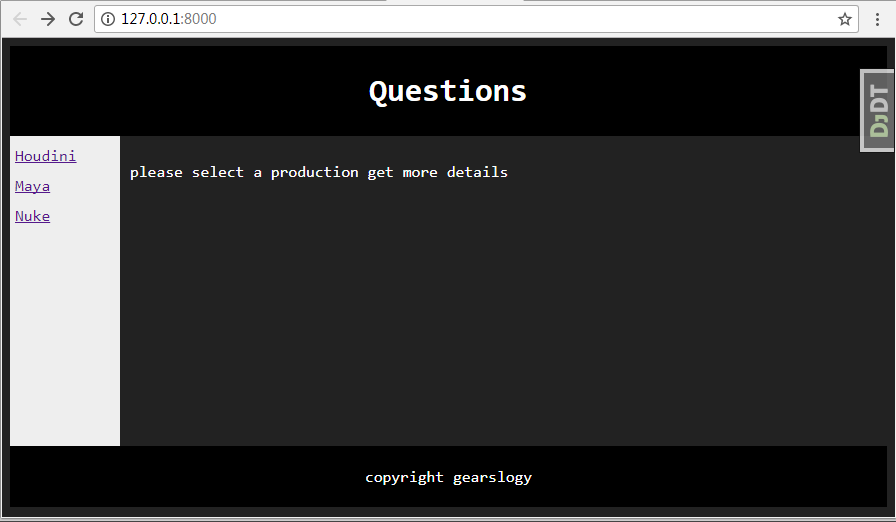
<head>

    <style>

        #header {

            background-color: black;

            color: white;

            text-align: center;

            padding: 5px;

            font-family: Consolas;

        }

        #nav {

            line-height: 30px;

            background-color: #eeeeee;

            height: 300px;

            width: 100px;

            float: left;

            padding: 5px;

            font-family: Consolas;

        }

        #section {

            width:auto;

            float: left;

            padding: 10px;

            color:white;

            text-align: center;

            font-family: Consolas;

        }

        #footer {

            background-color: black;

            color: white;

            clear: both;

            text-align: center;

            padding: 5px;

            font-family: Consolas;

        }

    </style>

</head>

<body style="background-color: #222222">

<!-- Header-->

<div id="header">

    <h1> Questions </h1>

</div>

<!-- nav -->

<div id="nav">

    {% if latest_question_list %}

        {% for question in latest_question_list %}

            <a href="/polls/{{ question.id }}/"> {{ question.question_text }}</a><br>

        {% endfor %}

    {% else %}

        <p>No polls are available.</p>

    {% endif %}

</div>

<!-- section -->

<div id="section">

<p>please select a production get more details</p>

</div>

<!-- footer -->

<div id="footer">

    <p> copyright gearslogy </p>

</div>

</body>
动态的获取跳转页面:
这样做的好处是我们现在是polls/urls.py定义的是这个路径:
url(r'^([0-9]+)/$',views.detail,name='detail'),
index.html里是:
<a href="/polls/{{ question.id }}/">{{ question.question_text }}</a>
其实这个是非常不好的方法,这个会导致你写死/polls/1
但是可以看到在urls.py里有name = 'detail',可以用下面的做法:
<a href="{% url 'detail' question.id %}"> {{question.question_text}}</a>
<!DOCTYPE html>

<html lang="en">

<head>

    <meta charset="UTF-8">

    <title>Questions</title>

</head>

<body>

{% for question in latest_question_list %}

    <ul>

        <a href="{% url 'detail' question.id %}"> {{question.question_text}}</a>

    </ul>

{% endfor %}

</body>

</html>
从下面开始将用python3开始项目。受不了文档中他妈的各种部适合
<1>数据库再次尝试:
查看models的api如何工作的:
from django.db import models

import datetime

from django.utils import timezone

# Create your models here.

class Question(models.Model):

    question_text = models.CharField(max_length= 200,help_text='Question text')

    pub_date = models.DateTimeField('data published')

    def __str__(self):

        return self.question_text

    def was_published_recently(self):

        return self.pub_date >= timezone.now() - datetime.timedelta(days=1)

class Choice(models.Model):

    question = models.ForeignKey(Question,on_delete=models.CASCADE)

    choice_text = models.CharField(max_length =200)

    votes = models.IntegerField(default=0)

    def __str__(self):

        return self.choice_text

class RelativeStuff(models.Model):

    question = models.ForeignKey(Question,on_delete=models.CASCADE)

    stuff_name = models.CharField(max_length = 200)
models.py
Choice和RelativeStuff都关联了Question
则Question类会有个动态对象是choice_set , relativestuff_set
如果
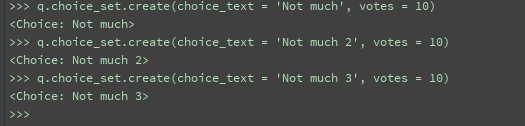
q = Question.objects.get(id=1) # 获取一个Question对象
q.choice_set.create(choice_text = 'Not much', votes = 10) #直接会插入数据库中
如下执行3次:
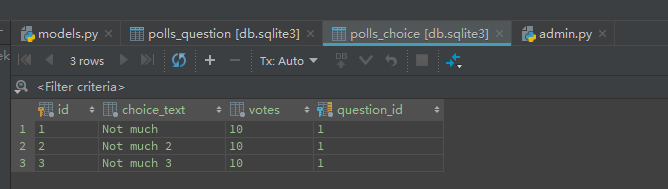
数据库直接就插入数据:
<2>1天撸一个表格程序:

实现细节: 静态文件:
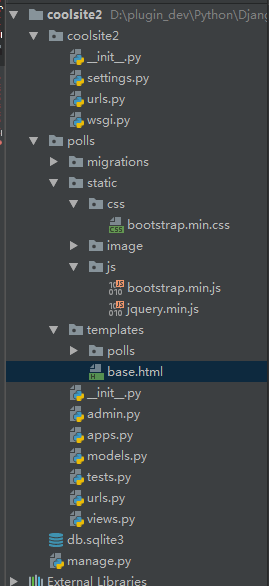
要在你的html引用static文件:
{% load staticfiles %}
然后:
<head>

    <meta charset="utf-8">

    <title> Gearslogy</title>

    <link rel="stylesheet" href="{% static 'css/bootstrap.min.css' %}">

    <script src="{% static 'js/jquery.min.js' %}"></script>

    <script src="{% static 'js/bootstrap.min.js' %}"></script>

</head>
base.html:
{% load staticfiles %}

<!DOCTYPE html>

<html>

<head>

    <meta charset="utf-8">

    <title> Gearslogy</title>

    <link rel="stylesheet" href="{% static 'css/bootstrap.min.css' %}">

    <script src="{% static 'js/jquery.min.js' %}"></script>

    <script src="{% static 'js/bootstrap.min.js' %}"></script>

</head>

<body>

<nav class="navbar navbar-inverse navbar-fixed-top" role="navigation" >

    <div class="container-fluid" >

    <div class="navbar-header">

        <a class="navbar-brand" href="{% url 'polls:index' %}">Home</a>

    </div>

    <div>

        <ul class="nav navbar-nav" >

            <li class="active"><a href="">Tables</a></li>

            <li class="dropdown">

                <a href="#" class="dropdown-toggle" data-toggle="dropdown">

                    Products <b class="caret"></b>

                </a>

                <ul class="dropdown-menu">

                    {% for question in question_list %}

                        <li><a href="{% url 'polls:detail' question.id %}"> {{ question.question_text }} </a></li>

                    {% endfor %}

                </ul>

            </li>

        </ul>

    </div>

    </div>

</nav>

<br>

<br>

<br>

<div>

    {% block primary %} {% endblock %}

</div>>

</body>

</html>
主页index.html
{% extends "base.html" %}

{% block primary %}

<table class="table table-hover">

  <caption>悬停表格布局</caption>

  <thead>

    <tr>

        {% for h in header %}

            <td> {{ h }} </td>

        {% endfor %}

    </tr>

  </thead>

  <tbody>

    <tr>

      <td>Tanmay</td>

      <td>Bangalore</td>

      <td>560001</td>

    </tr>

    <tr>

      <td>Sachin</td>

      <td>Mumbai</td>

      <td>400003</td>

    </tr>

    <tr>

      <td>Uma</td>

      <td>Pune</td>

      <td>411027</td>

    </tr>

  {% for sd in data %}

      <tr>

          {% for d in sd  %}

              <td>{{ d }}</td>

          {% endfor %}

      </tr>

  {% endfor %}

  </tbody>

</table>

{% endblock %}
另外一个细节:如果你要漏油一个图片:
views.py
def viewImage(request):

    return HttpResponse('<img src="/static/image/test.jpg"> HelloWorld </img>')
urls.py
from django.urls import path

from . import views

app_name = 'polls'

urlpatterns = [

    path('',views.index,name='index'),

    path('<int:question_id>/',views.detail,name='detail'),

    path('<int:question_id>/results/',views.results,name='results'),

    path('<int:question_id>/vote/',views.vote,name='vote'),

    path('view/',views.viewImage,name='viewImage'),

]
Web从入门到放弃<2>的更多相关文章
- Web从入门到放弃<8>
Ref: Cameron D. - HTML5, JavaScript and jQuery (Programmer to Programmer) - 2015 http://www.runoob.c ...
- Web从入门到放弃<7>
从这章开始读<javascript高级程序设计> <1>typeof 返回字符串 / 类型 未定义:undefined 布尔:boolean 字符串:string 数值:num ...
- Web从入门到放弃<5>
<1> CSS_DOM 1,structural layer 2,presentation layer 3,behavior layer style也是一个属性 <!DOCTYPE ...
- Web从入门到放弃<1>
HTML大法: <01> <!DOCTYPE html> <html lang="en"> <head> <meta char ...
- Web从入门到放弃<6>
<1> Canvas. 1,灰度图: js: function showAsGray() { var imgNode = document.getElementById('img'); ...
- Web从入门到放弃<4>
1,插入 如下html: <!DOCTYPE html> <html lang="en"> <head> <meta charset=&q ...
- Web从入门到放弃<3>
UI简单的美化全部来源于Bootstrap 知识来自<javascript dom编程艺术第二版> <1> 点击列表 页面不跳转图片刷新: 主要点: href如何点击完如何不 ...
- 后端API入门到放弃指北
后端API入门学习指北 了解一下一下概念. RESTful API标准] 所有的API都遵循[RESTful API标准]. 建议大家都简单了解一下HTTP协议和RESTful API相关资料. 阮一 ...
- OpenStack从入门到放弃
OpenStack从入门到放弃 目录: 为何选择云计算/云计算之前遇到的问题 什么是云计算 云服务模式 云应用形式 传统应用与云感知应用 openstack及其相关组件介绍 flat/vlan/gre ...
随机推荐
- loc iloc函数的区别
import pandas as pd data1 = pd.read_excel(r"G:\Python\example1.xlsx") loc 用行列标签,iloc用数字索引. ...
- Linux内存管理 (22)内存检测技术(slub_debug/kmemleak/kasan)
专题:Linux内存管理专题 关键词:slub_debug.kmemleak.kasan.oob.Redzone.Padding. Linux常见的内存访问错误有: 越界访问(out of bound ...
- 【区块链】【一】Hash 算法【转】
问题导读1.哈希算法在区块链的作用是什么?2.什么是哈希算法?3.哈希算法是否可逆?4.比特币采用的是什么哈希算法? 作用在学习哈希算法前,我们需要知道哈希在区块链的作用哈希算法的作用如下:区块链通过 ...
- SpringCloud(6)分布式配置中心Spring Cloud Config
1.Spring Cloud Config 简介 在分布式系统中,由于服务数量巨多,为了方便服务配置文件统一管理,实时更新,所以需要分布式配置中心组件.在Spring Cloud中,有分布式配置中心组 ...
- 在QT中使用C/C++, 在linux下生成 .so, 并调用 .so
时间不早了, 先下班了... 明天再写..
- spring和mybatis的整合配置
参考自: http://www.cnblogs.com/wangmingshun/p/5674633.html 链接中的文章里一共有三种整合方式,太多了怕记混了. 我这里只保留第二种. spring中 ...
- SpringBoot之普通类获取Spring容器中的bean
package com.geostar.geostack.git_branch_manager.common; import org.springframework.beans.BeansExcept ...
- Quartus13.1全编译出现引脚错误(神级bug)
BUG现象:分配完管脚后全编译出现如下错误. Error (171172):Detected confilicting assignments for the following nodes.Erro ...
- 【BZOJ5495】[十二省联考2019]异或粽子(主席树,贪心)
[BZOJ5495][十二省联考2019]异或粽子(主席树,贪心) 题面 BZOJ 洛谷 题解 这不是送分题吗... 转异或前缀和,构建可持久化\(Trie\). 然后拿一个堆维护每次的最大值,每次如 ...
- yii2 redirect重定向
redirect使用方法 $this->redirect(array('/site/contact','id'=>12)); //http://www.kuitao8.com/testwe ...