
Unity - 无限滚动
今天学习:Unity - UGUI - 无限滚动
目录
版本:
1、Unity 2020.3.10f1
时隔多周,在这里分享出来一点最近的功能吧。
借助UGUI - ScrollView,进行更改,并且实现无限滑动!!!!!!!!
一:思路分享(Share idea)
大概就是下边这个巨作的思路,希望对大家有个思想考量方向,不过不能因为我而放弃了自己的想法,适合自己的才是最好的。说不定你自己的思路比我的还好,不过功能要的快,所以我就百度了,发现早就有大佬们实现了,所以找了一篇下来,刚好满足需求。不过我还是要把自己思路分享出来!!!
画画技术水平有限,见谅。。。。。。。
1、上来获取最上一排的位置信息和宽高度;
2、设置一个触发高度/宽度位置;
3、当再移动的过程中每排最指定节点的高度大于/小于,指定触发点时,重新设置位置到第一排/最后一排的位置,反复如此。
4、在更改位置时,对要被更改的子节点进行设置相关索引或者其他一系列操作。

二:脚本编写(Scripts)
1、既然是要实现无限滑动,那我们就先来编写第一个相关脚本:InfinityGridLayoutGroup
using System.Collections;
using System.Collections.Generic;
using UnityEngine;
using UnityEngine.UI;
namespace ThisXHGame
{
/// <summary>
/// 无限滑动
/// </summary>
[RequireComponent(typeof(GridLayoutGroup))]
[RequireComponent(typeof(ContentSizeFitter))]
public class InfinityGridLayoutGroup : MonoBehaviour
{
/* 要确定当前所属canvas的rect下方scale缩放比例,要与之保持一样。 */
float _scale = 0.061f;
/* 实现无限滚动,需要的最少的child数量。
* 屏幕上能看到的+一行看不到的,比如我在屏幕上能看到 4 行,每一行 3 个。
* 则这个值为 4行 * 3个 + 1行 * 3个 = 15个。*/
int childrenAmount = 0;
#region Private Attribute
ScrollRect scrollRect;
RectTransform rectTransform;
GridLayoutGroup gridLayoutGroup;
ContentSizeFitter contentSizeFitter;
List<RectTransform> children = new List<RectTransform>();
int amount = 0;
int constraintCount;
int realIndex = -1;
float childHeight;
bool hasInit = false;
Vector2 startPosition;
Vector2 gridLayoutSize;
Vector2 gridLayoutPos;
Dictionary<Transform, Vector2> childsAnchoredPosition = new Dictionary<Transform, Vector2>();
Dictionary<Transform, int> childsSiblingIndex = new Dictionary<Transform, int>();
#endregion
public delegate void UpdateChildrenCallbackDelegate(int index, Transform trans);
public UpdateChildrenCallbackDelegate updateChildrenCallback = null;
void Start() => childrenAmount = transform.childCount;
IEnumerator InitChildren()
{
yield return 0;
if (!hasInit)
{
//获取Grid的宽度;
rectTransform = GetComponent<RectTransform>();
gridLayoutGroup = GetComponent<GridLayoutGroup>();
gridLayoutGroup.enabled = false;
constraintCount = gridLayoutGroup.constraintCount;
childHeight = gridLayoutGroup.cellSize.y;
contentSizeFitter = GetComponent<ContentSizeFitter>();
contentSizeFitter.enabled = false;
gridLayoutPos = rectTransform.anchoredPosition;
gridLayoutSize = rectTransform.sizeDelta;
//注册ScrollRect滚动回调;
scrollRect = transform.parent.GetComponent<ScrollRect>();
scrollRect.onValueChanged.AddListener((data) => { ScrollCallback(data); });
//获取所有child anchoredPosition 以及 SiblingIndex;
for (int index = 0; index < childrenAmount; index++)
{
Transform child = transform.GetChild(index);
RectTransform childRectTrans = child.GetComponent<RectTransform>();
childsAnchoredPosition.Add(child, childRectTrans.anchoredPosition);
childsSiblingIndex.Add(child, child.GetSiblingIndex());
}
}
else
{
rectTransform.anchoredPosition = gridLayoutPos;
rectTransform.sizeDelta = gridLayoutSize;
children.Clear();
realIndex = -1;
//children重新设置上下顺序;
foreach (var info in childsSiblingIndex)
{
info.Key.SetSiblingIndex(info.Value);
}
//children重新设置anchoredPosition;
for (int index = 0; index < childrenAmount; index++)
{
Transform child = transform.GetChild(index);
RectTransform childRectTrans = child.GetComponent<RectTransform>();
if (childsAnchoredPosition.ContainsKey(child))
{
childRectTrans.anchoredPosition = childsAnchoredPosition[child];
}
else
{
Debug.LogError("Unity Error Log : childs Anchored Position are no contain " + child.name);
}
}
}
//int needCount = (minAmount < amount) ? minAmount : amount;
//获取所有child;
for (int _idx = 0; _idx < childrenAmount; _idx++)
{
Transform child = transform.GetChild(_idx);
child.gameObject.SetActive(true);
RectTransform rect = child.GetComponent<RectTransform>();
children.Add(rect);
//初始化前面几个;
if (_idx < amount)
{
UpdateChildrenInfoCallback(_idx, child);
}
}
startPosition = rectTransform.anchoredPosition;
realIndex = children.Count - 1;
//Debug.Log( scrollRect.transform.TransformPoint(Vector3.zero));
//Debug.Log(transform.TransformPoint(children[0].localPosition));
hasInit = true;
//如果需要显示的个数小于设定的个数;
for (int index = 0; index < childrenAmount; index++)
{
children[index].gameObject.SetActive(index < amount);
}
if (gridLayoutGroup.constraint == GridLayoutGroup.Constraint.FixedColumnCount)
{
//如果小了一行,则需要把GridLayout的高度减去一行的高度;
int row = (childrenAmount - amount) / constraintCount;
//Debug.Log($"---------minAmount = {minAmount}----amount = {amount}-----constraintCount = {constraintCount}-------row = {row}--- ");
if (row > 0)
{
rectTransform.sizeDelta -= new Vector2(0, (gridLayoutGroup.cellSize.y + gridLayoutGroup.spacing.y) * row);
}
}
else
{
//如果小了一列,则需要把GridLayout的宽度减去一列的宽度;
int column = (childrenAmount - amount) / constraintCount;
if (column > 0)
{
rectTransform.sizeDelta -= new Vector2((gridLayoutGroup.cellSize.x + gridLayoutGroup.spacing.x) * column, 0);
}
}
}
/// <summary>
/// 设置总的个数;
/// </summary>
/// <param name="count">总个数</param>
public void InitSetAmount(int count)
{
amount = count;
StartCoroutine(InitChildren());
}
/// <summary>
/// 滑动回调
/// </summary>
void ScrollCallback(Vector2 data)
{
if (data.y >= 1.0f)
return;
UpdateChildrenInfo();
}
/// <summary>
/// 子物体的更改
/// </summary>
void UpdateChildrenInfo()
{
if (childrenAmount < transform.childCount)
return;
Vector2 currentPos = rectTransform.anchoredPosition;
if (gridLayoutGroup.constraint == GridLayoutGroup.Constraint.FixedColumnCount)
{
float offsetY = currentPos.y - startPosition.y;
//Debug.Log("offsetY is " + (offsetY > 0.0f));
if (offsetY > 0)
{
//向上拉,向下扩展;
{
if (realIndex >= amount - 1)
{
startPosition = currentPos;
return;
}
float scrollRectUp = scrollRect.transform.TransformPoint(Vector3.zero).y;
Vector3 childBottomLeft = new Vector3(children[0].anchoredPosition.x, children[0].anchoredPosition.y - gridLayoutGroup.cellSize.y, 0f);
float childBottom = transform.TransformPoint(childBottomLeft).y;
if (childBottom >= scrollRectUp + childHeight * _scale)
{
//移动到底部;
for (int index = 0; index < constraintCount; index++)
{
children[index].SetAsLastSibling();
children[index].anchoredPosition = new Vector2(children[index].anchoredPosition.x, children[children.Count - 1].anchoredPosition.y - gridLayoutGroup.cellSize.y - gridLayoutGroup.spacing.y);
realIndex++;
if (realIndex > amount - 1)
{
children[index].gameObject.SetActive(false);
}
else
{
UpdateChildrenInfoCallback(realIndex, children[index]);
}
}
//GridLayoutGroup 底部加长;
rectTransform.sizeDelta += new Vector2(0, gridLayoutGroup.cellSize.y + gridLayoutGroup.spacing.y);
//更新child;
for (int index = 0; index < children.Count; index++)
{
children[index] = transform.GetChild(index).GetComponent<RectTransform>();
}
}
}
}
else
{
//向下拉,下面收缩;
if (realIndex + 1 <= children.Count)
{
startPosition = currentPos;
return;
}
RectTransform scrollRectTransform = scrollRect.GetComponent<RectTransform>();
Vector3 scrollRectAnchorBottom = new Vector3(0, -scrollRectTransform.rect.height - gridLayoutGroup.spacing.y, 0f);
float scrollRectBottom = scrollRect.transform.TransformPoint(scrollRectAnchorBottom).y;
Vector3 childUpLeft = new Vector3(children[children.Count - 1].anchoredPosition.x, children[children.Count - 1].anchoredPosition.y, 0f);
float childUp = transform.TransformPoint(childUpLeft).y;
if (childUp < scrollRectBottom)
{
//把底部的一行 移动到顶部
for (int index = 0; index < constraintCount; index++)
{
children[children.Count - 1 - index].SetAsFirstSibling();
children[children.Count - 1 - index].anchoredPosition = new Vector2(children[children.Count - 1 - index].anchoredPosition.x, children[0].anchoredPosition.y + gridLayoutGroup.cellSize.y + gridLayoutGroup.spacing.y);
children[children.Count - 1 - index].gameObject.SetActive(true);
UpdateChildrenInfoCallback(realIndex - children.Count - index, children[children.Count - 1 - index]);
}
realIndex -= constraintCount;
//GridLayoutGroup 底部缩短;
rectTransform.sizeDelta -= new Vector2(0, gridLayoutGroup.cellSize.y + gridLayoutGroup.spacing.y);
//更新child;
for (int index = 0; index < children.Count; index++)
{
children[index] = transform.GetChild(index).GetComponent<RectTransform>();
}
}
}
}
else
{
float offsetX = currentPos.x - startPosition.x;
if (offsetX < 0)
{
//向左拉,向右扩展;
{
if (realIndex >= amount - 1)
{
startPosition = currentPos;
return;
}
float scrollRectLeft = scrollRect.transform.TransformPoint(Vector3.zero).x;
Vector3 childBottomRight = new Vector3(children[0].anchoredPosition.x + gridLayoutGroup.cellSize.x, children[0].anchoredPosition.y, 0f);
float childRight = transform.TransformPoint(childBottomRight).x;
if (childRight <= scrollRectLeft)
{
//移动到右边;
for (int index = 0; index < constraintCount; index++)
{
children[index].SetAsLastSibling();
children[index].anchoredPosition = new Vector2(children[children.Count - 1].anchoredPosition.x + gridLayoutGroup.cellSize.x + gridLayoutGroup.spacing.x, children[index].anchoredPosition.y);
realIndex++;
if (realIndex > amount - 1)
{
children[index].gameObject.SetActive(false);
}
else
{
UpdateChildrenInfoCallback(realIndex, children[index]);
}
}
//GridLayoutGroup 右侧加长;
rectTransform.sizeDelta += new Vector2(gridLayoutGroup.cellSize.x + gridLayoutGroup.spacing.x, 0);
//更新child;
for (int index = 0; index < children.Count; index++)
{
children[index] = transform.GetChild(index).GetComponent<RectTransform>();
}
}
}
}
else
{
//向右拉,右边收缩;
if (realIndex + 1 <= children.Count)
{
startPosition = currentPos;
return;
}
RectTransform scrollRectTransform = scrollRect.GetComponent<RectTransform>();
Vector3 scrollRectAnchorRight = new Vector3(scrollRectTransform.rect.width + gridLayoutGroup.spacing.x, 0, 0f);
float scrollRectRight = scrollRect.transform.TransformPoint(scrollRectAnchorRight).x;
Vector3 childUpLeft = new Vector3(children[children.Count - 1].anchoredPosition.x, children[children.Count - 1].anchoredPosition.y, 0f);
float childLeft = transform.TransformPoint(childUpLeft).x;
if (childLeft >= scrollRectRight)
{
//把右边的一行 移动到左边;
for (int index = 0; index < constraintCount; index++)
{
children[children.Count - 1 - index].SetAsFirstSibling();
children[children.Count - 1 - index].anchoredPosition = new Vector2(children[0].anchoredPosition.x - gridLayoutGroup.cellSize.x - gridLayoutGroup.spacing.x, children[children.Count - 1 - index].anchoredPosition.y);
children[children.Count - 1 - index].gameObject.SetActive(true);
UpdateChildrenInfoCallback(realIndex - children.Count - index, children[children.Count - 1 - index]);
}
//GridLayoutGroup 右侧缩短;
rectTransform.sizeDelta -= new Vector2(gridLayoutGroup.cellSize.x + gridLayoutGroup.spacing.x, 0);
//更新child;
for (int index = 0; index < children.Count; index++)
{
children[index] = transform.GetChild(index).GetComponent<RectTransform>();
}
realIndex -= constraintCount;
}
}
}
startPosition = currentPos;
}
/// <summary>
/// 更新回调
/// </summary>
/// <param name="index">当前索引</param>
/// <param name="trans">当前物体</param>
void UpdateChildrenInfoCallback(int index, Transform trans)
{
updateChildrenCallback?.Invoke(index, trans);
}
}
}
2、那我们有了相关脚本,我们就需要去编写相关控制脚本咯:TheInfinityScrollController
using UnityEngine;

using UnityEngine.UI;

namespace ThisXHGame

{

    /// <summary>

    /// 无限滑动控制器

    /// </summary>

    public class TheInfinityScrollController : MonoBehaviour

    {

        InfinityGridLayoutGroup infinityGridLayoutGroup;

        void Start()

        {

            初始化数据列表;

            infinityGridLayoutGroup =

GameObject.FindObjectOfType<InfinityGridLayoutGroup>();

            infinityGridLayoutGroup.updateChildrenCallback = UpdateChildrenCallback;

            for (int i = 0; i < infinityGridLayoutGroup.transform.childCount; i++)

            {

                Transform child = infinityGridLayoutGroup.transform.GetChild(i);

                child.GetComponent<Button>().onClick.AddListener(() =>

                {

                    OnClickButtonWithIndex(child.GetComponentInChildren<Text>());

                });

            }

            infinityGridLayoutGroup.InitSetAmount(100);

        }

        /// <summary>

        /// 通过当前缩略图索引从ios相册获取原图

        /// </summary>

        void OnClickButtonWithIndex(Text tex)

        {

            Debug.Log($" Unity log:     index is {tex.text} in your click

button...");

        }

        /// <summary>

        /// 上下翻滚更新函数

        /// </summary>

        void UpdateChildrenCallback(int indx, Transform trans)

        {

            Text tex = trans.Find("Text").GetComponent<Text>();

            tex.text = indx.ToString();

        }

    }

}
至此,我们全部代码已经编写完了。
三:场景面板布置(Hierarchy)
1、那既然是借助了ScrollView,那我们就先看相关设置。这里我们把ScrollView下的Viewport、Scrollbar Horizontal、Scrollbar Vertical全部删除,因为我们不需要他们。
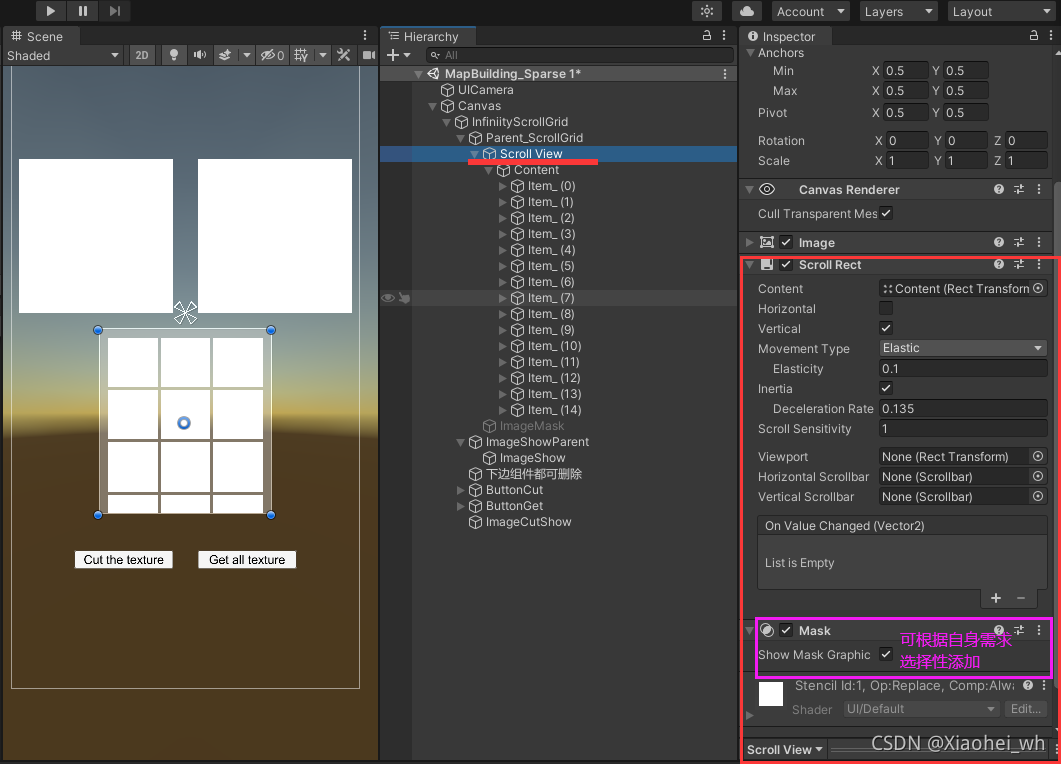
2、既然Viewport已经删除,那我们接着是整Content,首先增加脚本InfinityGridLayoutGroup,接着要注意:在GridLayoutGroup下的Constraint要设置为FixedColumnCount。★★★★★

3、好,我们接下来就是设置他的子节点了,具体要设置多少个,之前代码里有说明,不过这里还是再说一下。
/*
* 实现无限滚动,需要的最少的child数量。
* 屏幕上能看到的+一行看不到的,比如我在屏幕上能看到 4 行,每一行 3 个。
* 则这个值为 4行 * 3个 + 1行 * 3个 = 15个。
*/
那么根据这个结果,我们就创建15个子节点。

四:运行结果(Running Result)
1、刚运行

2、运行中

至此,圆满结束。
希望大家:点赞,留言,关注咯~
唠家常
- 小黑的今日分享结束啦,小伙伴们你们get到了么,你们有没有更好的办法呢,可以评论区留言分享,也可以加小黑的QQ:841298494,大家一起进步。
今日有推荐
参考:https://blog.csdn.net/huutu/article/details/51549762
- 客官,看完get之后记得点赞哟!
- 小伙伴你还想要别的知识?好的呀,分享给你们
- 小黑的杂货铺,想要什么都有,客官不进来喝杯茶么?
Unity - 无限滚动的更多相关文章
- [Unity3D插件]2dtoolkit系列二 动画精灵的创建以及背景图的无限滚动
经过昨天2dtoolkit系列教程一的推出,感觉对新手还有有一定的启发作用,引导学习使用unity 2dToolKit插件的使用过程,今天继续系列二——动画精灵的创建,以及背景图的无限循环滚动,在群里 ...
- iOScollectionView广告无限滚动(Swift实现)
今天公司里的实习生跑过来问我一般App上广告的无限滚动是怎么实现的,刚好很久没写博客了,就决定写下了,尽量帮助那些处于刚学iOS的程序猿. 做一个小demo,大概实现效果如下图所示: 基本实现思路: ...
- Infinite Scroll - jQuery & WP 无限滚动插件
无限滚动(Infinite Scroll)也称为自动分页.滚动分页和无限分页.常用在图片.文章或其它列表形式的网页中,用来在滚动网页的时候自动加载下一页的内容.Infinite Scroll 这款 ...
- 基于HTML5+CSS3的图片旋转、无限滚动、文字跳动特效
本文分享几种基于HTML5+CSS3实现的一些动画特效:图片旋转.无限滚动.文字跳动;实现起来均比较容易,动手来试试! 一.图片旋转 效果图如下: 这个效果实现起来其实并不困难.代码清单如下: < ...
- LoopBar – Tap酒吧与无限滚动
相约 LoopBar – 标签栏与无限滚动为Android由Cleveroad 在Cleveroad我们最近认识到通过使用任何一个应用程序类别的导航,导航面板是很无聊和琐碎.这就是为什么我们的设计师的 ...
- Android 高级UI设计笔记09:Android如何实现无限滚动列表
ListView和GridView已经成为原生的Android应用实现中两个最流行的设计模式.目前,这些模式被大量的开发者使用,主要是因为他们是简单而直接的实现,同时他们提供了一个良好,整洁的用户体验 ...
- 无限滚动 --demo
<!DOCTYPE HTML><html><head><meta http-equiv="Content-Type" content=&q ...
- 10 个 jQuery 的无限滚动的插件:
很多社交网站都使用了一些新技术来提高用户体验,而无限滚动的翻页技术就是其中一项,当你页面滑到列表底部时候无需点击就自动加载更多的内容. 下面为你推荐 10 个 jQuery 的无限滚动的插件: 1. ...
- 10款无限滚动自动翻页jquery插件
2012年3月29日 无限滚动自动翻页可以说是web2.0时代的一项堪称伟大的技术,它让我们在浏览页面的时候只需要把滚动条拉到网页底部就能自动显示下一页的 结果,改变了一直以来只能通过点击下一页来翻页 ...
- masonry结合json 制作无限滚动的瀑布流
做前端这行的 能直接贴代码就直接贴代码了,不用多说什么别的 效果需要引入jquery和jquery.masonry.min.js这两个JS JS代码如下: $(document).ready(func ...
随机推荐
- UE优化性能
UE 优化 参考:风恋残雪的博客 Stat unit 启动一个非Debug的游戏进程 打开控制台输入 Stat UNIT .PC端 ` , Android 四指点击 正常的渲染状态: 名称 功能 Fr ...
- SpringCloud(六) - RabbitMQ安装,三种消息发送模式,消息发送确认,消息消费确认(自动,手动)
1.安装erlang语言环境 1.1 创建 erlang安装目录 mkdir erlang 1.2 上传解压压缩包 上传到: /root/ 解压缩# tar -zxvf otp_src_22.0.ta ...
- pod(八):pod的调度——将 Pod 指派给节点
目录 一.系统环境 二.前言 三.pod的调度 3.1 pod的调度概述 3.2 pod自动调度 3.2.1 创建3个主机端口为80的pod 3.3 使用nodeName 字段指定pod运行在哪个节点 ...
- Optional用法与争议点
原创:扣钉日记(微信公众号ID:codelogs),欢迎分享,转载请保留出处. 简介 要说Java中什么异常最容易出现,我想NullPointerException一定当仁不让,为了解决这种null值 ...
- prefetch和preload
前面的话 基于VUE的前端小站改造成SSR服务器端渲染后,HTML文档会自动使用preload和prefetch来预加载所需资源,本文将详细介绍preload和prefetch的使用 资源优先级 在介 ...
- 什么是 X.509 证书以及它是如何工作的?
X.509 证书是基于广泛接受的国际电信联盟 (ITU) X.509 标准的数字证书,该标准定义了公钥基础设施 (PKI) 证书的格式. 它们用于管理互联网通信和计算机网络中的身份和安全. 它们不显眼 ...
- RabbitMq发布确认
RabbitMq发布确认 发布确认原理 生产者将信道设置成 confirm 模式,一旦信道进入 confirm 模式,所有在该信道上面发布的消息都将会被指派一个唯一的 ID(从 1 开始),一旦消息被 ...
- 链接脚本(Linker Scripts)语法和规则解析(自官方手册)
为了便于与英文原文对照学习与理解(部分翻译可能不准确),本文中的每个子章节标题和引用使用的都是官方手册英文原称.命令及命令行选项统一使用斜体书写.高频小节会用蓝色字体标出. 3 Linker Scri ...
- day24-服务器端渲染技术02
服务器端渲染技术02 11.EL表达式 11.1EL表达式介绍 EL表达式全称:Expression Language,是表达式语言 EL表达式主要是代替jsp页面的表达式脚本 EL表达式输出数据时, ...
- nc传输文件结束后不退出
原因 版本不同 udp传输不会自动关闭 解决方案 nc -l 1234 > file.img nc ip 1234 -q 0 < file.img 采用tcp传输文件 -q 文件传输结束后 ...