
CHtmlEditCtrl (2): Add a Source Text Editor to Your HTML Editor
In a previous article, I described how to create an HTML editor using the MFC CHtmlEditCtrl class in a dialog box. It could be used for creating "rich text" emails, chat-box composition, or perhaps even as an option for a syntax-highlighting code editor -- anywhere you would like to show HTML and let the user modify it.
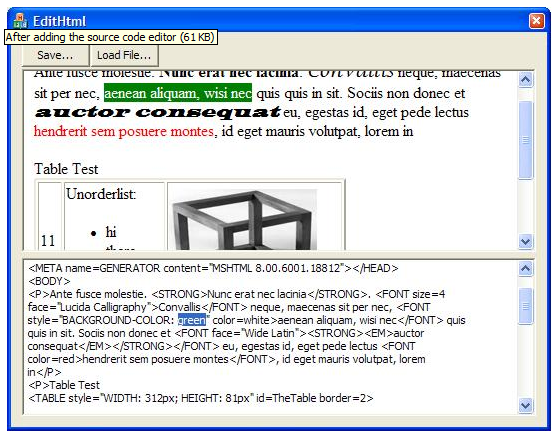
As the picture shows, we're going to add a source-text edit box so that you can make manual changes to the HTML source text -- giving you a way to explore some new options for this powerful control.
Use the Visual Studio Dialog Editor to add a multi-line Edit Control below the static text "placeholder" for the HTML editor. Right-click it and Add a control-type variable to the parent dialog (m_ctHtmlSrcText).

Add this to the OnBnClickedLoadfile() function:
|
m_ctHtmlSrcText.SetWindowTextW( m_sHtml ); // populate the Editbox |
Now, wouldn't it be cool if we could update the source text box whenever the user made changes in the HTML editor? Alas, there is no "OnChange" type notification from the control, so that's the next challenge: I needed to find a way to determine when the user has made a change in the HTML editor. I looked at the GetIsDirty() function, but that flag gets set right after the first edit and there's no clean way to set it back after an update from the source text -- so I went with a different approach...
I decided to set up a window timer and use it to compare the most recently-copied HTML to the current HTML. If it varies, then I re-populate the source text edit box, making sure to re-display it at the earlier scroll position.
And of course, we want to do a similar thing when the user modifies the HTML source text -- update the browser view with the changes. Here's the code for all of that:
|
//------------------------------------------------ // update the HTML source box with changes from HTML Editor // void CEditHtmlDlg::SyncSrcToHtml() { m_ctlEditHtml.GetDocumentHTML( m_sHtml ); int nLine= m_ctHtmlSrcText.GetFirstVisibleLine(); // remember cur pos m_ctHtmlSrcText.LockWindowUpdate(); // avoid some flashing m_ctHtmlSrcText.SetWindowTextW( m_sHtml ); m_ctHtmlSrcText.LineScroll(nLine, 0); m_ctHtmlSrcText.UnlockWindowUpdate(); m_fSrcNeedsSync= false; } //------------------------------------------------ // update the Browser view changes from source text box void CEditHtmlDlg::SyncHtmlToSrc() { //------- all this to locate the scroll position... long nOffsetTop; IHTMLDocument2* pDoc; BOOL fRet= m_ctlEditHtml.GetDHtmlDocument( &pDoc ); IHTMLElement* pBody; pDoc->get_body( &pBody ); IHTMLElement2* pBody2; pBody->QueryInterface (IID_IHTMLElement2, (void**)&pBody2); pBody2->get_scrollTop( &nOffsetTop ); //------- update the HTML m_ctHtmlSrcText.GetWindowTextW( m_sHtml ); m_ctlEditHtml.SetDocumentHTML( m_sHtml ); m_ctlEditHtml.LockWindowUpdate(); // avoid some flashing AwaitReady( 2 ); // CHtmlEditCtrl takes time for "document complete" //------- now scroll back to saved position IHTMLWindow2* pWin; pDoc->get_parentWindow( &pWin ); pWin->scrollTo(0,nOffsetTop); m_ctlEditHtml.UnlockWindowUpdate(); m_fHtmlNeedsSync= false; } |
Updating the source text window was basically a no-brainer, but handling the HTML editor update was a bit trickier. Re-loading the HTML into the CHtmlEditCtrl causes it to redisplay at the top -- a very rude thing to do to a user. I had to use the IHTMLElement2 get_scrollTop for the document body to obtain the current scroll position and the IHTMLWindow2 scrollTo function to restore it after reloading the HTML.
I found that without the call to AwaitReady (in line 32), the scrollTo function was ignored -- the embedded browser control needs a short time to reprocess the HTML. So I used a technique from an earlier article to delay processing until the control indicates it is ready. You'll find the AwaitReady() function in the project source code available for download at the end of this article.
In the Dialog Editor, right-click the source text edit control and use Add Event Handler... to create an OnEnChange handler to the dialog class.
Here's the OnTimer function and the CEdit's EN_CHANGE notification handler that use the SyncXxxxx functions:
|
void CEditHtmlDlg::OnEnChangeHtmlsrc() { m_dwLastEnChangeTick= GetTickCount(); m_fHtmlNeedsSync= true; } //-------------------------------------------- // I used a StartTimer() in OnInit Dialog // to execute this 10 times per second // void CEditHtmlDlg::OnTimer(UINT_PTR nIDEvent) { if ( m_fSrcNeedsSync ) { SyncSrcToHtml(); // update source view, set m_fSrcNeedsSync false } else { // check to see if HTML has changed CString sCurHtml; m_ctlEditHtml.GetDocumentHTML( sCurHtml ); if ( sCurHtml != m_sHtml ) { m_sHtml= sCurHtml; m_fSrcNeedsSync= true; // update on next pass through } } if ( m_fHtmlNeedsSync ) { // here, we wait until the user stops typing (1 second)... if( GetTickCount() > m_dwLastEnChangeTick + M_MsDelayBeforeUpdate ) { SyncHtmlToSrc(); // update HTML view, set m_fHtmlNeedsSync false } } CDialog::OnTimer(nIDEvent); } |
Some notes on the above code:
I added:
SetTimer( M_UpdateTimerID, 100, 0 );
to my OnInitDialog function, and used the Class Wizard to add the WM_TIMER handler. Thus, the OnTimer function executes 10 times per second.
Line 18 looks like it might be a problem -- ten times per second, the code fetches the HTML source text form the CHtmlEditCtrl and compares it to the previously-saved text. That seems like a lot of processing. However, most HTML files are relatively short and CPUs are fast. As a pragmatic test, even when I tried doing it 100 times per second on a large HTML file, I did not overburden my CPU. If you want, you can decrease the timer to five times or twice per second.
Line 25 looks at a time-value variable that gets set each time OnEnChangeHtmlsrc gets triggered (e.g., when the user types or pastes or deletes in the source text window). If less than one second has elapsed since the last such editing change, it does nothing. The end result is that you can finish your typing without being interrupted.
Summary:
We now have a dialog-based (non Doc/View) HTML editor that also displays and lets you modify the source HTML. It automatically updates one when you modify the other. We had to work around the lack of an "On Change" notification from CHtmlEditCtrl, but the timer-based solution works well.
In the next installment, we'll add some functionality to let the user set colors, create bullet lists, and so forth.
Project Source Code
The full source code for this project is available for download. It includes a VS2008 project file.
EditHtml.zip
References:
CHtmlEditCtrl Class
http://msdn.microsoft.com/en-us/library/h14ht0dh.aspx
CHtmlEditCtrlBase Class
http://msdn.microsoft.com/en-us/library/54542c1c.aspx
MSHTML Editing Overviews and Tutorials
http://msdn.microsoft.com/en-us/library/aa770039(VS.85).aspx
IHTMLElement2 Interface
http://msdn.microsoft.com/en-us/library/aa703984(VS.85).aspx
IHTMLWindow2 Interface
http://msdn.microsoft.com/en-us/library/aa741505(VS.85).aspx
=-=-=-=-=-=-=-=-=-=-=-=-=-=-=-=-=-=-=-=-=-=-=-=-=-=-=-=-=-=-=-=-=-=-=-=-=-=-=-=-=-=
If you liked this article and want to see more from this author, please click the Yes button near the:
Was this article helpful?
label that is just below and to the right of this text. Thanks!
=-=-=-=-=-=-=-=-=-=-=-=-=-=-=-=-=-=-=-=-=-=-=-=-=-=-=-=-=-=-=-=-=-=-=-=-=-=-=-=-=-=
From: https://www.experts-exchange.com/articles/1397/Add-a-Source-Text-Editor-to-Your-HTML-Editor.html
CHtmlEditCtrl (2): Add a Source Text Editor to Your HTML Editor的更多相关文章
- iOS - 解决Unable to add a source with url `https://github.com/CocoaPods/Specs.git` named
1 本来cocopods没有问题,最近创建项目,利用cocopods导入第三方库的时候,出现如下错误: [!] Unable to add a source with url `https://gi ...
- CodeMirror动态修改代码(关键: editor.getDoc().setValue(data); editor.refresh();)
在使用codemirror时,其原理是根据form中的textarea标签,自动加载其内容,获得代码行的显示.(具体使用方式参见 codemirror官网使用手册 http://codemirror. ...
- [NOI2003]Editor & [AHOI2006]文本编辑器editor BZOJ1507&BZOJ1269
分析: Splay区间操作裸题,维护出区间信息,按照要求模拟,注意读入格式,并且考虑内存回收(开不下) 附上代码: #include <cstdio> #include <algor ...
- CHtmlEditCtrl (3): More HTML Editor Options
In this version of our HTML Editor, we'll create a floating source view/edit window and we'll implem ...
- CHtmlEditCtrl(1) : Use CHtmlEditCtrl to Create a Simple HTML Editor
I needed a lightweight HTML editor to generate "rich text" emails, so I decided to explore ...
- ggplot2 texts : Add text annotations to a graph in R software
http://www.sthda.com/english/wiki/ggplot2-texts-add-text-annotations-to-a-graph-in-r-software Instal ...
- web & Rich Text Editor
web & Rich Text Editor 富文本编辑器 http://www.wangeditor.com/ https://github.com/wangfupeng1988/wangE ...
- [r]Seven habits of effective text editing
Seven habits of effective text editing(via) Bram Moolenaar November 2000 If you spend a lot of time ...
- JSON Editor 中文文档
JSON Editor JSON Editor 根据定义的JSON Schema 生成了一个Html 表单来对JSON进行编辑.它完整支持JSON Schema 的版本3和版本4,并且它集成了一些流行 ...
随机推荐
- Scrum:The Definition of Done —— 作业有没有写完呢?
Scrum:The Definition of Done -- 作业有没有写完呢?_苗得雨_新浪博客 http://blog.sina.com.cn/s/blog_59450ffc0102eiai.h ...
- PHP之PDO_MYSQL扩展安装步骤(转)
看到CakePHP文档要求安装pdo_mysql扩展,于是就尝试安装了一下. 这里我的系统是CentOS 6.0.如果你的系统是其他版本的Linux/Unix,可以参考.如果你的系统是Windows的 ...
- 分享下使用 svn,测试服务器代码自动更新、线上服务器代码手动更新的配置经验
分享下使用 svn,测试服务器代码自动更新.线上服务器代码手动更新的配置经验 利用SVN的POST-COMMIT钩子自动部署代码 Linux SVN 命令详解 Linux SVN 命令详解2 使用sv ...
- linux虚拟机与winodows共享文件夹----linux安装VMware tools
虚拟机里面想要获取原来本机 系统的文件,十分麻烦.为了实现原系统与虚拟机的共享文件夹,可以通过安装vmware tools达到共享目的. 1 安装vmware tools (1)检查虚拟机上是否挂 ...
- GetBuiltProjectOutputRecursive error running Xamarin Forms iOS on Visual Studio
Seems like I get this weird problem while running Xamarin.iOS on Visual studio. This happened after ...
- 哈希小demo hashCode取模
package demo; import java.util.ArrayList; import java.util.List; class Person { private String usern ...
- delphi中单独编译pas生成dcu文件
delphi中单独编译pas生成dcu文件 在网上下载了一个带源码的组件,结果碰到提示说缺少xxx.dcu.一看它的目录下确实没有,那能不能生成一个呢? 当然可以! 方法是使用delphi的安装目录\ ...
- View Programming Guide for iOS_读书笔记[正在更新……]
原文:View Programming Guide for iOS 1 Introduction 先熟悉一下基本概念. Window Windows do not have any visible c ...
- 行尸走肉第八季/全集The Walking Dead迅雷下载
<行尸走肉第八季>将在10月22号回归播出, 将于5月1日起正式开始拍摄!目前剧组已开始招募客串演员和丧尸群演,第八季拍摄时长初步预计会持续到11月16日.而这三位已确认为<行尸走肉 ...
- ScrollView滚动条的各种设置
ScrollView滚动条不显示:android:scrollbars="none"ScrollView滚动条恒显示:android:fadeScrollbars="fa ...