
《DSP using MATLAB》Problem 7.11
代码:
%% ++++++++++++++++++++++++++++++++++++++++++++++++++++++++++++++++++++++++++++++++

%%            Output Info about this m-file

fprintf('\n***********************************************************\n');

fprintf('        <DSP using MATLAB> Problem 7.11 \n\n');

banner();

%% ++++++++++++++++++++++++++++++++++++++++++++++++++++++++++++++++++++++++++++++++

% bandpass

ws1 = 0.3*pi; wp1 = 0.4*pi; wp2 = 0.5*pi; ws2 = 0.6*pi; As = 50; Rp = 0.5;

tr_width = min((wp1-ws1), (ws2-wp2));

M = ceil(6.6*pi/tr_width) + 1;                 % Hamming Window

fprintf('\nFilter Length is %d.\n', M);

n = [0:1:M-1]; wc1 = (ws1+wp1)/2; wc2 = (wp2+ws2)/2;

%wc = (ws + wp)/2,                    % ideal LPF cutoff frequency

hd = ideal_lp(wc2, M) - ideal_lp(wc1, M);

w_hamm = (hamming(M))';  h = hd .* w_hamm;

[db, mag, pha, grd, w] = freqz_m(h, [1]);  delta_w = 2*pi/1000;

[Hr,ww,P,L] = ampl_res(h);

Rp = -(min(db(wp1/delta_w+1 :1: wp2/delta_w)));     % Actual Passband Ripple

fprintf('\nActual Passband Ripple is %.4f dB.\n', Rp);

As = -round(max(db(ws2/delta_w+1 : 1 : 501)));        % Min Stopband attenuation

fprintf('\nMin Stopband attenuation is %.4f dB.\n', As);

[delta1, delta2] = db2delta(Rp, As)

% Plot

figure('NumberTitle', 'off', 'Name', 'Problem 7.11 ideal_lp Method')

set(gcf,'Color','white');

subplot(2,2,1); stem(n, hd); axis([0 M-1 -0.3 0.3]); grid on;

xlabel('n'); ylabel('hd(n)'); title('Ideal Impulse Response');

subplot(2,2,2); stem(n, w_hamm); axis([0 M-1 0 1.1]); grid on;

xlabel('n'); ylabel('w(n)'); title('Hamming Window');

subplot(2,2,3); stem(n, h); axis([0 M-1 -0.3 0.3]); grid on;

xlabel('n'); ylabel('h(n)'); title('Actual Impulse Response');

subplot(2,2,4); plot(w/pi, db); axis([0 1 -100 10]); grid on;

set(gca,'YTickMode','manual','YTick',[-90,-51,0]);

set(gca,'YTickLabelMode','manual','YTickLabel',['90';'51';' 0']);

set(gca,'XTickMode','manual','XTick',[0,0.3,0.4,0.5,0.6,1]);

xlabel('frequency in \pi units'); ylabel('Decibels'); title('Magnitude Response in dB');

figure('NumberTitle', 'off', 'Name', 'Problem 7.11 h(n) ideal_lp Method')

set(gcf,'Color','white');

subplot(2,2,1); plot(w/pi, db); grid on; %axis([0 1 -100 10]);

xlabel('frequency in \pi units'); ylabel('Decibels'); title('Magnitude Response in dB');

set(gca,'YTickMode','manual','YTick',[-90,-51,0])

set(gca,'YTickLabelMode','manual','YTickLabel',['90';'51';' 0']);

set(gca,'XTickMode','manual','XTick',[0,0.3,0.4,0.5,0.6,1,1.4,1.5,1.6,1.7,2]);

subplot(2,2,3); plot(w/pi, mag); grid on; %axis([0 1 -100 10]);

xlabel('frequency in \pi units'); ylabel('Absolute'); title('Magnitude Response in absolute');

set(gca,'XTickMode','manual','XTick',[0,0.3,0.4,0.5,0.6,1,1.4,1.5,1.6,1.7,2]);

set(gca,'YTickMode','manual','YTick',[0.0,0.5,1.0])

subplot(2,2,2); plot(w/pi, pha); grid on; %axis([0 1 -100 10]);

xlabel('frequency in \pi units'); ylabel('Rad'); title('Phase Response in Radians');

subplot(2,2,4); plot(w/pi, grd*pi/180);  grid on; %axis([0 1 -100 10]);

xlabel('frequency in \pi units'); ylabel('Rad'); title('Group Delay');

figure('NumberTitle', 'off', 'Name', 'Problem 7.11 h(n)')

set(gcf,'Color','white');

plot(ww/pi, Hr); grid on; %axis([0 1 -100 10]);

xlabel('frequency in \pi units'); ylabel('Hr'); title('Amplitude Response');

set(gca,'YTickMode','manual','YTick',[-delta2,0,delta2,1 - delta1,1, 1 + delta1])

%set(gca,'YTickLabelMode','manual','YTickLabel',['90';'45';' 0']);

%set(gca,'XTickMode','manual','XTick',[0,0.2,0.35,0.55,0.75,1,1.2,1.55,2]);
运行结果:
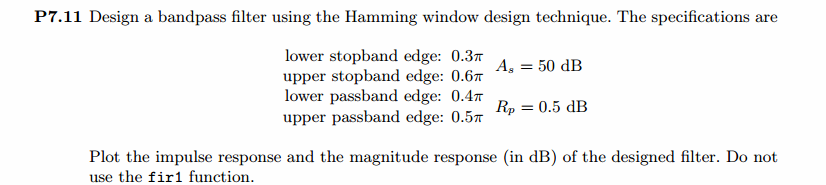
阻带最小衰减51dB,满足设计要求。
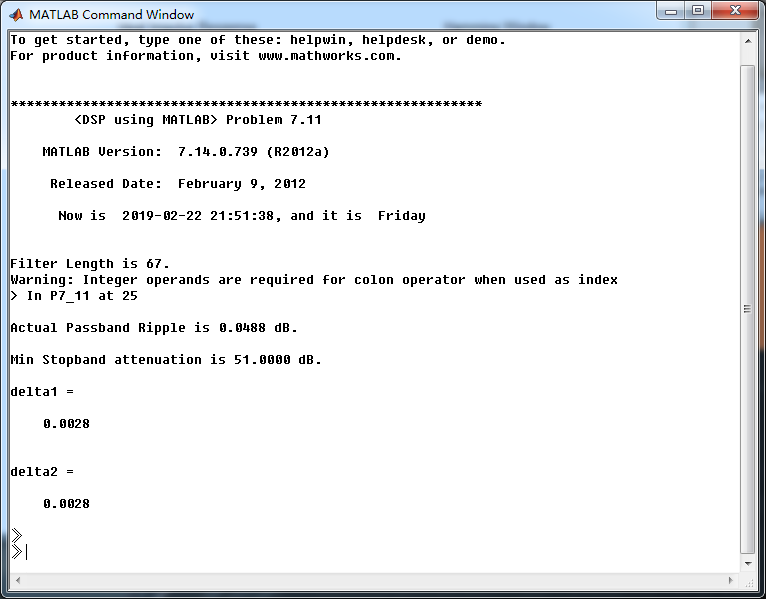
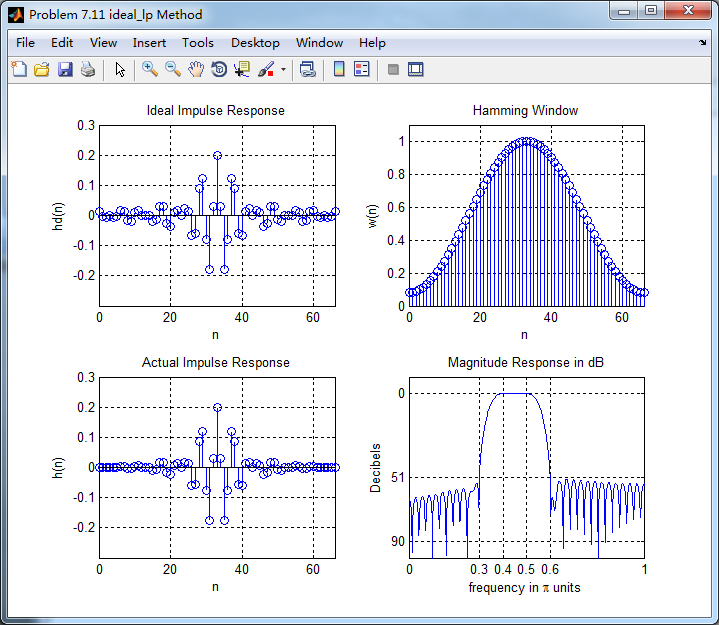
Hamming窗截断的滤波器脉冲响应,其幅度响应(dB和Absolute单位)、相位响应和群延迟
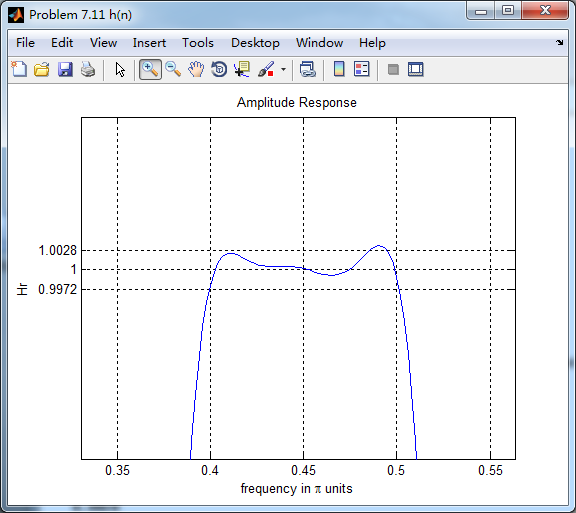
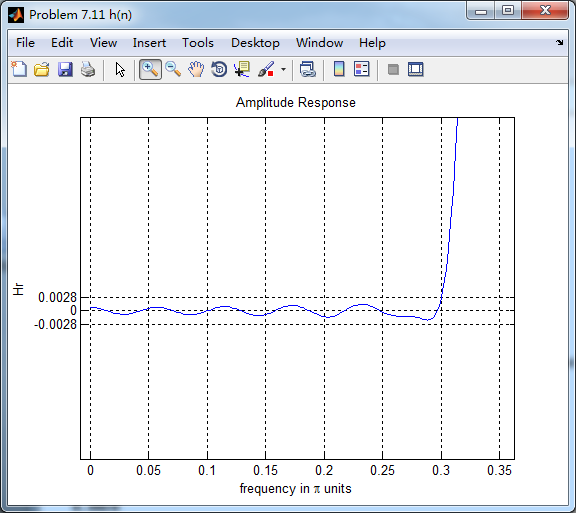
振幅响应
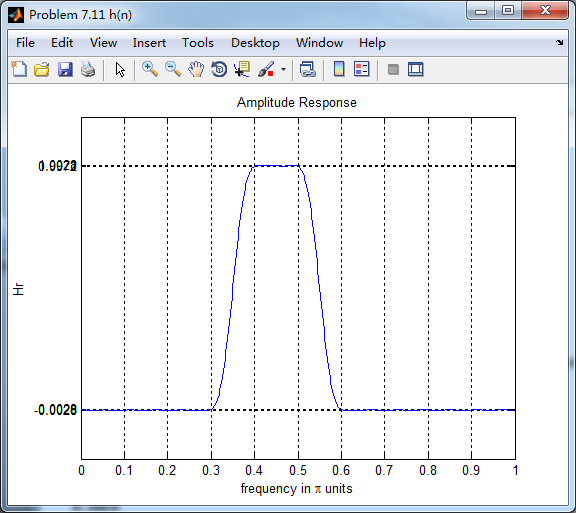
带通部分
阻带部分
《DSP using MATLAB》Problem 7.11的更多相关文章
- 《DSP using MATLAB》Problem 6.11
代码: %% ++++++++++++++++++++++++++++++++++++++++++++++++++++++++++++++++++++++++++++++++ %% Output In ...
- 《DSP using MATLAB》Problem 5.11
代码: %% ++++++++++++++++++++++++++++++++++++++++++++++++++++++++++++++++++++++++++++++++ %% Output In ...
- 《DSP using MATLAB》Problem 4.11
代码: %% ---------------------------------------------------------------------------- %% Output Info a ...
- 《DSP using MATLAB》Problem 8.11
代码: %% ------------------------------------------------------------------------ %% Output Info about ...
- 《DSP using MATLAB》Problem 7.16
使用一种固定窗函数法设计带通滤波器. 代码: %% ++++++++++++++++++++++++++++++++++++++++++++++++++++++++++++++++++++++++++ ...
- 《DSP using MATLAB》Problem 7.6
代码: 子函数ampl_res function [Hr,w,P,L] = ampl_res(h); % % function [Hr,w,P,L] = Ampl_res(h) % Computes ...
- 《DSP using MATLAB》Problem 5.21
证明: 代码: %% ++++++++++++++++++++++++++++++++++++++++++++++++++++++++++++++++++++++++++++++++++++++++ ...
- 《DSP using MATLAB》Problem 5.20
窗外的知了叽叽喳喳叫个不停,屋里温度应该有30°,伏天的日子难过啊! 频率域的方法来计算圆周移位 代码: 子函数的 function y = cirshftf(x, m, N) %% -------- ...
- 《DSP using MATLAB》Problem 5.14
说明:这两个小题的数学证明过程都不会,欢迎博友赐教. 直接上代码: %% +++++++++++++++++++++++++++++++++++++++++++++++++++++++++++++++ ...
随机推荐
- 【常见错误】Quartz常见错误
1.集群之后把其中一个Quartz服务停了,其他的也不接手工作 问题描述 集群之后,A节点执行了大多数任务,B节点大部分时间处于空闲,停掉A节点,B节点也不会接手工作. 解决方式 修改Quartz的配 ...
- SQLServer 对已有数据表添加自增主键
最近在做老表的数据整理,发现有的表没有主键标识,.NET Core 无法一键生成模型,需要带有主键的表才可以,所以需要针对已有数据添加主键,这是我找到的两种方式. 1. 主键为int 或者bigint ...
- udp套接字及利用socketserver模块实现并发以及并发编程
一:基于udp协议(数据报协议)的套接字:和tcp协议的套接字对比而言,由于udp是无链接的,所以先启动哪一端都不会报错,而且udp也不会有粘包 现象,所以对比下来,tcp协议的话传输数据更加可靠,但 ...
- 智能合约遇到的小错误 network up to date解决办法
https://blog.csdn.net/qindong564950620/article/details/68933678 说 network up to date .这个错误我刚开始不知道怎么解 ...
- 大数据技术之_19_Spark学习_04_Spark Streaming 应用解析 + Spark Streaming 概述、运行、解析 + DStream 的输入、转换、输出 + 优化
第1章 Spark Streaming 概述1.1 什么是 Spark Streaming1.2 为什么要学习 Spark Streaming1.3 Spark 与 Storm 的对比第2章 运行 S ...
- Android 回退键监听
回退键(back)监听:方法1:回调方法onBackPressed String LOG_TAG="TAG"; @Override public void onBackPr ...
- 5种网络IO模型(有图,很清楚)
同步(synchronous) IO和异步(asynchronous) IO,阻塞(blocking) IO和非阻塞(non-blocking)IO分别是什么,到底有什么区别?这个问题其实不同的人给出 ...
- 基于Python——实现解压文件夹中的.zip文件
[背景]当一个文件夹里存好好多.zip文件需要解压时,手动一个个解压再给文件重命名是一件很麻烦的事情,基于此,今天介绍一种使用python实现批量解压文件夹中的压缩文件并给文件重命名的方法—— [代码 ...
- 范式及其在mysql数据库设计中的应用
一.什么是范式 1.1.范式:Normal Format,是离散数学的知识,是为了解决数据的存储与优化而提出来的.要求存储数据后,凡是能够通过关系寻找出来的数据,坚决不再重复存储,终极目标是为了减少数 ...
- vue中修改了数据但视图无法更新的情况
数组数据变动:我们使用某些方法操作数组,变动数据时,有些方法无法被vue监测,有些可以 Vue包装了数个数组操作函数,使用这些方法操作的数组去,其数据变动时会被vue监测: push() pop() ...