
《DSP using MATLAB》Problem 7.6
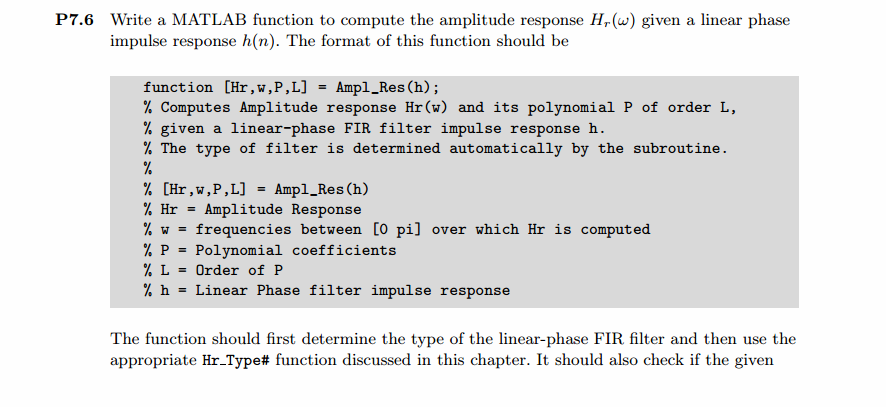
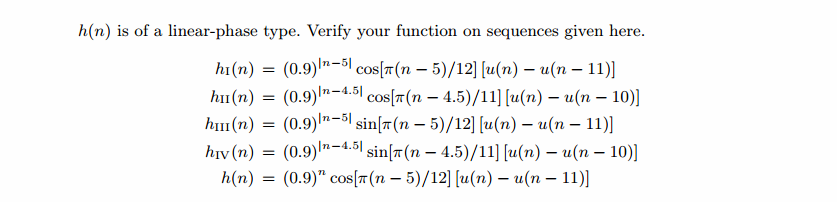
代码:
子函数ampl_res
function [Hr,w,P,L] = ampl_res(h);

%

% function [Hr,w,P,L] = Ampl_res(h)

% Computes Amplitude response Hr(w) and its polynomial P of order L,

% given a linear-phase FIR filter impulse response h.

% The type of filter is determined automatically by the suroutine.

%

% Hr = Amplitude Response

% w = Frequence between [0 pi] over which Hr is computed

% P = Polynomial coefficients

% L = Order of P

% h = Linear Phase filter impulse response

%

M = length(h);

if rem(M,2)==1

   if all(h(1:(M-1)/2)==h(M:-1:(M+3)/2)) [Hr,w,P,L] = Hr_Type1(h);

   elseif all(h(1:(M-1)/2)==-h(M:-1:(M+3)/2)) & h((M+1)/2)==0, [Hr,w,P,L] = Hr_Type3(h);

       else disp('not a linear-phase filter, check h'), return,

   end

elseif all(h(1:M/2)==h(M:-1:M/2+1)); [Hr,w,P,L] = Hr_Type2(h);

   elseif all(h(1:M/2)==-h(M:-1:M/2+1)); [Hr,w,P,L] = Hr_Type4(h);

       else disp('not a linear-phase filter, check h'), return,

   end

end
第1小题代码
%% ++++++++++++++++++++++++++++++++++++++++++++++++++++++++++++++++++++++++++++++++

%%            Output Info about this m-file

fprintf('\n***********************************************************\n');

fprintf('        <DSP using MATLAB> Problem 7.6 \n\n');

banner();

%% ++++++++++++++++++++++++++++++++++++++++++++++++++++++++++++++++++++++++++++++++

n1 = 0; n2 = 11;

n = [n1:n2];

h1n = 0.9 .^ abs(n-5) .* cos(pi*(n-5)/12) .* ( stepseq(0,n1,n2) - stepseq(11,n1,n2) );

h1n = h1n(1:11);

figure('NumberTitle', 'off', 'Name', 'Problem 7.6')

set(gcf,'Color','white');

stem([0:10], h1n); grid on;

xlabel('n'); ylabel('h1(n)'); title('Impulse Response');

[db, mag, pha, grd, w] = freqz_m(h1n, 1);

[Hr, ww, a, P] = ampl_res(h1n);

%[Hr, ww, a, P] = Hr_Type1(h1n);

% Plot

figure('NumberTitle', 'off', 'Name', 'Problem 7.6')

set(gcf,'Color','white');

subplot(2,2,1); plot(w/pi, db); grid on; axis([0 2 -100 10]);

xlabel('frequency in \pi units'); ylabel('Decibels'); title('Magnitude Response in dB');

set(gca,'YTickMode','manual','YTick',[-80,-40,0]);

set(gca,'YTickLabelMode','manual','YTickLabels',['80';'40';' 0']);

subplot(2,2,3); plot(w/pi, mag); grid on; %axis([0 1 -100 10]);

xlabel('frequency in \pi units'); ylabel('Absolute'); title('Magnitude Response in absolute');

subplot(2,2,2); plot(w/pi, pha); grid on; %axis([0 1 -100 10]);

xlabel('frequency in \pi units'); ylabel('Rad'); title('Phase Response in Radians');

subplot(2,2,4); plot(w/pi, grd*pi/180);  grid on; %axis([0 1 -100 10]);

xlabel('frequency in \pi units'); ylabel('Rad'); title('Group Delay');

figure('NumberTitle', 'off', 'Name', 'Problem 7.6')

set(gcf,'Color','white');

subplot(2,1,1); plot(ww/pi, Hr); grid on; axis([0, 1, 0, 8]);

xlabel('frequency in \pi nuits'); ylabel('Hr'); title('Amplitude Response');

subplot(2,1,2); stem([n1:n2-1], h1n); grid on;%axis([-1, M, -1.1, 1.1]);

xlabel('n'); ylabel('h1(n)'); title('Impulse Response');
运行结果:
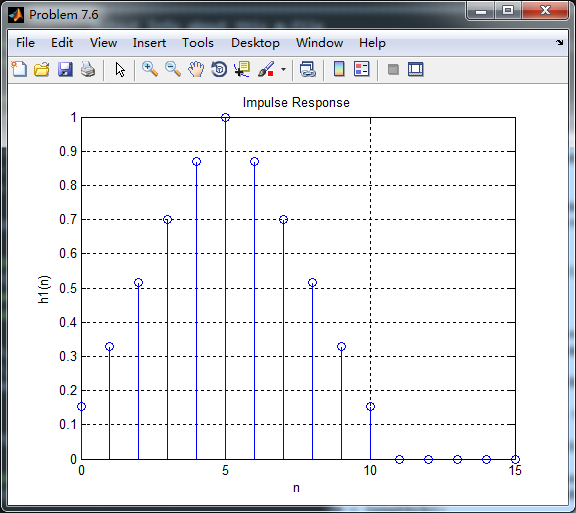
由上图看,很明显是非线性相位FIR的,但是其非零值(即前11个元素)构成线性相位FIR滤波器脉冲响应,如下

由上图可知,脉冲响应是第1类线性相位,其幅度响应(dB和绝对单位)、相位响应、群延迟响应如下:

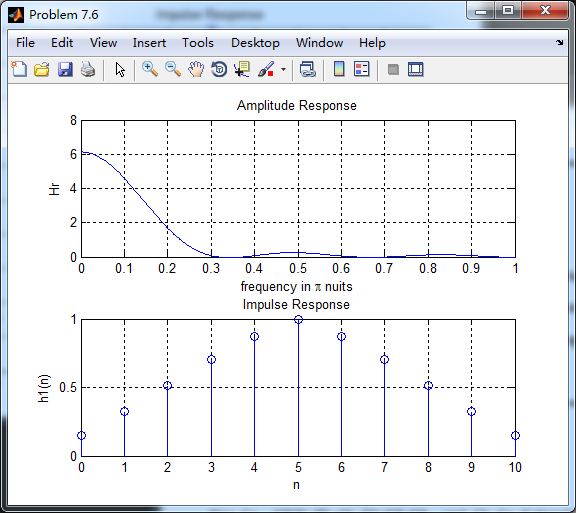
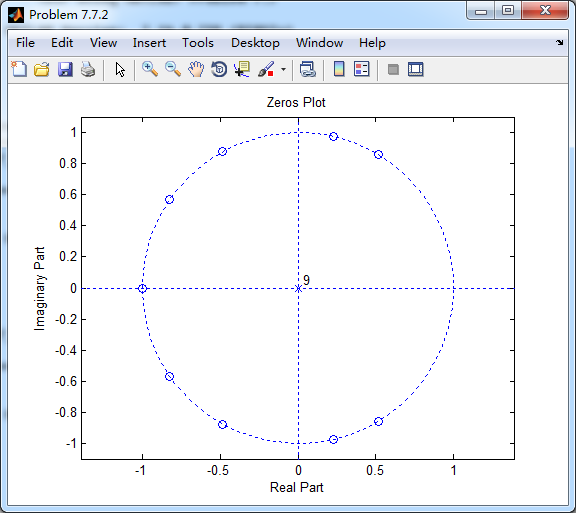
该序列的零点图如下

第2小题
非线性相位FIR滤波器脉冲响应

取其前10个元素,构成第2类型Type-II型线性相位FIR滤波器脉冲响应
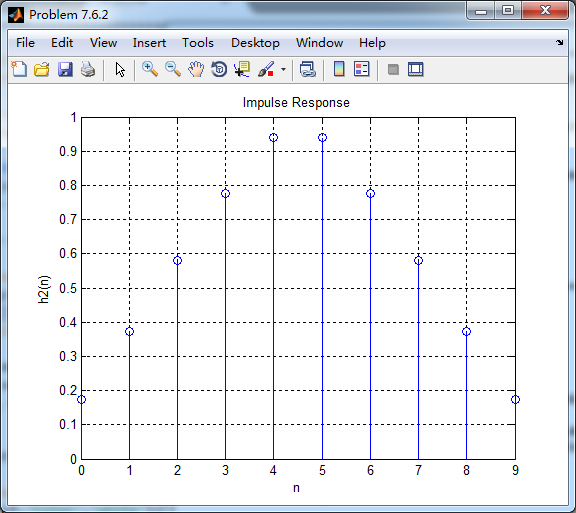
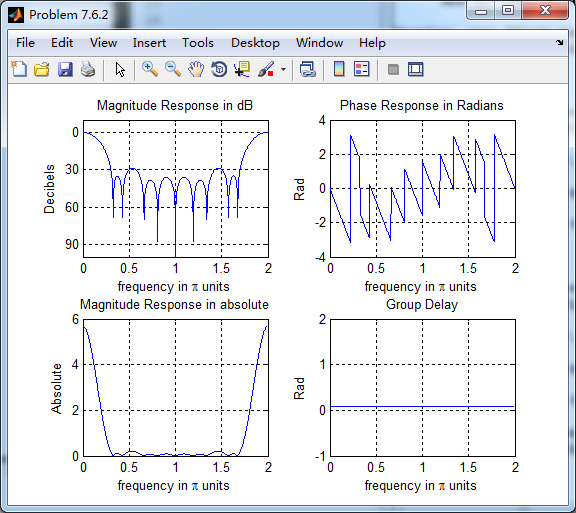
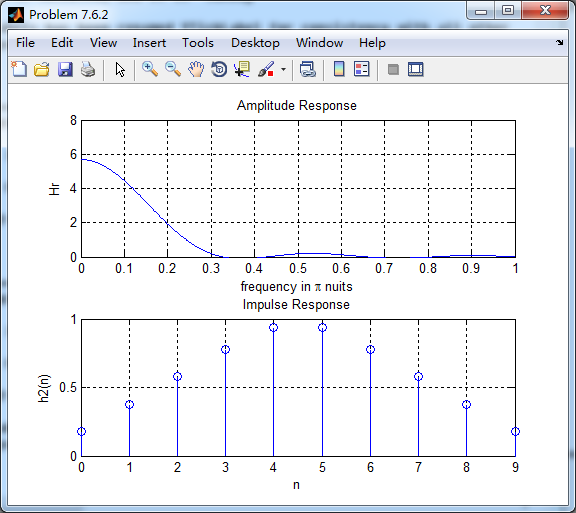
其零点图如下:
其余小题就不贴图了。
《DSP using MATLAB》Problem 7.6的更多相关文章
- 《DSP using MATLAB》Problem 7.27
代码: %% ++++++++++++++++++++++++++++++++++++++++++++++++++++++++++++++++++++++++++++++++ %% Output In ...
- 《DSP using MATLAB》Problem 7.26
注意:高通的线性相位FIR滤波器,不能是第2类,所以其长度必须为奇数.这里取M=31,过渡带里采样值抄书上的. 代码: %% +++++++++++++++++++++++++++++++++++++ ...
- 《DSP using MATLAB》Problem 7.25
代码: %% ++++++++++++++++++++++++++++++++++++++++++++++++++++++++++++++++++++++++++++++++ %% Output In ...
- 《DSP using MATLAB》Problem 7.24
又到清明时节,…… 注意:带阻滤波器不能用第2类线性相位滤波器实现,我们采用第1类,长度为基数,选M=61 代码: %% +++++++++++++++++++++++++++++++++++++++ ...
- 《DSP using MATLAB》Problem 7.23
%% ++++++++++++++++++++++++++++++++++++++++++++++++++++++++++++++++++++++++++++++++ %% Output Info a ...
- 《DSP using MATLAB》Problem 7.16
使用一种固定窗函数法设计带通滤波器. 代码: %% ++++++++++++++++++++++++++++++++++++++++++++++++++++++++++++++++++++++++++ ...
- 《DSP using MATLAB》Problem 7.15
用Kaiser窗方法设计一个台阶状滤波器. 代码: %% +++++++++++++++++++++++++++++++++++++++++++++++++++++++++++++++++++++++ ...
- 《DSP using MATLAB》Problem 7.14
代码: %% ++++++++++++++++++++++++++++++++++++++++++++++++++++++++++++++++++++++++++++++++ %% Output In ...
- 《DSP using MATLAB》Problem 7.13
代码: %% ++++++++++++++++++++++++++++++++++++++++++++++++++++++++++++++++++++++++++++++++ %% Output In ...
- 《DSP using MATLAB》Problem 7.12
阻带衰减50dB,我们选Hamming窗 代码: %% ++++++++++++++++++++++++++++++++++++++++++++++++++++++++++++++++++++++++ ...
随机推荐
- Learning-Python【18】:Python常用模块(1)—— time、datetime、randrom
time 模块:与时间相关的功能的模块 在 Python 中,时间分为三种: 1.时间戳:是一个时间的表示,根据不同的语言,可以是整数或浮点数,是从1970年1月1日0时0分0秒到现在经历的秒数 2. ...
- Learning-Python【33】:并发编程之多进程
一.multiprocessing 模块介绍 Python 中的多线程无法利用多核优势,如果想要充分地使用多核 CPU 的资源(os.cpu_count()查看),在 Python 中大部分情况需要使 ...
- 《温故而知新》JAVA基础四
类的封装 定义:将类的一些信息隐藏起来,不允许外部的程序直接的访问,而是通过该类提供的一些方法来获取 好处:只能通过特定的法方法访问数据,保护了数据, 实现封装的步骤: 修改属性的可见性:(一般类属性 ...
- Vue实现购物车小球动画
思路: 1.因页面分组件分的比较细,由图可知是组件5到组件4的联动. 如果利用组件间通信需要 子组件5 -->组件3-->所有组件的父组件-->组件4, 层级略显复杂,所以使用了vu ...
- https 适配
1info plist <key>NSAppTransportSecurity</key> <dict> <key>NSAllowsArbitraryL ...
- 【转】 ISP-镜头阴影校正(LSC)
转自:https://blog.csdn.net/xiaoyouck/article/details/77206505 介绍镜头阴影校正(Lens Shading Correction)是为了解决由于 ...
- volatile关键字的作用
引言:以前只是看过介绍volatile的文章,对其的理解也只是停留在理论的层面上,由于最近在项目当中用到了关于并发方面的技术,所以下定决心深入研究一下java并发方面的知识.网上关于volatile的 ...
- 微信支付---公众号支付和H5支付区别
微信支付分为如下几种:(来源https://pay.weixin.qq.com/wiki/doc/api/index.html) 本文主要讲解公众号支付和H5支付,两者均属于线上支付比较常用的方式: ...
- centos7安装doxygen
编译 编译过程参考官网:https://www.stack.nl/~dimitri/doxygen/download.html 编译过程: git clone https://github.com/d ...
- 跟随我在oracle学习php(5)
框架(把一个页面引入当前页面 易维护 扩展 复用)<iframe src=”” frameborder=“”> 格式:iframe <frameset> <frame&g ...