
Spring Security在标准登录表单中添加一个额外的字段
概述
在本文中,我们将通过向标准登录表单添加额外字段来实现Spring Security的自定义身份验证方案。
我们将重点关注两种不同的方法,以展示框架的多功能性以及我们可以使用它的灵活方式。
我们的第一种方法是一个简单的解决方案,专注于重用现有的核心Spring Security实现。
我们的第二种方法是更加定制的解决方案,可能更适合高级用例。
2. Maven设置
我们将使用Spring Boot启动程序来引导我们的项目并引入所有必需的依赖项。
我们将使用的设置需要父声明,Web启动器和安全启动器;我们还将包括thymeleaf :
<parent>

    <groupId>org.springframework.boot</groupId>

    <artifactId>spring-boot-starter-parent</artifactId>

    <version>2.0.0.M7</version>

    <relativePath/>

</parent>

<dependencies>

    <dependency>

        <groupId>org.springframework.boot</groupId>

        <artifactId>spring-boot-starter-web</artifactId>

    </dependency>

    <dependency>

        <groupId>org.springframework.boot</groupId>

        <artifactId>spring-boot-starter-security</artifactId>

    </dependency>

    <dependency>

        <groupId>org.springframework.boot</groupId>

        <artifactId>spring-boot-starter-thymeleaf</artifactId>

     </dependency>

     <dependency>

        <groupId>org.thymeleaf.extras</groupId>

        <artifactId>thymeleaf-extras-springsecurity4</artifactId>

    </dependency>

</dependencies>
可以在Maven Central找到最新版本的Spring Boot安全启动器。
3.简单的项目设置
在我们的第一种方法中,我们将专注于重用Spring Security提供的实现。特别是,我们将重用DaoAuthenticationProvider和UsernamePasswordToken,因为它们是“开箱即用”的。
关键组件包括:
- SimpleAuthenticationFilter - UsernamePasswordAuthenticationFilter的扩展
- SimpleUserDetailsService - UserDetailsService的实现
- User - Spring Security提供的User类的扩展,它声明了我们的额外域字段
- SecurityConfig - 我们的Spring Security配置,它将SimpleAuthenticationFilter插入到过滤器链中,声明安全规则并连接依赖项
- login.html - 收集用户名,密码和域的登录页面
3.1. 简单Authentication Filter
在我们的SimpleAuthenticationFilter中,域和用户名字段是从请求中提取的。我们连接这些值并使用它们来创建UsernamePasswordAuthenticationToken的实例。
然后将令牌传递给AuthenticationProvider进行身份验证:
public class SimpleAuthenticationFilter

  extends UsernamePasswordAuthenticationFilter {

    @Override

    public Authentication attemptAuthentication(

      HttpServletRequest request,

      HttpServletResponse response)

        throws AuthenticationException {

        // ...

        UsernamePasswordAuthenticationToken authRequest

          = getAuthRequest(request);

        setDetails(request, authRequest);

        return this.getAuthenticationManager()

          .authenticate(authRequest);

    }

    private UsernamePasswordAuthenticationToken getAuthRequest(

      HttpServletRequest request) {

        String username = obtainUsername(request);

        String password = obtainPassword(request);

        String domain = obtainDomain(request);

        // ...

        String usernameDomain = String.format("%s%s%s", username.trim(),

          String.valueOf(Character.LINE_SEPARATOR), domain);

        return new UsernamePasswordAuthenticationToken(

          usernameDomain, password);

    }

    // other methods

}
3.2.简单的UserDetails服务
UserDetailsService定义了一个名为loadUserByUsername的方法。我们的实现提取用户名和域名。然后将值传递给我们的UserRepository以获取用户:
public class SimpleUserDetailsService implements UserDetailsService {

    // ...

    @Override

    public UserDetails loadUserByUsername(String username) throws UsernameNotFoundException {

        String[] usernameAndDomain = StringUtils.split(

          username, String.valueOf(Character.LINE_SEPARATOR));

        if (usernameAndDomain == null || usernameAndDomain.length != 2) {

            throw new UsernameNotFoundException("Username and domain must be provided");

        }

        User user = userRepository.findUser(usernameAndDomain[0], usernameAndDomain[1]);

        if (user == null) {

            throw new UsernameNotFoundException(

              String.format("Username not found for domain, username=%s, domain=%s",

                usernameAndDomain[0], usernameAndDomain[1]));

        }

        return user;

    }

}
3.3. Spring Security配置
我们的设置与标准的Spring Security配置不同,因为我们在默认情况下通过调用addFilterBefore将SimpleAuthenticationFilter插入到过滤器链中:
@Override

protected void configure(HttpSecurity http) throws Exception {

    http

      .addFilterBefore(authenticationFilter(),

        UsernamePasswordAuthenticationFilter.class)

      .authorizeRequests()

        .antMatchers("/css/**", "/index").permitAll()

        .antMatchers("/user/**").authenticated()

      .and()

      .formLogin().loginPage("/login")

      .and()

      .logout()

      .logoutUrl("/logout");

}
我们可以使用提供的DaoAuthenticationProvider,因为我们使用SimpleUserDetailsService配置它。回想一下,我们的SimpleUserDetailsService知道如何解析我们的用户名和域字段,并返回在验证时使用的相应用户。
public AuthenticationProvider authProvider() {

    DaoAuthenticationProvider provider = new DaoAuthenticationProvider();

    provider.setUserDetailsService(userDetailsService);

    provider.setPasswordEncoder(passwordEncoder());

    return provider;

}
由于我们使用的是SimpleAuthenticationFilter,因此我们配置自己的AuthenticationFailureHandler以确保正确处理失败的登录尝试:
public SimpleAuthenticationFilter authenticationFilter() throws Exception {

    SimpleAuthenticationFilter filter = new SimpleAuthenticationFilter();

    filter.setAuthenticationManager(authenticationManagerBean());

    filter.setAuthenticationFailureHandler(failureHandler());

    return filter;

}
3.4.登录页面
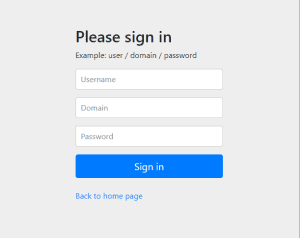
我们使用的登录页面收集我们的SimpleAuthenticationFilter提取的额外的字段:
<form class="form-signin" th:action="@{/login}" method="post">

 <h2 class="form-signin-heading">Please sign in</h2>

 <p>Example: user / domain / password</p>

 <p th:if="${param.error}" class="error">Invalid user, password, or domain</p>

 <p>

   <label for="username" class="sr-only">Username</label>

   <input type="text" id="username" name="username" class="form-control"

     placeholder="Username" required autofocus/>

 </p>

 <p>

   <label for="domain" class="sr-only">Domain</label>

   <input type="text" id="domain" name="domain" class="form-control"

     placeholder="Domain" required autofocus/>

 </p>

 <p>

   <label for="password" class="sr-only">Password</label>

   <input type="password" id="password" name="password" class="form-control"

     placeholder="Password" required autofocus/>

 </p>

 <button class="btn btn-lg btn-primary btn-block" type="submit">Sign in</button><br/>

 <p><a href="/index" th:href="@{/index}">Back to home page</a></p>

</form>
当我们运行应用程序并访问http:// localhost:8081上下文时,我们会看到一个访问安全页面的链接。单击该链接将显示登录页面。正如所料,我们看到了额外的域名字段
3.5.总结
在我们的第一个例子中,我们能够通过“伪造”用户名字段来重用DaoAuthenticationProvider和UsernamePasswordAuthenticationToken。
因此,我们能够使用最少量的配置和其他代码添加对额外登录字段的支持。
4.自定义项目设置
我们的第二种方法与第一种方法非常相似,但可能更适合于非平凡用例。
我们的第二种方法的关键组成部分包括:
- CustomAuthenticationFilter - UsernamePasswordAuthenticationFilter的扩展
- CustomUserDetailsService - 声明loadUserbyUsernameAndDomain方法的自定义接口
- CustomUserDetailsServiceImpl - CustomUserDetailsService的实现
- CustomUserDetailsAuthenticationProvider - AbstractUserDetailsAuthenticationProvider的扩展
- CustomAuthenticationToken - UsernamePasswordAuthenticationToken的扩展
- User - Spring Security提供的User类的扩展,它声明了我们的额外域字段
- SecurityConfig - 我们的Spring Security配置,它将CustomAuthenticationFilter插入到过滤器链中,声明安全规则并连接依赖项
- login.html - 收集用户名,密码和域的登录页面
4.1.自定义验证过滤器
在我们的CustomAuthenticationFilter中,我们从请求中提取用户名,密码和域字段。这些值用于创建CustomAuthenticationToken的实例,该实例将传递给AuthenticationProvider进行身份验证:
public class CustomAuthenticationFilter

  extends UsernamePasswordAuthenticationFilter {

    public static final String SPRING_SECURITY_FORM_DOMAIN_KEY = "domain";

    @Override

    public Authentication attemptAuthentication(

        HttpServletRequest request,

        HttpServletResponse response)

          throws AuthenticationException {

        // ...

        CustomAuthenticationToken authRequest = getAuthRequest(request);

        setDetails(request, authRequest);

        return this.getAuthenticationManager().authenticate(authRequest);

    }

    private CustomAuthenticationToken getAuthRequest(HttpServletRequest request) {

        String username = obtainUsername(request);

        String password = obtainPassword(request);

        String domain = obtainDomain(request);

        // ...

        return new CustomAuthenticationToken(username, password, domain);

    }
4.2.自定义UserDetails服务
我们的CustomUserDetailsService合约定义了一个名为loadUserByUsernameAndDomain的方法。
我们创建的CustomUserDetailsServiceImpl类只是实现并委托我们的CustomUserRepository来获取用户:
public UserDetails loadUserByUsernameAndDomain(String username, String domain)

    throws UsernameNotFoundException {

    if (StringUtils.isAnyBlank(username, domain)) {

        throw new UsernameNotFoundException("Username and domain must be provided");

    }

    User user = userRepository.findUser(username, domain);

    if (user == null) {

        throw new UsernameNotFoundException(

          String.format("Username not found for domain, username=%s, domain=%s",

            username, domain));

    }

    return user;

}
4.3.自定义UserDetailsAuthenticationProvider
我们的CustomUserDetailsAuthenticationProvider将AbstractUserDetailsAuthenticationProvider和委托扩展到我们的CustomUserDetailService以检索用户。这个类最重要的特性是retrieveUser方法的实现。
请注意,我们必须将身份验证令牌强制转换为CustomAuthenticationToken才能访问我们的自定义字段:
@Override

protected UserDetails retrieveUser(String username,

  UsernamePasswordAuthenticationToken authentication)

    throws AuthenticationException {

    CustomAuthenticationToken auth = (CustomAuthenticationToken) authentication;

    UserDetails loadedUser;

    try {

        loadedUser = this.userDetailsService

          .loadUserByUsernameAndDomain(auth.getPrincipal()

            .toString(), auth.getDomain());

    } catch (UsernameNotFoundException notFound) {

        if (authentication.getCredentials() != null) {

            String presentedPassword = authentication.getCredentials()

              .toString();

            passwordEncoder.matches(presentedPassword, userNotFoundEncodedPassword);

        }

        throw notFound;

    } catch (Exception repositoryProblem) {

        throw new InternalAuthenticationServiceException(

          repositoryProblem.getMessage(), repositoryProblem);

    }

    // ...

    return loadedUser;

}
4.4.总结
我们的第二种方法几乎与我们首先提出的简单方法相同。通过实现我们自己的AuthenticationProvider和CustomAuthenticationToken,我们避免了需要使用自定义解析逻辑来调整我们的用户名字段。
5.结论
在本文中,我们在Spring Security中实现了一个使用额外登录字段的表单登录。我们以两种不同的方式做到了这一点
- 在我们简单的方法中,我们最小化了我们需要编写的代码量。通过使用自定义解析逻辑调整用户名,我们能够重用DaoAuthenticationProvider和UsernamePasswordAuthentication
- 在我们更加个性化的方法中,我们通过扩展AbstractUserDetailsAuthenticationProvider并使用CustomAuthenticationToken提供我们自己的CustomUserDetailsService来提供自定义字段支持。
与往常一样,所有源代码都可以在GitHub上找到。
Spring Security在标准登录表单中添加一个额外的字段的更多相关文章
- spring security采用自定义登录页和退出功能
更新... 首先采用的是XML配置方式,请先查看 初识Spring security-添加security 在之前的示例中进行代码修改 项目结构如下: 一.修改spring-security.xml ...
- Spring Security 的注册登录流程
Spring Security 的注册登录流程 数据库字段设计 主要数据库字段要有: 用户的 ID 用户名称 联系电话 登录密码(非明文) UserDTO对象 需要一个数据传输对象来将所有注册信息发送 ...
- spring security使用自定义登录界面后,不能返回到之前的请求界面的问题
昨天因为集成spring security oauth2,所以对之前spring security的配置进行了一些修改,然后就导致登录后不能正确跳转回被拦截的页面,而是返回到localhost根目录. ...
- spring security之 默认登录页源码跟踪
spring security之 默认登录页源码跟踪 2021年的最后2个月,立个flag,要把Spring Security和Spring Security OAuth2的应用及主流程源码研究透 ...
- 如何在启用SharePoint浏览器功能的InfoPath 表单中添加托管代码以动态地加载并显示图片
InfoPath 的浏览器表单不支持加载并显示图片,当然在模板中可以插入图片,但是如果想显示数据库的一幅图片,或是动态加载一张图片就无能为力了. 基实这个问题可以通过在浏览器表单中使用: " ...
- 在HTML文件的表单中添加{%csrf_token%}便可以解决问题
原因是django为了在用户提交表单时防止跨站攻击所做的保护 只需在HTML文件的表单中添加{%csrf_token%}便可以解决问题 ------------------------if判断{% i ...
- form表单中只有一个input时,按回车键后表单自动提交(form表单的一个小坑)
form中只有一个input按回车键表单会自动提交 在一个form表单中,若只有一个input,按回车键表单会自动提交,但是当表单中存在多个input时,按回车键不会执行任何操作,这是form表单的一 ...
- 在数据表中添加一个字段的SQL语句怎么写
如果要在数据表中添加一个字段,应该如何表示呢?下面就为您介绍表添加字段的SQL语句的写法,希望可以让您对SQL语句有更深的认识. 通用式: alter table [表名] add [字段名] 字 ...
- 在vue中下拉框切换事件中改新建表单中的一个值,页面不显示
事件中改新建表单中的一个值,页面不显示,当另一个对象值发生改变时,这个页面上的值才会显示 由于新建表单是弹窗,在弹出时会重新给每个字段重新赋值,在赋值时没给这个字段赋值(常见新加功能时,加了一个字段, ...
随机推荐
- codeforces 659C C. Tanya and Toys(水题+map)
题目链接: C. Tanya and Toys time limit per test 1 second memory limit per test 256 megabytes input stand ...
- 基类的两个派生类再派生一个派生类 用virtual避免二义性
class vehicle{ int MaxSpeed; int Weight;public: vehicle(int maxspeed, int weight) :MaxSpeed(maxspeed ...
- BZOJ_4025_二分图_线段树按时间分治+并查集
BZOJ_4025_二分图_线段树按时间分治+并查集 Description 神犇有一个n个节点的图.因为神犇是神犇,所以在T时间内一些边会出现后消失.神犇要求出每一时间段内这个图是否是二分图.这么简 ...
- HDFS数据迁移目录到正确姿势
添加了一块硬盘,原来的DataNode已经把原有的硬盘占满:怎么办,想要把旧有的数据迁移到新的硬盘上面: 1. 在CDH中修改目录(在HDFS组件中搜索.dir),本例中,新加的硬盘挂载在/data上 ...
- POJ2182:Lost Cows
浅谈线段树和树状数组:https://www.cnblogs.com/AKMer/p/9946944.html 题目传送门:http://poj.org/problem?id=2182 线段树,倒着确 ...
- java计算两个时间相差(天、小时、分钟、秒)
public static Long dateDiff(String startTime, String endTime, String format, String str) { // 按照传入的格 ...
- 我对sobel算子的理解
转自:http://blog.csdn.net/yanmy2012/article/details/8110316 索贝尔算子(Sobeloperator)主要用作边缘检测,在技术上,它是一离散性差分 ...
- 浅析C语言中strtol()函数与strtoul()函数的用法
转自:http://www.jb51.net/article/71463.htm C语言strtol()函数:将字符串转换成long(长整型数) 头文件: ? 1 #include <stdli ...
- jmeter设置默认为中文
1.编辑jmeter目录/bin/jmeter.porperties文件 2.点击将language的注释去掉,并将值变为zh_CN保存.
- [hdu4812]D Tree(点分治)
题意:问有多少条路径,符合路径上所有节点的权值乘积模1000003等于k. 解题关键:预处理阶乘逆元,然后通过hash和树形dp$O(1)$的判定乘积存在问题,注意此道题是如何处理路径保证不重复的,具 ...