
Curve 曲线 工具
最近研究了曲线绘制的工具,主要是2D方程的绘制。综合了许多工具,完成了一下两个脚本。
绘制的工具:
 using UnityEngine;

 using System.Collections;

 using UnityEngine.UI;

 public class Curve : MaskableGraphic

 {

     public Color color;

     public float m_LineWidth = ;

     [Range(, )]

     public int Acc = ;

     public System.Func<float, float> xConvert = x=>x;

     public System.Func<float, float> yConvert = y => y;

     public System.Func<float, float> MainFunc = f => f;

     protected override void OnPopulateMesh(VertexHelper vh)

     {

         var rect = this.rectTransform.rect;

         vh.Clear();

         Debug.Log(rect.xMin);

         Debug.Log(rect.xMax);

         Vector2 pos_first = new Vector2(rect.xMin, CalcY() * rect.height+rect.yMin);

         for (float x = rect.xMin + Acc; x < rect.xMax; x += Acc)

         {

             Vector2 pos = new Vector2(x, CalcY((x - rect.xMin) / rect.width) * rect.height+rect.yMin);

             var quad = GenerateQuad(pos_first, pos);

             vh.AddUIVertexQuad(quad);

             pos_first = pos;

         }

         Vector2 pos_last = new Vector2(rect.xMax, CalcY() * rect.height+rect.yMin);

         vh.AddUIVertexQuad(GenerateQuad(pos_first, pos_last));

         for (int i = ; i < vh.currentVertCount - ; i += )

         {

             vh.AddTriangle(i + , i + , i + );

             vh.AddTriangle(i + , i + , i + );

         }

         Debug.Log("PopulateMesh..." + vh.currentVertCount);

     }

     //根据曲线组件来计算Y

     //**** x 为 (x - rect.xMin) / rect.width)  所以范围 为 0~1

     //返回值 为y ,取值范围限定在 0~1;

     private float CalcY(float x)

     {

         return yConvert((MainFunc(xConvert(x))));

     }

     private UIVertex[] GenerateQuad(Vector2 pos1, Vector2 pos2)

     {

         float dis = Vector2.Distance(pos1, pos2);

         float y = m_LineWidth * 0.5f * (pos2.x - pos1.x) / dis;

         float x = m_LineWidth * 0.5f * (pos2.y - pos1.y) / dis;

         if (y <= )

             y = -y;

         else

             x = -x;

         UIVertex[] vertex = new UIVertex[];

         vertex[].position = new Vector3(pos1.x + x, pos1.y + y);

         vertex[].position = new Vector3(pos2.x + x, pos2.y + y);

         vertex[].position = new Vector3(pos2.x - x, pos2.y - y);

         vertex[].position = new Vector3(pos1.x - x, pos1.y - y);

         for (int i = ; i < vertex.Length; i++)

         {

             vertex[i].color = color;

         }

         return vertex;

     }

 }
控制脚本:
 using UnityEngine;

 using System.Collections;

 using System;

 [RequireComponent(typeof(Curve))]

 public class CurveItem : MonoBehaviour {

     private Curve curve;

     private Vector2[] posArray;

     //绘制谱图x 最小值

     [Header("绘制谱图x 最小值")]

     public float xMin;

     //绘制谱图 x 最大值

     [Header("绘制谱图x 最大值")]

     public float xMax;

     //绘制 谱图 y 最小值

     [Header("绘制谱图y 最小值")]

     public float yMin;

     //绘制谱图 y 最大值

     [Header("绘制谱图y 最大值")]

     public float yMax;

     [Header("绘制谱图取样间隔")]

     public float delta;

     // Use this for initialization

     void Start () {

         curve = this.GetComponentInChildren<Curve>();

     }

     #region 主要方法

     public void ShowPutu(Func<float, float> func)

     {

         //    DrawLine(LineDrawer.GetSampleArray(func, xMin, xMax, delta));

         curve.MainFunc = func;

         curve.xConvert = MathTool.GetLinear(, xMin, , xMax);

         curve.yConvert = MathTool.GetLinear(yMin, , yMax, 1f);

         curve.enabled = false;

         curve.enabled = true;

     }

     #endregion

     #region Test

     private Func<float, float> func = x=>x*x;

     [ContextMenu("谱图")]

     private void Test()

     {

         ShowPutu(func);

     }

     #endregion

 }
Math工具
     //获取线性方程

     public static Func<float, float> GetLinear(float x0, float y0, float x1, float y1)

     {

         Func<float, float> linear = x =>

         {

             float a = (y1 - y0) / (x1 - x0);

             return x*a+y0-x0*a;

         };

         return linear;

     }
调用以下方法即可。
ShowPutu(Func<float, float> func)
将两个脚本都挂载在Canvas下的一个空物体上。
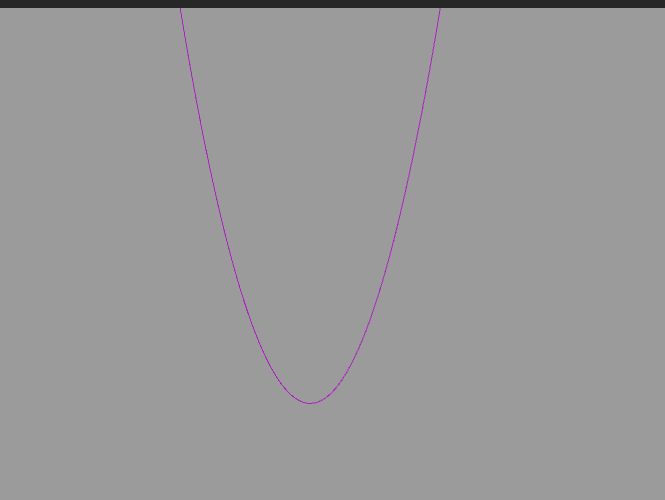
演示 x=>x*x:
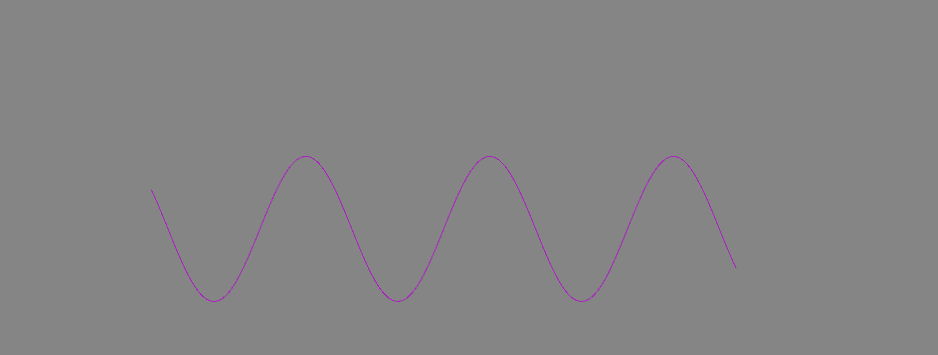
演示 x=>Mathf.Asin(x):
Curve 曲线 工具的更多相关文章
- canvas基础[二]教你编写贝塞尔曲线工具
贝塞尔曲线 bezierCurveTo 在线工具 https://canvature.appspot.com/ [感觉这个好用一些] https://blogs.sitepointstatic.com ...
- iOS - Quartz 2D 贝塞尔曲线
1.贝塞尔曲线 贝塞尔曲线(Bézier curve),又称贝兹曲线或贝济埃曲线,是应用于二维图形应用程序的数学曲线.一般的矢量图形软件通过它来精确画出曲线,贝兹曲线由线段与节点组成,节点是可拖动的支 ...
- javascript -- canvas绘制曲线
绘制曲线有几种思路: 1.通过quadraticCurveTo(controlX, controlY, endX, endY)方法来绘制二次曲线 2.通过bezierCurveTo(controlX1 ...
- canvas教程(三) 绘制曲线
经过 canvas 教程(二) 绘制直线 我们知道了 canvas 的直线是怎么绘制的 而本次是给大家带来曲线相关的绘制 绘制圆形 在 canvas 中我们可以使用 arc 方法画一个圆 contex ...
- Android - Animation 贝塞尔曲线之美
概述 贝塞尔曲线于1962,由法国工程师皮埃尔·贝塞尔所广泛发表,他运用贝塞尔曲线来为汽车的主体进行设计.贝塞尔曲线最初由Paul de Casteljau于1959年运用de Casteljau演算 ...
- Envelope几何对象 Curve对象几何对象 Multipatch几何对象 Geometry集合接口 IGeometryCollection接口
Envelope是所有几何对象的外接矩形,用于表示几何对象的最小边框,所有的几何对象都有一个Envelope对象,IEnvelope是Envelope对象的主要接口,通过它可以获取几何对象的XMax, ...
- WPF将点列连接成光滑曲线——贝塞尔曲线
原文:WPF将点列连接成光滑曲线--贝塞尔曲线 背景 最近在写一个游戏场景编辑器,虽然很水,但是还是遇到了不少问题.连接离散个点列成为光滑曲线就是一个问题.主要是为了通过关键点产生2D的赛道场景.总之 ...
- Canvas 线性图形(三):曲线
前言 画曲线要用到二次贝塞尔曲线或三次贝塞尔曲线.贝塞尔曲线是计算机图形学中相当重要的参数曲线,在一些比较成熟的位图软件中也有贝塞尔曲线工具,如 PhotoShop. 二次贝塞尔曲线 二次贝塞尔曲线在 ...
- truetype技术和矢量字库的技术原理及实现(转)
源:truetype技术和矢量字库的技术原理及实现 广泛汉字矢量字库(HZKSLxxJ)格式 在矢量字库中,每个汉字都是以128 X 128点阵制成矢量数据.每个汉字 ...
随机推荐
- 基于vue 、vue-router 、firebase的todolist小项目
第一次写博客,都不知道改怎么写的好. 本着一颗学习的心,也希望一段时间后再回来在看看自己写的代码,会不会让自己有种不忍直视的念头 *-* 还是先上图吧~ 这是首页,主要是展示所有的列表页面,可以通过输 ...
- day22
# day22 ## 复习 ```python# 1.内存管理# 引用计数:垃圾回收机制工作原理# -- 引用就 +1 ,释放就 -1 , 当计数为0时,就会被垃圾回收机制回收 # 标记清除:解决循环 ...
- WebForm服务器验证控件与前端js自定义验证共同使用
问题: 前端aspx页面中需要在button中添加OnClientClick事件后,这个OnClientClick所执行的自定义的客户端js验证:这个时候,所有的服务器验证控件都会失效! ...
- 设置RHEL-7.0的运行级别
在RHEL7中修改默认运行级别与7以前版本的修改方式不同(7以前版本可以修改/etc/inittab中的“id:5:initdefault:”参数值来实现),RHEL7在/etc/inittab文件中 ...
- C# linq操作是否延迟对照表
·Select - Select选择:延迟 ·Where - Where查询:延迟 ·OrderBy - 按指定表达式对集合正序排序:延迟 ·OrderByDescending - 按指定表达式对集合 ...
- edu9E. Thief in a Shop
题意:n个物品每个价值a[i],要求选k个,可以重复,问能取到哪几个价值 题解:fft裸题.但是直接一次fft,然后快速幂会boom.这样是严格的\(2^{20}*log2(2^{20})*log(w ...
- BUAA_OO第二单元作业总结——多线程
OO第二单元作业总结——多线程 单元任务 本单元主要的内容是通过模拟电梯的运行来熟悉多线程的实现,从简单的单部FAFS电梯开始,ALS电梯,到最后的多部ALS电梯. 一.设计策略分析总结 1.1 多线 ...
- node-sass模块的安装
使用淘宝源 npm config set sass_binary_site=https://npm.taobao.org/mirrors/node-sass/ npm config set phant ...
- PAT 1136 A Delayed Palindrome
1136 A Delayed Palindrome (20 分) Consider a positive integer N written in standard notation with k ...
- iOS调试踩过的坑 以及instruments使用指南
1. 低版本的XCode工程中包含的lib,在高版本的XCode中会编译错误,提示找不到库,故需要恢复libC++库到原位置上,参考 https://github.com/devdawei/libst ...