
Spring学习笔记2—AOP
1.AOP概念
AOP(Aspect Oriented Programming):面向切面编程,AOP能够将那些与业务无关,却为业务模块所共同调用的应用(例如事务处理、日志管理、权限控制等)封装起来,便于减少系统的重复代码,降低模块间的耦合度,并有利于未来的可操作性和可维护性。
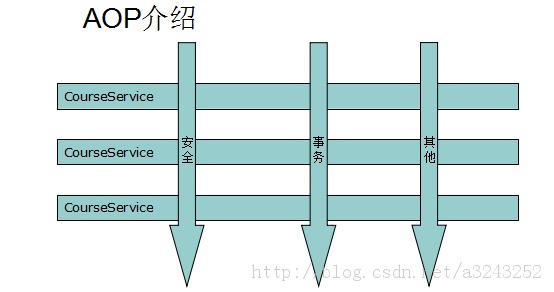
2.AOP术语
通知(Advice)
在AOP术语中,切面的工作被成为通知。通知定义了切面是什么以及何时使用。
Spring切面可以应用5种类型的通知:
- Before —— 在方法被调用之前调用通知;
- After —— 在方法完成之后调用通知,无论方法执行是否成功;
- After-returning —— 在方法成功执行之后调用通知;
- After-throwing —— 在方法抛出异常后调用通知;
- Around —— 通知包裹了被通知的方法,在被通知的方法调用之前和调用之后执行自定义的行为;
连接点(Joinpoint)
连接点是在应用执行过程中能够插入切面的一个点。切面代码可以利用这些点插入到应用的正常流程之中,并添加新的行为。
切点(Pointcut)
如果通知定义了切面的“什么”和“何时”,那么切点就定义了“何处”,即切点用于准确定位应该在什么地方应用切面的通知。
切面(Aspect)
切面是通知和切点的结合。通知和切点共同定义了关于切面的全部内容——它是什么,在何时和何处完成其功能。
引入(Introduction)
引入允许我们向现有的类添加新方法或属性,通过通知类,从而可以在无需修改现有的类的情况下,让它们具有新的行为和状态(通过使用<aop:declare-parents>声明实现)。
织入(Weaving)
织入是将切面应用到目标对象来创建新的代理对象的过程,切面在指定的连接点被织入到目标对象中(注入前置、后置通知等)。
3.使用切点选择连接点
Spring AOP中,需要使用AspectJ的切点表达式语言来定义切点。
Spring仅支持AspectJ切点指示器的一个子集:
| AspectJ指示器 | 描述 |
| execution | 用于匹配方法执行的连接点 |
| within | 用于匹配指定类型内的方法执行 |
| this | 用于匹配当前AOP代理对象类型的执行方法,注意是AOP代理对象的类型匹配,这样就可能包括引入接口也类型匹配 |
| target | 用于匹配当前目标对象类型的执行方法,注意是目标对象的类型匹配,这样就不包括引入接口也类型匹配 |
| args | 用于匹配当前执行的方法传入的参数为指定类型的执行方法 |
| @within | 用于匹配持有指定注解类型内的方法 |
| @target | 用于匹配当前目标对象类型的执行方法,其中目标对象持有指定的注解 |
| @args | 用于匹配当前执行的方法传入的参数持有指定注解的执行 |
| @annotation | 用于匹配当前执行方法持有指定注解的方法 |
| bean | Spring AOP扩展的,用于匹配特定名称的Bean对象的执行方法 |
| reference pointcut | 表示引用其他命名切入点 |
在Spring中尝试使用其他AspectJ指示器时,将会抛出IllegalArgumentException异常。
例如,当切点表达式如下时:
execution(* com.wdcloud.jyx.bj.service.*Service.*(..))
我们使用execution指示器选择com.wdcloud.jyx.bj.service包下后缀为Service的所有类的所有方法,表达式以*开始,表示我们不关心方法的返回值,而方法参数为(..)表示匹配任意参数的方法。
4.在Spring中配置AOP
这里介绍两种配置方法:使用xml配置AOP和使用@AspcetJ注解配置AOP,并且还介绍使用@AspcetJ注解配置AOP时如何获取目标方法名、方法参数和方法返回值。
基于xml配置Spring AOP:
Spring提供了声明式切面的选择。Spring的AOP配置元素简化了基于POJO切面的声明:
| AOP配置元素 | 功能 |
|---|---|
| <aop:advisor> | 定义一个AOP通知器 |
| <aop:after> | 定义一个AOP后置通知(不考虑被通知的方法是否执行成功,相当于再finally中执行) |
| <aop:after-returning> | 定义一个AOP返回后通知 |
| <aop:after-throwing> | 定义一个AOP抛出后通知 |
| <aop:around> | 定义一个AOP环绕通知 |
| <aop:aspect> | 定义一个切面 |
| <aop:before> | 定义一个AOP前置通知 |
| <aop:config> | 顶层的AOP元素。大多数<aop:*>元素必须包含在<aop:config>里 |
| <aop:pointcut> | 定义一个切点 |
| <aop:declare-parents> | 为被通知的对象引入额外的接口,并透明地实现 |
4.1 引用 aspectJ 的 jar 包: aspectjweaver.jar aspectjrt.jar
4.2 在applicationContext.xml中引入AOP对应的命名空间:
    xmlns:aop="http://www.springframework.org/schema/aop"

    xsi:schemaLocation="http://www.springframework.org/schema/aop

                http://www.springframework.org/schema/aop/spring-aop-3.0.xsd">
4.3 创建切面类:
public class LogInterceptor {

    public void before() {

        System.out.println("----------method start----------");

    }

    public void after() {

        System.out.println("----------method after----------");

    }

    public void AfterReturning() {

        System.out.println("----------method AfterReturning----------");

    }

    public void AfterThrowing() {

        System.out.println("----------method AfterThrowing----------");

    }

}
4.4 在applicationContext.xml中配置AOP
  <!-- spring AOP配置 -->

    <bean id="logAdvice" class="com.wdcloud.solr.util.LogInterceptor"/>

    <aop:config>

        <aop:aspect ref="logAdvice">

            <aop:pointcut id="pointcut" expression="execution(* com.wdcloud.solr.action.*Action.*(..))" />

            <aop:before pointcut-ref="pointcut" method="before" />

            <aop:after-returning pointcut-ref="pointcut" method="AfterReturning" />

            <aop:after-throwing pointcut-ref="pointcut" method="AfterThrowing" />

         </aop:aspect>

    </aop:config>
测试结果:

基于@AspcetJ注解配置Spring AOP:
4.1和4.2步骤同上。
4.3 创建切面类:
@Component

@Aspect

public class LogInterceptor {

    // 定义切点

    public static final String actionPointcut = "execution(* com.wdcloud.solr.action.*Action.*(..))";

    @Before(actionPointcut)

    public void before() {

        System.out.println("----------method start----------");

    }

    @After(actionPointcut)

    public void after() {

        System.out.println("----------method after----------");

    }

    @AfterReturning(actionPointcut)

    public void afterReturning() {

        System.out.println("----------method AfterReturning----------");

    }

    @AfterThrowing(actionPointcut)

    public void afterThrowing() {

        System.out.println("----------method AfterThrowing----------");

    }

}
4.4 在applicationContext.xml中配置AOP
<!-- 自动为spring容器中那些配置@aspectJ切面的bean创建代理 -->
<!-- proxy-target-class属性,默认为false,表示使用jdk动态代理织入增强,当poxy-target-class="true"时,表示使用CGLib动态代理技术织入增强 -->

<aop:aspectj-autoproxy proxy-target-class="true"/>
测试结果:

使用@AspcetJ注解配置AOP时如何获取目标方法名、方法参数和方法返回值:
访问目标方法最简单的做法是定义切面方法时,将第一个参数定义为JoinPoint类型,当该切面方法被调用时,该JoinPoint参数就代表了织入切面的连接点。JoinPoint里包含了如下几个常用的方法:
Object[] getArgs:返回目标方法的参数
Signature getSignature:返回目标方法的签名
Object getTarget:返回被织入增强处理的目标对象
Object getThis:返回AOP框架为目标对象生成的代理对象
将上面的切面类修改如下:
@Component

@Aspect

public class LogInterceptor {

    // 定义切点

    public static final String actionPointcut = "execution(* com.wdcloud.solr.action.*Action.*(..))";

    public static final String servicePointcut = "execution(* com.wdcloud.solr.service.*Service.*(..))";

    @Before(actionPointcut)

    public void before(JoinPoint point) {

        System.out.println("----------method " + point.getSignature().getDeclaringTypeName() + "."

                + point.getSignature().getName() + " start----------");

        System.out.println("----------param:" + JSONObject.toJSONString(point.getArgs()) + "----------");

    }

    @After(actionPointcut)

    public void after(JoinPoint point) {

        System.out.println("----------method " + point.getSignature().getDeclaringTypeName() + "."

                + point.getSignature().getName() + " end----------");

    }

    @AfterReturning(pointcut = actionPointcut, returning = "returnValue")

    public void afterReturning(JoinPoint point, Object returnValue) {

        System.out.println("----------result:" + JSONObject.toJSONString(returnValue) + "----------");

        System.out.println("----------method " + point.getSignature().getDeclaringTypeName() + "."

                + point.getSignature().getName() + " end----------");

    }

    //当有多个切点的时候,用"||"连接切点即可

    @AfterThrowing(pointcut = actionPointcut + "||" + servicePointcut, throwing = "exception")

    public void afterThrowing(JoinPoint point, Exception exception) {

        System.out.println("----------exception:" + exception.getMessage() + "----------");

    }

}
测试结果:

如果想要在aop中排除某些方法,可以这样配置切点:
public static final String noGetMethodPointcut = "execution(* witparking.starlightmanagement.service.impl.*Service.*(..)) and " +

        "!execution(* witparking.starlightmanagement.service.impl.*Service.get*(..))";
参考
http://blog.csdn.net/robinjwong/article/details/25568481#t6
http://www.cnblogs.com/oumyye/p/4480196.html
http://blog.csdn.net/ye_sheng/article/details/48178983
Spring学习笔记2—AOP的更多相关文章
- Spring学习笔记之aop动态代理(3)
Spring学习笔记之aop动态代理(3) 1.0 静态代理模式的缺点: 1.在该系统中有多少的dao就的写多少的proxy,麻烦 2.如果目标接口有方法的改动,则proxy也需要改动. Person ...
- Spring学习笔记4——AOP
AOP 即 Aspect Oriented Program 面向切面编程 首先,在面向切面编程的思想里面,把功能分为核心业务功能,和周边功能. 所谓的核心业务,比如登陆,增加数据,删除数据都叫核心业务 ...
- [Spring学习笔记 4 ] AOP 概念原理以及java动态代理
一.Spring IoC容器补充(1) Spring IoC容器,DI(依赖注入): 注入的方式:设值方法注入setter(属性注入)/构造子注入(构造函数传入依赖的对象)/字段注入Field(注解) ...
- Spring学习笔记之AOP配置篇(一)
[TOC] 1. 创建并声明一个切面 首先,创建一个类,添加@Component注解使其添加到IoC容器 然后,添加@Aspect注解,使其成为一个切面 最后,在配置文件里面,使用<aop:as ...
- spring学习笔记(一) Spring概述
博主Spring学习笔记整理大部分内容来自Spring实战(第四版)这本书. 强烈建议新手购入或者需要电子书的留言. 在学习Spring之前,我们要了解这么几个问题:什么是Spring?Spring ...
- Java框架spring 学习笔记(十八):事务管理(xml配置文件管理)
在Java框架spring 学习笔记(十八):事务操作中,有一个问题: package cn.service; import cn.dao.OrderDao; public class OrderSe ...
- 不错的Spring学习笔记(转)
Spring学习笔记(1)----简单的实例 --------------------------------- 首先需要准备Spring包,可从官方网站上下载. 下载解压后,必须的两个包是s ...
- 【Spring学习笔记-MVC-5】利用spring MVC框架,实现ajax异步请求以及json数据的返回
作者:ssslinppp 时间:2015年5月26日 15:32:51 1. 摘要 本文讲解如何利用spring MVC框架,实现ajax异步请求以及json数据的返回. Spring MV ...
- 【Spring学习笔记-MVC-3】SpringMVC返回Json数据-方式1
<Spring学习笔记-MVC>系列文章,讲解返回json数据的文章共有3篇,分别为: [Spring学习笔记-MVC-3]SpringMVC返回Json数据-方式1:http://www ...
随机推荐
- Sublime text 3 搭建Python3 IDE
起因:为了提高编码工作中的体验,Sublime Text:不仅具有华丽的界面,还支持插件扩展机制,用她来写代码,绝对是一种享受. Vim难于上手,Eclipse,VS 体积庞大,即便体积轻巧迅速启动的 ...
- mariadb mysql 报'Access denied for user 'root'@'localhost' (using password: NO)'错误的解决
C:\Program Files\MariaDB 10.2\bin>mysql admin -u root password "x123456789" mysql Ver 1 ...
- Atitit.收银机小票打印功能的设计 java php c#.net版本
Atitit.收银机小票打印功能的设计 java php c#.net版本 1. 1. 打印方式有4种:1 1.1. 1.1. 一是不经过任何修改,直接调用javascript中的window.pr ...
- 【藏】使用Entity Framework时要注意的一些性能问题
这篇文章写的很好: http://diaosbook.com/Post/2012/12/9/performance-issue-in-select-one-or-few-colums-via-enti ...
- Hibernate一对多映射列表实例(使用xml文件)
如果持久化类具有包含实体引用的列表(List)对象,则需要使用一对多关联来映射列表元素. 在这里,我们使用论坛应用场景,在论坛中一个问题有多个答案. 在这种情况下,一个问题可以有多个答案,每个答案可能 ...
- response.sendRedirect 的功能是地址重定向(页面跳转)
response.sendRedirect 的功能是地址重定向(页面跳转) 1.response.sendredirect(url); 新的页面并不能处理旧页面的pagecontext(request ...
- xilinx 赛灵思fpga verilog hdl 教程
http://www.eefocus.com/article/08-03/37231s.html http://wenku.baidu.com/link?url=5mdkMmm4BGGi7gRdgSk ...
- CentOS 6.5 安装Gitlab 7.12.2
官网环境要求 参见:https://github.com/gitlabhq/gitlabhq GitLab is a Ruby on Rails application that runs on th ...
- OpenCV学习笔记十四:opencv_objdetect模块
一,简介: 该库用于目标检测.
- 41个Web开发者必须收藏的JavaScript实用技巧
1. 将彻底屏蔽鼠标右键 oncontextmenu=”window.event.returnValue=false” < table border oncontextmenu=return(f ...