
Hadoop学习之路(6)MapReduce自定义分区实现
MapReduce自带的分区器是HashPartitioner
原理:先对map输出的key求hash值,再模上reduce task个数,根据结果,决定此输出kv对,被匹配的reduce任务取走。
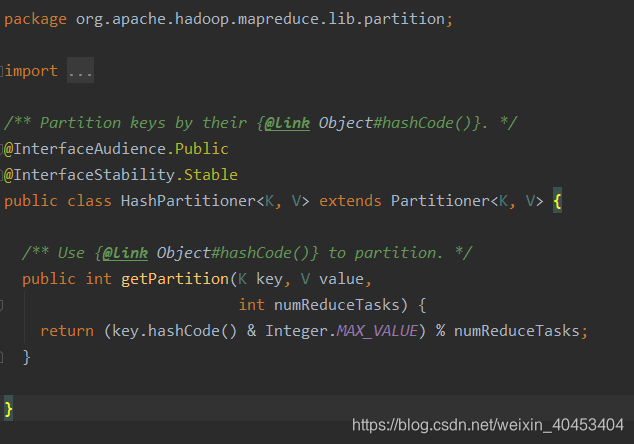
自定义分分区需要继承Partitioner,复写getpariton()方法
自定义分区类:
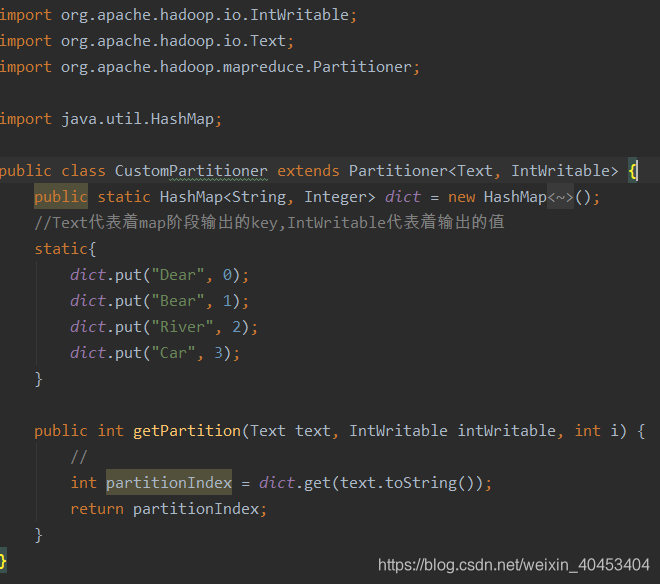
注意:map的输出是<K,V>键值对
其中int partitionIndex = dict.get(text.toString()),partitionIndex是获取K的值
附:被计算的的文本
Dear Dear Bear Bear River Car Dear Dear  Bear Rive

Dear Dear Bear Bear River Car Dear Dear  Bear Rive
需要在main函数中设置,指定自定义分区类
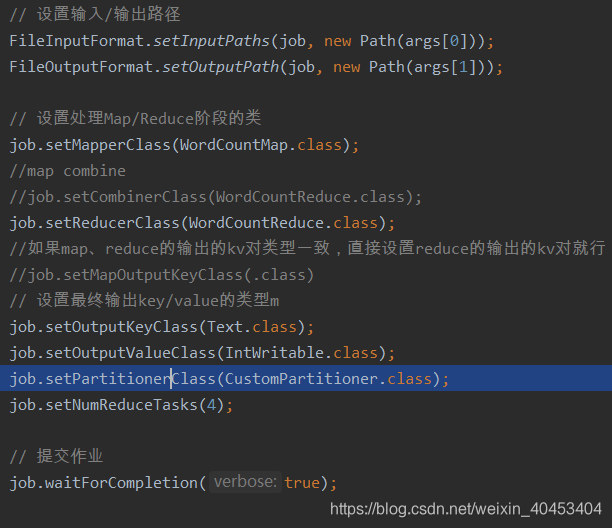
自定义分区类:
import org.apache.hadoop.io.IntWritable;

import org.apache.hadoop.io.Text;

import org.apache.hadoop.mapreduce.Partitioner;

import java.util.HashMap;

public class CustomPartitioner extends Partitioner<Text, IntWritable> {

    public static HashMap<String, Integer> dict = new HashMap<String, Integer>();

    //Text代表着map阶段输出的key,IntWritable代表着输出的值

    static{

        dict.put("Dear", 0);

        dict.put("Bear", 1);

        dict.put("River", 2);

        dict.put("Car", 3);

    }

    public int getPartition(Text text, IntWritable intWritable, int i) {

        //

        int partitionIndex = dict.get(text.toString());

        return partitionIndex;

    }

}
注意:map的输出结果是键值对<K,V>,int partitionIndex = dict.get(text.toString());中的partitionIndex是map输出键值对中的键的值,也就是K的值。
Maper类:
import org.apache.hadoop.io.IntWritable;

import org.apache.hadoop.io.LongWritable;

import org.apache.hadoop.io.Text;

import org.apache.hadoop.mapreduce.Mapper;

import java.io.IOException;

public class WordCountMap extends Mapper<LongWritable, Text, Text, IntWritable> {

    public void map(LongWritable key, Text value, Context context)

            throws IOException, InterruptedException {

        String[] words = value.toString().split("\t");

        for (String word : words) {

            // 每个单词出现1次,作为中间结果输出

            context.write(new Text(word), new IntWritable(1));

        }

    }

}
Reducer类:
import org.apache.hadoop.io.IntWritable;

import org.apache.hadoop.io.LongWritable;

import org.apache.hadoop.io.Text;

import org.apache.hadoop.mapreduce.Mapper;

import java.io.IOException;

public class WordCountMap extends Mapper<LongWritable, Text, Text, IntWritable> {

    public void map(LongWritable key, Text value, Context context)

            throws IOException, InterruptedException {

        String[] words = value.toString().split("\t");

        for (String word : words) {

            // 每个单词出现1次,作为中间结果输出

            context.write(new Text(word), new IntWritable(1));

        }

    }

}
main函数:
import org.apache.hadoop.conf.Configuration;

import org.apache.hadoop.fs.Path;

import org.apache.hadoop.io.IntWritable;

import org.apache.hadoop.io.Text;

import org.apache.hadoop.mapreduce.Job;

import org.apache.hadoop.mapreduce.lib.input.FileInputFormat;

import org.apache.hadoop.mapreduce.lib.output.FileOutputFormat;

import java.io.IOException;

public class WordCountMain {

    public static void main(String[] args) throws IOException,

            ClassNotFoundException, InterruptedException {

        if (args.length != 2 || args == null) {

            System.out.println("please input Path!");

            System.exit(0);

        }

        Configuration configuration = new Configuration();

        configuration.set("mapreduce.job.jar","/home/bruce/project/kkbhdp01/target/com.kaikeba.hadoop-1.0-SNAPSHOT.jar");

        Job job = Job.getInstance(configuration, WordCountMain.class.getSimpleName());

        // 打jar包

        job.setJarByClass(WordCountMain.class);

        // 通过job设置输入/输出格式

        //job.setInputFormatClass(TextInputFormat.class);

        //job.setOutputFormatClass(TextOutputFormat.class);

        // 设置输入/输出路径

        FileInputFormat.setInputPaths(job, new Path(args[0]));

        FileOutputFormat.setOutputPath(job, new Path(args[1]));

        // 设置处理Map/Reduce阶段的类

        job.setMapperClass(WordCountMap.class);

        //map combine

        //job.setCombinerClass(WordCountReduce.class);

        job.setReducerClass(WordCountReduce.class);

        //如果map、reduce的输出的kv对类型一致,直接设置reduce的输出的kv对就行;如果不一样,需要分别设置map, reduce的输出的kv类型

        //job.setMapOutputKeyClass(.class)

        // 设置最终输出key/value的类型m

        job.setOutputKeyClass(Text.class);

        job.setOutputValueClass(IntWritable.class);

        job.setPartitionerClass(CustomPartitioner.class);

        job.setNumReduceTasks(4);

        // 提交作业

        job.waitForCompletion(true);

    }

}
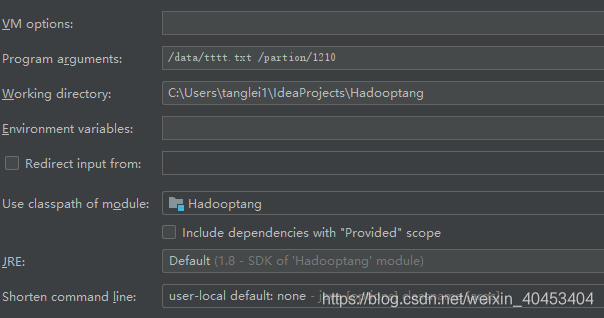
main函数参数设置:
Hadoop学习之路(6)MapReduce自定义分区实现的更多相关文章
- Hadoop学习之路(7)MapReduce自定义排序
本文测试文本: tom 20 8000 nancy 22 8000 ketty 22 9000 stone 19 10000 green 19 11000 white 39 29000 socrate ...
- Hadoop学习之路(5)Mapreduce程序完成wordcount
程序使用的测试文本数据: Dear River Dear River Bear Spark Car Dear Car Bear Car Dear Car River Car Spark Spark D ...
- 阿里封神谈hadoop学习之路
阿里封神谈hadoop学习之路 封神 2016-04-14 16:03:51 浏览3283 评论3 发表于: 阿里云E-MapReduce >> 开源大数据周刊 hadoop 学生 s ...
- 《Hadoop学习之路》学习实践
(实践机器:blog-bench) 本文用作博文<Hadoop学习之路>实践过程中遇到的问题记录. 本文所学习的博文为博主“扎心了,老铁” 博文记录.参考链接https://www.cnb ...
- Hadoop学习之路(十三)MapReduce的初识
MapReduce是什么 首先让我们来重温一下 hadoop 的四大组件: HDFS:分布式存储系统 MapReduce:分布式计算系统 YARN:hadoop 的资源调度系统 Common:以上三大 ...
- Hadoop mapreduce自定义分区HashPartitioner
本文发表于本人博客. 在上一篇文章我写了个简单的WordCount程序,也大致了解了下关于mapreduce运行原来,其中说到还可以自定义分区.排序.分组这些,那今天我就接上一次的代码继续完善实现自定 ...
- Hadoop 学习之路(三)—— 分布式计算框架 MapReduce
一.MapReduce概述 Hadoop MapReduce是一个分布式计算框架,用于编写批处理应用程序.编写好的程序可以提交到Hadoop集群上用于并行处理大规模的数据集. MapReduce作业通 ...
- 【Hadoop】MapReduce自定义分区Partition输出各运营商的手机号码
MapReduce和自定义Partition MobileDriver主类 package Partition; import org.apache.hadoop.io.NullWritable; i ...
- Hadoop学习之路(二十)MapReduce求TopN
前言 在Hadoop中,排序是MapReduce的灵魂,MapTask和ReduceTask均会对数据按Key排序,这个操作是MR框架的默认行为,不管你的业务逻辑上是否需要这一操作. 技术点 MapR ...
随机推荐
- 题解 USACO12DEC【逃跑的BarnRunning Away From…】
期末考前写题解,\(rp++! \ rp++! \ rp++!\) \[ description \] 给出一个以 \(1\) 为根的边带权有根树,给定一个参数 \(L\) ,问每个点的子树中与它距离 ...
- 视觉光盘,只有我可以贴全世界唯一,Windows上最高级的DOCKER客户端数字, 夜晚点击一个都没有,值班的小编辛苦了
继上一篇视觉光盘,只有我可以贴全世界唯一,你永远截不到的图片(小编请用人性化语言解释移出首页) 合体了 晚上的小编, 呆了吗? 我看到了少于150字的随笔不允许发布到网站首页 我决定了用我专业的龟式输 ...
- Go语言实现:【剑指offer】翻转单词顺序列
该题目来源于牛客网<剑指offer>专题. 例如,"student. a am I",正确的句子应该是"I am a student." Go语言实 ...
- 实验楼-python3简明教程笔记
#!/usr/bin/env python3 days = int(input("Enter days: ")) print("Months = {} Days = {} ...
- windows运行shell脚本
1. 环境变量的理解:快速找到程序并执行,配置在path的目录下有系统环境和用户环境,配置在此的只要目录路径就好,在cmd输入名字就会去此路径找匹配程序执行 2. 将git安装目录下的....\Git ...
- 写给Unity开发者的iOS内存调试指南
0x00 前言 工作的过程中,常常会发现有小伙伴对Unity的Profiler提供的内存数据与某些原生平台Profiler工具,例如iOS系统和Xcode,所提供的内存数据有差异而感到好奇.而且大家对 ...
- Django使用 djcelery时报ImportError: No module named south.db错误
这时候可能是安装的Django-celery.celery的版本过低引起的,可以到pycharm查看推荐的版本,把版本更换到的推荐的版本就解决了
- CVE-2020-0618 SQL 远程代码执行
CVE-2020-0618 SQL Server远程代码执行 1.简介 SQL Server Reporting Services(SSRS)提供了一组本地工具和服务,用于创建,部署和管理移动报告和分 ...
- NCE L3
单词 课文
- 安装nanomsg
xftp上传nanomsg安装包 1.解压安装包tar -xvf nanomsg-1.1.0.tar 进入目录cd nanomsg-1.1.0新建安装目录(在nanomsg-1.1.0目录下)mkdi ...