
Python 之scrapy框架58同城招聘爬取案例
一、项目目录结构:
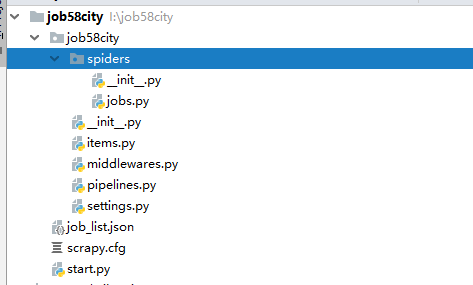
代码如下:
# -*- coding: utf-8 -*-

# Define here the models for your scraped items

#

# See documentation in:

# https://doc.scrapy.org/en/latest/topics/items.html

import scrapy

class Job58CityItem(scrapy.Item):

    # define the fields for your item here like:

    # name = scrapy.Field()

    job_name = scrapy.Field()

    money = scrapy.Field()

    job_wel = scrapy.Field()

    company = scrapy.Field()

    position_type = scrapy.Field()

    xueli = scrapy.Field()

    jingyan = scrapy.Field()

    address = scrapy.Field()
# -*- coding: utf-8 -*-

import scrapy

from ..items import Job58CityItem

class JobsSpider(scrapy.Spider):

    name = 'jobs'

    allowed_domains = ['58.com']

    # 配置起始页url

    offset = 1

    url = "https://cd.58.com/job/pn{0}/"

    start_urls = [url.format(str(offset))]

    #解析html内容

    def parse(self, response):

        for each in response.xpath("//ul[@id='list_con']/li"):

            item = Job58CityItem()

            item['job_name'] = each.xpath(".//span[@class='name']/text()").extract()[0]

            money_list = each.xpath(".//p[@class='job_salary']/text()").extract()

            money = "未知"

            if len(money_list) > 0:

                money = money_list[0]

            item['money'] = money

            span = each.xpath(".//div[@class='job_wel clearfix']/span")

            item['job_wel'] = []

            for i in span:

                item['job_wel'].append(i.xpath("./text()").extract()[0])

            item['company'] = each.xpath(".//div[@class='comp_name']/a/text()").extract()[0]

            item['position_type'] = each.xpath(".//span[@class='cate']/text()").extract()[0]

            item['xueli'] = each.xpath(".//span[@class='xueli']/text()").extract()[0]

            item['jingyan'] = each.xpath(".//span[@class='jingyan']/text()").extract()[0]

            item['address'] = each.xpath("//span[@class='address']/text()").extract()[0]

            yield item

        if self.offset < 100:

            self.offset += 1

        yield scrapy.Request("https://cd.58.com/job/pn{0}/".format(str(self.offset)), callback=self.parse)
from scrapy import cmdline

if __name__ == '__main__':

    cmdline.execute("scrapy crawl jobs".split())
数据:

源码链接:https://github.com/yangsphp/Scrapy-master
Python 之scrapy框架58同城招聘爬取案例的更多相关文章
- python爬虫 scrapy框架(一)爬取壁纸照片
此项目仅供学习参考, 不用于任何商业用途 若侵权留言,立刻删除 刚入门爬虫不久,一心想找个网站试试,然后朋友推荐了这个壁纸网站
- Scrapy 框架 CrawlSpider 全站数据爬取
CrawlSpider 全站数据爬取 创建 crawlSpider 爬虫文件 scrapy genspider -t crawl chouti www.xxx.com import scrapy fr ...
- scrapy框架用CrawlSpider类爬取电影天堂.
本文使用CrawlSpider方法爬取电影天堂网站内国内电影分类下的所有电影的名称和下载地址 CrawlSpider其实就是Spider的一个子类. CrawlSpider功能更加强大(链接提取器,规 ...
- 爬虫(十七):Scrapy框架(四) 对接selenium爬取京东商品数据
1. Scrapy对接Selenium Scrapy抓取页面的方式和requests库类似,都是直接模拟HTTP请求,而Scrapy也不能抓取JavaScript动态谊染的页面.在前面的博客中抓取Ja ...
- python爬虫scrapy框架
Scrapy 框架 关注公众号"轻松学编程"了解更多. 一.简介 Scrapy是用纯Python实现一个为了爬取网站数据.提取结构性数据而编写的应用框架,用途非常广泛. 框架的力量 ...
- python爬虫scrapy框架——人工识别登录知乎倒立文字验证码和数字英文验证码(2)
操作环境:python3 在上一文中python爬虫scrapy框架--人工识别知乎登录知乎倒立文字验证码和数字英文验证码(1)我们已经介绍了用Requests库来登录知乎,本文如果看不懂可以先看之前 ...
- Python爬虫(四)——开封市58同城数据模型训练与检测
前文参考: Python爬虫(一)——开封市58同城租房信息 Python爬虫(二)——对开封市58同城出租房数据进行分析 Python爬虫(三)——对豆瓣图书各模块评论数与评分图形化分析 数据的构建 ...
- [Python爬虫] 使用 Beautiful Soup 4 快速爬取所需的网页信息
[Python爬虫] 使用 Beautiful Soup 4 快速爬取所需的网页信息 2018-07-21 23:53:02 larger5 阅读数 4123更多 分类专栏: 网络爬虫 版权声明: ...
- 【图文详解】scrapy爬虫与动态页面——爬取拉勾网职位信息(2)
上次挖了一个坑,今天终于填上了,还记得之前我们做的拉勾爬虫吗?那时我们实现了一页的爬取,今天让我们再接再厉,实现多页爬取,顺便实现职位和公司的关键词搜索功能. 之前的内容就不再介绍了,不熟悉的请一定要 ...
随机推荐
- 两个栈实现队列,开始做错了 —— 剑指Offer
开始大意了,这道题目居然做错了: https://www.nowcoder.net/practice/54275ddae22f475981afa2244dd448c6?tpId=13&tqId ...
- load函数
load函数的作用 1.load函数的作用是,从server获取数据,而且把数据放到指定的元素(通常是div元素)中. 2.说的再具体一些就是,把获取到的数据插入到当前文档的某个div元素中. ser ...
- wpf slider进度条的样式模板,带有进度颜色显示
效果图: 仅仅需在前台加上这段代码就可以: <UserControl.Resources> <!--笔刷--> <LinearGradientBrush x:Key=&q ...
- hdu 1728 逃离迷宫 bfs记步数
题链:http://acm.hdu.edu.cn/showproblem.php?pid=1728 逃离迷宫 Time Limit: 1000/1000 MS (Java/Others) Mem ...
- android从数据库中取音乐数据
android从手机数据库中取音乐数据 直接贴代码 public void getMp3(){ list = new ArrayList<>(); Cursor mAudioCursor ...
- web的自己主动化公布
</pre>基于眼下业务的版本号.使用的maven 及tomcat <p></p><p>假设我们使用 Jenkins 公布是比較好的,可是存在一定的问题 ...
- Java程序执行超时——Future接口介绍
在Java中,如果需要设定代码执行的最长时间,即超时,可以用Java线程池ExecutorService类配合Future接口来实现. Future接口是Java标准API的一部分,在java.uti ...
- POJ 3683 Priest John's Busiest Day (2-SAT+输出可行解)
题目地址:POJ 3683 第一次做须要输出可行解的题目. . .大体思路是先用强连通来推断是否有可行解,然后用逆序建图.用拓扑排序来进行染色.然后输出可行解. 详细思路见传送门 由于推断的时候少写了 ...
- visual studio推荐的插件
https://marketplace.visualstudio.com/items?itemName=EricLebetsamer.BootstrapSnippetPack https://mark ...
- [Codeforces Round495A] Sonya and Hotels
[题目链接] https://codeforces.com/contest/1004/problem/A [算法] 直接按题意模拟即可 时间复杂度 :O(NlogN) [代码] #include< ...