
Spring boot Sample 006之spring-boot-custom-servlet
一、环境
1.1、Idea 2020.1
1.2、JDK 1.8
二、步骤
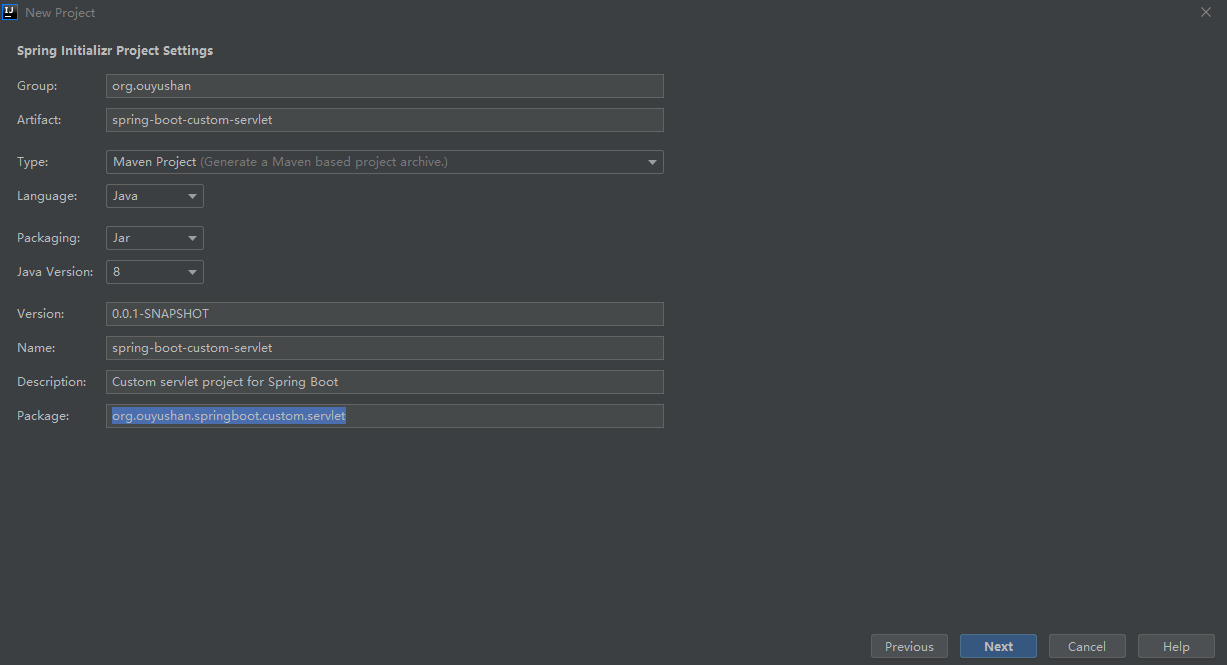
2.1、点击File -> New Project -> Spring Initializer,点击next

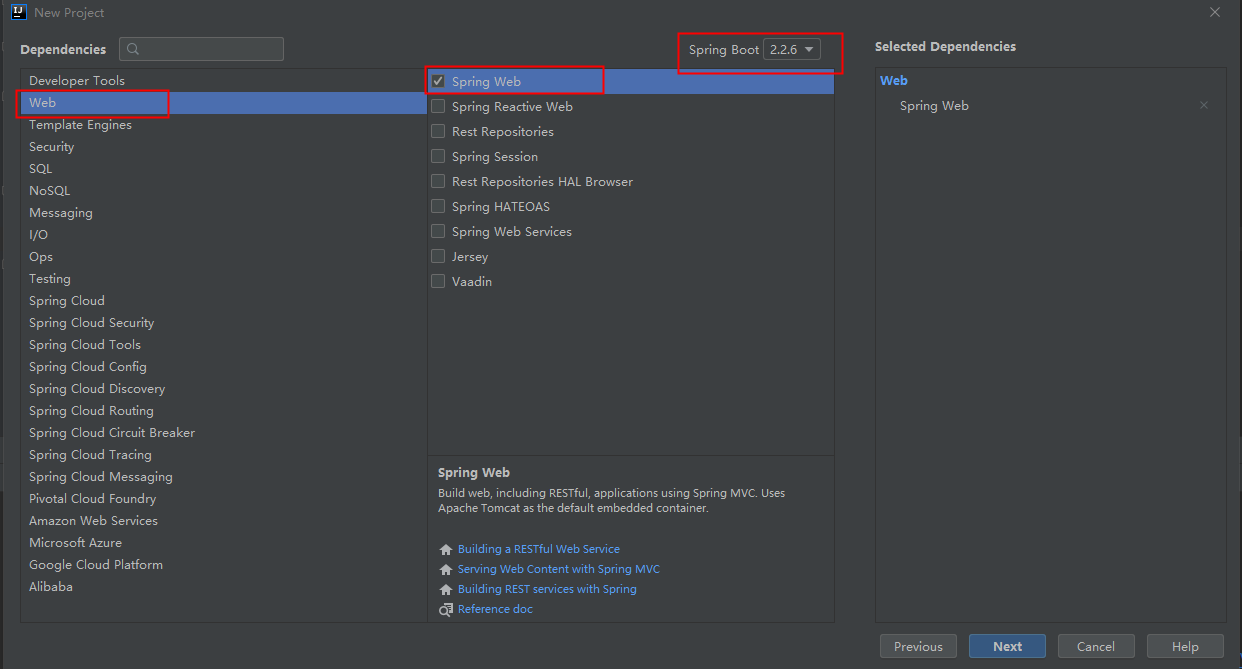
2.3、选择Web依赖,选中Spring Web。可以选择Spring Boot版本,本次默认为2.2.6,点击Next
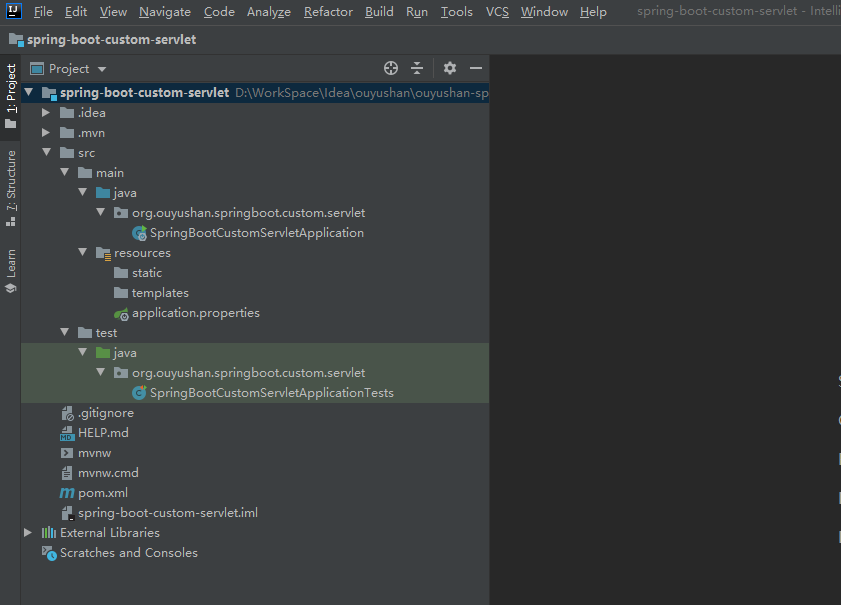
2.4、项目结构
三、自定义实现
3.1、通过bean实现

package org.ouyushan.springboot.custom.servlet.config.listener;

import javax.servlet.ServletContextEvent;

import javax.servlet.ServletContextListener;

/**

 * @Description: 自定义监听器

 * @Author: ouyushan

 * @Email: ouyushan@hotmail.com

 * @Date: 2020/4/28 10:45

 */

public class CustomListener implements ServletContextListener {

    @Override

    public void contextInitialized(ServletContextEvent sce) {

        System.out.println("========contextInitialized========");

    }

    @Override

    public void contextDestroyed(ServletContextEvent sce) {

        System.out.println("========contextDestroyed========");

    }

}
package org.ouyushan.springboot.custom.servlet.config.filter;

import javax.servlet.*;

import java.io.IOException;

/**

 * @Description: 自定义fileter

 * @Author: ouyushan

 * @Email: ouyushan@hotmail.com

 * @Date: 2020/4/28 10:38

 */

public class CustomFilter implements Filter {

    @Override

    public void init(FilterConfig filterConfig) throws ServletException {

        System.out.println("========init filter========");

    }

    @Override

    public void doFilter(ServletRequest servletRequest, ServletResponse servletResponse, FilterChain filterChain) throws IOException, ServletException {

        System.out.println("========do filter========");

        filterChain.doFilter(servletRequest, servletResponse);

    }

    @Override

    public void destroy() {

        System.out.println("========destroy filter========");

    }

}
package org.ouyushan.springboot.custom.servlet.config.servlet;

import javax.servlet.ServletException;

import javax.servlet.http.HttpServlet;

import javax.servlet.http.HttpServletRequest;

import javax.servlet.http.HttpServletResponse;

import java.io.IOException;

/**

 * @Description: 自定义servlet

 * @Author: ouyushan

 * @Email: ouyushan@hotmail.com

 * @Date: 2020/4/28 10:25

 */

public class CustomServlet extends HttpServlet {

    @Override

    protected void doGet(HttpServletRequest req, HttpServletResponse resp) throws ServletException, IOException {

        System.out.println("========servlet get method is called========");

        resp.getWriter().write("hello world by get");

    }

    @Override

    protected void doPost(HttpServletRequest req, HttpServletResponse resp) throws ServletException, IOException {

        System.out.println("========servlet post method is called========");

        resp.getWriter().write("hello world by post");

    }

}
package org.ouyushan.springboot.custom.servlet.controller;

import org.springframework.web.bind.annotation.RequestMapping;

import org.springframework.web.bind.annotation.RestController;

/**

 * @Description:

 * @Author: ouyushan

 * @Email: ouyushan@hotmail.com

 * @Date: 2020/4/28 10:55

 */

@RestController

@RequestMapping("/api")

public class ServletController {

    @RequestMapping("/servlet")

    public String servlet() {

        return "custom servlet";

    }

    @RequestMapping("/filter")

    public String filter() {

        return "custom filter";

    }

}
package org.ouyushan.springboot.custom.servlet;

import org.ouyushan.springboot.custom.servlet.config.filter.CustomFilter;

import org.ouyushan.springboot.custom.servlet.config.listener.CustomListener;

import org.ouyushan.springboot.custom.servlet.config.servlet.CustomServlet;

import org.springframework.boot.SpringApplication;

import org.springframework.boot.autoconfigure.SpringBootApplication;

import org.springframework.boot.web.servlet.FilterRegistrationBean;

import org.springframework.boot.web.servlet.ServletListenerRegistrationBean;

import org.springframework.boot.web.servlet.ServletRegistrationBean;

import org.springframework.context.annotation.Bean;

@SpringBootApplication

public class SpringBootCustomServletApplication {

    @Bean

    public ServletRegistrationBean servletRegistrationBean() {

        // 只有路径是以/custom/servlet开始的才会触发

        return new ServletRegistrationBean(new CustomServlet(), "/custom/servlet");

    }

    @Bean

    public FilterRegistrationBean filterRegistrationBean() {

        //第二个参数为需要拦截的路径,不传则拦截所有

        return new FilterRegistrationBean(new CustomFilter(), servletRegistrationBean());

    }

    @Bean

    public ServletListenerRegistrationBean<CustomListener> servletListenerRegistrationBean() {

        return new ServletListenerRegistrationBean<CustomListener>(new CustomListener());

    }

    public static void main(String[] args) {

        SpringApplication.run(SpringBootCustomServletApplication.class, args);

    }

}
========contextInitialized========

========init filter========
custom servlet
========do filter========

========servlet get method is called========
========destroy filter========

========contextDestroyed========
3.2、通过实现ServletContextInitializer实现
// 方式二 通过实现ServletContextInitializer

@SpringBootApplication

public class SpringBootCustomServletApplication implements ServletContextInitializer {

@Override

public void onStartup(ServletContext servletContext) {

    // 创建Servlet,并映射访问路径为/custom/servlet

    servletContext.addServlet("customServlet", new CustomServlet()).addMapping("/custom/servlet");

    // 创建Filter,拦截的Servlet

    servletContext.addFilter("customFilter", new CustomFilter())

            .addMappingForServletNames(EnumSet.of(DispatcherType.REQUEST), true, "customServlet");

    // 设置自定义filter

    servletContext.addListener(new CustomListener());

}

public static void main(String[] args) {

    SpringApplication.run(SpringBootCustomServletApplication.class, args);

}

}
========contextInitialized========

========init filter========
custom servlet
========do filter========

========servlet get method is called========
========destroy filter========

========contextDestroyed========
3.3、通过@ServletComponentScan结合注解实现
@ServletComponentScan

@SpringBootApplication

public class SpringBootCustomServletApplication {

    public static void main(String[] args) {

        SpringApplication.run(SpringBootCustomServletApplication.class, args);

    }

}
package org.ouyushan.springboot.custom.servlet.config.servlet;

import javax.servlet.ServletException;

import javax.servlet.annotation.WebServlet;

import javax.servlet.http.HttpServlet;

import javax.servlet.http.HttpServletRequest;

import javax.servlet.http.HttpServletResponse;

import java.io.IOException;

/**

 * @Description: 自定义servlet

 * @Author: ouyushan

 * @Email: ouyushan@hotmail.com

 * @Date: 2020/4/28 10:25

 */

@WebServlet(name = "customServlet", urlPatterns = "/custom/servlet")

public class CustomServlet extends HttpServlet {

    @Override

    protected void doGet(HttpServletRequest req, HttpServletResponse resp) throws IOException {

        System.out.println("========servlet get method is called========");

        resp.getWriter().write("hello world by get");

    }

    @Override

    protected void doPost(HttpServletRequest req, HttpServletResponse resp) throws IOException {

        System.out.println("========servlet post method is called========");

        resp.getWriter().write("hello world by post");

    }

}

package org.ouyushan.springboot.custom.servlet.config.filter;

import javax.servlet.*;

import javax.servlet.annotation.WebFilter;

import java.io.IOException;

/**

 * @Description: 自定义fileter

 * @Author: ouyushan

 * @Email: ouyushan@hotmail.com

 * @Date: 2020/4/28 10:38

 */

@WebFilter(filterName = "customFilter", urlPatterns = "/*")

public class CustomFilter implements Filter {

    @Override

    public void init(FilterConfig filterConfig) {

        System.out.println("========init filter========");

    }

    @Override

    public void doFilter(ServletRequest servletRequest, ServletResponse servletResponse, FilterChain filterChain) throws IOException, ServletException {

        System.out.println("========do filter========");

        filterChain.doFilter(servletRequest, servletResponse);

    }

    @Override

    public void destroy() {

        System.out.println("========destroy filter========");

    }

}

package org.ouyushan.springboot.custom.servlet.config.listener;

import javax.servlet.ServletContextEvent;

import javax.servlet.ServletContextListener;

import javax.servlet.annotation.WebListener;

/**

 * @Description: 自定义监听器

 * @Author: ouyushan

 * @Email: ouyushan@hotmail.com

 * @Date: 2020/4/28 10:45

 */

@WebListener

public class CustomListener implements ServletContextListener {

    @Override

    public void contextInitialized(ServletContextEvent sce) {

        System.out.println("========contextInitialized========");

    }

    @Override

    public void contextDestroyed(ServletContextEvent sce) {

        System.out.println("========contextDestroyed========");

    }

}
========contextInitialized========

========init filter========
custom servlet
========do filter========

========servlet get method is called========
========destroy filter========

========contextDestroyed========
Spring boot Sample 006之spring-boot-custom-servlet的更多相关文章
- Spring boot Sample 012之spring-boot-web-upload
一.环境 1.1.Idea 2020.1 1.2.JDK 1.8 二.目的 spring boot 整合web实现文件上传下载 三.步骤 3.1.点击File -> New Project -& ...
- Spring boot Sample 0010之spring-boot-web-freemarker
一.环境 1.1.Idea 2020.1 1.2.JDK 1.8 二.目的 spring boot 整合freemarker模板开发web项目 三.步骤 3.1.点击File -> New Pr ...
- Spring boot Sample 009之spring-boot-web-thymeleaf
一.环境 1.1.Idea 2020.1 1.2.JDK 1.8 二.目的 spring boot 整合thymeleaf模板开发web项目 三.步骤 3.1.点击File -> New Pro ...
- Spring boot Sample 005之spring-boot-profile
一.环境 1.1.Idea 2020.1 1.2.JDK 1.8 二.目的 通过yaml文件配置spring boot 属性文件 三.步骤 3.1.点击File -> New Project - ...
- Spring Boot (五)Spring Data JPA 操作 MySQL 8
一.Spring Data JPA 介绍 JPA(Java Persistence API)Java持久化API,是 Java 持久化的标准规范,Hibernate是持久化规范的技术实现,而Sprin ...
- 一起学JAVA之《spring boot》03 - 开始spring boot基本配置及项目结构(转)
<div class="markdown_views"> <h3 id="一导航"><a name="t0"& ...
- Spring 5.x 、Spring Boot 2.x 、Spring Cloud 与常用技术栈整合
项目 GitHub 地址:https://github.com/heibaiying/spring-samples-for-all 版本说明: Spring: 5.1.3.RELEASE Spring ...
- spring cloud教程之使用spring boot创建一个应用
<7天学会spring cloud>第一天,熟悉spring boot,并使用spring boot创建一个应用. Spring Boot是Spring团队推出的新框架,它所使用的核心技术 ...
- Spring Boot——2分钟构建spring web mvc REST风格HelloWorld
之前有一篇<5分钟构建spring web mvc REST风格HelloWorld>介绍了普通方式开发spring web mvc web service.接下来看看使用spring b ...
随机推荐
- MySQL连接不上
access denied for user root @localhost 解决办法: create user 'root'@'localhost' identified by '你的密码'; gr ...
- PI/PO Token配置
接收方通道配置 因为本例中需要在访问业务接口时,获取某平台的TOKEN认证,并在调用业务接口时,将TOKEN一同传给某平台,但是不能放在请求参数中,而是放在HTTP的Headers 注意!是Heade ...
- X Error:BadDrawable (individ Pixmap or Window parameter 9)
#描述 平台:aarch64 系统:ubuntu16.04.02 Qt Version:4.8.7 Qt程序可以正常运行,界面渲染出现问题以及乱码,控制提示错误内容: "unable to ...
- OpenStack黄金十年:我与OpenStack的故事
导读:从2010年到2020年,OpenStack项目整整走过了十个春夏秋冬.不管是OpenStack基金会,还是积极参与OpenStack社区的厂商.企业乃至开发者,想必都有肺腑之言想对OpenSt ...
- VMware Centos7 桥接 DHCP无法获得IP
问题描述 VMware Centos7 桥接模式下,虚拟机无法获得IP,无法联网 解决方案 网络设置为DHCP自动获取IP 查看主机(不是虚拟机)的相关服务是否打开,主要是VMware DHCP 这个 ...
- CSS像素与绝对像素
之前在电视的webview上投放广告页面时,遇到了个问题,就是视窗大小和文档大小不一致.最后发现原来有CSS Pixel这个概念,搜集了一些资料,希望能把这个问题捋捋清楚. 首先提出一个大家常常会忽略 ...
- 使用vue实现购物车功能
页面效果图: html代码: <div class="shop-car" id='car'> <div class="count-custom" ...
- 【雕爷学编程】Arduino动手做(51)---触摸按键模块
37款传感器与模块的提法,在网络上广泛流传,其实Arduino能够兼容的传感器模块肯定是不止37种的.鉴于本人手头积累了一些传感器和模块,依照实践(动手试试)出真知的理念,以学习和交流为目的,这里准备 ...
- node响应头缓存设置
我把react项目分成4个板块,在路由的顶层 今天在手机上打开react项目的时候,发现平级路由跳转时某一个图片较多的板块图片总是渲染得很慢,这分明是重新发起请求了. 然后我先查一下react-rou ...
- 【python(deap库)实现】GEAP 遗传算法/遗传编程 genetic programming +
目录 前言 1.优化问题的定义 单目标优化 多目标优化 2.个体编码 实数编码 二进制编码 序列编码(Permutation encoding) 粒子(Particles) 3 初始种群建立 一般族群 ...