
Android-表格布局 计算器 修改版
 <?xml version="1.0" encoding="utf-8"?>

 <TableLayout xmlns:android="http://schemas.android.com/apk/res/android"

     android:layout_width="match_parent"

     android:layout_height="match_parent"

     android:layout_row="4"

     android:stretchColumns="3">

     <EditText

         android:layout_width="387dp"

         android:layout_height="170dp"

         android:editable="true"

         android:inputType="number"

         android:textSize="30dp"

         android:background="#999">

     </EditText>

     <TableRow>

         <Button

             android:layout_width="0dp"

             android:layout_height="70dp"

             android:text="CE"

             android:textSize="40dp"

             android:background="#990"

             android:textColor="#FFF"

             android:layout_weight="1"/>

         <Button

             android:layout_width="0dp"

             android:layout_height="70dp"

             android:text="C"

             android:textSize="40dp"

             android:background="#990"

             android:textColor="#FFF"

             android:layout_weight="1"/>

         <Button

             android:layout_width="0dp"

             android:layout_height="70dp"

             android:textSize="40dp"

             android:background="#990"

             android:textColor="#FFF"

             android:text="()"

             android:layout_weight="1"/>

         <Button

             android:layout_width="0dp"

             android:layout_height="70dp"

             android:text="+"

             android:textSize="40dp"

             android:background="#990"

             android:textColor="#FFF"

             android:layout_weight="1"/>

     </TableRow>

     <TableRow>

         <Button

             android:layout_width="0dp"

             android:layout_height="70dp"

             android:text="7"

             android:textSize="40dp"

             android:background="#999"

             android:textColor="#FFF"

             android:layout_weight="1"/>

         <Button

             android:layout_width="0dp"

             android:layout_height="70dp"

             android:text="8"

             android:textSize="40dp"

             android:background="#999"

             android:textColor="#FFF"

             android:layout_weight="1"/>

         <Button

             android:layout_width="0dp"

             android:layout_height="70dp"

             android:text="9"

             android:textSize="40dp"

             android:background="#999"

             android:textColor="#FFF"

             android:layout_weight="1"/>

         <Button

             android:layout_width="0dp"

             android:layout_height="70dp"

             android:text="-"

             android:textSize="40dp"

             android:background="#990"

             android:textColor="#FFF"

             android:layout_weight="1"/>

     </TableRow>

     <TableRow>

         <Button

             android:layout_width="0dp"

             android:layout_height="70dp"

             android:text="4"

             android:textSize="40dp"

             android:background="#999"

             android:textColor="#FFF"

             android:layout_weight="1"/>

         <Button

             android:layout_width="0dp"

             android:layout_height="70dp"

             android:text="5"

             android:textSize="40dp"

             android:background="#999"

             android:textColor="#FFF"

             android:layout_weight="1"/>

         <Button

             android:layout_width="0dp"

             android:layout_height="70dp"

             android:text="6"

             android:textSize="40dp"

             android:background="#999"

             android:textColor="#FFF"

             android:layout_weight="1"/>

         <Button

             android:layout_width="0dp"

             android:layout_height="70dp"

             android:text="*"

             android:textSize="40dp"

             android:background="#990"

             android:textColor="#FFF"

             android:layout_weight="1"/>

     </TableRow>

     <TableRow>

         <Button

             android:layout_width="0dp"

             android:layout_height="70dp"

             android:text="1"

             android:textSize="40dp"

             android:background="#999"

             android:textColor="#FFF"

             android:layout_weight="1"/>

         <Button

             android:layout_width="0dp"

             android:layout_height="70dp"

             android:text="2"

             android:textSize="40dp"

             android:background="#999"

             android:textColor="#FFF"

             android:layout_weight="1"/>

         <Button

             android:layout_width="0dp"

             android:layout_height="70dp"

             android:text="3"

             android:textSize="40dp"

             android:background="#999"

             android:textColor="#FFF"

             android:layout_weight="1"/>

         <Button

             android:layout_width="0dp"

             android:layout_height="70dp"

             android:text="÷"

             android:textSize="40dp"

             android:background="#990"

             android:textColor="#FFF"

             android:layout_column="3"

             android:layout_weight="1"/>

     </TableRow>

     <TableRow>

         <Button

             android:layout_width="0dp"

             android:layout_height="70dp"

             android:text="0"

             android:textSize="40dp"

             android:background="#999"

             android:textColor="#FFF"

             android:layout_weight="1"/>

         <Button

             android:layout_width="0dp"

             android:layout_height="70dp"

             android:text="00"

             android:textSize="40dp"

             android:background="#999"

             android:textColor="#FFF"

             android:layout_weight="1"/>

         <Button

             android:layout_width="0dp"

             android:layout_height="70dp"

             android:text="."

             android:textSize="40dp"

             android:background="#999"

             android:textColor="#FFF"

             android:layout_weight="1"/>

         <Button

             android:layout_width="0dp"

             android:layout_height="70dp"

             android:text="="

             android:textSize="40dp"

             android:background="#990"

             android:textColor="#FFF"

             android:layout_weight="1"/>

     </TableRow>

 </TableLayout>
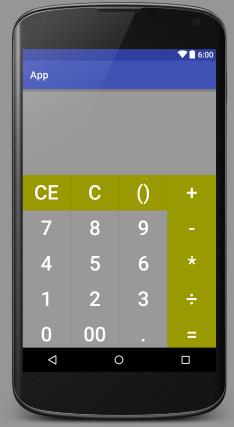
Android-表格布局 计算器 修改版的更多相关文章
- Android表格布局(Table Layout)
Android表格布局(Table Layout) 先来看布局管理器之间继承关系图: 图1 可知TableLayout继承了LinearLayout,所以表格布局本质上依然是线性管理器. 表格布局采用 ...
- Android表格布局之设置边框
Android表格布局本身没有边框,不过可以通过背景色的设置可以实现表格边框的显示. 首先可以设置TableRow的背景色,然后设置内容的背景色.根据它们的颜色差就出现了边框.只要微调Content与 ...
- Android 表格布局<TableLayout>
表格布局即,tableLayout,表格布局通过行.列的形式来管理UI组件,TablelLayout并不需要明确地声明包含多少行.多少列,而是通过TableRow,以及其他组件来控制表格的行数和列数, ...
- [android] 表格布局和绝对布局
/*****************2016年4月28日 更新*************************************/ 知乎:为什么Android没有像iOS一样提供autolay ...
- Android 表格布局 TableLayout
属性介绍 stretchColumns:列被拉伸 shrinkColumns:列被收缩 collapseColumns:列被隐藏 举例测试 <TableLayout android:id=&qu ...
- Android 网格布局 计算器
<GridLayout xmlns:android="http://schemas.android.com/apk/res/android" xmlns:tools=&quo ...
- Android 线性布局 计算器
<?xml version="1.0" encoding="utf-8"?> <LinearLayout xmlns:android=&quo ...
- 案例:TableLayout表格布局——迷你计算器
计算器可以常用线性布局(LinearLayout)和表格布局(tableLayout).Gridlayout 今天我用的是表格布局 效果如下: 代码如下: <TableLayout xmlns: ...
- Android 仿美团网,大众点评购买框悬浮效果之修改版
转帖请注明本文出自xiaanming的博客(http://blog.csdn.net/xiaanming/article/details/17761431),请尊重他人的辛勤劳动成果,谢谢! 我之前写 ...
随机推荐
- ubuntu sublime-text package control
1.ubuntu 环境下sublime-text的 package control一直配置失败 因为我下的是sublime-text3,而网上一般都是sublime-text2的教程. 2.subli ...
- MyEcplise中关于部署文件不成功的问题
MyEclipse 点击 部署 按钮 无效 正常情况下,当我们点击MyEclipse任务栏上的部署按钮时,会弹出项目部署框,如下图: 但我们有时也会遇到点击部署按钮怎么也弹不出项目部署框的 ...
- [转]通过PowerShell工具跨多台服务器执行SQL脚本
转至:http://www.cnblogs.com/SameZhao/p/4743692.html 有时候,当我们并没有合适的第三方工具(大部分需要付费)去管理多台数据库服务器,那么如何做最省力.省心 ...
- 161116、springmvc自己实现防止表单重复提交(基于注解)
原理:在去某个页面直接生成一个随机数(这里使用的是UUID)并放入session中,用户提交表单时将这个随机数传入服务端与session中的值进行比较,如果不不存在或不相等,则认为是重复提交:如果相等 ...
- 161025、java提高篇之关键字static
一. static代表着什么 在Java中并不存在全局变量的概念,但是我们可以通过static来实现一个"伪全局"的概念,在Java中static表示"全局"或 ...
- iOS的通知Notification
这里是不同的对象之间的通知, 不是本地通知. 一开始玩, 很挠头, 后来发现原来只是对象init的过程出了问题. 首先, 新建一个简单的单controller的工程. 然后打开它的ViewContro ...
- Java中类方法与实例方法的区别
实例方法可以对当前对象的实例变量进行操作,也可以对类变量进行操作,但类方法不能访问实例变量.实例方法必须由实例对象来调用,而类方法除了可由实例对象调用外,还可以由类名直接调用. 另外,在类方法中不能使 ...
- windows win10上传文件到linux服务器
1.最直接当然使用终端secucrt和xshell putty之类的,然后使用sz rz 2.如果服务器端不支持sz rz可以使用scp命令,下面这个pscp.exe就是支持scp的,基于ssh,很好 ...
- 提高PHP性能的实用方法+40个技巧优化您的PHP代码
1.用单引号代替双引号来包含字符串,这样做会更快一些.因为PHP会在双引号包围的字符串中搜寻变量,单引号则不会,注意:只有echo能这么做,它是一种可以把多个字符串当作参数的"函数" ...
- LINQ TO DATATABLE/DATASET基本操作之-简单查询
废话不说,直接贴上代码: 其中:SerchLinqData();方法查询数据并返回一个datatable表.为数据源. #region 绑定数据 public static string BindDt ...