
TabNavigator Container Example
<?xml version="1.0" encoding="utf-8"?>

<s:Application xmlns:fx="http://ns.adobe.com/mxml/2009"

               xmlns:s="library://ns.adobe.com/flex/spark"

               xmlns:mx="library://ns.adobe.com/flex/mx" minWidth="955" minHeight="600"

               >

    <s:Panel title="TabNavigator Container Example"

             width="75%" height="75%"

             horizontalCenter="0" verticalCenter="0">

        <s:VGroup left="10" right="10" top="10" bottom="10">

            <s:Label width="100%" color="blue"

                     text="Select the tabs to change the panel."/>

            <mx:TabNavigator id="tn"  width="100%" height="100%">

                <!-- Define each panel using a VBox container. -->

                <mx:VBox label="Panel 1">

                    <mx:Label text="TabNavigator container panel 1"/>

                </mx:VBox>

                <mx:VBox label="Panel 2">

                    <mx:Label text="TabNavigator container panel 2"/>

                </mx:VBox>

                <mx:VBox label="Panel 3">

                    <mx:Label text="TabNavigator container panel 3"/>

                </mx:VBox>

            </mx:TabNavigator>

            <s:Label width="100%" color="blue"

                     text="Programmatically select the panel using a Button control."/>

            <s:HGroup>

                <mx:Button label="Select Tab 1" click="tn.selectedIndex=0"/>

                <mx:Button label="Select Tab 2" click="tn.selectedIndex=1"/>

                <mx:Button label="Select Tab 3" click="tn.selectedIndex=2"/>

            </s:HGroup>

        </s:VGroup>

    </s:Panel>

</s:Application>

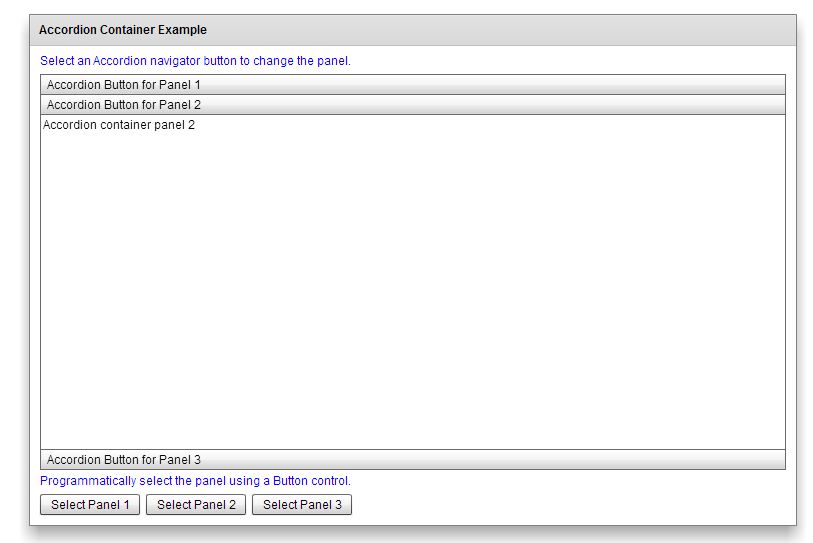
<?xml version="1.0" encoding="utf-8"?>

<s:Application xmlns:fx="http://ns.adobe.com/mxml/2009"

               xmlns:s="library://ns.adobe.com/flex/spark"

               xmlns:mx="library://ns.adobe.com/flex/mx" minWidth="955" minHeight="600"

               >

    <s:Panel title="Accordion Container Example"

             width="75%" height="75%"

             horizontalCenter="0" verticalCenter="0">

        <s:VGroup left="10" right="10" top="10" bottom="10">

            <s:Label width="100%" color="blue"

                     text="Select an Accordion navigator button to change the panel."/>

            <mx:Accordion id="accordion" width="100%" height="100%">

                <!-- Define each panel using a VBox container. -->

                <mx:VBox label="Accordion Button for Panel 1">

                    <mx:Label text="Accordion container panel 1"/>

                </mx:VBox>

                <mx:VBox label="Accordion Button for Panel 2">

                    <mx:Label text="Accordion container panel 2"/>

                </mx:VBox>

                <mx:VBox label="Accordion Button for Panel 3">

                    <mx:Label text="Accordion container panel 3"/>

                </mx:VBox>

            </mx:Accordion>

            <s:Label width="100%" color="blue"

                     text="Programmatically select the panel using a Button control."/>

            <s:HGroup>

                <s:Button label="Select Panel 1" click="accordion.selectedIndex=0;"/>

                <s:Button label="Select Panel 2" click="accordion.selectedIndex=1;"/>

                <s:Button label="Select Panel 3" click="accordion.selectedIndex=2;"/>

            </s:HGroup>

        </s:VGroup>

    </s:Panel>

</s:Application>
TabNavigator Container Example的更多相关文章
- react native 使用TabNavigator编写APP底部导航
第一步,下载依赖 npm install react-native-tab-navigator --save 第二步,引入 import TabNavigator from 'react-native ...
- React Native商城项目实战04 - 封装TabNavigator.Item的创建
1.Main.js /** * 主页面 */ import React, { Component } from 'react'; import { StyleSheet, Text, View, Im ...
- 在docker中运行ASP.NET Core Web API应用程序(附AWS Windows Server 2016 widt Container实战案例)
环境准备 1.亚马逊EC2 Windows Server 2016 with Container 2.Visual Studio 2015 Enterprise(Profresianal要装Updat ...
- .Container与.container_fluid区别
.Container与.container_fluid是bootstrap中的两种不同类型的外层容器,两者的区别是:.container 类用于固定宽度并支持响应式布局的容器..container-f ...
- View and Data API Tips: Constrain Viewer Within a div Container
By Daniel Du When working with View and Data API, you probably want to contain viewer into a <div ...
- [LeetCode] Container With Most Water 装最多水的容器
Given n non-negative integers a1, a2, ..., an, where each represents a point at coordinate (i, ai). ...
- 如何装最多的水? — leetcode 11. Container With Most Water
炎炎夏日,还是呆在空调房里切切题吧. Container With Most Water,题意其实有点噱头,简化下就是,给一个数组,恩,就叫 height 吧,从中任选两项 i 和 j(i <= ...
- Docker - command in docker container
1.查看Container 里面运行的进程 在运行容器以后,可以查看里面的进程: docker top <container_id> or <container_name> 2 ...
- 【leetcode】Container With Most Water
题目描述: Given n non-negative integers a1, a2, ..., an, where each represents a point at coordinate (i, ...
随机推荐
- Wsus 清理的计划任务
<# Get-ExecutionPolicy 默认为 RemoteSigned 该签名设置 Set-ExecutionPolicy Unrestricted 添加到排除 powershell - ...
- Python模块简介及安装 [numpy,pandas,matplotlib,scipy,statsmodels,Gensim,sklearn,keras]
https://pan.baidu.com/s/1bpVv3Ef 67bd 模块安装文件下载地址 pip install "numpy-1.12.0b+mkl-cp35- ...
- Mysql 性能优化5【重要】数据库结构优化
数据库设计的步骤 我们大多使用mysql 设计三范式 设置时区
- Mysql 性能优化4 mysql参数配置
mysql 参数的介绍 大概450项参数,大多保持默认就可以了 错误的参数 崩溃,错误,运行缓慢. 参数最好在生产环境前配置好.最好不要在生产环境 中 直接配置,有可能不会立即生效,或者之前的数据和配 ...
- vue element-ui 用checkebox 来模拟选值 1/0
https://jsfiddle.net/57dz2m3s/12/ 复制 粘贴 打开url就可以看到效果
- python学习疑问
1.(已解决) test = [1, 2, 3, 4] ", id(test)) def func(a): ", id(a)) a = a.remove(1) ", id ...
- P1601高精度加法
传送门 虽然本题一本通上有,但是一本通不是万能的,这道题就漏掉了进位(所以这告诉我们加法进位很重要) 直接上修改后的题解 #include<iostream> #include<cs ...
- [转]短短几年,Ceph如何引爆中国的开源热潮?
原文:http://article.ccw.com.cn/article/view/131427 ,2018-04-02,本文作者:计世传媒 赵新竹 世民Sammy:非常荣幸有机会在北京Cephalo ...
- 在CentOS6的上安装Windows2012R2的KVM虚拟机
在CentOS6的上安装Windows2012R2的KVM虚拟机 1:上传cn_windows_server_2012_r2_vl_with_update_x64_dvd_6052729.iso下载驱 ...
- win7 没有权限使用网络资源
局域网下同一工作组电脑无法访问 提示"....没有权限使用网络资源...." 一.组策略 win + R 输入gpedit.msc并回车,打开本地组策略编辑器 按如下展开 计算机配 ...