
TensorFlow从入门到理解(六):可视化梯度下降
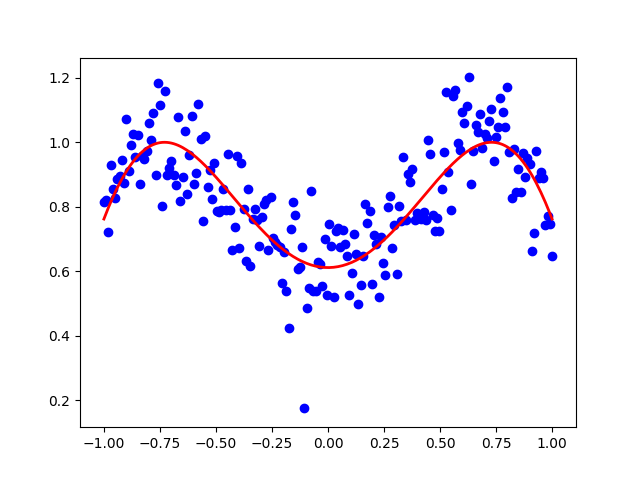
运行代码:
import tensorflow as tf

import numpy as np

import matplotlib.pyplot as plt

from mpl_toolkits.mplot3d import Axes3D

LR = 0.1

REAL_PARAMS = [1.2, 2.5]

INIT_PARAMS = [[5, 4],

               [5, 1],

               [2, 4.5]][2]

x = np.linspace(-1, 1, 200, dtype=np.float32)   # x data

y_fun = lambda a, b: np.sin(b*np.cos(a*x))

tf_y_fun = lambda a, b: tf.sin(b*tf.cos(a*x))

noise = np.random.randn(200)/10

y = y_fun(*REAL_PARAMS) + noise         # target

# tensorflow graph

a, b = [tf.Variable(initial_value=p, dtype=tf.float32) for p in INIT_PARAMS]

pred = tf_y_fun(a, b)

mse = tf.reduce_mean(tf.square(y-pred))

train_op = tf.train.GradientDescentOptimizer(LR).minimize(mse)

a_list, b_list, cost_list = [], [], []

with tf.Session() as sess:

    sess.run(tf.global_variables_initializer())

    for t in range(400):

        a_, b_, mse_ = sess.run([a, b, mse])

        a_list.append(a_); b_list.append(b_); cost_list.append(mse_)    # record parameter changes

        result, _ = sess.run([pred, train_op])                          # training

# visualization codes:

print('a=', a_, 'b=', b_)

plt.figure(1)

plt.scatter(x, y, c='b')    # plot data

plt.plot(x, result, 'r-', lw=2)   # plot line fitting

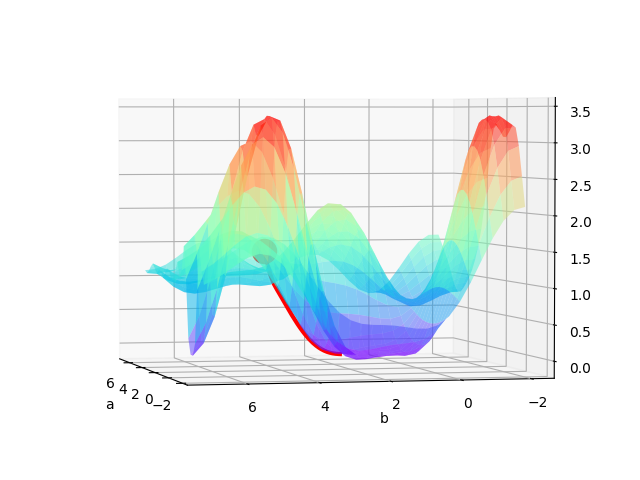
# 3D cost figure

fig = plt.figure(2); ax = Axes3D(fig)

a3D, b3D = np.meshgrid(np.linspace(-2, 7, 30), np.linspace(-2, 7, 30))  # parameter space

cost3D = np.array([np.mean(np.square(y_fun(a_, b_) - y)) for a_, b_ in zip(a3D.flatten(), b3D.flatten())]).reshape(a3D.shape)

ax.plot_surface(a3D, b3D, cost3D, rstride=1, cstride=1, cmap=plt.get_cmap('rainbow'), alpha=0.5)

ax.scatter(a_list[0], b_list[0], zs=cost_list[0], s=300, c='r')  # initial parameter place

ax.set_xlabel('a'); ax.set_ylabel('b')

ax.plot(a_list, b_list, zs=cost_list, zdir='z', c='r', lw=3)    # plot 3D gradient descent

plt.show()
运行结果:
TensorFlow从入门到理解(六):可视化梯度下降的更多相关文章
- TensorFlow从入门到理解
一.<莫烦Python>学习笔记: TensorFlow从入门到理解(一):搭建开发环境[基于Ubuntu18.04] TensorFlow从入门到理解(二):你的第一个神经网络 Tens ...
- TensorFlow从入门到理解(二):你的第一个神经网络
运行代码: from __future__ import print_function import tensorflow as tf import numpy as np import matplo ...
- TensorFlow从入门到理解(五):你的第一个循环神经网络RNN(回归例子)
运行代码: import tensorflow as tf import numpy as np import matplotlib.pyplot as plt BATCH_START = 0 TIM ...
- TensorFlow从入门到理解(四):你的第一个循环神经网络RNN(分类例子)
运行代码: import tensorflow as tf from tensorflow.examples.tutorials.mnist import input_data # set rando ...
- TensorFlow从入门到理解(三):你的第一个卷积神经网络(CNN)
运行代码: from __future__ import print_function import tensorflow as tf from tensorflow.examples.tutoria ...
- TensorFlow从入门到理解(一):搭建开发环境【基于Ubuntu18.04】
*注:教程及本文章皆使用Python3+语言,执行.py文件都是用终端(如果使用Python2+和IDE都会和本文描述有点不符) 一.安装,测试,卸载 TensorFlow官网介绍得很全面,很完美了, ...
- NN优化方法对照:梯度下降、随机梯度下降和批量梯度下降
1.前言 这几种方法呢都是在求最优解中常常出现的方法,主要是应用迭代的思想来逼近.在梯度下降算法中.都是环绕下面这个式子展开: 当中在上面的式子中hθ(x)代表.输入为x的时候的其当时θ參数下的输出值 ...
- 超简单tensorflow入门优化程序&&tensorboard可视化
程序1 任务描述: x = 3.0, y = 100.0, 运算公式 x×W+b = y,求 W和b的最优解. 使用tensorflow编程实现: #-*- coding: utf-8 -*-) im ...
- TensorFlow学习——入门篇
本文主要通过一个简单的 Demo 介绍 TensorFlow 初级 API 的使用方法,因为自己也是初学者,因此本文的目的主要是引导刚接触 TensorFlow 或者 机器学习的同学,能够从第一步开始 ...
随机推荐
- A1087. All Roads Lead to Rome
Indeed there are many different tourist routes from our city to Rome. You are supposed to find your ...
- 【洛谷P1060 开心的金明】
题目描述 金明今天很开心,家里购置的新房就要领钥匙了,新房里有一间他自己专用的很宽敞的房间.更让他高兴的是,妈妈昨天对他说:“你的房间需要购买哪些物品,怎么布置,你说了算,只要不超过NNN元钱就行”. ...
- haploview出现“results file must contain a snp column”的解决方法
将plink文件用“--recode HV ”的参数生成即可 /software/plink --file yourfile --recode HV --snps-only just-acgt --o ...
- Mybatis项目中不使用代理写法【我】
首先 spring 配置文件中引入 数据源配置 <?xml version="1.0" encoding="UTF-8"?> <beans x ...
- Mock1 moco框架的基本介绍
前言: Mock就是模拟接口的,一般在开发人员还没有开发完接口,但是有接口文档,这个时候就可以执行接口测试,前端同学也可以用mock功能给自己使用. 功能:可以模拟http协议发送请求 下载链接:ht ...
- pip的更新问题
OSX系统中在利用pip安装有些模块的时候出现”you are using pip version 9.0.1, however version 10.0.0 is available. You sh ...
- POJ 1743 Musical Theme (Hash)
Musical Theme Time Limit: 1000MS Memory Limit: 30000K Total Submissions: 33820 Accepted: 11259 D ...
- layui获取子集表单中的值,关闭父级弹窗
js代码 var GetParams = function(url,bool) { try { if(bool){ var index = url.indexOf('?'); url = url.ma ...
- 把菜单栏变成万能工具箱,让你的 Mac 更酷炫
文章来源:知乎 文章收录于:风云社区 www.scoee.com,提供上千款各类mac软件下载 为了彰显存在感,各路 Mac 应用都喜欢在菜单栏上安置一个图标:其中有的只是用来召唤主界面,也有一些应用 ...
- Spring_xml方式开发
1. spring核心配置文件: <?xml version="1.0" encoding="UTF-8"?> <beans xmlns=&q ...