
iOS开发笔记-一种任意字体、颜色混排UILabel的实现
最近开发新App,射妓狮给的图上出现一种不同大小字体混排的Label,就像下面这种:
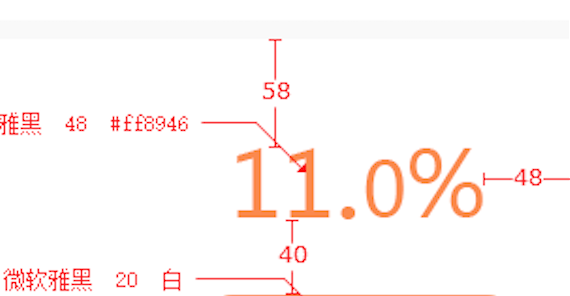
想了想,最简单的方法是使用多个UILabel排列显示,但是这样不仅麻烦而且效果也不好,索性自定义UILabel来尽可能的满足使用灵活性。
实现方法
与正常自定义控件的方法类似,主要利用了CoreGraphics来动态绘制字体,但这里字体的参数都用NSArray存储,以尽最大可能不受具体内容约束,实现灵活性。
代码如下:
#import <UIKit/UIKit.h>

@interface UnevenHeightLabel : UIView

@property (nonatomic) NSArray *strings;

@property (nonatomic) NSArray *fonts;

@property (nonatomic) NSArray *originY;

@property (nonatomic) NSArray *fontColors;

-(instancetype) initWithUnevenHeightStrings:(NSArray *)strings stringFonts:(NSArray *)fonts originY:(NSArray *)originY  stringColors:(NSArray *) colors;

@end
#import "UnevenHeightLabel.h"

#import "UIColor+HexColor.h"

@implementation UnevenHeightLabel

// Only override drawRect: if you perform custom drawing.

// An empty implementation adversely affects performance during animation.

- (void)drawRect:(CGRect)rect {

    // Drawing code

    CGContextRef ctx = UIGraphicsGetCurrentContext();

    CGContextSetLineWidth(ctx, 1.0f);

    CGRect startRect;

    CGSize requiredSize;

    float sumWidth=;

    if(_strings!=nil&& _strings.count>){

        for (int i=; i<_strings.count; i++) {

            CGSize maxSize=rect.size;

            requiredSize=[_strings[i] boundingRectWithSize:maxSize options:NSStringDrawingUsesFontLeading attributes:@{NSFontAttributeName:_fonts[i]} context:nil].size;

            if(i==){

                startRect=CGRectMake(, , maxSize.width, maxSize.height);

            }

            else{

                startRect=CGRectMake(sumWidth, [_originY[i] floatValue], requiredSize.width, requiredSize.height);

            }

            [_strings[i] drawInRect:startRect

                     withAttributes:@{NSFontAttributeName:_fonts[i],

                                      NSForegroundColorAttributeName:_fontColors[i]}];

            sumWidth=sumWidth+requiredSize.width;

        }

    }

}

-(instancetype)initWithUnevenHeightStrings:(NSArray *)strings stringFonts:(NSArray *)fonts originY:(NSArray *)originY stringColors:(NSArray *)colors {

    self=[super init];

    self.strings=strings;

    self.fonts=fonts;

    self.originY=originY;

    self.fontColors=colors;

    //[self setNeedsDisplay];

    return self;

}

@end
Demo:
使用方法很简单,直接在需要使用的地方调用,如下:
 UnevenHeightLabel  *label=[[UnevenHeightLabel alloc] initWithUnevenHeightStrings:@[@"11.",@"",@"%"]  stringFonts:@[[UIFont systemFontOfSize:],[UIFont systemFontOfSize:],[UIFont systemFontOfSize:]] originY:@[@,@,@] stringColors:@[[UIColor redColor],[UIColor blueColor],[UIColor greenColor]]];

    label.frame=CGRectMake(, , , );

    label.backgroundColor=[UIColor clearColor];

    [self.view addSubview:label];

    UnevenHeightLabel *mylabel=[[UnevenHeightLabel alloc] initWithUnevenHeightStrings:@[@"A",@"a",@"B",@"b",@"C",@"c"]

                                                                          stringFonts:@[[UIFont systemFontOfSize:],

                                                                                        [UIFont systemFontOfSize:],

                                                                                        [UIFont systemFontOfSize:],

                                                                                        [UIFont systemFontOfSize:],

                                                                                        [UIFont systemFontOfSize:],

                                                                                        [UIFont systemFontOfSize:]]

                                                                              originY:@[@,@,@,@,@,@]

                                                                         stringColors:@[

                                                                                        [UIColor redColor],

                                                                                        [UIColor orangeColor],

                                                                                        [UIColor greenColor],

                                                                                        [UIColor blueColor],

                                                                                        [UIColor cyanColor],

                                                                                        [UIColor purpleColor]]];

    [mylabel setFrame:CGRectMake(SCREEN_WIDTH/-, SCREEN_HEIGHT/-, , )];

    [mylabel setBackgroundColor:[UIColor clearColor]];

    [self.view addSubview:mylabel];
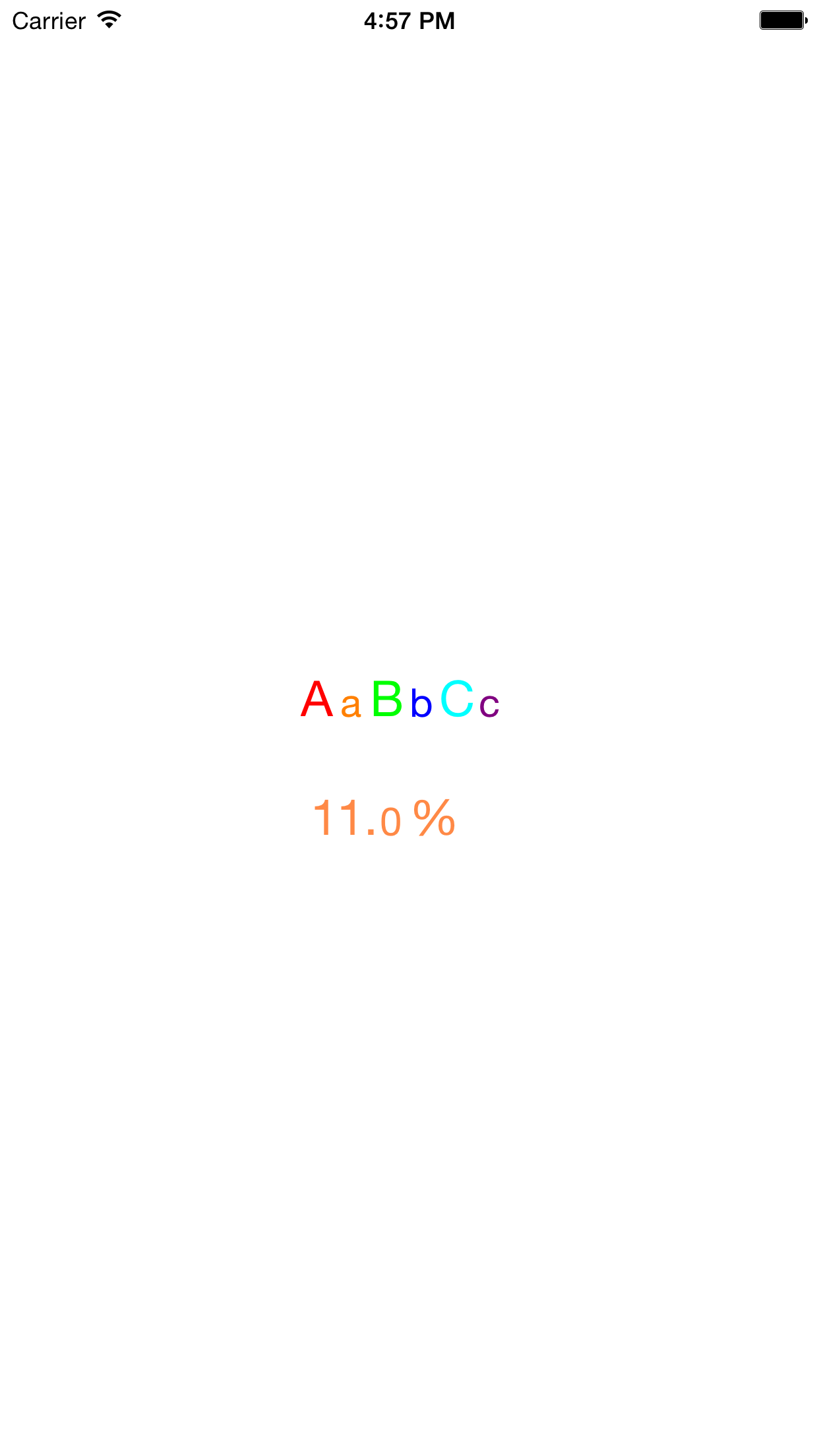
效果如下:
iOS开发笔记-一种任意字体、颜色混排UILabel的实现的更多相关文章
- 【iOS学习笔记】改变状态栏字体颜色
Step1. info.plist中设置UIViewControllerBasedStatusBarAppearance为NO Step2. AppDelegate.m中添加 - (BOOL)appl ...
- iOS开发 - 第05篇 - 项目 - 12 - 图文混排
1.首页微博文字处理 对于之前微博项目中首页:微博文字中的用户名.话题.链接等文字须要高亮显示.表情字符串须要显示相应表情. 思路: 1>之前微博中的文字使用NSString,要达到不同文字的高 ...
- iOS开发笔记--使用blend改变图片颜色
最近对Core Animation和Core Graphics的内容东西比较感兴趣,自己之前也在这块相对薄弱,趁此机会也想补习一下这块的内容,所以之后几篇可能都会是对CA和CG学习的记录的文章. 在应 ...
- iOS开发笔记-两种单例模式的写法
iOS开发笔记-两种单例模式的写法 单例模式是开发中最常用的写法之一,iOS的单例模式有两种官方写法,如下: 不使用GCD #import "ServiceManager.h" ...
- 李洪强iOS开发之-修改状态栏的字体的颜色
李洪强iOS开发之-修改状态栏的字体的颜色 修改的效果: -(void)viewDidAppear:(BOOL)animated { [super viewDidAppear:animated]; [ ...
- iOS开发笔记7:Text、UI交互细节、两个动画效果等
Text主要总结UILabel.UITextField.UITextView.UIMenuController以及UIWebView/WKWebView相关的一些问题. UI细节主要总结界面交互开发中 ...
- iOS开发UITableViewCell的选中时的颜色设置(转)
iOS开发UITableViewCell的选中时的颜色设置 1.系统默认的颜色设置 //无色 cell.selectionStyle = UITableViewCellSelectionStyle ...
- iOS开发UI篇—iOS开发中三种简单的动画设置
iOS开发UI篇—iOS开发中三种简单的动画设置 [在ios开发中,动画是廉价的] 一.首尾式动画 代码示例: // beginAnimations表示此后的代码要“参与到”动画中 [UIView b ...
- IOS开发-几种截屏方法
IOS开发-几种截屏方法 1. UIGraphicsBeginImageContextWithOptions(pageView.page.bounds.size, YES, zoomSc ...
随机推荐
- Deploy, Issue and Transfer Tokens
[Deploy, Issue and Transfer Tokens] 本例使用 eosio.token 合约来尝试发行Token. 1.签出 eosio.contracts. git clone h ...
- 交叉编译sudo
编译Sudo version 1.8.6p7下载路径:https://www.sudo.ws/news.html 1.交叉编译 # tar -xvf sudo-1.8.6p7.tar.gz # cd ...
- Xadmin显示视图
.display显示要设置的字段 1. 自定义样式类,显示出要显示的字段,在这个类中,也可以设置对应函数. list_display=[check,"title",delete]2 ...
- PHP开发——数组
数组的概念 l 数组是一组数的集合.如:$arr = array(1,2,3,4,5,6) l 标量数据类型是一个值的容器,而数组就是多个值的容器. 数组的分类 l 枚举数组:数组元素的下标(索 ...
- charles本地调试之map和rewrite功能
charles是一款mac下代理调试工具,对于前端开发同学来说是相当方便的一个调试接口的工具:不过charles需要收费,不过在天朝几乎收费的软件都能找到破解方法: 使用charles前,需要将cha ...
- java读取jar包中的文件
随手写了一个java小工具,maven打包成功后,发现工具总是读不到打在jar包中的文件信息,要读取的文件位于 /src/main/resources 目录下,打包成功后,文件就在jar包中根目录下, ...
- windbg 经典死锁调试
代码 // Deadlock_Debug.cpp : 定义控制台应用程序的入口点. // #include "stdafx.h" #include "windows.h& ...
- Netsharp配置文件
一.总体说明 netsharp下需要配置的项目一般是需要独立启动的项目,主要有四个 netsharp-web netsharp-test netsharp-elephant netsharp-donk ...
- 别人的Linux私房菜(7)文件与目录管理
- 代表上一个工作目录 ~username代表用户所在的家目录 cd切换目录 配合之上的参数 . .. / ~ ~name (change directory) pwd显 ...
- #10072. 「一本通 3.2 例 1」Sightseeing Trip(floyd求最小环+路径)
https://loj.ac/problem/10072 针对无向图 因为Floyd是按照结点的顺序更新最短路的,所以我们在更新最短路之前先找到一个连接点k,当前的点k肯定不存在于已存在的最短路f[i ...