
struts2核心配置之Action
一、实现Action类
1、POJO实现(Plain Ordinary Java Object 简单的java对象)
public class User1 {

    public String execute(){

        System.out.println("Action1");

        return "success";

    }

}
Action类不继承任何特殊类,不实现任何特殊接口,只要有一个公共的无参的构造函数(默认构造函数即可)和一个execute()方法
execute()方法要求:public类型,返回值String,方法无参
2、实现Action接口
public class User2 implements Action {

    public String execute() throws Exception {

        System.out.println("Action2");

        return "success";

    }

}
Action接口具体代码
public interface Action {

    //接口中常量字符串

    public static final String SUCCESS="success";

    public static final String NONE="none";

    public static final String ERROR="error";

    public static final String INPUT="input";

    public static final String LOGIN="login";

    public String execute() throws Exception;

}
常量使用:execute()中return ”success“等同于return SUCCESS
3、继承ActionSupport类
public class User3 extends ActionSupport {
   private static final long serialVersionUID=1L;

    @Override

    public String execute() throws Exception {

        System.out.println("Action3");

        return SUCCESS;

    }

}
因为ActionSupport类实现了Serializable接口,所以继承的Action类需要声明变量 serialVersionUID
二、配置Action
Action元素属性
| 属性 | 说明 | 是否必须 |
| name | 标识Action,指定Action所处理请求的URL | 是 |
| class | 指定Action对应的实现类 | 否 |
| method | 指定请求Action时的调用方法 | 否 |
如果没有指定class属性值,其默认值为com.opensymphony.xwork2.ActionSupport类,该类使用默认处理方法execute(),ActionSupport类中的execute()方法不会做任何处理,二十直接返回success值。
如果没有指定method属性,Action调用class的execute()方法。
三、使用通配符
<package name="test" namespace="/test" extends="struts-default">

        <action name="ActionTest_*" class="com.test.pojo.TestAction2" method="{1}">

            <result name="hello">/{}.jsp</result>

            <result name="hi">/{}.jsp</result>

        </action>

</package>
在上述代码中,当客户端发送/test/ActionTest_hello.action这样的请求时,<action>元素的name属性就被设置成ActionTest_hello,method就被设置成hello;,当客户端发送/test/ActionTest_hi.action这样的请求时,<action>元素的name属性就被设置成ActionTest_hi,method就被设置成hi。
结果:

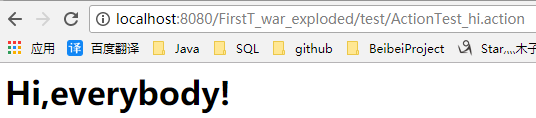
其中method的属性值中的数字1匹配表示匹配第一个*。如果定义的Action名称为*_*,class属性为action.{1},method属性值为{2}。如果Action名称设置为*,则可以匹配所有Action。
struts2核心配置之Action的更多相关文章
- Struts2中配置默认Action
1.当访问的Action不存在时,页面会显示错误信息,可以通过配置默认Action处理用户异常的操作:2.配置方法: 在struts.xml文件中的<package>下添加如下内容: ...
- struts2核心配置之struts.xml
struts.xml -常量配置 -包配置 -包含配置 一.常量配置 struts2常量的配置通常采用三种方式: 1.在struts.xml中使用<constant>元素配置常量 < ...
- struts2核心配置之Result
result作用:在struts.xml中,使用<result>元素配置result逻辑视图和物理视图之间的映射 元素属性 属性 说明 是否必须 name 指定逻辑视图的名称(Action ...
- JavaWeb框架_Struts2_(二)----->Struts2的核心配置
2. Struts2的核心配置 2.1 配置Struts.xml文件 2.1.1 Struts.xml文件 Struts2框架的核心配置文件是Struts.xml,该文件主要用来配置Action和 ...
- JavaWeb_(Struts2框架)struts.xml核心配置、动态方法调用、结果集的处理
此系列博文基于同一个项目已上传至github 传送门 JavaWeb_(Struts2框架)Struts创建Action的三种方式 传送门 JavaWeb_(Struts2框架)struts.xml核 ...
- Struts2基于注解的Action配置
使用注解来配置Action的最大好处就是可以实现零配置,但是事务都是有利有弊的,使用方便,维护起来就没那么方便了. 要使用注解方式,我们必须添加一个额外包:struts2-convention-plu ...
- 在Struts2中配置Action
在Struts2中配置Action <package>: 1.定义Action使用<package>标签下的<action>标签完成,一个<package&g ...
- Struts2学习---基本配置,action,动态方法调用,action接收参数
首先我们先来直接配置,然后再来讲原理: 第一步:jar包的引入: 我们可以到struts2的官网上下载: http://struts.apache.org/download.cgi#struts251 ...
- Struts2之配置文件中Action的详细配置
在Struts2之配置一文中,我们知道一个struts配置文件可以分为三部分:常量配置 包含其他配置文件的配置 Action配置 . 这其中 常量配置 和 包含其他配置文件的配置 二 ...
随机推荐
- 「模板」「讲解」Treap名次树
Treap实现名次树 前言 学平衡树的过程可以说是相当艰难.浏览Blog的过程中看到大量指针版平衡树,不擅长指针操作的我已经接近崩溃.于是,我想着一定要写一篇非指针实现的Treap的Blog. 具体如 ...
- css 实现元素水平垂直居中总结5中方法
个人总结,如有错误请指出,有好的建议请留言.o(^▽^)o 一.margin:0 auto:text-align:center:line-height方法 <div id="divAu ...
- CentOS7安装Memcached 三步曲
1.yum 安装 yum clean allyum -y updateyum -y install memcached 2.Memcached 运行 memcached -h //查看考号修改配置vi ...
- 【Dream Counting, 2006 Dec-数数的梦】数位dp
题意:给定两个数,问区间[A,B]中0~9分别出现了多少次.A,B<=10^18 题解:应该是最裸的数位dp吧..一开始没有记忆化tle了TAT 我们可以求出区间[0,B]的,再减去区间[0,A ...
- bzoj 2730: [HNOI2012]矿场搭建——tarjan求点双
Description 煤矿工地可以看成是由隧道连接挖煤点组成的无向图.为安全起见,希望在工地发生事故时所有挖煤点的工人都能有一条出路逃到救援出口处.于是矿主决定在某些挖煤点设立救援出口,使得无论哪一 ...
- Linux 中使用 dd 测试磁盘性能
翻译自 : Linux I/O Performance Tests using dd 基本说明 dd 可以用来做简单的低级别复制文件. 这样做, 一般都是可一直直接访问设备文件. 需要说明的是, 错误 ...
- Network of Schools(POJ1326+有向图进行缩点)
题目链接:http://poj.org/problem?id=1236 题目: 题意:对于n个学校,对于一个系统传给某个学校,那么他会传给他得支援学校.从第二开始,每行给你多个数字,表示第i个学校可以 ...
- perl发送post数据
把post数据写进一个匿名数组里就行 #!/usr/bin/env perl -w use strict; use LWP::UserAgent; my $ua = LWP::UserAgent-&g ...
- Django rest framework 限制访问频率(源码分析)
基于 http://www.cnblogs.com/ctztake/p/8419059.html 当用发出请求时 首先执行dispatch函数,当执行当第二部时: #2.处理版本信息 处理认证信息 处 ...
- C语言restrict限定符
restrict是c99标准引入的,它只可以用于限定和约束指针,并表明指针是访问一个数据对象的唯一且初始的方式.即它告诉编译器,所有修改该指针所指向内存中内容的操作都必须通过该指针来修改,而不能通过其 ...