
RadioButton实现多选一
RadioButton实现多选一
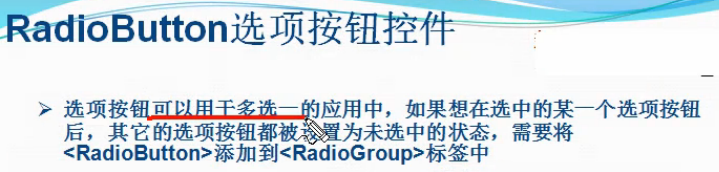
一、简介
二、RadioButton实现多选一方法
1、将多个RadioButton放在一个RadioGroup里面
     <RadioGroup

         android:id="@+id/radioGroup1"

         android:layout_width="match_parent"

         android:layout_height="wrap_content" >

         <RadioButton

             android:layout_width="wrap_content"

             android:layout_height="wrap_content"

             android:text="男"

             android:textColor="#FFFFFF" />

         <RadioButton

             android:layout_width="wrap_content"

             android:layout_height="wrap_content"

             android:text="女"

             android:textColor="#FFFFFF" />

     </RadioGroup>
2、在RadioGroup里面取出每个RadioButton
 public void onClick(View v) {

                 // TODO Auto-generated method stub

                 int len = radioGroup1.getChildCount();

                 for (int i = 0; i < len; i++) {

                     RadioButton radio = (RadioButton) radioGroup1.getChildAt(i);                 }

             }
3、检查每个RadioButton是否被选取
 if (radio.isChecked()) {

                         break;

                     }
4、取出被选取的那个RadioButton里面的值
 Toast.makeText(Activity01.this, radio.getText(),

                                 Toast.LENGTH_LONG).show();
三、代码实例
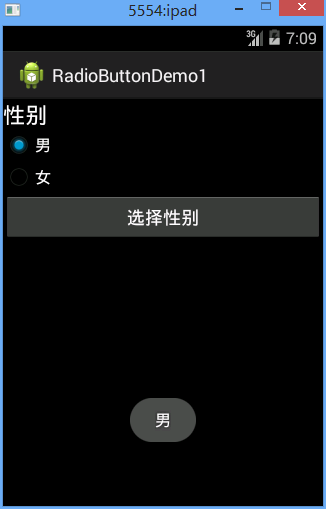
效果图:
代码:
fry.Activity01
 package fry;

 import com.example.RadioButtonDemo1.R;

 import android.app.Activity;

 import android.os.Bundle;

 import android.view.View;

 import android.view.View.OnClickListener;

 import android.widget.Button;

 import android.widget.RadioButton;

 import android.widget.RadioGroup;

 import android.widget.TextView;

 import android.widget.Toast;

 public class Activity01 extends Activity {

     private Button btn_chooseGender;

     private RadioGroup radioGroup1;

     private TextView tv_answer;

     @Override

     protected void onCreate(Bundle savedInstanceState) {

         // TODO Auto-generated method stub

         super.onCreate(savedInstanceState);

         setContentView(R.layout.activity01);

         btn_chooseGender = (Button) findViewById(R.id.btn_chooseGender);

         radioGroup1 = (RadioGroup) findViewById(R.id.radioGroup1);

         tv_answer = (TextView) findViewById(R.id.tv_answer);

         /*

          * RadioButton实现多选一方法

          * 1、将多个RadioButton放在一个RadioGroup里面

          * 2、在RadioGroup里面取出每个RadioButton

          * 3、检查每个RadioButton是否被选取

          * 4、取出被选取的那个RadioButton里面的值

          */

         btn_chooseGender.setOnClickListener(new OnClickListener() {

             @Override

             public void onClick(View v) {

                 // TODO Auto-generated method stub

                 int len = radioGroup1.getChildCount();

                 for (int i = 0; i < len; i++) {

                     RadioButton radio = (RadioButton) radioGroup1.getChildAt(i);

                     if (radio.isChecked()) {

                         Toast.makeText(Activity01.this, radio.getText(),

                                 Toast.LENGTH_LONG).show();

                         break;

                     }

                 }

             }

         });

     }

 }
/RadioButtonDemo1/res/layout/activity01.xml
 <?xml version="1.0" encoding="utf-8"?>

 <LinearLayout xmlns:android="http://schemas.android.com/apk/res/android"

     android:layout_width="match_parent"

     android:layout_height="match_parent"

     android:background="@android:color/black"

     android:orientation="vertical" >

     <TextView

         android:layout_width="match_parent"

         android:layout_height="wrap_content"

         android:text="性别"

         android:textAppearance="?android:attr/textAppearanceLarge"

         android:layout_gravity="center_horizontal"

         android:textColor="#FFFFFF" />

     <RadioGroup

         android:id="@+id/radioGroup1"

         android:layout_width="match_parent"

         android:layout_height="wrap_content" >

         <RadioButton

             android:layout_width="wrap_content"

             android:layout_height="wrap_content"

             android:text="男"

             android:textColor="#FFFFFF" />

         <RadioButton

             android:layout_width="wrap_content"

             android:layout_height="wrap_content"

             android:text="女"

             android:textColor="#FFFFFF" />

     </RadioGroup>

     <Button

         android:id="@+id/btn_chooseGender"

         android:layout_width="match_parent"

         android:layout_height="wrap_content"

         android:text="选择性别"

         android:textColor="#FFFFFF" />

         />

     <TextView

         android:id="@+id/tv_answer"

         android:layout_width="match_parent"

         android:layout_height="wrap_content"

         android:text=""

         android:textAppearance="?android:attr/textAppearanceLarge"

         android:layout_gravity="center_horizontal"

         android:textColor="#FFFFFF" />

 </LinearLayout>
四、收获
1、
android:textColor="#FFFFFF"
设置颜色,直接用#FFFFFF
2、
android:layout_gravity="center_horizontal"
文字居中显示
3、
RadioButton在RadioGroup里面实现多选一
4、
android:background="@android:color/black"
设置黑色,系统自带颜色
5、
int len = radioGroup1.getChildCount();
RadioGroup获取孩子数量
6、
RadioButton radio = (RadioButton) radioGroup1.getChildAt(i);
RadioGroup获取孩子
7、
if (radio.isChecked())
判断RadioButton是否被选取
8、
Toast.makeText(Activity01.this, radio.getText(),Toast.LENGTH_LONG).show();
吐司
RadioButton实现多选一的更多相关文章
- 可分组的选择框控件(MVVM下)(Toggle样式 仿造单选框RadioButton,复选框CheckBox功能)
原地址: http://www.cnblogs.com/yk250/p/5660340.html 效果图如下:支持分组的单选框,复选框样式和MVVM下功能的实现.这是项目中一个快捷键功能的扩展. 1, ...
- 使用RadioGroup与RadioButton实现多选一
RadioGroup是RadioButton的集合, RadioGroup里面可以包含很多RadioButton,提供多选一机制,只能选择其中一个 RadioGroup的orientation(方向) ...
- 安卓开发:UI组件-RadioButton和复选框CheckBox
2.5RadioButton 为用户提供由两个及以上互斥的选项组成的选项集. 2.5.1精简代码 在按钮变多之后,多次重复书写点击事件有些繁琐,我们在这里创建一个事件OnClick,每次点击时调用该事 ...
- Android 单选按钮(RadioButton)和复选框(CheckBox)的使用
1.RadioButton (1)介绍 (2)单选按钮点击事件的用法 (3)RadioButton与RadioGroup配合使用实现单选题功能 (4)xml布局及使用 <?xml version ...
- Qt Quick 常用元素:RadioButton(单选框),CheckBox(复选框) 与 GroupBox(分组框)
先介绍一下 ExclusiveGroup. ExclusiveGroup (互斥分组)本身是不可见元素,用于将若干个可选择元素组合在一起, 供用户选择其中的一个选项.你可以在 ExclusiveGro ...
- Android的RadioButton和checkBox的用法-android学习之旅(十九)
RadioButton和checkBox简介 单选按钮(RadioButton)和复选框(CheckBox)都继承了Button,因此属性的设置和Button差不多,只是加了一个android:che ...
- Android开发:文本控件详解——RadioButton和CheckBox(一)基本属性
一.RadioButton和RadioGroup: RadioButton是单个的圆形单选框,而RadioGroup是可以容纳多个RadioButton存在的容器,因此RadioButton和Radi ...
- Android笔记——Android自定义控件
目录: 1.自定义控件概述 01_什么是自定义控件 Android系统中,继承Android系统自带的View或者ViewGroup控件或者系统自带的控件,并在这基础上增加或者重新组合成我们想要的效果 ...
- ASP.net 常用服务器控件
新人初学,有错请指,大神轻喷. .net中有HTML控件和标准服务器控件. 老师教学用的是vs2010是这样分的,不知道15里是不是这样. 如果使用HTML控件我们就会发现页面中加载了原本HTML代码 ...
随机推荐
- java.lang.IllegalStateException: Queue full
其实异常说的很清楚 队列满了! ArrayBlockingQueue FIFO 的队列: ArrayBlockingQueue内部是通过一个Object数组和一个ReentrantLock实现的.同时 ...
- 使用ODBC 数据库 ,运行程序时 出现 “遇到不适当的参数”
我知道的一种情况是 数据库打开了,没有关闭,再次调用数据库打开函数,会出现这样错误.当然是打开同一个数据库同一张表.
- tomcat和jboss的区别
1. Tomcat是Apache鼎力支持的Java Web应用服务器(注:servlet容器),由于它优秀的稳定性以及丰富的文档资料,广泛的使用人群,从而在开源领域受到最广泛的青睐. 2. Jboss ...
- EXP直接导出压缩问津,IMP直接导入压缩文件的方法
在10G之前,甚至在10G的Oracle环境中,有很多数据量不大,重要性不太高的系统依然采用EXP/IMP逻辑导出备份方式,或者,作为辅助备份方式. 通常情况下,我们都是这样操作的:1.exp导出2. ...
- thinkphp使用阿里云OSS最新SDK,文件部署
这文章是建立在你已经注册号阿里云的OSS,和创建好Bucket前提下: 其实阿里云的帮助与文档写的很详细,这里只说一下源码方式 1.phpsdk下载地址(摘自阿里云OSS的帮助与文档)(也有我自己下载 ...
- mysql多实例的配置
1.创建多实例的目录: mkdir -p /data/mysql/mysql_3307/{data,tmp,logs} mkdir -p /data/mysql/mysql_3308/{data,tm ...
- [转]c# 画图中bitmap类处理出图片时,存储的注意事项
今天查找以前写的画图程序,想完善一下,发现 图片添加文字水印时候会有些模糊,特别是小字体的时候特别模糊, 经过一番调适,终于发现了问题 帖上代码,警示自己 System.Drawing.Image i ...
- Changing an Elements innerHTML in TWebBrowser
I'm unable to change the innerHTML of a javascript element, but i can change the id so i'm not sure ...
- c++中指针作为函数参数的详细理解
在C语言中,函数的参数不仅可以是整数.小数.字符等具体的数据,还可以是指向它们的指针.用指针变量作函数参数可以将函数外部的地址传递到函数内部,使得在函数内部可以操作函数外部的数据,并且这些数据不会随着 ...
- mysql用户与权限管理笔记
今天想使用一下李刚那本书上的hibernate的Demo,试出了点问题,过程中就发现mysql的用户管理和权限管理上也有点东西要注意,所以顺便就写一下mysql用户管理和权限管理的笔记. 先说一说my ...