
resin服务之三---独立resin的配置
独立resin的配置
|
关掉httpd服务: [root@data-1-1 ~]# killall httpd [root@data-1-1 ~]# lsof -i :80 ------>httpd服务的80端口已经停掉!
配置resin主配置文件修改如下内容: 90 <http address="*" port="80"/> 104 <http address="*" port="80"/>
启动服务: [root@data-1-1 ~]# killall java [root@data-1-1 ~]# /application/resin/bin/httpd.sh -server peng start Resin/3.1.13 started -server 'peng' for watchdog at 127.0.0.1:6921 [root@data-1-1 ~]# /application/resin/bin/httpd.sh -server peng01 start Resin/3.1.13 started -server 'peng01' for watchdog at 127.0.0.1:6922
查看的80端口是resin开通的: [root@data-1-1 ~]# lsof -i :80 COMMAND PID USER FD TYPE DEVICE SIZE/OFF NODE NAME java 27876 root 73u IPv6 2885724 0t0 TCP *:http (LISTEN) |
测试(此时是resin独立做web服务)
|
[root@data-1-1 ~]# curl http://www.peng.cc/test.jsp 99+1=100 [root@data-1-1 ~]# curl http://blog.peng.cc/test.jsp 99+1=100 [root@data-1-1 ~]# curl http://blog.peng.org/test.jsp 1+1=2 [root@data-1-1 ~]# curl http://www.peng.org/test.jsp 1+1=2 |
为resin配置别名功能
实现Apache前端多个域名对应后端一个或多个resin的域名。
|
265 <!--Create first virtual hosts at 20160112.--> 266 <host id="www.peng.org" root-directory="/application/resin/webapps"> 267 <host-alias>blog.peng.org</host-alias> <host-alias>bbs.peng.org</host-alias> |
为resin配置错误页面优雅显示
|
282 <error-page error-code='404' location='/tips/404.html'/> |
提示:以上配置在每个对应的resin host里都要配置。
演示过程如下:
|
[root@data-1-1 ~]# cd /application/resin/webapps/peng/ [root@data-1-1 peng]# mkdir tips [root@data-1-1 peng]# echo 'this is 404 error page!' >>tips/404.html [root@data-1-1 peng]# cat tips/404.html this is 404 error page! 提示:错误页面配置内容的根目录是resin站点的根目录,例如:/application/resin/webapps/peng
访问一个不存在的页面,客户端访问发现已经进行了404错误页面跳转了: [root@data-1-1 peng]# curl http://www.peng.org/b.jsp this is 404 error page! 提示:Windows客户端谷歌支持,IE和搜狗测试支持的不是很好。 |
为resin配置状态信息显示页面
|
278 <servlet-mapping servlet-class='com.caucho.servlets.ResinStatusServlet'> 279 <url-pattern>/resin-status-peng.org</url-pattern> 280 <init enable="read"/> 281 </servlet-mapping> |
浏览器输入如下地址,查看显示结果:
http://www.peng.org/resin-status-peng.org
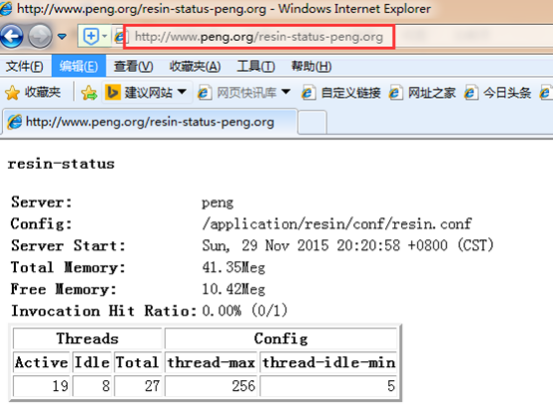
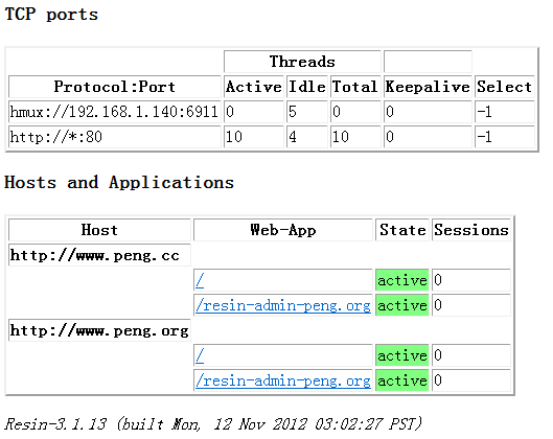
独立resin web服务与整合企业里如何选用?
Apache+resin
1)resin下的8080和8081端口要不要开启?
解答:看业务需求!
Apache+resin ==》提供服务
Resin+http80(内置web服务器)==》提供服务
2)如果开启了,实现了哪些功能?
解答:resin独立提供web服务。
3)关闭了,又有什么好处呢?
解答:Apache和resin一起工作,轻松,动静分离。
为resin配置管理页面
|
285 <web-app id="/resin-admin-peng.org" root-directory="${resin.home}/php/admin"> 286 <character-encoding>utf8</character-encoding> 287 <prologue> 288 <resin:set var="resin_admin_external" value="true"/> 289 <resin:set var="resin_admin_insecure" value="true"/> 290 </prologue> 291 <security-constraint> 292 <web-resource-collection> 293 <url-pattern>/*</url-pattern> 294 </web-resource-collection> 295 </security-constraint> 296 </web-app> |
操作演示如下:
浏览器上输入地址:http://www.peng.org/resin-admin-peng.org/
出现如下界面:

在标红的地方输入用户名:peng 密码:redhat
出现如下内容:
The digest for user peng in realm resin is Ji1p9d0+6tX5O0iEGgnPMQ==
The following can now be set in the resin.conf file to enable administration functionality.
<resin xmlns="http://caucho.com">
<management path="admin">
<user name="peng" password="Ji1p9d0+6tX5O0iEGgnPMQ=="/>
...
</management>
...
</resin>
By default, access to the administration application is limited to the localhost. The default behaviour can be changed in the resin.conf file. To enable access to clients other than localhost:
<resin:set var="resin_admin_external" value="true"/>
Once the file has been updated, you can continue to the administration area.
When prompted, use the username and password you provided.
修改resin.conf配置文件(增加标黄的内容):
|
21 <management path="${resin.root}/admin"> 22 <user name="peng" password="Ji1p9d0+6tX5O0iEGgnPMQ==" disable="false"/> 23 24 <resin:if test="${resin.professional}"> 25 <deploy-service/> 26 <jmx-service/> 27 <log-service/> 28 <xa-log-service/> 29 </resin:if> 30 </management> |
重启服务:
|
[root@data-1-1 ~]# killall java [root@data-1-1 ~]# /application/resin/bin/httpd.sh -server peng start Resin/3.1.13 started -server 'peng' for watchdog at 127.0.0.1:6921 [root@data-1-1 ~]# /application/resin/bin/httpd.sh -server peng01 start Resin/3.1.13 started -server 'peng01' for watchdog at 127.0.0.1:6922 |
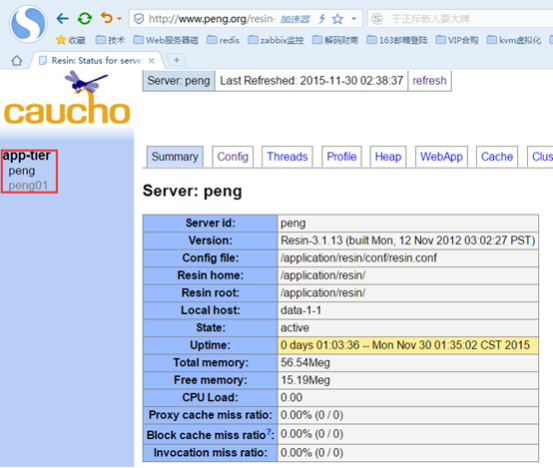
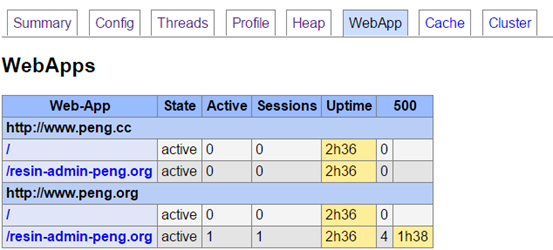
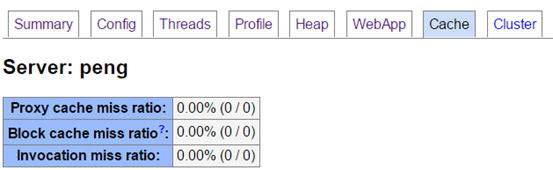
在浏览器界面填入相关信息点击提交:



resin服务之三---独立resin的配置的更多相关文章
- Apached+resin服务搭建
一.前言 Resin是CAUCHO公司的产品,是一个非常流行的支持servlets 和jsp的引擎,速度非常快.对servlet和JSP提供了良好的支持,性能也比较优良,resin自身采用JAVA语言 ...
- resin服务之一---安装及部署
参考网站: http://caucho.com/ http://www.oschina.net/p/resin http://caucho.com/resin-4.0/admin/starting-r ...
- resin服务之二----整合resin+Apache服务
整合resin+Apache服务 1.为什么要整合Apache和resin? a. 早期的resin,tomcat对httpd服务支持不好. b. tomcat,resin对rewrite,expi ...
- resin服务一直不停重启
resin服务不断重启. 原因为resin配置文件使用域名.需要到服务上绑定一下域名.
- Reporting Service服务SharePoint集成模式安装配置(3、4、安装sharepoint 2010必备组件及产品)
Reporting Service服务SharePoint集成模式安装配置 第三步和第四部 第三步 安装sharepoint 2010必备组件 1.安装SharePoint2010必备组件,执行Pre ...
- SVN1.6服务端和客户端安装配置指导
本节向大家描述SVN1.6服务端和客户端安装配置步骤,随着SVN的快速发展,版本也进行了升级更新,本节就和大家一起学习一下SVN1.6服务端和客户端安装配置步骤,欢迎大家一起来学习.下面是具体介绍.1 ...
- Windows下基于IIS服务的SSL服务器的配置
Windows下基于IIS服务的SSL服务器的配置 实验环境 Windows Server 2008 R1(CA) Windows Server 2008 R2(web服务器) Windows 7 x ...
- paip. java resin 远程 调试 java resin remote debug
paip. java resin 远程 调试 java resin remote debug 作者Attilax 艾龙, EMAIL:1466519819@qq.com 来源:attilax的专栏 ...
- CAS单点登录(SSO)服务端的部署和配置---连接MySQL进行身份认证
一.修改系统host,加入 127.0.0.1 server.test.com127.0.0.1 client1.test.com127.0.0.1 client2.test.com 二.安装grad ...
随机推荐
- 一键生成的BI智能数据看板谁不爱?
随着互联网思维的深化,如财务.市场.运营.销售等越来越多的岗位,都开始重视并自发性的开始了解并学习数据分析,来引导帮助决策. 人力资源制定效能仪表盘,去实时掌握人员状况和人均效能,通过对招聘漏斗的分析 ...
- 在Mac上安装mysql并配置环境(详细篇)
在Mac上安装mysql并配置环境(详细篇) 1.下载mysql mysql官网 这一步根据自己电脑架构选择,分为arm和x86 下载完成之后打开就可以 接下来运行安装就可以,一直下一步,设置完密码就 ...
- 【C# IO 操作 】内存包装类 Memory <T>和 Span<T> 相关类型
简介 .NET 包含多个相互关联的类型,它们表示任意内存的连续的强类型区域. 这些方法包括: System.Span<T> 用于访问连续的内存区域 得到该类型的实例: 1个T类型的数组 1 ...
- 2、CPU是怎么实现运算的 ?
我先来了解一下芯片构造,芯片由晶体管组成的.晶体管组成逻辑运算与或非电路. P型半导体的"P"表示正电的意思,取自英文Positive的第一个字母. N型半导体的"N&q ...
- Objective-C 基础教程第五章,复合
目录 Objective-C 基础教程第五章,复合 什么是复合? Car程序 自定义NSLog() 存取方法get Set Tires(轮胎) 存取方法 Car类代码的其他变化 扩展Car程序 复合还 ...
- Java:Collections
说明 工具类,提供了许多静态方法,用于操作集合. 模块:java.util.Collections 方法:全是static方法,使用时直接Collections.xxx( ... ) 返回值类型 方法 ...
- iNeuOS工业互联网操作系统下发命令给iNeuLink硬件网关,进一步修改设备参数和控制设备
目 录 1. 应用场景... 1 2. DCS数据采集... 2 3. 硬件网关的配置... 2 4. 平台端配置... 3 1. 应用场景 i ...
- windows下安装gym
安装gym在执行pip install -e'.[all]'这句语句时,可能会出现这种情况 在pycharm中运行的时候会出现如下这种情况: 或者这种情况 出现这种问题可能是python的版本太高了, ...
- ospf应用简单
ospf应用简单 OSPF (SPF) 属于链路状态路由选择协议,并且是公有标准, 理论上是没有网络规模限制的: 支持网络的层次化设计,可以将网络分为2层. 层,是通过"区域" ...
- 从源码分析RocketMq消息的存储原理
rocketmq在存储消息的时候,最终是通过mmap映射成磁盘文件进行存储的,本文就消息的存储流程作一个整理.源码版本是4.9.2 主要的存储组件有如下4个: CommitLog:存储的业务层,接收& ...