
《DSP using MATLAB》Problem 8.11

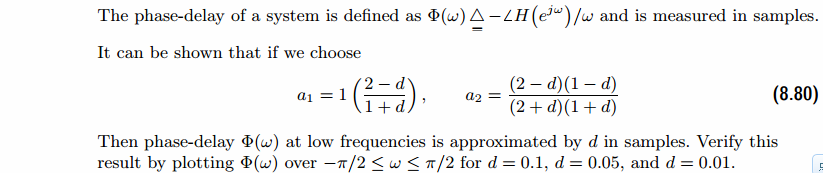
代码:
%% ------------------------------------------------------------------------

%%            Output Info about this m-file

fprintf('\n***********************************************************\n');

fprintf('        <DSP using MATLAB> Problem 8.11 \n\n');

banner();

%% ------------------------------------------------------------------------

%d = 0.10

%d = 0.05

d = 0.01

a1 = (2-d)/(1+d);

a2 = (2-d)*(1-d)/((2+d)*(1+d));

% digital IIR 2nd-order allpass filter

b = [a2  a1  1]

a = [1  a1  a2]

figure('NumberTitle', 'off', 'Name', 'Problem 8.11 Pole-Zero Plot')

set(gcf,'Color','white');

zplane(b,a);

title(sprintf('Pole-Zero Plot, d=%.2f',d));

%pzplotz(b,a);

[db, mag, pha, grd, w] = freqz_m(b, a);

% ---------------------------------------------------------------------

%  Choose the gain parameter of the filter, maximum gain is equal to 1

% ---------------------------------------------------------------------

gain1=max(mag)                    % with poles

K = 1

[db, mag, pha, grd, w] = freqz_m(K*b, a);

figure('NumberTitle', 'off', 'Name', 'Problem 8.11 IIR allpass filter')

set(gcf,'Color','white');

subplot(2,2,1); plot(w/pi, db); grid on; axis([0 2 -60 10]);

set(gca,'YTickMode','manual','YTick',[-60,-30,0])

set(gca,'YTickLabelMode','manual','YTickLabel',['60';'30';' 0']);

set(gca,'XTickMode','manual','XTick',[0,0.25,0.5,1,1.5,1.75,2]);

xlabel('frequency in \pi units'); ylabel('Decibels'); title('Magnitude Response in dB');

subplot(2,2,3); plot(w/pi, mag); grid on; %axis([0 1 -100 10]);

xlabel('frequency in \pi units'); ylabel('Absolute'); title('Magnitude Response in absolute');

set(gca,'XTickMode','manual','XTick',[0,0.25,0.5,1,1.5,1.75,2]);

set(gca,'YTickMode','manual','YTick',[0,1.0]);

subplot(2,2,2); plot(w/pi, pha); grid on; %axis([0 1 -100 10]);

xlabel('frequency in \pi units'); ylabel('Rad'); title('Phase Response in Radians');

subplot(2,2,4); plot(w/pi, grd*pi/180);  grid on; %axis([0 1 -100 10]);

xlabel('frequency in \pi units'); ylabel('Rad'); title('Group Delay');

set(gca,'XTickMode','manual','XTick',[0,0.25,0.5,1,1.5,1.75,2]);

%set(gca,'YTickMode','manual','YTick',[0,1.0]);

figure('NumberTitle', 'off', 'Name', 'Problem 8.11 IIR allpass filter')

set(gcf,'Color','white');

plot(w/pi, -pha/w); grid on; %axis([0 1 -100 10]);

xlabel('frequency in \pi units'); ylabel('Rad'); title('Phase Delay in samples');

% Impulse Response

fprintf('\n----------------------------------');

fprintf('\nPartial fraction expansion method: \n');

[R, p, c] = residuez(K*b,a)

MR = (abs(R))'              % Residue  Magnitude

AR = (angle(R))'/pi         % Residue  angles in pi units

Mp = (abs(p))'              % pole  Magnitude

Ap = (angle(p))'/pi         % pole  angles in pi units

[delta, n] = impseq(0,0,20);

h_chk = filter(K*b,a,delta);      % check sequences

% ------------------------------------------------------------------------------------------------

%                                gain parameter K

% ------------------------------------------------------------------------------------------------

%h =  0.2202 * ((-0.9385) .^ n) + (-0.8308) * ((-0.7887) .^ n) + 1.3509 * delta;    %d=0.1

%h =  0.1099 * ((-0.9688) .^ n) + (-0.4112) * ((-0.8884) .^ n) + 1.1619 * delta;    %d=0.05

h =  0.0220 * ((-0.9937) .^ n) + (-0.0820) * ((-0.9766) .^ n) + 1.0305 * delta;    %d=0.01

% ------------------------------------------------------------------------------------------------

figure('NumberTitle', 'off', 'Name', 'Problem 8.11 IIR allpass filter, h(n) by filter and Inv-Z ')

set(gcf,'Color','white');

subplot(2,1,1); stem(n, h_chk); grid on; %axis([0 2 -60 10]);

xlabel('n'); ylabel('h\_chk'); title('Impulse Response sequences by filter');

subplot(2,1,2); stem(n, h); grid on; %axis([0 1 -100 10]);

xlabel('n'); ylabel('h'); title('Impulse Response sequences by Inv-Z');

[db, mag, pha, grd, w] = freqz_m(h, [1]);

figure('NumberTitle', 'off', 'Name', 'Problem 8.11 IIR filter, h(n) by Inv-Z ')

set(gcf,'Color','white');

subplot(2,2,1); plot(w/pi, db); grid on; axis([0 2 -60 10]);

set(gca,'YTickMode','manual','YTick',[-60,-30,0])

set(gca,'YTickLabelMode','manual','YTickLabel',['60';'30';' 0']);

set(gca,'XTickMode','manual','XTick',[0,0.25,1,1.75,2]);

xlabel('frequency in \pi units'); ylabel('Decibels'); title('Magnitude Response in dB');

subplot(2,2,3); plot(w/pi, mag); grid on; %axis([0 1 -100 10]);

xlabel('frequency in \pi units'); ylabel('Absolute'); title('Magnitude Response in absolute');

set(gca,'XTickMode','manual','XTick',[0,0.25,1,1.75,2]);

set(gca,'YTickMode','manual','YTick',[0,1.0]);

subplot(2,2,2); plot(w/pi, pha); grid on; %axis([0 1 -100 10]);

xlabel('frequency in \pi units'); ylabel('Rad'); title('Phase Response in Radians');

subplot(2,2,4); plot(w/pi, grd*pi/180);  grid on; %axis([0 1 -100 10]);

xlabel('frequency in \pi units'); ylabel('Rad'); title('Group Delay');

set(gca,'XTickMode','manual','XTick',[0,0.25,1,1.75,2]);

%set(gca,'YTickMode','manual','YTick',[0,1.0]);
运行结果:
这里放d=0.1的运行结果。
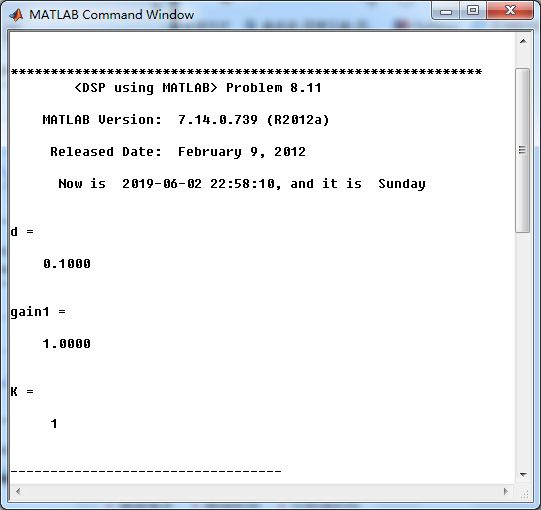
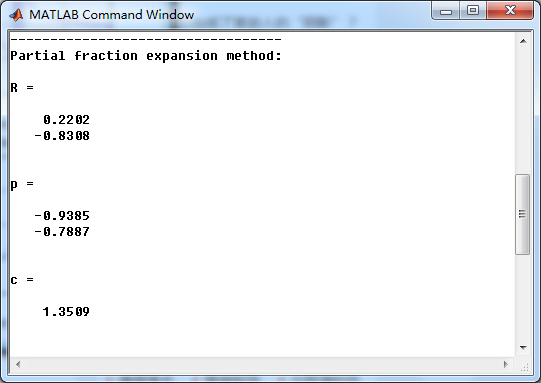
二阶全通滤波器的留数、极点
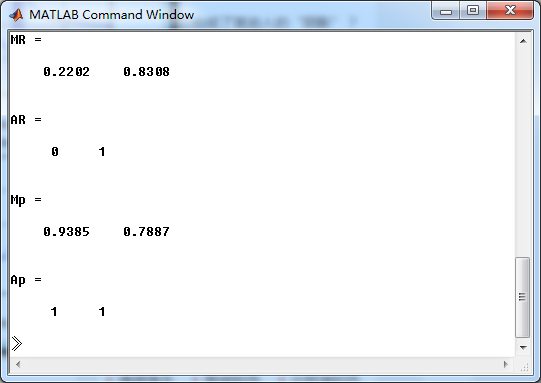
系统零极点图,可以看出,两个零点都在单位圆外,幅角为π
方法一,利用系统函数直接形式,将脉冲序列做输入,得到脉冲响应h,得到系统幅度谱、相位谱和群延迟,如下图

方法二,将二阶全通系统函数部分分式展开,然后查表求逆z变换,得到脉冲响应h_chk
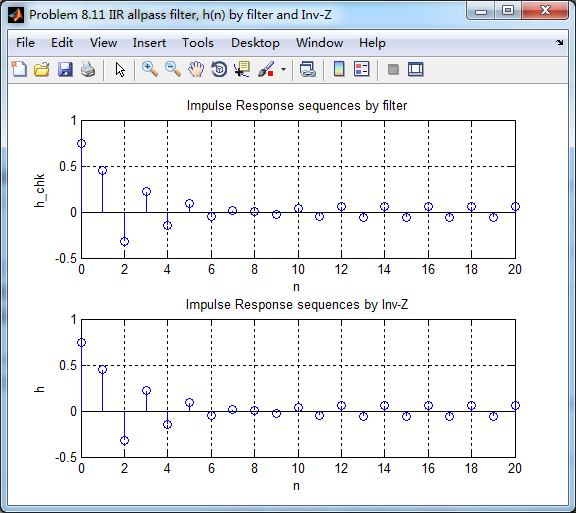
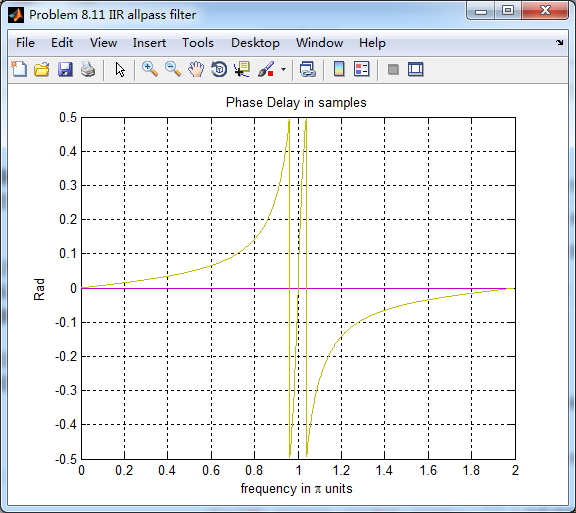
幅度谱、相位谱和群延迟,可以看到,ω=π时,幅度有衰减

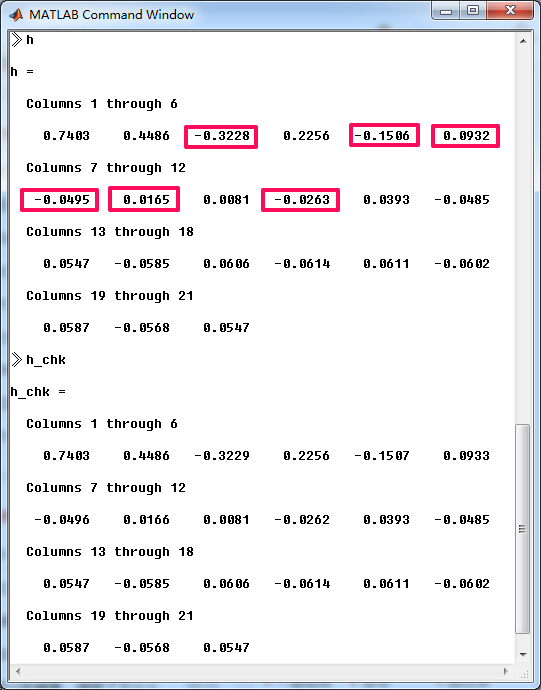
可见,两种方法得到的脉冲响应h有区别,我们将各自前21个元素列出来,方框处二者稍有区别。
但,为何有区别,没搞懂,欢迎各位博友不吝赐教。
《DSP using MATLAB》Problem 8.11的更多相关文章
- 《DSP using MATLAB》Problem 7.11
代码: %% ++++++++++++++++++++++++++++++++++++++++++++++++++++++++++++++++++++++++++++++++ %% Output In ...
- 《DSP using MATLAB》Problem 6.11
代码: %% ++++++++++++++++++++++++++++++++++++++++++++++++++++++++++++++++++++++++++++++++ %% Output In ...
- 《DSP using MATLAB》Problem 5.11
代码: %% ++++++++++++++++++++++++++++++++++++++++++++++++++++++++++++++++++++++++++++++++ %% Output In ...
- 《DSP using MATLAB》Problem 4.11
代码: %% ---------------------------------------------------------------------------- %% Output Info a ...
- 《DSP using MATLAB》Problem 7.16
使用一种固定窗函数法设计带通滤波器. 代码: %% ++++++++++++++++++++++++++++++++++++++++++++++++++++++++++++++++++++++++++ ...
- 《DSP using MATLAB》Problem 7.6
代码: 子函数ampl_res function [Hr,w,P,L] = ampl_res(h); % % function [Hr,w,P,L] = Ampl_res(h) % Computes ...
- 《DSP using MATLAB》Problem 5.21
证明: 代码: %% ++++++++++++++++++++++++++++++++++++++++++++++++++++++++++++++++++++++++++++++++++++++++ ...
- 《DSP using MATLAB》Problem 5.20
窗外的知了叽叽喳喳叫个不停,屋里温度应该有30°,伏天的日子难过啊! 频率域的方法来计算圆周移位 代码: 子函数的 function y = cirshftf(x, m, N) %% -------- ...
- 《DSP using MATLAB》Problem 5.14
说明:这两个小题的数学证明过程都不会,欢迎博友赐教. 直接上代码: %% +++++++++++++++++++++++++++++++++++++++++++++++++++++++++++++++ ...
随机推荐
- mysql实现访问审计
mysql的连接首先都是通过init_connect初始化,然后连接到实例. 我们利用这一点,通过在init_connect的时候记录下用户的thread_id,用户名和用户地址实现db的访问审计功能 ...
- ASP.NET加断点调试,却跳不进方法的原因。
1.首先调试后看一下断点是不是空心的,如果是,鼠标放在断点上,按提示操作即可. 提示如图所示:
- 继承内部类时使用外部类对象.super()调用内部类的构造方法
问题简介 今天在看<Java编程思想>的时候,看到了一个很特殊的语法,懵逼了半天--一个派生类继承自一个内部类,想要创建这个派生类的对象,首先得创建其父类的对象,也就是这个内部类,而调 ...
- Leetcode976. Largest Perimeter Triangle三角形的最大周长
给定由一些正数(代表长度)组成的数组 A,返回由其中三个长度组成的.面积不为零的三角形的最大周长. 如果不能形成任何面积不为零的三角形,返回 0. 示例 1: 输入:[2,1,2] 输出:5 示例 2 ...
- AndroidStudio WiFi调试插件
前言 此篇博客也是Android studio插件篇的一部分,后续有时间我会介绍更多AndroidStudio的插件方便开发. Android设备用WiFi调试在以前一般是通过adb连接的,但是这样的 ...
- COGS2353 【HZOI2015】有标号的DAG计数 I
题面 题目描述 给定一正整数n,对n个点有标号的有向无环图(可以不连通)进行计数,输出答案mod 10007的结果 输入格式 一个正整数n 输出格式 一个数,表示答案 样例输入 3 样例输出 25 提 ...
- 基于vue的环信基本实时通信功能
本篇文章借鉴了一些资料,然后在这个基础上,我将环信的实现全部都集成在一个组件里面进行实现: https://blog.csdn.net/github_35631540/article/details/ ...
- 0908CSP-S模拟测试赛后总结
我早就料到昨天会考两场2333 话说老师终于给模拟赛改名了啊. 距离NOIP祭日还有60天hhh. 以上是废话. %%%DeepinC无敌神 -rank1 zkt神.kx神.动动神 -rank2 有钱 ...
- Git中.gitignore忽略规则
# 此为注释 – 将被 Git 忽略 *.a # 忽略所有 .a 结尾的文件 !lib.a # 但 lib.a 除外 /TODO # 仅仅忽略项目根目录下的 TODO 文件,不包括 subdir/TO ...
- CF 1063B Labyrinth
传送门 解题思路 看上去很简单,\(bfs\)写了一发被\(fst\)...后来才知道好像一群人都被\(fst\)了,这道题好像那些每个点只经过一次的传统\(bfs\)都能被叉,只需要构造出一个一块一 ...