
吴裕雄 PYTHON 人工智能——基于MASK_RCNN目标检测(5)
import os

import sys

import numpy as np

import tensorflow as tf

import matplotlib

import matplotlib.pyplot as plt

import keras

import utils

import model as modellib

import visualize

from model import log

%matplotlib inline

# Root directory of the project

ROOT_DIR = os.getcwd()

# Directory to save logs and trained model

MODEL_DIR = os.path.join(ROOT_DIR, "logs")

# Local path to trained weights file

COCO_MODEL_PATH = os.path.join(ROOT_DIR, "mask_rcnn_coco.h5")

# Download COCO trained weights from Releases if needed

if not os.path.exists(COCO_MODEL_PATH):

    utils.download_trained_weights(COCO_MODEL_PATH)

# Path to Shapes trained weights

SHAPES_MODEL_PATH = os.path.join(ROOT_DIR, "mask_rcnn_shapes.h5")
# Run one of the code blocks

# Shapes toy dataset

# import shapes

# config = shapes.ShapesConfig()

# MS COCO Dataset

import coco

config = coco.CocoConfig()
# Device to load the neural network on.

# Useful if you're training a model on the same

# machine, in which case use CPU and leave the

# GPU for training.

DEVICE = "/cpu:0"  # /cpu:0 or /gpu:0
def get_ax(rows=1, cols=1, size=16):

    """Return a Matplotlib Axes array to be used in

    all visualizations in the notebook. Provide a

    central point to control graph sizes.

    Adjust the size attribute to control how big to render images

    """

    _, ax = plt.subplots(rows, cols, figsize=(size*cols, size*rows))

    return ax
# Create model in inference mode

with tf.device(DEVICE):

    model = modellib.MaskRCNN(mode="inference", model_dir=MODEL_DIR,

                              config=config)

# Set weights file path

if config.NAME == "shapes":

    weights_path = SHAPES_MODEL_PATH

elif config.NAME == "coco":

    weights_path = COCO_MODEL_PATH

# Or, uncomment to load the last model you trained

# weights_path = model.find_last()[1]

# Load weights

print("Loading weights ", weights_path)

model.load_weights(weights_path, by_name=True)
# Show stats of all trainable weights

visualize.display_weight_stats(model)

# Pick layer types to display

LAYER_TYPES = ['Conv2D', 'Dense', 'Conv2DTranspose']

# Get layers

layers = model.get_trainable_layers()

layers = list(filter(lambda l: l.__class__.__name__ in LAYER_TYPES,

                layers))

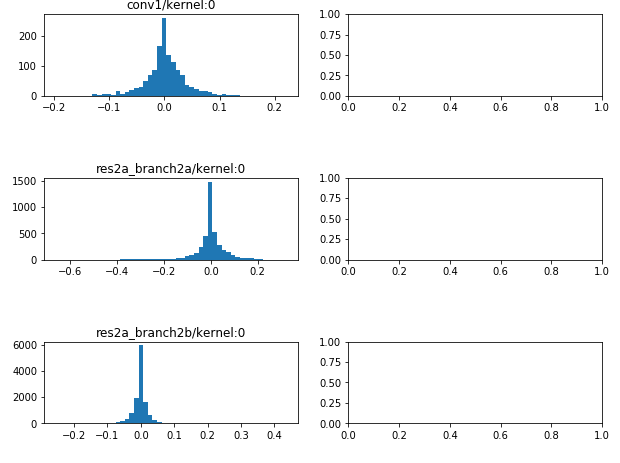
# Display Histograms

fig, ax = plt.subplots(len(layers), 2, figsize=(10, 3*len(layers)),

                       gridspec_kw={"hspace":1})

for l, layer in enumerate(layers):

    weights = layer.get_weights()

    for w, weight in enumerate(weights):

        tensor = layer.weights[w]

        ax[l, w].set_title(tensor.name)

        _ = ax[l, w].hist(weight[w].flatten(), 50)
吴裕雄 PYTHON 人工智能——基于MASK_RCNN目标检测(5)的更多相关文章
- 吴裕雄 PYTHON 人工智能——基于MASK_RCNN目标检测(4)
import os import sys import random import math import re import time import numpy as np import tenso ...
- 吴裕雄 python 人工智能——基于Mask_RCNN目标检测(3)
import os import sys import random import math import re import time import numpy as np import cv2 i ...
- 吴裕雄 python 人工智能——基于Mask_RCNN目标检测(2)
import os import sys import itertools import math import logging import json import re import random ...
- 吴裕雄 python 人工智能——基于Mask_RCNN目标检测(1)
import os import sys import random import math import numpy as np import skimage.io import matplotli ...
- 吴裕雄 python 人工智能——基于神经网络算法在智能医疗诊断中的应用探索代码简要展示
#K-NN分类 import os import sys import time import operator import cx_Oracle import numpy as np import ...
- 吴裕雄 PYTHON 人工智能——智能医疗系统后台智能分诊模块及系统健康养生公告简约版代码展示
#coding:utf-8 import sys import cx_Oracle import numpy as np import pandas as pd import tensorflow a ...
- 吴裕雄 python 人工智能——智能医疗系统后台用户复诊模块简约版代码展示
#复诊 import sys import os import time import operator import cx_Oracle import numpy as np import pand ...
- 吴裕雄 python 人工智能——智能医疗系统后台用户注册、登录和初诊简约版代码展示
#用户注册.登录模块 #数据库脚本 CREATE TABLE usertable( userid number(8) primary key not null , username varchar(5 ...
- TF项目实战(基于SSD目标检测)——人脸检测1
SSD实战——人脸检测 Tensorflow 一 .人脸检测的困难: 1. 姿态问题 2.不同种族人, 3.光照 遮挡 带眼睛 4.视角不同 5. 不同尺度 二. 数据集介绍以及转化VOC: 1. F ...
随机推荐
- python | 网络编程(socket、udp、tcp)
一.套接字 socket 1.1 作用:实现不同主机间的进程间通信(不同电脑.手机等设备之间收发数据) 1.2 分类:udp.tcp 1.3 创建 socket import socket socke ...
- ubuntu18+caffe+cuda
昨天安装caffe,因为用的是cuda10.2,遇到各种问题,最终也没有安装成功.使用cmake配置成功.生成成功.编译的时候报错. /usr/local/cuda/include/cuda_runt ...
- Jarvis OJ - 栈系列部分pwn - Writeup
最近做了Jarvis OJ的一部分pwn题,收获颇丰,现在这里简单记录一下exp,分析过程和思路以后再补上 Tell Me Something 此题与level0类似,请参考level0的writeu ...
- 剑指offer 面试题. 剪绳子
题目描述 给你一根长度为n的绳子,请把绳子剪成整数长的m段(m.n都是整数,n>1并且m>1),每段绳子的长度记为k[0],k[1],...,k[m].请问k[0]xk[1]x...xk[ ...
- JS高级---总结apply和call方法的使用
apply和call的使用方法 apply的使用语法 函数名字.apply(对象,[参数1,参数2,...]); 方法名字.apply(对象,[参数1,参数2,...]); call的使用语法 ...
- C++-HDU2196-Computer-[树的直径]
直径定义:树上的最长路径,不妨设端点分别为s,t 可以证明(感觉):每个点到其最远点必定为s or t,反之亦然 首先,第一次dfs找到s 然后,第二次dfs以s为根找到t 最后,第三次dfs以t为根 ...
- 1060 Are They Equal (25分)
1060 Are They Equal (25分) 题目 思路 定义结构体 struct fraction{ string f; int index; } 把输入的两个数先都转换为科学计数法,统一标准 ...
- gradle-技能保存
gradle编译java springboot,指定使用哪个环境配置文件 首先在build.gradle里面声明一个变量 def profileName = project.hasProperty(& ...
- php设计模式之观察者模式实例代码
php提供的两个接口,一个被观察者接口SplSubject,一个或多个观察者接口SPLObserver,和一个可以储存对象的类SplObjectStorage.被观察者有三个方法,需要实现这三个方法, ...
- python修改文件后缀名
修改文件后缀名 # -*- coding: utf-8 -*- import os # # 列出当前目录下所有的文件 # filedir = 'C:\\Users\\WT\\Desktop\\test ...