
Ubuntu宝塔面板设置网站 Apache Server API为Apache 2.0 Handler模式
用过宝塔面板(https://www.bt.cn)的谁用谁知道; 以下来自官网的介绍:
“宝塔Linux面板是提升运维效率的服务器管理软件,支持一键LAMP/LNMP/集群/监控/网站/FTP/数据库/JAVA等100多项服务器管理功能”。
一个多平台开发集成工具, 宝塔安装Apache+php 默认Server API 是FPM/FastCGI模式,且不支持自动切换,要修改为Apache 2.0 Handler模式只能手动修改。https://www.bt.cn/bbs/forum.php?mod=viewthread&tid=33550&highlight=handler
为什么要改为Apache 2.0 Handler模式
目前项目中server用的是Apache,服务器配置的是Server API= Apache 2.0 Handler,本地使用宝塔的集成环境,自然Server API=FPM/FastCGI模式,某天git pull代码后本地无法启动,查看error log 提示:
Invalid command 'php_value', perhaps mis-spelled or defined by a module not included
发现在根目录下的.htaccess 文件中多了一行
php_value max_input_vars
这个是php提交post设置最大值提交参数,那么问题来了,为什么服务器支持而我本地提示不支持呢,找到了这篇文章;
https://stackoverflow.com/questions/31270385/php-value-in-htaccess-show-internal-server-error
You need to determine if PHP is setup in CGI mode. If it is you cannot add those lines to your .htaccess file. You will need to make your changes via php.ini
so you cannot use the following directives in .htaccess files: php_flag, php_admin_flag, php_value, php_admin_value.
直接注释掉,但每次git push都要忽略该文件。麻烦。。。。。
设置 Server API为Apache 2.0 Handler模式
在stackoverflow 中看到了类似的问题
How to change Server API from CGI/FastCGI to apache2handler
copy answer comment:
To change Server Api FPM to apache2handler, As far you know yo need to compile PHP. Apache compile does not necessary. In fact if you are using Apache Passanger mod or else, compiling Apache might bring problems. So that is why you do not want to compile Apache to change Server Api for PHP.
所以,是不是宝塔中配置的Apache不需要用重新编译,只要我重新编译下php即可。OK, Let's go!
下载 & 编译 php源码
宝塔提供了N多个PHP版本,为了区分他们提供的版本,我下载了宝塔没有提供的一个php版本做为测试用,php5.6.23
wget https://www.php.net/distributions/php-5.6.23.tar.gz
从目前配置 Configure Command复制信息
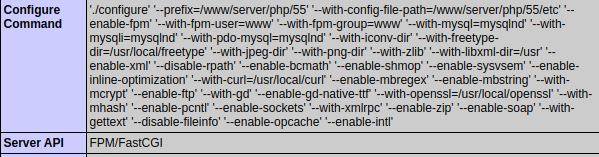
修改信息为如下:
'./configure' '--prefix=/www/server/php/56' '--with-config-file-path=/www/server/php/56/etc' '--with-apxs2=/www/server/apache/bin/apxs' '--disable-cgi' '--with-mysql=mysqlnd' '--with-mysqli=mysqlnd' '--with-pdo-mysql=mysqlnd' '--with-iconv-dir' '--with-freetype-dir=/usr/local/freetype' '--with-jpeg-dir' '--with-png-dir' '--with-zlib' '--with-libxml-dir=/usr' '--enable-xml' '--disable-rpath' '--enable-bcmath' '--enable-shmop' '--enable-sysvsem' '--enable-inline-optimization' '--with-curl=/usr/local/curl' '--enable-mbregex' '--enable-mbstring' '--with-mcrypt' '--enable-ftp' '--with-gd' '--enable-gd-native-ttf' '--with-openssl=/usr/local/openssl' '--with-mhash' '--enable-pcntl' '--enable-sockets' '--with-xmlrpc' '--enable-zip' '--enable-soap' '--with-gettext' '--disable-fileinfo' '--enable-intl'
其中 --prefix指php要安装的位置,--with-config-file-path指配置文件的路径,--with-apxs2指Apache sapi 的目录文件。取消了'--enable-opcache'因为opcache一直编译报错。
sudo make && make install
安装好之后复制php.ini-production文件到/www/server/php/56/etc/php.ini
此时会发现在/www/server/apache/modules中生成了libphp5.so模块。
修改Apache配置
修改Apache配置文件: /www/server/apache/conf/httpd.conf
查找 libphp5.so,理论上可以找的如下一行
LoadModule php5_module modules/libphp5.so

将查找到那行移动到LoadModule 配置块的最上面,OK! Apache配置httpd.conf 就这么一行代码挪动,仅此而已!
修改vhost配置
宝塔默认vhost位于/www/server/panel/vhost/apache/***.conf文件,也可以登陆宝塔后台-站点修改-配置文件,将#php FilesMatch配置块去掉。
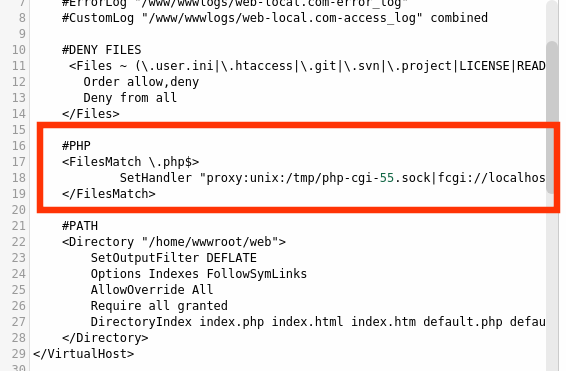
ok,保存并重启服务。
*注: 只要修改希望vhost提供Server API= Apache 2.0 Handler的vhost,不修改其他vhost依然可以提供FastCGI模式。so,Apache可以提供不同php版本的不同Server API。
phpinfo查看:

Ubuntu宝塔面板设置网站 Apache Server API为Apache 2.0 Handler模式的更多相关文章
- 宝塔面板设置腾迅COS自动备份网站
之前写了如何配置腾迅云COS并挂载到服务器中,今天看到宝塔面板中有腾迅云COS的插件,不过研究了下,只是将COS绑定在宝塔面板中,不能自动备份,需要用到宝塔的计划任务功能 1.下载腾迅云COS插件 2 ...
- 【服务器】CentOs7系统使用宝塔面板搭建网站,有FTP配置(保姆式教程)
内容繁多,请耐心跟着流程走,在过程中遇到问题请在下面留言(我只是小白,请专业人士喷轻点). 这次用thinkphp5.1做演示,单纯的做演示,我打算下一篇文章用typecho(博客框架)演示. 前言 ...
- IdentityServer4:IdentityServer4+API+Client实践OAuth2.0客户端模式(1)
一.OAuth2.0 1.OAuth2.0概念 OAuth2.0(Open Authorization)是一个开放授权协议:第三方应用不需要接触到用户的账户信息(如用户名密码),通过用户的授权访问用户 ...
- How to install Apache Server on Windows
Note Those of you interested in the Apache 2.0.X tutorial, it has been abandon and I will no longer ...
- APache PDFbox API使用(1)----简单介绍
因为项目的须要.近期在学习APache PDFbox API,Apache PDFbox API是Apache Java 开源社区中个一个项目,其受Apache 版权 V2的保护,其提供了以下的功能 ...
- 宝塔面板+djiango+mod wsgi +apache 配置多项目站点
在一台服务器上同时有多个djiango项目,那么就需要配置多站点,利用不同的域名不同的端口 同时存在多个项目. 环境,centos + 宝塔面板+apache+django 1.在centos环境下 ...
- 腾讯云服务器安装宝塔面板快速配置LNMP/LAMP网站系统
我们在选择购买腾讯云服务器之后,有部分用户肯定是用来建站用途的.毕竟云服务器的性能和功能比虚拟主机优秀很多.腾讯云服务器拥有香港.北京.广州.上海.美国等多个机房,可以安装Linux和Windows系 ...
- Server 主机屋云服务器 宝塔面板 部署nginx反向代理的vue项目
图文记录云服务器上部署需要nginx反向代理的vue项目: 一.先登录并购买云服务器,根据自己需求购买,此处不详细介绍: 二.登录后如下图,点击进入云服务器界面: 三.在云服务器界面点击管理,进入管理 ...
- Ubuntu 16.04 LAMP server tutorial with Apache 2.4, PHP 7 and MariaDB (instead of MySQL)
https://www.howtoforge.com/tutorial/install-apache-with-php-and-mysql-on-ubuntu-16-04-lamp/ This tut ...
随机推荐
- MySQL--mysqldmp命令参数set-gtid-purged
在MySQL 5.7版本中使用mysqldump导出数据时,如果未显式指定set-gtid-purged参数,会报下面错误: Warning: A partial dump from a server ...
- Letsencrypt.org CA免费证书生成
Letsencrypt.org CA免费证书使用 Let's 支持多中客户端,这里使用acme.sh客户端配置免费证书. acme.sh优点: github官方地址 纯用Shell(Unix外壳)语言 ...
- springboot java.awt.AWTException: headless environment
修改启动类即可 @SpringBootApplicationpublic class SystemctlApplication { public static void main(String[] a ...
- 逆向破解之160个CrackMe —— 021
CrackMe —— 021 160 CrackMe 是比较适合新手学习逆向破解的CrackMe的一个集合一共160个待逆向破解的程序 CrackMe:它们都是一些公开给别人尝试破解的小程序,制作 c ...
- 调皮的js
一.中文变量名 今天偶然看文章.看到js的var还可以用中文做变量名,那么我们试试,看看中文的变量名是否能打印出值呢? var 临时变量="111"; console.log(临时 ...
- 利用python jieba库统计政府工作报告词频
1.安装jieba库 舍友帮装的,我也不会( ╯□╰ ) 2.上网寻找政府工作报告 3.参照课本三国演义词频统计代码编写 import jieba txt = open("D:\政府工作报告 ...
- Linux下用ls和du命令查看文件以及文件夹大小(转)
转自:https://www.cnblogs.com/xueqiuqiu/p/7635722.html ls的用法 ls -l |grep "^-"|wc -l或find ./co ...
- RxCocoa, RxSwift, Bond, Interstellar
While you can use any functional library, I personally prefer RxSwift because I have the most experi ...
- Spring Data JPA:关联映射操作
1.一对一的关系关联 需求:用户和角色一对一关联 package com.example.jpa.pojo; import javax.persistence.*; @Entity @Table(na ...
- Event 事件(最简单实用)
public partial class Form1 : Form { /// <summary> /// 定义事件 /// </summary> public event E ...