
MySQL/MariaDB数据库的存储引擎
MySQL/MariaDB数据库的存储引擎
作者:尹正杰
版权声明:原创作品,谢绝转载!否则将追究法律责任。
一.MySQL体系结构
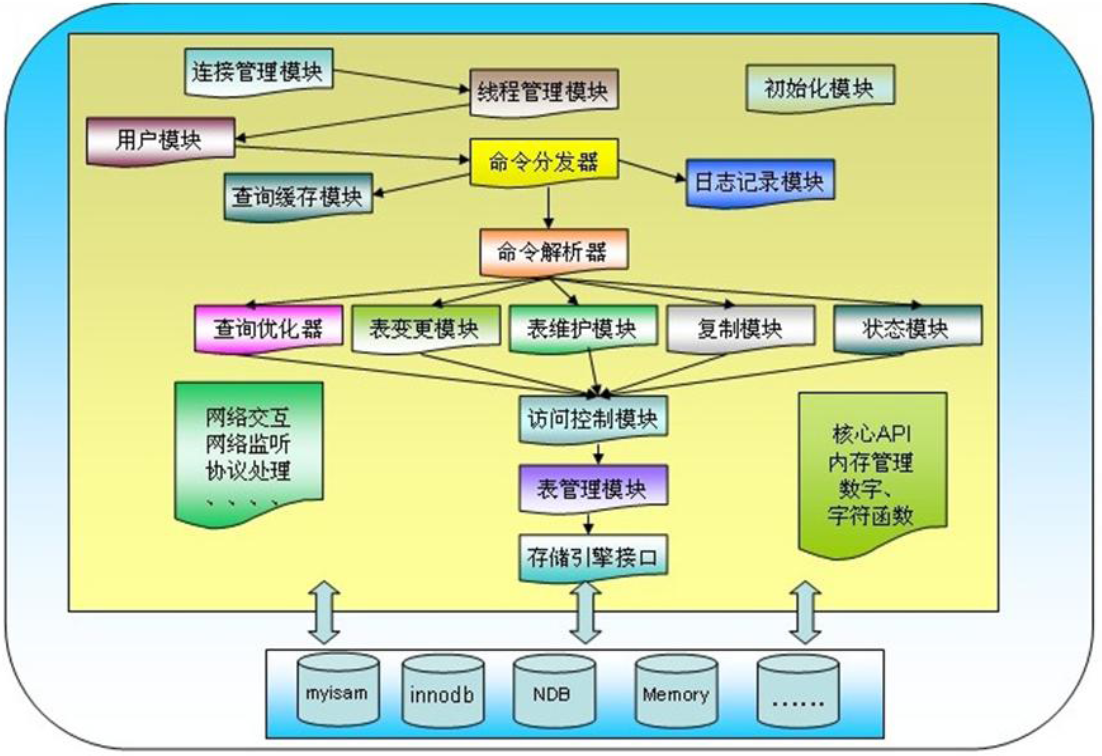
连接管理模块:
  负责接收远程用户的连接。

线程管理模块:
  维护一个线程池,通过连接管理模块接入的连接会在线程池中分配一个空闲线程去响应,当用户端口连接后线程资源会被回收(并不会被销毁),即重新放回线程池。

用户管理:
  负责验证用户是否合法。

命名分发器:
  负责分发命令到相应模块并记录日志信息。

查询缓存模块:

  负责缓存曾经执行SQL的返回结果。当下次查询到与之匹配的结果就直接返回缓存结果。

日志记录模块:
  用户执行命令是由相应日志的,负责记录用户操作记录以便于日后审计或者数据恢复等。

命令解析器:
  负责解析用户执行的SQL语句

查询优化器:
  选择最优的查询路径,比如使用索引查询等。

表变更模块:
  表的变更管理,比如对表进行重命名操作。

表维护模块:
  表的维护管理,比如对表中的内容进行增删改操作。

复制模块:
  用于复制的模块,比如MySQL的主从复制就得用它的功能实现。

状态模块:
  让用户了解MySQL数据库当前的工作状态。当登录数据库成功时可以使用一个叫做"status"命令查看当前数据库相关状态。

访问控制模块:
  负责权限管理,虽然用户模块已经验证是否由该用户,但是否有权限还得访问控制模块来管理。

表管理模块:
  管理表的模块调用存储引擎负责来实现数据存储。

存储引擎接口:
  数据库的数据最终还是保存到磁盘上,因此需要专门的存储引擎接口让用户调用,比如myisam,innodb,NDB,Memory等。
二. 存储引擎概述
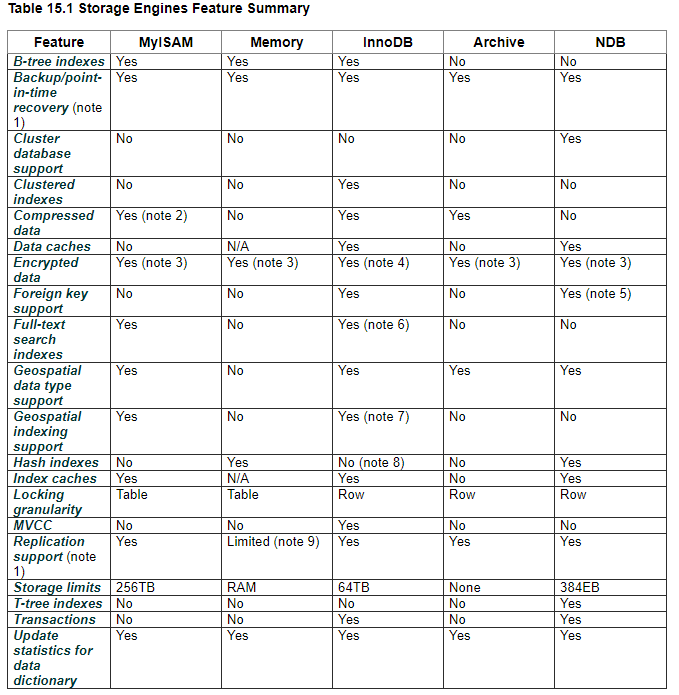
存储引擎说白了就是如何管理数据库中的数据在磁盘上的存储文件。

笔记:

  1.在服务器而不是在存储引擎中实现。

  2.仅当使用压缩行格式时,才支持压缩MyISAM表。在MyISAM中使用压缩行格式的表是只读的。

  3.通过加密功能在服务器中实现。

  4.通过加密功能在服务器上实现;在MySQL 5.7和更高版本中,支持静态数据表空间加密。

  5. MySQL Cluster NDB 7.3和更高版本提供了对外键的支持。

  6. MySQL 5.6和更高版本提供了对FULLTEXT索引的InnoDB支持。

  7. MySQL 5.7和更高版本提供了InnoDB对地理空间索引的支持。

  8. InnoDB在内部将哈希索引用于其自适应哈希索引功能。

博主推荐阅读:

    https://docs.oracle.com/cd/E17952_01/mysql-5.5-en/storage-engines.html
1>.MyISAM引擎
MyISAM引擎特点

  1.不支持事务

  2.表级锁定

  3.读写相互阻塞,写入不能读,读时不能写

  4.只缓存索引

  5.不支持外键约束

  6.不支持聚簇索引

  7.读取数据较快,占用资源较少

  8.不支持MVCC(多版本并发控制机制)高并发

  9.崩溃恢复性较差

  10.MySQL5.5.5前默认的数据库引擎

MyISAM存储引擎适用场景

  只读(或者写较少)、表较小(可以接受长时间进行修复操作)

MyISAM引擎文件

  tbl_name.frm: 表格式定义

  tbl_name.MYD: 数据文件

  tbl_name.MYI: 索引文件
2>.InnoDB引擎
InnoDB引擎特点

  行级锁

  支持事务,适合处理大量短期事务

  读写阻塞与事务隔离级别相关

  可缓存数据和索引

  支持聚簇索引

  崩溃恢复性更好

  支持MVCC高并发

  从MySQL5.5后支持全文索引

  从MySQL5.5.5开始为默认的数据库引擎

InnoDB数据库文件

  所有InnoDB表的数据和索引放置于同一个表空间中

    表空间文件:datadir定义的目录下

    数据文件:ibddata1, ibddata2, ...

  每个表单独使用一个表空间存储表的数据和索引

    启用:innodb_file_per_table=ON

    InnoDB系统变量链接:https://mariadb.com/kb/en/library/xtradbinnodb-server-system-variables/#innodb_file_per_tableON (>= MariaDB 5.5)

    两类文件放在数据库独立目录中

      数据文件(存储数据和索引):tb_name.ibd

      表格式定义:tb_name.frm
3>.Performance_Schema
Performance_Schema数据库使用。
4>.Memory
将所有数据存储在RAM中,以便在需要快速查找参考和其他类似数据的环境中进行快速访问。适用存放临时数据。该引擎以前被称为HEAP引擎
5>.MRG_MyISAM
使MySQL DBA或开发人员能够对一系列相同的MyISAM表进行逻辑分组,并将它们作为一个对象引用。适用于VLDB(Very Large Data Base)环境,如数据仓库
6>.Archive
为存储和检索大量很少参考的存档或安全审核信息,只支持SELECT和INSERT操作;支持行级锁和专用缓存区
7>.Federated联合
用于访问其它远程MySQL服务器一个代理,它通过创建一个到远程MySQL服务器的客户端连接,并将查询传输到远程服务器执行,而后完成数据存取,提供链接单独MySQL服务器的能力,以便从多个物理服务器创建一个逻辑数据库。非常适合分布式或数据集市环境
8>.BDB
可替代InnoDB的事务引擎,支持COMMIT、ROLLBACK和其他事务特性
9>.Cluster/NDB
MySQL的簇式数据库引擎,尤其适合于具有高性能查找要求的应用程序,这类查找需求还要求具有最高的正常工作时间和可用性
10>.CSV
CSV存储引擎使用逗号分隔值格式将数据存储在文本文件中。可以使用CSV引擎以CSV格式导入和导出其他软件和应用程序之间的数据交换
11>.BLACKHOLE
黑洞存储引擎接受但不存储数据,检索总是返回一个空集。该功能可用于分布式数据库设计,数据自动复制,但不是本地存储
12>.example
“stub”引擎,它什么都不做。可以使用此引擎创建表,但不能将数据存储在其中或从中检索。目的是作为例子来说明如何开始编写新的存储引擎
13>.MariaDB支持的其它存储引擎
  OQGraph

  SphinxSE

  TokuDB

  Cassandra

  CONNECT

  SQUENCE
三.管理存储引擎
1>.查看mysql支持的存储引擎
MariaDB [yinzhengjie]> SHOW ENGINES;

+--------------------+---------+----------------------------------------------------------------------------------+--------------+------+--------

----+| Engine             | Support | Comment                                                                          | Transactions | XA   | Savepoi

nts |+--------------------+---------+----------------------------------------------------------------------------------+--------------+------+--------

----+| CSV                | YES     | Stores tables as CSV files                                                       | NO           | NO   | NO

    || MRG_MyISAM         | YES     | Collection of identical MyISAM tables                                            | NO           | NO   | NO

    || MyISAM             | YES     | Non-transactional engine with good performance and small data footprint          | NO           | NO   | NO

    || SEQUENCE           | YES     | Generated tables filled with sequential values                                   | YES          | NO   | YES

    || PERFORMANCE_SCHEMA | YES     | Performance Schema                                                               | NO           | NO   | NO

    || MEMORY             | YES     | Hash based, stored in memory, useful for temporary tables                        | NO           | NO   | NO

    || Aria               | YES     | Crash-safe tables with MyISAM heritage                                           | NO           | NO   | NO

    || InnoDB             | DEFAULT | Supports transactions, row-level locking, foreign keys and encryption for tables | YES          | YES  | YES

    |+--------------------+---------+----------------------------------------------------------------------------------+--------------+------+--------

----+8 rows in set (0.00 sec)

MariaDB [yinzhengjie]>
MariaDB [yinzhengjie]> SHOW ENGINES;
MariaDB [yinzhengjie]> SHOW ENGINES\G

*************************** 1. row ***************************

      Engine: CSV

     Support: YES

     Comment: Stores tables as CSV files

Transactions: NO

          XA: NO

  Savepoints: NO

*************************** 2. row ***************************

      Engine: MRG_MyISAM

     Support: YES

     Comment: Collection of identical MyISAM tables

Transactions: NO

          XA: NO

  Savepoints: NO

*************************** 3. row ***************************

      Engine: MyISAM

     Support: YES

     Comment: Non-transactional engine with good performance and small data footprint

Transactions: NO

          XA: NO

  Savepoints: NO

*************************** 4. row ***************************

      Engine: SEQUENCE

     Support: YES

     Comment: Generated tables filled with sequential values

Transactions: YES

          XA: NO

  Savepoints: YES

*************************** 5. row ***************************

      Engine: PERFORMANCE_SCHEMA

     Support: YES

     Comment: Performance Schema

Transactions: NO

          XA: NO

  Savepoints: NO

*************************** 6. row ***************************

      Engine: MEMORY

     Support: YES

     Comment: Hash based, stored in memory, useful for temporary tables

Transactions: NO

          XA: NO

  Savepoints: NO

*************************** 7. row ***************************

      Engine: Aria

     Support: YES

     Comment: Crash-safe tables with MyISAM heritage

Transactions: NO

          XA: NO

  Savepoints: NO

*************************** 8. row ***************************

      Engine: InnoDB

     Support: DEFAULT

     Comment: Supports transactions, row-level locking, foreign keys and encryption for tables

Transactions: YES

          XA: YES

  Savepoints: YES

8 rows in set (0.00 sec)

MariaDB [yinzhengjie]>
MariaDB [yinzhengjie]> SHOW ENGINES\G
2>.查看当前默认的存储引擎
MariaDB [yinzhengjie]> SHOW VARIABLES LIKE '%STORAGE_ENGINE%';

+----------------------------+--------+

| Variable_name              | Value  |

+----------------------------+--------+

| default_storage_engine     | InnoDB |

| default_tmp_storage_engine |        |

| enforce_storage_engine     |        |

| storage_engine             | InnoDB |

+----------------------------+--------+

4 rows in set (0.00 sec)

MariaDB [yinzhengjie]>

MariaDB [yinzhengjie]>
MariaDB [yinzhengjie]> SHOW VARIABLES LIKE '%STORAGE_ENGINE%';
3>.设置默认的存储引擎
[root@node105.yinzhengjie.org.cn ~]# cat /mysql/3306/etc/my.cnf

[mysqld]

character-set-server    = utf8mb4

default_storage_engine  = InnoDB      #指定默认的存储引擎为InnoDB

port                 = 3306

datadir                = /mysql/3306/data

socket                = /mysql/3306/socket/mysql.sock

[mysqld_safe]

log-error        = /mysql/3306/log/mariadb.log

pid-file        = /mysql/3306/pid/mariadb.pid

[root@node105.yinzhengjie.org.cn ~]#

[root@node105.yinzhengjie.org.cn ~]#
[root@node105.yinzhengjie.org.cn ~]# cat /mysql/3306/etc/my.cnf
4>.查看库中所有表使用的存储引擎
MariaDB [yinzhengjie]> SHOW TABLE STATUS FROM yinzhengjie;

+----------+--------+---------+------------+------+----------------+-------------+-----------------+--------------+-----------+----------------+-

--------------------+---------------------+------------+-----------------+----------+----------------+---------+| Name     | Engine | Version | Row_format | Rows | Avg_row_length | Data_length | Max_data_length | Index_length | Data_free | Auto_increment |

Create_time         | Update_time         | Check_time | Collation       | Checksum | Create_options | Comment |+----------+--------+---------+------------+------+----------------+-------------+-----------------+--------------+-----------+----------------+-

--------------------+---------------------+------------+-----------------+----------+----------------+---------+| classes  | InnoDB |      10 | Dynamic    |    8 |           2048 |       16384 |               0 |            0 |         0 |              9 |

2019-10-28 22:10:33 | NULL                | NULL       | utf8_general_ci |     NULL |                |         || coc      | InnoDB |      10 | Dynamic    |   14 |           1170 |       16384 |               0 |            0 |         0 |             15 |

2019-10-28 22:10:33 | NULL                | NULL       | utf8_general_ci |     NULL |                |         || courses  | InnoDB |      10 | Dynamic    |    7 |           2340 |       16384 |               0 |            0 |         0 |              8 |

2019-10-28 22:10:33 | NULL                | NULL       | utf8_general_ci |     NULL |                |         || scores   | InnoDB |      10 | Dynamic    |   15 |           1092 |       16384 |               0 |            0 |         0 |             16 |

2019-10-28 22:10:33 | NULL                | NULL       | utf8_general_ci |     NULL |                |         || students | InnoDB |      10 | Dynamic    |   25 |            655 |       16384 |               0 |            0 |         0 |             26 |

2019-10-28 22:10:33 | 2019-10-29 07:58:57 | NULL       | utf8_general_ci |     NULL |                |         || teachers | InnoDB |      10 | Dynamic    |    4 |           4096 |       16384 |               0 |            0 |         0 |              5 |

2019-10-28 22:10:33 | NULL                | NULL       | utf8_general_ci |     NULL |                |         |+----------+--------+---------+------------+------+----------------+-------------+-----------------+--------------+-----------+----------------+-

--------------------+---------------------+------------+-----------------+----------+----------------+---------+6 rows in set (0.00 sec)

MariaDB [yinzhengjie]>
MariaDB [yinzhengjie]> SHOW TABLE STATUS FROM yinzhengjie;
MariaDB [yinzhengjie]> SHOW TABLE STATUS FROM yinzhengjie\G

*************************** 1. row ***************************

           Name: classes

         Engine: InnoDB

        Version: 10

     Row_format: Dynamic

           Rows: 8

 Avg_row_length: 2048

    Data_length: 16384

Max_data_length: 0

   Index_length: 0

      Data_free: 0

 Auto_increment: 9

    Create_time: 2019-10-28 22:10:33

    Update_time: NULL

     Check_time: NULL

      Collation: utf8_general_ci

       Checksum: NULL

 Create_options:

        Comment:

*************************** 2. row ***************************

           Name: coc

         Engine: InnoDB

        Version: 10

     Row_format: Dynamic

           Rows: 14

 Avg_row_length: 1170

    Data_length: 16384

Max_data_length: 0

   Index_length: 0

      Data_free: 0

 Auto_increment: 15

    Create_time: 2019-10-28 22:10:33

    Update_time: NULL

     Check_time: NULL

      Collation: utf8_general_ci

       Checksum: NULL

 Create_options:

        Comment:

*************************** 3. row ***************************

           Name: courses

         Engine: InnoDB

        Version: 10

     Row_format: Dynamic

           Rows: 7

 Avg_row_length: 2340

    Data_length: 16384

Max_data_length: 0

   Index_length: 0

      Data_free: 0

 Auto_increment: 8

    Create_time: 2019-10-28 22:10:33

    Update_time: NULL

     Check_time: NULL

      Collation: utf8_general_ci

       Checksum: NULL

 Create_options:

        Comment:

*************************** 4. row ***************************

           Name: scores

         Engine: InnoDB

        Version: 10

     Row_format: Dynamic

           Rows: 15

 Avg_row_length: 1092

    Data_length: 16384

Max_data_length: 0

   Index_length: 0

      Data_free: 0

 Auto_increment: 16

    Create_time: 2019-10-28 22:10:33

    Update_time: NULL

     Check_time: NULL

      Collation: utf8_general_ci

       Checksum: NULL

 Create_options:

        Comment:

*************************** 5. row ***************************

           Name: students

         Engine: InnoDB

        Version: 10

     Row_format: Dynamic

           Rows: 25

 Avg_row_length: 655

    Data_length: 16384

Max_data_length: 0

   Index_length: 0

      Data_free: 0

 Auto_increment: 26

    Create_time: 2019-10-28 22:10:33

    Update_time: 2019-10-29 07:58:57

     Check_time: NULL

      Collation: utf8_general_ci

       Checksum: NULL

 Create_options:

        Comment:

*************************** 6. row ***************************

           Name: teachers

         Engine: InnoDB

        Version: 10

     Row_format: Dynamic

           Rows: 4

 Avg_row_length: 4096

    Data_length: 16384

Max_data_length: 0

   Index_length: 0

      Data_free: 0

 Auto_increment: 5

    Create_time: 2019-10-28 22:10:33

    Update_time: NULL

     Check_time: NULL

      Collation: utf8_general_ci

       Checksum: NULL

 Create_options:

        Comment:

6 rows in set (0.00 sec)

MariaDB [yinzhengjie]>

MariaDB [yinzhengjie]>
MariaDB [yinzhengjie]> SHOW TABLE STATUS FROM yinzhengjie\G
5>.查看库中指定表的存储引擎
MariaDB [yinzhengjie]> SHOW TABLE STATUS LIKE 'students';

+----------+--------+---------+------------+------+----------------+-------------+-----------------+--------------+-----------+----------------+-

--------------------+---------------------+------------+-----------------+----------+----------------+---------+| Name     | Engine | Version | Row_format | Rows | Avg_row_length | Data_length | Max_data_length | Index_length | Data_free | Auto_increment |

Create_time         | Update_time         | Check_time | Collation       | Checksum | Create_options | Comment |+----------+--------+---------+------------+------+----------------+-------------+-----------------+--------------+-----------+----------------+-

--------------------+---------------------+------------+-----------------+----------+----------------+---------+| students | InnoDB |      10 | Dynamic    |   25 |            655 |       16384 |               0 |            0 |         0 |             26 |

2019-10-28 22:10:33 | 2019-10-29 07:58:57 | NULL       | utf8_general_ci |     NULL |                |         |+----------+--------+---------+------------+------+----------------+-------------+-----------------+--------------+-----------+----------------+-

--------------------+---------------------+------------+-----------------+----------+----------------+---------+1 row in set (0.00 sec)

MariaDB [yinzhengjie]>
MariaDB [yinzhengjie]> SHOW TABLE STATUS LIKE 'students';
MariaDB [yinzhengjie]> SHOW TABLE STATUS LIKE 'students'\G

*************************** 1. row ***************************

           Name: students

         Engine: InnoDB

        Version: 10

     Row_format: Dynamic

           Rows: 25

 Avg_row_length: 655

    Data_length: 16384

Max_data_length: 0

   Index_length: 0

      Data_free: 0

 Auto_increment: 26

    Create_time: 2019-10-28 22:10:33

    Update_time: 2019-10-29 07:58:57

     Check_time: NULL

      Collation: utf8_general_ci

       Checksum: NULL

 Create_options:

        Comment:

1 row in set (0.00 sec)

MariaDB [yinzhengjie]>
MariaDB [yinzhengjie]> SHOW TABLE STATUS LIKE 'students'\G
MariaDB [yinzhengjie]> SHOW CREATE TABLE students;

+----------+-------------------------------------------------------------------------------------------------------------------------------------

----------------------------------------------------------------------------------------------------------------------------------------------------------------------------------------------------------------------------+| Table    | Create Table

                                                                                                                                                                                                                            |+----------+-------------------------------------------------------------------------------------------------------------------------------------

----------------------------------------------------------------------------------------------------------------------------------------------------------------------------------------------------------------------------+| students | CREATE TABLE `students` (

  `StuID` int(10) unsigned NOT NULL AUTO_INCREMENT,

  `Name` varchar(50) NOT NULL,

  `Age` tinyint(3) unsigned NOT NULL,

  `Gender` enum('F','M') NOT NULL,

  `ClassID` tinyint(3) unsigned DEFAULT NULL,

  `TeacherID` int(10) unsigned DEFAULT NULL,

  PRIMARY KEY (`StuID`)

) ENGINE=InnoDB AUTO_INCREMENT=26 DEFAULT CHARSET=utf8 |

+----------+-------------------------------------------------------------------------------------------------------------------------------------

----------------------------------------------------------------------------------------------------------------------------------------------------------------------------------------------------------------------------+1 row in set (0.00 sec)

MariaDB [yinzhengjie]>
MariaDB [yinzhengjie]> SHOW CREATE TABLE students;
MariaDB [yinzhengjie]> SHOW TABLES;

+-----------------------+

| Tables_in_yinzhengjie |

+-----------------------+

| classes               |

| coc                   |

| courses               |

| scores                |

| students              |

| teachers              |

+-----------------------+

6 rows in set (0.00 sec)

MariaDB [yinzhengjie]>

MariaDB [yinzhengjie]> SHOW CREATE TABLE students\G

*************************** 1. row ***************************

       Table: students

Create Table: CREATE TABLE `students` (

  `StuID` int(10) unsigned NOT NULL AUTO_INCREMENT,

  `Name` varchar(50) NOT NULL,

  `Age` tinyint(3) unsigned NOT NULL,

  `Gender` enum('F','M') NOT NULL,

  `ClassID` tinyint(3) unsigned DEFAULT NULL,

  `TeacherID` int(10) unsigned DEFAULT NULL,

  PRIMARY KEY (`StuID`)

) ENGINE=InnoDB AUTO_INCREMENT=26 DEFAULT CHARSET=utf8

1 row in set (0.00 sec)

MariaDB [yinzhengjie]>
MariaDB [yinzhengjie]> SHOW CREATE TABLE students\G
6>.设置表的存储引擎
创建表时指定存储引擎,若不指定则使用默认的存储引擎:

  CREATE TABLE tb_name(... ) ENGINE=InnoDB;

直接修改表的存储引擎:

  ALTER TABLE tb_name ENGINE=InnoDB;
MySQL/MariaDB数据库的存储引擎的更多相关文章
- mysql修改数据库的存储引擎(InnoDB)
查看当前的存储引擎 show engines; 基本的差别:MyISAM类型不支持事务处理等高级处理,而InnoDB类型支持.MyISAM类型的表强调的是性能,其执行数度比InnoDB类型更快,但是不 ...
- MySQL数据库InnoDB存储引擎多版本控制(MVCC)实现原理分析
文/何登成 导读: 来自网易研究院的MySQL内核技术研究人何登成,把MySQL数据库InnoDB存储引擎的多版本控制(简称:MVCC)实现原理,做了深入的研究与详细的文字图表分析,方便大家理解I ...
- MySQL数据库InnoDB存储引擎中的锁机制
MySQL数据库InnoDB存储引擎中的锁机制 http://www.uml.org.cn/sjjm/201205302.asp 00 – 基本概念 当并发事务同时访问一个资源的时候,有可能 ...
- MySQL数据库InnoDB存储引擎
MySQL数据库InnoDB存储引擎Log漫游 http://blog.163.com/zihuan_xuan/blog/static/1287942432012366293667/
- 查看和改动MySQL数据库表存储引擎
要做一名合格的程序猿,除了把代码写的美丽外,熟知数据库方面的知识也是不可或缺的.以下总结一下怎样查看和改动MySQL数据库表存储引擎: 1.查看数据库所能支持的存储引擎: ...
- mysql数据库各存储引擎比較
mysql数据库差别于其它数据库的最重要的一个特点是其插件式的表存储引擎,存储引擎是基于表的.而不是数据库 InnoDB存储引擎: 支持事务,其设计目标主要面向在线事务处理(OLTP)的 ...
- 百万年薪python之路 -- MySQL数据库之 存储引擎
MySQL之存储引擎 一. 存储引擎概述 定义: 存储引擎是mysql数据库独有的存储数据.为数据建立索引.更新数据.查询数据等技术的实现方法 首先声明一点: 存储引擎这个概念只有MySQL才有. ...
- MySQL数据库MyISAM存储引擎转为Innodb
MySQL数据库MyISAM存储引擎转为Innodb 之前公司的数据库存储引擎全部为MyISAM,数据量和访问量都不是很大,所以一直都没什么问题.但是最近出现了MySQL数据表经常被锁的情况,直接导 ...
- mysql数据库之 存储引擎、事务、视图、触发器、存储过程、函数、流程控制、数据库备份
目录 一.存储引擎 1.什么是存储引擎? 2.mysql支持的存储引擎 3. 使用存储引擎 二.事务 三.视图 1.什么是视图 2.为什么要用视图 3.如何用视图 四.触发器 为何要用触发器 创建触发 ...
随机推荐
- Linux实现定时备份MySQL数据库并删除30天前的备份文件
1. MySQL5.6以上版本 2. 修改 /etc/my.cnf 文件 # vim /etc/my.cnf [client] host=localhost user=你的数据库用户 password ...
- CocosCreator TypeScript项目 (vscode 设置中文,默认调试环境设置)
版本:2.2.1 深圳好多公司用的cocoscreator,学习一下. 这篇是如何安装,然后运行一个hello world. 一 下载 cocoscreator:https://www.cocos. ...
- EasyDSS高性能RTMP、HLS(m3u8)、HTTP-FLV、RTSP流媒体服务器功能简介---实时数据统计报表、视频文件上传、点播、分享、集成
熟悉EasyDSS流媒体服务器的小伙伴应该都知道,EasyDSS通过将EasyRTMP推流的直播流进行直播转码.智能处理.视频分发,再通过 CDN 分发节点分发到终端播放 SDK为观众播放高清低延时的 ...
- WPF--控件模板的视觉效果呈现流程及逻辑
外部通过属性把数据--传递给-->(破拆后)内部可视化树 ----> 内部可视化树呈现出视觉效果 ----> 各种内部可视化组件的视觉效果组合 --- 呈现 --> 外部的 ...
- fidder配置 https设置 手机客户端
1.APP抓包时的手机代理设置: 让手机和PC在同一个局域网下面: 1.如果PC是笔记本,让iOS或Android手机.iPhone或笔记本它们连接同一个wifi网络即可(自己试了不行,未找到原因). ...
- Java实现RSA加密&AES加密&DES加密
RSA package com.demo; import org.springframework.util.StringUtils; import javax.crypto.Cipher; impor ...
- 精通react之react-router4源码分析(100代码实现router功能)
1.react-router4 是一个 react 组件 通过和 location / histroy 结合,来显示页面不同URL对应显示不同的组件 其中包含了三种路由.hash / boswer 等 ...
- Spark学习(3) SparkSQL
什么事sparkSQL Spark SQL是Spark用来处理结构化数据的一个模块,它提供了一个编程抽象叫做DataFrame并且作为分布式SQL查询引擎的作用, 它是将Spark SQL转换成RDD ...
- OpenLayers加载百度离线瓦片地图(完美无偏移)
本文使用OpenLayers最新版本V5.3.0演示:如何使用OpenLayer完美无偏移加载百度离线瓦片地图.OpenLayers 5.3.0下载地址为:https://github.com/ope ...
- XXE任意文件读取(当xml解析内容有输出时)
利用XXE漏洞读取文件 参考:https://www.jianshu.com/p/4fc721398e97 首先找到登录源码如下: 由题目可以利用XXE漏洞读取文件 先登录用Burp Suite抓包: ...