
大数据学习——Kafka集群部署
1下载安装包

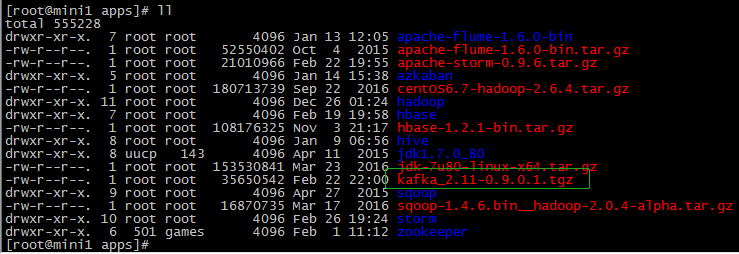
2解压安装包
 tar -zxvf  kafka_2.-0.9.0.1.tgz

 mv kafka_2.-0.9.0.1 kafka
3修改配置文件
cp server.properties server.properties.bak
# Licensed to the Apache Software Foundation (ASF) under one or more

# contributor license agreements.  See the NOTICE file distributed with

# this work for additional information regarding copyright ownership.

# The ASF licenses this file to You under the Apache License, Version 2.0

# (the "License"); you may not use this file except in compliance with

# the License.  You may obtain a copy of the License at

#

#    http://www.apache.org/licenses/LICENSE-2.0

#

# Unless required by applicable law or agreed to in writing, software

# distributed under the License is distributed on an "AS IS" BASIS,

# WITHOUT WARRANTIES OR CONDITIONS OF ANY KIND, either express or implied.

# See the License for the specific language governing permissions and

# limitations under the License.

# see kafka.server.KafkaConfig for additional details and defaults

############################# Server Basics #############################

# The id of the broker. This must be set to a unique integer for each broker.

broker.id=

zookeeper.connect=mini1:,mini2:,mini3:

############################# Socket Server Settings #############################

#listeners=PLAINTEXT://:9092

# The port the socket server listens on

port=

# Hostname the broker will bind to. If not set, the server will bind to all interfaces

host.name=mini1

# Hostname the broker will advertise to producers and consumers. If not set, it uses the

# value for "host.name" if configured.  Otherwise, it will use the value returned from

# java.net.InetAddress.getCanonicalHostName().

advertised.host.name=192.168.74.100

# The port to publish to ZooKeeper for clients to use. If this is not set,

# it will publish the same port that the broker binds to.

advertised.port=

# The number of threads handling network requests

num.network.threads=

# The number of threads doing disk I/O

num.io.threads=

# The send buffer (SO_SNDBUF) used by the socket server

socket.send.buffer.bytes=

# The receive buffer (SO_RCVBUF) used by the socket server

socket.receive.buffer.bytes=

# The maximum size of a request that the socket server will accept (protection against OOM)

socket.request.max.bytes=

############################# Log Basics #############################

# A comma seperated list of directories under which to store log files

log.dirs=/apps/logs/kafka

# The default number of log partitions per topic. More partitions allow greater

# parallelism for consumption, but this will also result in more files across

# the brokers.

num.partitions=

# The number of threads per data directory to be used for log recovery at startup and flushing at shutdown.

# This value is recommended to be increased for installations with data dirs located in RAID array.

num.recovery.threads.per.data.dir=

############################# Log Flush Policy #############################

# Messages are immediately written to the filesystem but by default we only fsync() to sync

# the OS cache lazily. The following configurations control the flush of data to disk.

# There are a few important trade-offs here:

#    . Durability: Unflushed data may be lost if you are not using replication.

#    . Latency: Very large flush intervals may lead to latency spikes when the flush does occur as there will be a lot of data to flush.

#    . Throughput: The flush is generally the most expensive operation, and a small flush interval may lead to exceessive seeks.

# The settings below allow one to configure the flush policy to flush data after a period of time or

# every N messages (or both). This can be done globally and overridden on a per-topic basis.

# The number of messages to accept before forcing a flush of data to disk

#log.flush.interval.messages=

# The maximum amount of time a message can sit in a log before we force a flush

#log.flush.interval.ms=

############################# Log Retention Policy #############################

# The following configurations control the disposal of log segments. The policy can

# be set to delete segments after a period of time, or after a given size has accumulated.

# A segment will be deleted whenever *either* of these criteria are met. Deletion always happens

# from the end of the log.

# The minimum age of a log file to be eligible for deletion

log.retention.hours=

# A size-based retention policy for logs. Segments are pruned from the log as long as the remaining

# segments don't drop below log.retention.bytes.

#log.retention.bytes=

# The maximum size of a log segment file. When this size is reached a new log segment will be created.

log.segment.bytes=

# The interval at which log segments are checked to see if they can be deleted according

# to the retention policies

log.retention.check.interval.ms=

############################# Zookeeper #############################

# Zookeeper connection string (see zookeeper docs for details).

# This is a comma separated host:port pairs, each corresponding to a zk

# server. e.g. "127.0.0.1:3000,127.0.0.1:3001,127.0.0.1:3002".

# You can also append an optional chroot string to the urls to specify the

# root directory for all kafka znodes.

# Timeout in ms for connecting to zookeeper

zookeeper.connection.timeout.ms=
/etc/profile
export KAFKA_HOME=/root/apps/kafka

export PATH=${KAFKA_HOME}/bin:$PATH
4分发安装包
 scp -r $PWD mini2:$PWD

 scp -r $PWD mini3:$PWD
修改 mini2上的配置文件
server.properties broker.id=1 host.name=mini2 advertised.host.name=192.168.74.101
修改 mini3上的配置文件
server.properties broker.id=2 host.name=mini3 advertised.host.name=192.168.74.103
5启动集群
在/root/apps/kafka/bin目录下
./kafka-server-start.sh /root/apps/kafka/config/server.properties
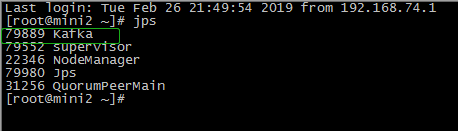
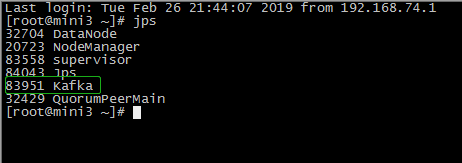
6查看集群

------------------------------------------------------------------------------------------------------------------------------------------------------------------------------------------------------------------------------------------------------------------------------------
------------------------------------------------------------------------------------------------------------------------------------------------------------------------------------------------------------------------------------------------------------------------------------
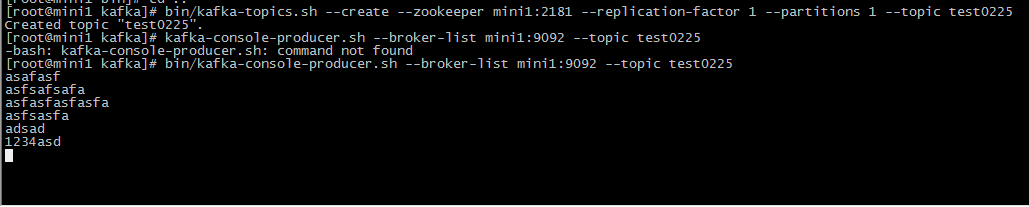
在mini1的/root/apps/kafka目录下
1 创建topic
bin/kafka-topics.sh --create --zookeeper mini1: --replication-factor --partitions --topic test0225
2 生产者生产数据
bin/kafka-console-producer.sh --broker-list mini1: --topic test0225
在mini3的/root/apps/kafka目录下
3消费者消费
bin/kafka-console-consumer.sh --zookeeper mini1: --from-beginning --topic test0225

大数据学习——Kafka集群部署的更多相关文章
- 大数据学习——HADOOP集群搭建
4.1 HADOOP集群搭建 4.1.1集群简介 HADOOP集群具体来说包含两个集群:HDFS集群和YARN集群,两者逻辑上分离,但物理上常在一起 HDFS集群: 负责海量数据的存储,集群中的角色主 ...
- 大数据学习——Storm集群搭建
安装storm之前要安装zookeeper 一.安装storm步骤 1.下载安装包 2.解压安装包 .tar.gz storm 3.修改配置文件 mv /root/apps/storm/conf/st ...
- 大数据学习——hdfs集群启动
第一种方式: 1 格式化namecode(是对namecode进行格式化) hdfs namenode -format(或者是hadoop namenode -format) 进入 cd /root/ ...
- 大数据学习——hadoop集群搭建2.X
1.准备Linux环境 1.0先将虚拟机的网络模式选为NAT 1.1修改主机名 vi /etc/sysconfig/network NETWORKING=yes HOSTNAME=itcast ### ...
- 大数据学习——下载集群根目录下的文件到E盘
代码如下: package cn.itcast.hdfs; import java.io.IOException; import org.apache.hadoop.conf.Configuratio ...
- 大数据学习——yarn集群启动
启动yarn命令: start-yarn.sh 验证是否启动成功 jps查看进程 http://192.168.74.100:8088页面 关闭 stop-yarn.sh
- Kafka集群部署以及使用
Kafka集群部署 部署步骤 hadoop102 hadoop103 hadoop104 zk zk zk kafka kafka kafka http://kafka.apache.org/down ...
- zookeeper集群+kafka集群 部署
zookeeper集群 +kafka 集群部署 1.Zookeeper 概述: Zookeeper 定义 zookeeper是一个开源的分布式的,为分布式框架提供协调服务的Apache项目 Zooke ...
- 朝花夕拾之--大数据平台CDH集群离线搭建
body { border: 1px solid #ddd; outline: 1300px solid #fff; margin: 16px auto; } body .markdown-body ...
随机推荐
- JavaMailSender怎么发送163和qq邮件
https://blog.csdn.net/Tracycater/article/details/73441010 引入Maven依赖包 <dependency> <groupId& ...
- jquery select取option的value值发生变化事件
html代码如下所示: <div id = "schedule"> <label>是否设置:</label> <select name=& ...
- 打造自己的JavaScript武器库
自己打造一把趁手的武器,高效率完成前端业务代码. 前言 作为战斗在业务一线的前端,要想少加班,就要想办法提高工作效率.这里提一个小点,我们在业务开发过程中,经常会重复用到日期格式化.url参数转对象. ...
- 洛谷P1628 合并序列
题目描述 有N个单词和字符串T,按字典序输出以字符串T为前缀的所有单词. 输入输出格式 输入格式: 输入文件第一行包含一个正整数N: 接下来N行,每行一个单词,长度不超过100: 最后一行包含字符串T ...
- org.mybatis.spring.MyBatisSystemException: nested exception is org.apache.ibatis.binding.BindingException: Parameter 'userId' not found. Available parameters are [arg1, arg0, param1, param2]
2018-06-27 16:43:45.552 INFO 16932 --- [nio-8081-exec-1] o.a.c.c.C.[Tomcat].[localhost].[/] : ...
- SAP Cloud for Customer使用移动设备访问系统的硬件要求
如果用平板电脑的话,推荐的设备列表: Android Samsung Galaxy Tab S2○ Processor: 2 x quad-core CPU -- 1.9 and 1.3 gigahe ...
- 交互干货必收 | App界面交互设计规范
原文地址:http://www.woshipm.com/ucd/193776.html
- 阿里云apt-get安装包时Err:2 http://mirrors.cloud.aliyuncs.com/ubuntu xenial-security/main amd64 git amd64 1:2.7.4-0ubuntu1.2 404 Not Found
新部署的云服务器出现如下错误: root@iZj6cbjalvhsw0fhndmm5xZ:~# apt-get install git Reading package lists... Done Bu ...
- 手把手教你写 Vue UI 组件库
最近在研究 muse-ui 的实现,发现网上很少有关于 vue 插件具体实现的文章,官方的文档也只是一笔带过,对于新手来说并不算友好. 笔者结合官方文档,与自己的摸索总结,以最简单的 FlexBox ...
- Node.js连接mysql报加密方式错误解决方案
本人在学习全栈开发过程中做一个Node的web项目在连接本地MySQL8.0版本的数据库时,发现Navicat连接不上,它报了一个数据库的加密方式导致连接不上的错误,错误如下: MySQL8.0版本的 ...