
spring boot +mybatis 整合 连接数据库测试(从0到1)
spring boot 整合mybatis
1.打开idea创建一个项目
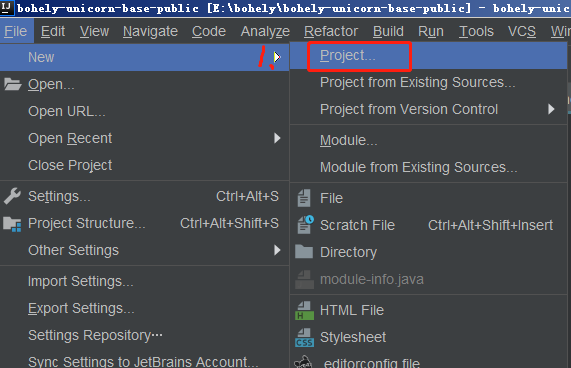
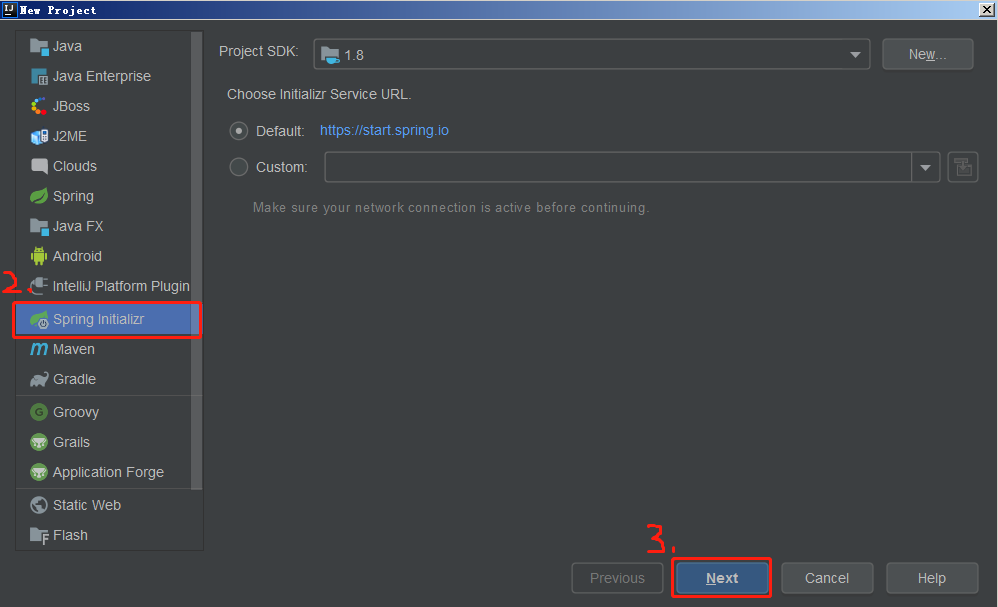
2.在弹出的窗口中选择spring initializr(初始化项目),点击next
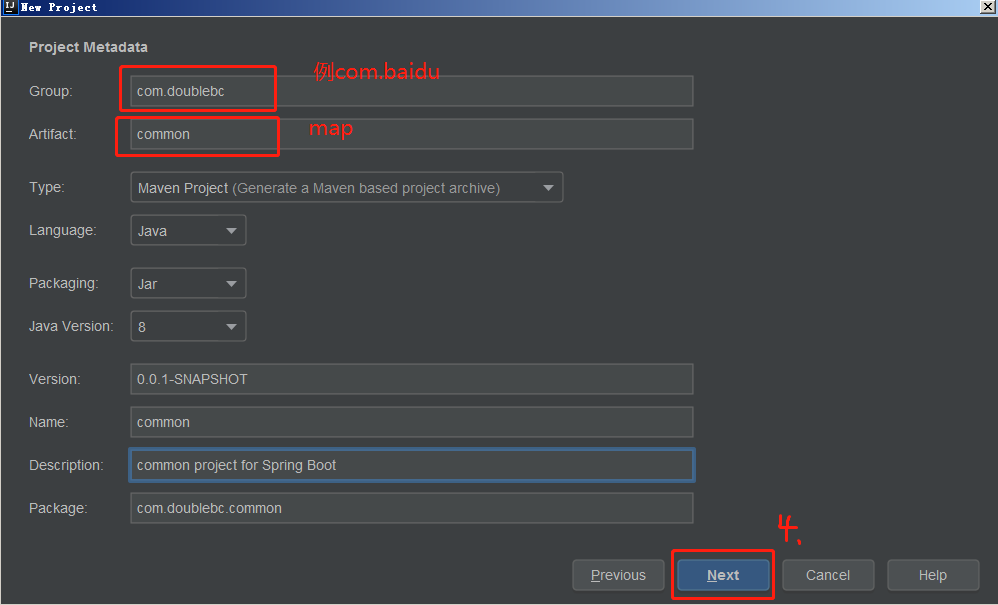
3.接下来填写group 与artifact
(groupid和artifactId被统称为“坐标”是为了保证项目唯一性而提出的,如果你要把你项目弄到maven本地仓库去,你想要找到你的项目就必须根据这两个id去查找。
groupId一般分为多个段,这里我只说两段,第一段为域,第二段为公司名称。域又分为org、com、cn等等许多,其中org为非营利组织,com为商业组织。举个apache公司的tomcat项目例子:这个项目的groupId是org.apache,它的域是org(因为tomcat是非营利项目),公司名称是apache,artigactId是tomcat。
比如我创建一个项目,我一般会将groupId设置为cn.dbc,cn表示域为中国,dbc是我个人姓名缩写,artifactId设置为testProj,表示你这个项目的名称是testProj,依照这个设置,你的包结构最好是cn.pq.testProj打头的,如果有个StudentDeng,它的全路径就是cn.pq.testProj.StudentDeng)
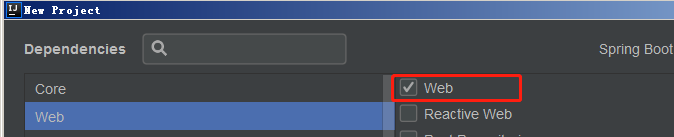
4.接着选择基本依赖项,也就是基础jar包
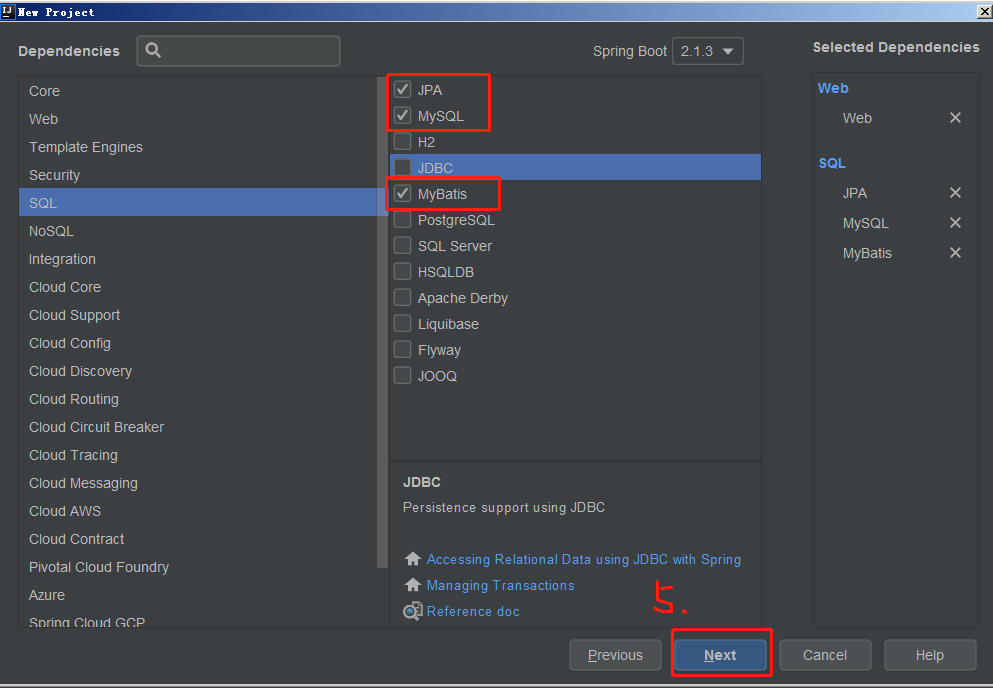
5.接下来页面继续点击next即可完成创建项目
6.建立基本包类结构进行测试,包括pom文件
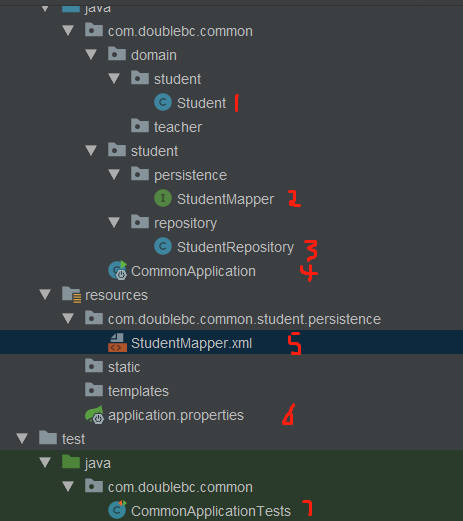
package com.doublebc.common.domain.student;

Student类

/**

 * @author DBC

 * @date create 2019/2/28 12:20

 */

public class Student {

    private Integer id;

    private String name;

    private String sex;

    public Integer getId() {

        return id;

    }

    public void setId(Integer id) {

        this.id = id;

    }

    public String getName() {

        return name;

    }

    public void setName(String name) {

        this.name = name;

    }

    public String getSex() {

        return sex;

    }

    public void setSex(String sex) {

        this.sex = sex;

    }

}
package com.doublebc.common.student.persistence;

import com.doublebc.common.domain.student.Student;

/**

 * @author DBC

 * @date create 2019/2/28 12:14

 */

public interface StudentMapper {

    void addStudent(Student student);

}
package com.doublebc.common.student.repository;

import com.doublebc.common.student.persistence.StudentMapper;

import com.doublebc.common.domain.student.Student;

import org.springframework.beans.factory.annotation.Autowired;

import org.springframework.stereotype.Repository;

/**

 * @author DBC

 * @date create 2019/2/28 12:15

 */

@Repository

public class StudentRepository {

    @Autowired

    private StudentMapper studentMapper;

    public void addStudent(Student student){

        this.studentMapper.addStudent(student);

    }

}
package com.doublebc.common;

import org.mybatis.spring.annotation.MapperScan;

import org.springframework.boot.SpringApplication;

import org.springframework.boot.autoconfigure.SpringBootApplication;

@SpringBootApplication

@MapperScan("com.doublebc")

public class CommonApplication {

    public static void main(String[] args) {

        SpringApplication.run(CommonApplication.class, args);

    }

}
<?xml version="1.0" encoding="UTF-8"?>

<!DOCTYPE mapper PUBLIC "-//mybatis.org//DTD Mapper 3.0//EN"

        "http://mybatis.org/dtd/mybatis-3-mapper.dtd">

<mapper namespace="com.doublebc.common.student.persistence.StudentMapper">

    <insert id="addStudent" useGeneratedKeys="true" keyProperty="id">

        insert into T_STUDENT

        (

          name,

          sex

        )values (

        #{name},

        #{sex}

        )

    </insert>

</mapper>
属性文件

server.port=8019

spring.datasource.url=jdbc:mysql://127.0.0.1:3306/test?useUnicode=true&characterEncoding=UTF-8&serverTimezone=UTC

spring.datasource.username=root

spring.datasource.password=12345

spring.datasource.driver-class-name=com.mysql.jdbc.Driver
<?xml version="1.0" encoding="UTF-8"?>

<project xmlns="http://maven.apache.org/POM/4.0.0" xmlns:xsi="http://www.w3.org/2001/XMLSchema-instance"

         xsi:schemaLocation="http://maven.apache.org/POM/4.0.0 http://maven.apache.org/xsd/maven-4.0.0.xsd">

    <modelVersion>4.0.0</modelVersion>

    <parent>

        <groupId>org.springframework.boot</groupId>

        <artifactId>spring-boot-starter-parent</artifactId>

        <version>2.1.3.RELEASE</version>

        <relativePath/> <!-- lookup parent from repository -->

    </parent>

    <groupId>com.doublebc</groupId>

    <artifactId>common</artifactId>

    <version>0.0.1-SNAPSHOT</version>

    <name>common</name>

    <description>common project for Spring Boot</description>

    <properties>

        <java.version>1.8</java.version>

    </properties>

    <dependencies>

        <!-- 持久层 -->

        <dependency>

            <groupId>org.springframework.boot</groupId>

            <artifactId>spring-boot-starter-data-jpa</artifactId>

        </dependency>

        <dependency>

            <groupId>org.springframework.boot</groupId>

            <artifactId>spring-boot-starter-web</artifactId>

        </dependency>

        <dependency>

            <groupId>org.mybatis.spring.boot</groupId>

            <artifactId>mybatis-spring-boot-starter</artifactId>

            <version>2.0.0</version>

        </dependency>

        <dependency>

            <groupId>mysql</groupId>

            <artifactId>mysql-connector-java</artifactId>

            <scope>runtime</scope>

        </dependency>

        <dependency>

            <groupId>org.springframework.boot</groupId>

            <artifactId>spring-boot-starter-test</artifactId>

            <scope>test</scope>

        </dependency>

    </dependencies>

    <build>

        <plugins>

            <plugin>

                <groupId>org.springframework.boot</groupId>

                <artifactId>spring-boot-maven-plugin</artifactId>

            </plugin>

        </plugins>

    <!--编译时增加xml文件-->

    <resources>

        <resource>

            <directory>src/main/java</directory>

            <includes>

                <include>**/*.xml</include>

            </includes>

            <filtering>true</filtering>

        </resource>

        <resource>

            <directory>src/main/resources</directory>

            <filtering>true</filtering>

        </resource>

    </resources>

    </build>

</project>
问题一:org.apache.ibatis.binding.BindingException: Invalid bound statement (not found):异常
1:检查xml文件所在的package名称是否和interface对应的package名称一一对应
2:检查xml文件的namespace是否和xml文件的package名称一一对应
3:检查函数名称能否对应上
4:去掉xml文件中的中文注释
5:随意在xml文件中加一个空格或者空行然后保存
如果以上没问题,那么在pom文件中加上红色那一段,然后build重新编译一下项目,看xml文件是否被编译成功,并且检查是否与mapper.class字节码文件在同一包下。
如果在target目录下有xml,但与mapper.class又没在同一目录下,可包名明明是相同的啊?如何解决?
注意:我们在resources目录下建包结构的时候需要一层一层建,或者用“/”隔开,不能用点“.”来分隔多个目录。
所以符合以上规则重新建立一个与Mapper.java同路径的包名,即可正确编译。
问题二:在建包的时候,使用点“.”与“/”符合的区别.
在java包中则不可用/来建包结构,可以用点“.”

例如:文件的相对路径为com/demo/student与com/demo.student的区别
这样应该就没问题啦!
附上结果:

spring boot +mybatis 整合 连接数据库测试(从0到1)的更多相关文章
- Spring boot Mybatis 整合(完整版)
个人开源项目 springboot+mybatis+thymeleaf+docker构建的个人站点开源项目(集成了个人主页.个人作品.个人博客) 朋友自制的springboot接口文档组件swagge ...
- Spring boot Mybatis 整合(注解版)
之前写过一篇关于springboot 与 mybatis整合的博文,使用了一段时间spring-data-jpa,发现那种方式真的是太爽了,mybatis的xml的映射配置总觉得有点麻烦.接口定义和映 ...
- Spring boot Mybatis 整合
PS: 参考博客 PS: spring boot配置mybatis和事务管理 PS: Spring boot Mybatis 整合(完整版) 这篇博客里用到了怎样 生成 mybatis 插件来写程 ...
- Spring boot Mybatis整合构建Rest服务(超细版)
Springboot+ Mybatis+MySql整合构建Rest服务(涵盖增.删.改.查) 1.概要 1.1 为什么要使用Spring boot? 1.1.1 简单方便.配置少.整合了大多数框架 ...
- Spring Boot Mybatis整合
Spring Boot是由Pivotal团队提供的全新框架,其设计目的是用来简化新Spring应用的初始搭建以及开发过程.该框架使用了特定的方式来进行配置,从而使开发人员不再需要定义样板化的配置. 特 ...
- spring boot mybatis 整合教程
本项目使用的环境: 开发工具:Intellij IDEA 2017.1.3 springboot: 1.5.6 jdk:1.8.0_161 maven:3.3.9 额外功能 PageHelper 分页 ...
- Spring Boot + MyBatis + Druid + Redis + Thymeleaf 整合小结
Spring Boot + MyBatis + Druid + Redis + Thymeleaf 整合小结 这两天闲着没事想利用**Spring Boot**加上阿里的开源数据连接池**Druid* ...
- Spring Boot:整合MyBatis框架
综合概述 MyBatis 是一款优秀的持久层框架,它支持定制化 SQL.存储过程以及高级映射.MyBatis 避免了几乎所有的 JDBC 代码和手动设置参数以及获取结果集.MyBatis 可以使用简单 ...
- 框架篇:Spring+SpringMVC+Mybatis整合开发
前言: 前面我已搭建过ssh框架(http://www.cnblogs.com/xrog/p/6359706.html),然而mybatis表示不服啊. Mybatis:"我抗议!" ...
随机推荐
- hibernate10--命名查询
<?xml version="1.0"?> <!DOCTYPE hibernate-mapping PUBLIC "-//Hibernate/Hiber ...
- sublime3 快速运行 java
build 系统 Java.sublime-build { "cmd": ["javac $file_name && java $file_base_na ...
- Tesseract
定义 Tesseract是一个将图像翻译成文字的OCR库(光学文字识别,Optical Character Recognition) 安装 sudo apt-get install tesseract ...
- Spark SQL 之 Join 实现
原文地址:Spark SQL 之 Join 实现 Spark SQL 之 Join 实现 涂小刚 2017-07-19 217标签: spark , 数据库 Join作为SQL中一个重要语法特性,几乎 ...
- JACKSON详解
Jackson 框架,轻易转换JSON Jackson可以轻松的将Java对象转换成json对象和xml文档,同样也可以将json.xml转换成Java对象. 前面有介绍过json-lib这个框架,在 ...
- Linux命令更新系统时间,更新所有文件的时间(转)
https://blog.csdn.net/ccj2020/article/details/76026606
- 视频转GIF动态图怎样实现
怎样将视频转GIF动态图呢?随着现在社交方式的不断发展,GIF动态图也成了现在聊天中必不可少的,一种娱乐形式.那么当我们在看视频时,看到了精彩的片段,我们应该怎样将这些精彩的视频片段制作成GIF动态图 ...
- To be better —msup荣获平安科技“2018年度优秀合作伙伴”称号
2018年12月4日,平安科技在深圳平安金融中心举办了“2018年平安科技优秀培训合作伙伴交流会”,msup收到了邀请参与此次评选,并从80余家合作伙伴中脱颖而出,在交付量.满意度.师资内容.服务水准 ...
- Markdown编辑工具及命令
Markdown是一种可以使用普通文本编辑器编辑的标记语言,通过使用简单的编辑,可以使文本具有一定的格式. Typora是一款简介的Markerdown编辑器. 文本编辑语法: 标题: # 一阶标题 ...
- [07-01]http网页提示含义
出现较多的一些网页代码提示的意思: 100 - 继续. 101 - 切换协议. 110 重新启动标记答复. 120 服务已就绪,在 nnn 分钟后开始. 125 数据连接已打开,正在开始传输. 150 ...