
Entity Framework Tutorial Basics(7):DBContext
DBContext:
As you have seen in the previous Create Entity Data Model section, EDM generates the SchoolDBEntities class, which was derived from the System.Data.Entity.DbContext class, as shown below. The class that derives DbContext is called context class in entity framework.
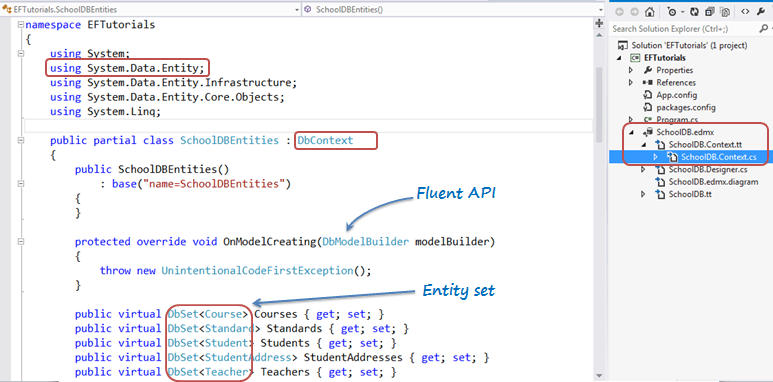
Prior to EntityFramework 4.1, EDM used to generate context classes that were derived from the ObjectContext class. It was a little tricky to work with ObjectContext. DbContext is conceptually similar to ObjectContext. It is a wrapper around ObjectContext which is useful in all the development models: Code First, Model First and Database First.
DbContext is an important part of Entity Framework. It is a bridge between your domain or entity classes and the database.
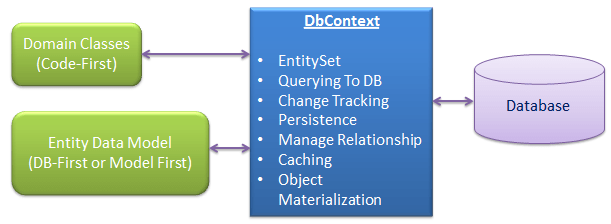
DbContext is the primary class that is responsible for interacting with data as object. DbContext is responsible for the following activities:
- EntitySet: DbContext contains entity set (DbSet<TEntity>) for all the entities which is mapped to DB tables.
- Querying: DbContext converts LINQ-to-Entities queries to SQL query and send it to the database.
- Change Tracking: It keeps track of changes that occurred in the entities after it has been querying from the database.
- Persisting Data: It also performs the Insert, Update and Delete operations to the database, based on what the entity states.
- Caching: DbContext does first level caching by default. It stores the entities which have been retrieved during the life time of a context class.
- Manage Relationship: DbContext also manages relationship using CSDL, MSL and SSDL in DB-First or Model-First approach or using fluent API in Code-First approach.
- Object Materialization: DbContext converts raw table data into entity objects.
The following is an example of SchoolDBEntities class (context class that derives DbContext) generated with EDM for SchoolDB database in the previous section.
namespace EFTutorials

{

    using System;

    using System.Data.Entity;

    using System.Data.Entity.Infrastructure;

    using System.Data.Entity.Core.Objects;

    using System.Linq;

    public partial class SchoolDBEntities : DbContext

    {

        public SchoolDBEntities()

            : base("name=SchoolDBEntities")

        {

        }

        protected override void OnModelCreating(DbModelBuilder modelBuilder)

        {

            throw new UnintentionalCodeFirstException();

        }

        public virtual DbSet<Course> Courses { get; set; }

        public virtual DbSet<Standard> Standards { get; set; }

        public virtual DbSet<Student> Students { get; set; }

        public virtual DbSet<StudentAddress> StudentAddresses { get; set; }

        public virtual DbSet<Teacher> Teachers { get; set; }

        public virtual DbSet<View_StudentCourse> View_StudentCourse { get; set; }

        public virtual ObjectResult<GetCoursesByStudentId_Result> GetCoursesByStudentId(Nullable<int> studentId)

        {

            var studentIdParameter = studentId.HasValue ?

                new ObjectParameter("StudentId", studentId) :

                new ObjectParameter("StudentId", typeof(int));

            return ((IObjectContextAdapter)this).ObjectContext.ExecuteFunction<GetCoursesByStudentId_Result>("GetCoursesByStudentId", studentIdParameter);

        }

        public virtual int sp_DeleteStudent(Nullable<int> studentId)

        {

            var studentIdParameter = studentId.HasValue ?

                new ObjectParameter("StudentId", studentId) :

                new ObjectParameter("StudentId", typeof(int));

            return ((IObjectContextAdapter)this).ObjectContext.ExecuteFunction("sp_DeleteStudent", studentIdParameter);

        }

        public virtual ObjectResult<Nullable<decimal>> sp_InsertStudentInfo(Nullable<int> standardId, string studentName)

        {

            var standardIdParameter = standardId.HasValue ?

                new ObjectParameter("StandardId", standardId) :

                new ("StandardId", typeof(int));

            var studentNameParameter = studentName != null ?

                new ObjectParameter("StudentName", studentName) :

                new ObjectParameter("StudentName", typeof(string));

            return ((IObjectContextAdapter)this).ObjectContext.ExecuteFunction<Nullable<decimal>>("sp_InsertStudentInfo", standardIdParameter, studentNameParameter);

        }

        public virtual int sp_UpdateStudent(Nullable<int> studentId, Nullable<int> standardId, string studentName)

        {

            var studentIdParameter = studentId.HasValue ?

                new ObjectParameter("StudentId", studentId) :

                new ObjectParameter("StudentId", typeof(int));

            var standardIdParameter = standardId.HasValue ?

                new ObjectParameter("StandardId", standardId) :

                new ObjectParameter("StandardId", typeof(int));

            var studentNameParameter = studentName != null ?

                new ObjectParameter("StudentName", studentName) :

                new ObjectParameter("StudentName", typeof(string));

            return ((IObjectContextAdapter)this).ObjectContext.ExecuteFunction("sp_UpdateStudent", studentIdParameter, standardIdParameter, studentNameParameter);

        }

    }

}
As you can see in the above example, context class (SchoolDBEntities) includes entity set of type DbSet<TEntity> for all the entities. Learn more about DbSet class here. It also includes functions for the stored procedures and views included in EDM.
Context class overrides OnModelCreating method. Parameter DbModelBuilder is called Fluent API, which can be used to configure entities in the Code-First approach.
Instantiating DbContext:
You can use DbContext by instantiating context class and use for CRUD operation as shown below.
using (var ctx = new SchoolDBEntities())

{

    //Can perform CRUD operation using ctx here..

}
Getting ObjectContext from DbContext:
DBContext API is easier to use than ObjectContext API for all common tasks. However, you can get the reference of ObjectContext from DBContext in order to use some of the features of ObjectContext. This can be done by using IObjectContextAdpter as shown below:
using (var ctx = new SchoolDBEntities())

{

    var objectContext = (ctx as System.Data.Entity.Infrastructure.IObjectContextAdapter).ObjectContext;

    //use objectContext here..

}
EDM also generates entity classes. Learn about the different types of entity in the next chapter.
Entity Framework Tutorial Basics(7):DBContext的更多相关文章
- Entity Framework Tutorial Basics(1):Introduction
以下系列文章为Entity Framework Turial Basics系列 http://www.entityframeworktutorial.net/EntityFramework5/enti ...
- Entity Framework Tutorial Basics(4):Setup Entity Framework Environment
Setup Entity Framework Environment: Entity Framework 5.0 API was distributed in two places, in NuGet ...
- Entity Framework Tutorial Basics(43):Download Sample Project
Download Sample Project: Download sample project for basic Entity Framework tutorials. Sample projec ...
- Entity Framework Tutorial Basics(42):Colored Entity
Colored Entity in Entity Framework 5.0 You can change the color of an entity in the designer so that ...
- Entity Framework Tutorial Basics(41):Multiple Diagrams
Multiple Diagrams in Entity Framework 5.0 Visual Studio 2012 provides a facility to split the design ...
- Entity Framework Tutorial Basics(37):Lazy Loading
Lazy Loading: One of the important functions of Entity Framework is lazy loading. Lazy loading means ...
- Entity Framework Tutorial Basics(36):Eager Loading
Eager Loading: Eager loading is the process whereby a query for one type of entity also loads relate ...
- Entity Framework Tutorial Basics(34):Table-Valued Function
Table-Valued Function in Entity Framework 5.0 Entity Framework 5.0 supports Table-valued functions o ...
- Entity Framework Tutorial Basics(33):Spatial Data type support in Entity Framework 5.0
Spatial Data type support in Entity Framework 5.0 MS SQL Server 2008 introduced two spatial data typ ...
随机推荐
- ZOJ2112 Dynamic Rankings (线段树套平衡树)(主席树)
The Company Dynamic Rankings has developed a new kind of computer that is no longer satisfied with t ...
- 2017-2018-1 20179215《Linux内核原理与分析》第十二周作业
Sql注入基础原理介绍 分组:和20179205王雅哲共同完成实验 一.实验说明 1.1 sql注入 SQL注入攻击通过构建特殊的输入作为参数传入Web应用程序,而这些输入大都是SQL语法里的一些组 ...
- 1110. Complete Binary Tree (25)
Given a tree, you are supposed to tell if it is a complete binary tree. Input Specification: Each in ...
- 「长乐集训 2017 Day1」区间 线段树
题目 对于两个区间\((a,b),(c,d)\),若\(c < a < d\)或\(c < b < d\)则可以从\((a,b)\)走到\((c,d)\)去,现在有以下两种操作 ...
- django的get_or_create
转:http://www.nanerbang.com/article/51/ get_or_create会根据条件从数据库里面查找符合条件的记录,如果没有符合条件的记录,则新创建一条记录
- webpack 故障处理
Webpack 的配置比较复杂,很容出现错误,下面是一些通常的故障处理手段. 一般情况下,webpack 如果出问题,会打印一些简单的错误信息,比如模块没有找到.我们还可以通过参数 --display ...
- Thinkphp 自定义404页面
一. 手册->调试->异常处理 在公共config.php 中加入: 'TMPL_EXCEPTION_FILE' => '/Public/404.html', //访问不存在的跳转 ...
- C++对C语言的拓展(2)—— inline内联函数
C语言中有宏函数的概念.宏函数的特点是内嵌到调用代码中去,避免了函数调用 的开销.但是由于宏函数的处理发生在预处理阶段,缺失了语法检测和有可能带来的语意差错. 1.内联函数基本概念 C++提供了 in ...
- 批处理执行多个SQL文件到oracle
最近因为项目需要,打算写一个批处理程序,更新数据库中的表数据.写了3个sql文件:a.sql,b.sql,c.sql,在这三个文件中,实现了创建表,并向表中插入数据的操作.目前我通过SQLPLUS可以 ...
- BZOJ2002:[HNOI2010]弹飞绵羊
浅谈分块:https://www.cnblogs.com/AKMer/p/10369816.html 题目传送门:https://lydsy.com/JudgeOnline/problem.php?i ...