
Entity Framework Tutorial Basics(7):DBContext
DBContext:
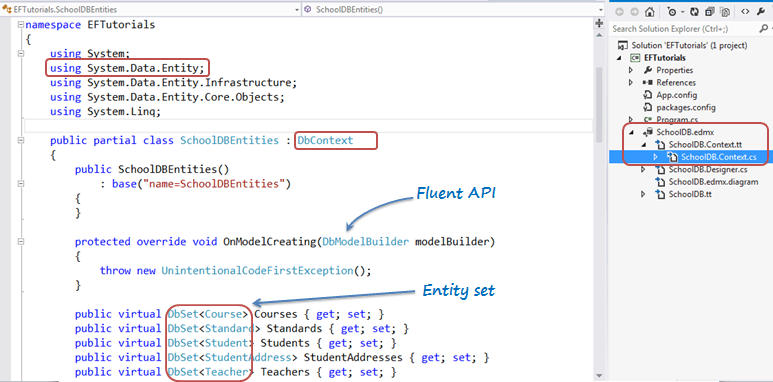
As you have seen in the previous Create Entity Data Model section, EDM generates the SchoolDBEntities class, which was derived from the System.Data.Entity.DbContext class, as shown below. The class that derives DbContext is called context class in entity framework.
Prior to EntityFramework 4.1, EDM used to generate context classes that were derived from the ObjectContext class. It was a little tricky to work with ObjectContext. DbContext is conceptually similar to ObjectContext. It is a wrapper around ObjectContext which is useful in all the development models: Code First, Model First and Database First.
DbContext is an important part of Entity Framework. It is a bridge between your domain or entity classes and the database.
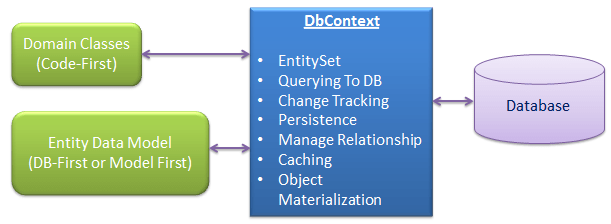
DbContext is the primary class that is responsible for interacting with data as object. DbContext is responsible for the following activities:
- EntitySet: DbContext contains entity set (DbSet<TEntity>) for all the entities which is mapped to DB tables.
- Querying: DbContext converts LINQ-to-Entities queries to SQL query and send it to the database.
- Change Tracking: It keeps track of changes that occurred in the entities after it has been querying from the database.
- Persisting Data: It also performs the Insert, Update and Delete operations to the database, based on what the entity states.
- Caching: DbContext does first level caching by default. It stores the entities which have been retrieved during the life time of a context class.
- Manage Relationship: DbContext also manages relationship using CSDL, MSL and SSDL in DB-First or Model-First approach or using fluent API in Code-First approach.
- Object Materialization: DbContext converts raw table data into entity objects.
The following is an example of SchoolDBEntities class (context class that derives DbContext) generated with EDM for SchoolDB database in the previous section.
namespace EFTutorials

{

    using System;

    using System.Data.Entity;

    using System.Data.Entity.Infrastructure;

    using System.Data.Entity.Core.Objects;

    using System.Linq;

    public partial class SchoolDBEntities : DbContext

    {

        public SchoolDBEntities()

            : base("name=SchoolDBEntities")

        {

        }

        protected override void OnModelCreating(DbModelBuilder modelBuilder)

        {

            throw new UnintentionalCodeFirstException();

        }

        public virtual DbSet<Course> Courses { get; set; }

        public virtual DbSet<Standard> Standards { get; set; }

        public virtual DbSet<Student> Students { get; set; }

        public virtual DbSet<StudentAddress> StudentAddresses { get; set; }

        public virtual DbSet<Teacher> Teachers { get; set; }

        public virtual DbSet<View_StudentCourse> View_StudentCourse { get; set; }

        public virtual ObjectResult<GetCoursesByStudentId_Result> GetCoursesByStudentId(Nullable<int> studentId)

        {

            var studentIdParameter = studentId.HasValue ?

                new ObjectParameter("StudentId", studentId) :

                new ObjectParameter("StudentId", typeof(int));

            return ((IObjectContextAdapter)this).ObjectContext.ExecuteFunction<GetCoursesByStudentId_Result>("GetCoursesByStudentId", studentIdParameter);

        }

        public virtual int sp_DeleteStudent(Nullable<int> studentId)

        {

            var studentIdParameter = studentId.HasValue ?

                new ObjectParameter("StudentId", studentId) :

                new ObjectParameter("StudentId", typeof(int));

            return ((IObjectContextAdapter)this).ObjectContext.ExecuteFunction("sp_DeleteStudent", studentIdParameter);

        }

        public virtual ObjectResult<Nullable<decimal>> sp_InsertStudentInfo(Nullable<int> standardId, string studentName)

        {

            var standardIdParameter = standardId.HasValue ?

                new ObjectParameter("StandardId", standardId) :

                new ("StandardId", typeof(int));

            var studentNameParameter = studentName != null ?

                new ObjectParameter("StudentName", studentName) :

                new ObjectParameter("StudentName", typeof(string));

            return ((IObjectContextAdapter)this).ObjectContext.ExecuteFunction<Nullable<decimal>>("sp_InsertStudentInfo", standardIdParameter, studentNameParameter);

        }

        public virtual int sp_UpdateStudent(Nullable<int> studentId, Nullable<int> standardId, string studentName)

        {

            var studentIdParameter = studentId.HasValue ?

                new ObjectParameter("StudentId", studentId) :

                new ObjectParameter("StudentId", typeof(int));

            var standardIdParameter = standardId.HasValue ?

                new ObjectParameter("StandardId", standardId) :

                new ObjectParameter("StandardId", typeof(int));

            var studentNameParameter = studentName != null ?

                new ObjectParameter("StudentName", studentName) :

                new ObjectParameter("StudentName", typeof(string));

            return ((IObjectContextAdapter)this).ObjectContext.ExecuteFunction("sp_UpdateStudent", studentIdParameter, standardIdParameter, studentNameParameter);

        }

    }

}
As you can see in the above example, context class (SchoolDBEntities) includes entity set of type DbSet<TEntity> for all the entities. Learn more about DbSet class here. It also includes functions for the stored procedures and views included in EDM.
Context class overrides OnModelCreating method. Parameter DbModelBuilder is called Fluent API, which can be used to configure entities in the Code-First approach.
Instantiating DbContext:
You can use DbContext by instantiating context class and use for CRUD operation as shown below.
using (var ctx = new SchoolDBEntities())

{

    //Can perform CRUD operation using ctx here..

}
Getting ObjectContext from DbContext:
DBContext API is easier to use than ObjectContext API for all common tasks. However, you can get the reference of ObjectContext from DBContext in order to use some of the features of ObjectContext. This can be done by using IObjectContextAdpter as shown below:
using (var ctx = new SchoolDBEntities())

{

    var objectContext = (ctx as System.Data.Entity.Infrastructure.IObjectContextAdapter).ObjectContext;

    //use objectContext here..

}
EDM also generates entity classes. Learn about the different types of entity in the next chapter.
Entity Framework Tutorial Basics(7):DBContext的更多相关文章
- Entity Framework Tutorial Basics(1):Introduction
以下系列文章为Entity Framework Turial Basics系列 http://www.entityframeworktutorial.net/EntityFramework5/enti ...
- Entity Framework Tutorial Basics(4):Setup Entity Framework Environment
Setup Entity Framework Environment: Entity Framework 5.0 API was distributed in two places, in NuGet ...
- Entity Framework Tutorial Basics(43):Download Sample Project
Download Sample Project: Download sample project for basic Entity Framework tutorials. Sample projec ...
- Entity Framework Tutorial Basics(42):Colored Entity
Colored Entity in Entity Framework 5.0 You can change the color of an entity in the designer so that ...
- Entity Framework Tutorial Basics(41):Multiple Diagrams
Multiple Diagrams in Entity Framework 5.0 Visual Studio 2012 provides a facility to split the design ...
- Entity Framework Tutorial Basics(37):Lazy Loading
Lazy Loading: One of the important functions of Entity Framework is lazy loading. Lazy loading means ...
- Entity Framework Tutorial Basics(36):Eager Loading
Eager Loading: Eager loading is the process whereby a query for one type of entity also loads relate ...
- Entity Framework Tutorial Basics(34):Table-Valued Function
Table-Valued Function in Entity Framework 5.0 Entity Framework 5.0 supports Table-valued functions o ...
- Entity Framework Tutorial Basics(33):Spatial Data type support in Entity Framework 5.0
Spatial Data type support in Entity Framework 5.0 MS SQL Server 2008 introduced two spatial data typ ...
随机推荐
- uva1315 Crazy tea party(找规律)
题意就是说把顺时针排的1到n换成逆时针排的需要的最少交换步数. 如果是线形的一串数,需要的交换次数就是个冒泡排序的交换次数:n*(n-1)/2,或者用a[i]=(i-1)+a[i-1]推出来. 对于环 ...
- Codeforces Round #281 (Div. 2) A. Vasya and Football(模拟)
简单题,却犯了两个错误导致WA了多次. 第一是程序容错性不好,没有考虑到输入数据中可能给实际已经罚下场的人再来牌,这种情况在system测试数据里是有的... 二是chronologically这个词 ...
- hdu4771 Stealing Harry Potter's Precious(DFS,BFS)
练习dfs和bfs的好题. #include<iostream> #include<cstdio> #include<cstdlib> #include<cs ...
- 快速构建一个 Springboot
快速构建一个 Springboot 官网:http://projects.spring.io/spring-boot/ Spring Boot可以轻松创建可以“运行”的独立的,生产级的基于Spring ...
- maven module开发 自动打包
http://blog.csdn.net/u011113713/article/details/52413903 http://blog.csdn.net/sisyphus_z/article/det ...
- [BZOJ1242]Fishing Net
dbzoj vjudge1 vjudge2 sol 给一个无向图,求判定是不是弦图. sol 还是弦图那套理论. 复杂度是\(O(n^2)\)的,因为\(m\)本质上和\(n^2\)是同级的. cod ...
- element-ui table 底部滚动条问题
1.将 .el-table 标签css属性中的 position: relative; width: 100%; max-width: 100%; 修改成 position: absolute; wi ...
- 常用Request对象获取请求信息
Request.ServerVariables(“REMOTE_ADDR”) ‘获取访问IPRequest.ServerVariables(“LOCAL_ADDR”) ‘同上Request.Serve ...
- Mesos-slave启动处理记录
1. work_dir错误导致启动异常 /etc/mesos-slave/work_dir设置的目录不存在或者权限不够将会导致启动异常. 2. 根据日志信息以及status信息来判断问题 通过serv ...
- HDU1584(蜘蛛牌)
蜘蛛牌 Time Limit: 10000/5000 MS (Java/Others) Memory Limit: 32768/32768 K (Java/Others)Total Submis ...