
WPF- 模拟触发Touch Events
基于API:
  [DllImport("User32.dll")]

  public static extern bool InitializeTouchInjection(uint maxCount = 256, TouchFeedback feedbackMode = TouchFeedback.DEFAULT);

  [DllImport("User32.dll")]

  public static extern bool InjectTouchInput(int count, [MarshalAs(UnmanagedType.LPArray), In] PointerTouchInfo[] contacts);
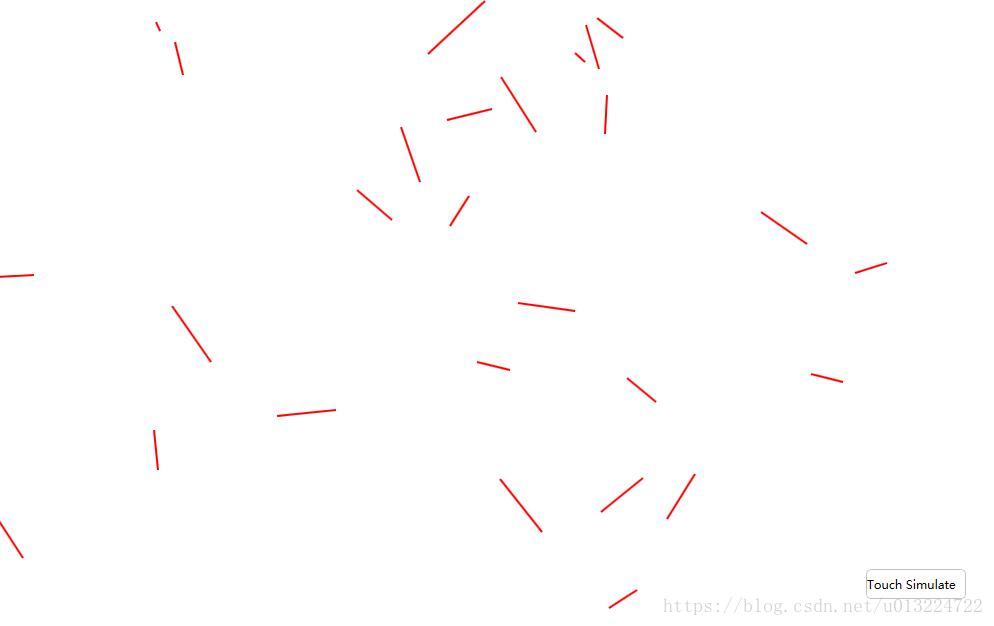
实现效果:点击按钮,自动触发TouchDown事件、获取TouchEventArgs参数得到坐标,创建Line并设置X1、Y1属性,紧接着触发TouchMove、TouchUp事件,得到TouchUp的TouchEventArgs设置Line的X2、Y2属性。
private void MainWindow_TouchUp(object sender, TouchEventArgs e)

{

    System.Windows.Input.TouchPoint oPos = e.GetTouchPoint(this);

    this.ProxyLine.X2 = oPos.Position.X;

    this.ProxyLine.Y2 = oPos.Position.Y;

    this.GdRootZm.Children.Add(this.ProxyLine);

    Console.WriteLine("TouchID " + e.TouchDevice.Id + " TouchUp "

                       + oPos.Position.X + "    " + oPos.Position.Y);

}

private void MainWindow_TouchMove(object sender, TouchEventArgs e)

{

    System.Windows.Input.TouchPoint oPos = e.GetTouchPoint(this);

    Console.WriteLine("TouchID " + e.TouchDevice.Id + " TouchMove "

                      + oPos.Position.X + "    " + oPos.Position.Y);

}

private Line ProxyLine;

private void MainWindow_TouchDown(object sender, TouchEventArgs e)

{

    System.Windows.Input.TouchPoint oPos = e.GetTouchPoint(this);

    Line oLine = new Line();

    oLine.Stroke = new SolidColorBrush(Colors.Red);

    oLine.StrokeThickness = 2;

    oLine.X1 = oPos.Position.X;

    oLine.Y1 = oPos.Position.Y;

    this.ProxyLine = oLine;

    Console.WriteLine("TouchID " + e.TouchDevice.Id + "  TouchDown "

                      + oPos.Position.X + "    " + oPos.Position.Y);

}
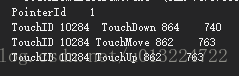
Console Write Result:
效果图如下:
private void SimulateTouch(int x, int y)

{

    // Touch Down Simulate

    PointerTouchInfo contact = MakePointerTouchInfo(x, y, 5, 1);

    PointerFlags oFlags = PointerFlags.DOWN | PointerFlags.INRANGE | PointerFlags.INCONTACT;

    contact.PointerInfo.PointerFlags = oFlags;

    bool bIsSuccess = TouchInjector.InjectTouchInput(1, new[] { contact });

    // Touch Move Simulate

    int nMoveIntervalX = this.GetRandomSeed().Next(-60, 60);

    int nMoveIntervalY = this.GetRandomSeed().Next(-60, 60);

    contact.Move(nMoveIntervalX, nMoveIntervalY);

    oFlags = PointerFlags.INRANGE | PointerFlags.INCONTACT | PointerFlags.UPDATE;

    contact.PointerInfo.PointerFlags = oFlags;

    TouchInjector.InjectTouchInput(1, new[] { contact });

    // Touch Up Simulate

    contact.PointerInfo.PointerFlags = PointerFlags.UP;

    TouchInjector.InjectTouchInput(1, new[] { contact });

}
Source Url:https://github.com/DuelCode/TouchSimulate
Multi Touch Also Support Like this:
private void BdrSimulateZm_MouseLeftButtonUp(object sender, MouseButtonEventArgs e)

{

    // Touch Down Simulate

    int x1 = this.GetRandomSeed().Next(50, 1680 - 100);

    int y1 = this.GetRandomSeed().Next(50, 1080 - 100);

    PointerTouchInfo oContact1 = MakePointerTouchInfo(x1, y1, 5, 1);

    int x2 = this.GetRandomSeed().Next(50, 1680 - 100);

    int y2 = this.GetRandomSeed().Next(50, 1080 - 100);

    PointerTouchInfo oContact2 = MakePointerTouchInfo(x2, y2, 5, 1);

    PointerFlags oFlags = PointerFlags.DOWN | PointerFlags.INRANGE | PointerFlags.INCONTACT;

    oContact1.PointerInfo.PointerFlags = oFlags;

    oContact2.PointerInfo.PointerFlags = oFlags;

    TouchInjector.InjectTouchInput(2, new[] { oContact1, oContact2 });

    // Touch Move Simulate

    int nMoveIntervalX = this.GetRandomSeed().Next(-60, 60);

    int nMoveIntervalY = this.GetRandomSeed().Next(-60, 60);

    oContact1.Move(nMoveIntervalX, nMoveIntervalY);

    oContact2.Move(nMoveIntervalX, nMoveIntervalY);

    oFlags = PointerFlags.INRANGE | PointerFlags.INCONTACT | PointerFlags.UPDATE;

    oContact1.PointerInfo.PointerFlags = oFlags;

    oContact2.PointerInfo.PointerFlags = oFlags;

    TouchInjector.InjectTouchInput(2, new[] { oContact1 , oContact2 });

    // Touch Up Simulate

    oContact1.PointerInfo.PointerFlags = PointerFlags.UP;

    oContact2.PointerInfo.PointerFlags = PointerFlags.UP;

    TouchInjector.InjectTouchInput(2, new[] { oContact1, oContact2 });

}
WPF- 模拟触发Touch Events的更多相关文章
- wpf 模拟3D效果(和手机浏览图片效果相似)(附源码)
原文 wpf 模拟3D效果(和手机浏览图片效果相似)(附源码) pf的3D是一个很有意思的东西,类似于ps的效果,类似于电影动画的效果,因为动画的效果,(对于3D基础的摄像机,光源,之类不介绍,对于依 ...
- iOS Programming Touch Events and UIResponder
iOS Programming Touch Events and UIResponder 1 Touch Events As a subclass of UIResponder, a UIView ...
- js模拟触发事件
html标签元素封装着实用的[事件],但在很多时候,需要[模拟触发事件],比如 [按钮单机事件] 可以实实在在点击按钮触发该事件,但体验而言,很多时候需要js逻辑处理让实现 触发事件的效果这时就用 ...
- [React Native] State and Touch Events -- TextInput, TouchableHighLight
In React, components manage their own state. In this lesson, we'll walk through building a component ...
- WPF 模拟UI 键盘录入
原文:WPF 模拟UI 键盘录入 版权声明:本文为博主原创文章,未经博主允许不得转载. https://blog.csdn.net/yangyisen0713/article/details/1835 ...
- WPF模拟探照灯文字
原文:WPF模拟探照灯文字 版权声明:本文为博主原创文章,未经博主允许不得转载. https://blog.csdn.net/yangyisen0713/article/details/1835936 ...
- WPF模拟雷达界面效果图
原文:WPF模拟雷达界面效果图 iPad塔防的防守兵的效果很炫,2个小时用WPF模拟了一个. 效果图: 关键代码: <Grid> <Grid.Background> <I ...
- WPF模拟Office2010文件菜单的TabControl模板
原文:WPF模拟Office2010文件菜单的TabControl模板 这是Office2010中的文件菜单点开后的效果.本文我将以强大的WPF(www.itstrike.cn)来实现类似的效果.希望 ...
- wpf 模拟抖音很火的罗盘时钟,附源码,下载就能跑
wpf 模拟抖音很火的罗盘时钟,附源码 前端时间突然发现,抖音火了个壁纸,就是黑底蕾丝~~~ 错错错,黑底白字的罗盘时钟! 作为程序员的我,也觉得很新颖,所以想空了研究下,这不,空下来了就用wpf, ...
随机推荐
- STL algorithm算法make_heap和sort_heap(32)
make_heap原型: std::make_heap default (1) template <class RandomAccessIterator> void make_heap ( ...
- Eclipse 快捷键大全 分类: C_OHTERS 2014-06-01 13:05 332人阅读 评论(0) 收藏
精选常用: 1. ctrl+shift+r:打开资源 这可能是所有快捷键组合中最省时间的了.这组快捷键可以让你打开你的工作区中任何一个文件,而你只需要按下文件名或mask名中的前几个字母,比如a ...
- golang 操作 Redis & Mysql & RabbitMQ
golang 操作 Redis & Mysql & RabbitMQ Reids 安装导入 go get github.com/garyburd/redigo/redis import ...
- java判断字符串是否为数字
我们在做安卓开发中,一定会遇到判断某字符串是否是数字的问题,本文使用正则表达式可以很方便的判断出来,希望本文对安卓开发者有所帮助. 1 public boolean isNumeric(Strin ...
- Identifying a distributed denial of service (DDOS) attack within a network and defending against such an attack
The invention provides methods, apparatus and systems for detecting distributed denial of service (D ...
- 双机热备的Quartz集群
sqlserver搭建高可用双机热备的Quartz集群部署[附源码] 一般拿Timer和Quartz相比较的,简直就是对Quartz的侮辱,两者的功能根本就不在一个层级上,如本篇介绍的Quartz ...
- HDU 4352 XHXJ's LIS - 状压dp + LIS
传送门 题目大意: 求[l, r]中数位的最长上升序列恰好为k的数的个数. 题目分析: 首先要理解\(o(nlogn)\)求LIS问题的思路,每次寻找第一个大于等于的数将其更改. 设dp[pos][s ...
- oracle表空间查询维护命令大全之中的一个(数据表空间)史上最全
表空间是数据库的逻辑划分,一个表空间仅仅能属于一个数据库. 全部的数据库对象都存放在建立指定的表空间中.但主要存放的是表, 所以称作表空间.在oracle 数据库中至少存在一个表空间.即S ...
- C# 使用外部别名
原文:C# 使用外部别名 版权声明:博客已迁移到 http://lindexi.gitee.io 欢迎访问.如果当前博客图片看不到,请到 http://lindexi.gitee.io 访问博客.本文 ...
- leveldb原理和使用
LevelDB是一个基于本地文件的存储引擎,非分布式存储引擎,原理基于BigTable(LSM文件树),无索引机制,存储条目为Key-value.适用于保存数据缓存.日志存储.高速缓存等应用,主要是避 ...