
020 SpringMVC返回Json
一:处理Json
1.添加jar包
添加json需要的包
2.后端返回json对用的对象或者集合
使用ResponseBody标签
 package com.spring.it.json;

 import java.util.Collection;

 import org.springframework.beans.factory.annotation.Autowired;

 import org.springframework.stereotype.Controller;

 import org.springframework.web.bind.annotation.RequestMapping;

 import org.springframework.web.bind.annotation.ResponseBody;

 import com.spring.it.dao.EmployeeDao;

 import com.spring.it.enties.Employee;

 @Controller

 public class ReturnJsonHander {

     @Autowired

     private EmployeeDao employeeDao;

     @ResponseBody

     @RequestMapping(value="/testJson")

     public Collection<Employee> testJson() {

         return employeeDao.getAll();

     }

 }
3.前段
 <%@ page language="java" contentType="text/html; charset=ISO-8859-1"

     pageEncoding="ISO-8859-1"%>

 <!DOCTYPE html PUBLIC "-//W3C//DTD HTML 4.01 Transitional//EN" "http://www.w3.org/TR/html4/loose.dtd">

 <html>

 <head>

 <meta http-equiv="Content-Type" content="text/html; charset=ISO-8859-1">

 <script type="text/javascript" src="scripts/jquery-1.9.1.min.js"></script>

 <script type="text/javascript">

     $(function(){

         $("#testJson").click(function(){

             var url=this.href;

             var args={};

             $.post(url,args,function(data){

                 for(var i=0;i<data.length;i++){

                     var id=data[i].id;

                     var lastName=data[i].lastName;

                     alert(id+":"+lastName);

                 }

             });

             return false;

         });

     })

 </script>

 <title>Insert title here</title>

 </head>

 <body>

     <br>

     <a href="emps">list emps</a>

     <br><br>

     <a href="testJson" id="testJson">Test Json</a>

 </body>

 </html>
4.返回json
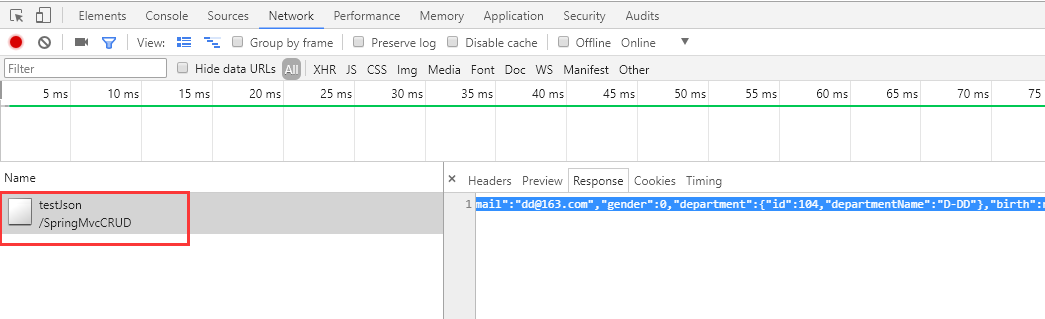
 [{

     "id": 1001,

     "lastName": "E-AA",

     "email": "aa@163.com",

     "gender": 1,

     "department": {

         "id": 101,

         "departmentName": "D-AA"

     },

     "birth": null,

     "salary": null

 }, {

     "id": 1002,

     "lastName": "E-BB",

     "email": "bb@163.com",

     "gender": 1,

     "department": {

         "id": 102,

         "departmentName": "D-BB"

     },

     "birth": null,

     "salary": null

 }, {

     "id": 1003,

     "lastName": "E-CC",

     "email": "cc@163.com",

     "gender": 0,

     "department": {

         "id": 103,

         "departmentName": "D-CC"

     },

     "birth": null,

     "salary": null

 }, {

     "id": 1004,

     "lastName": "E-DD",

     "email": "dd@163.com",

     "gender": 0,

     "department": {

         "id": 104,

         "departmentName": "D-DD"

     },

     "birth": null,

     "salary": null

 }, {

     "id": 1005,

     "lastName": "E-EE",

     "email": "ee@163.com",

     "gender": 1,

     "department": {

         "id": 105,

         "departmentName": "D-EE"

     },

     "birth": null,

     "salary": null

 }]
5.请求
二:HttpMessageConverter
1.工作原理
使用HttpMessageConverter<T>将请求信息转化并绑定到处理方法的入参中,或将响应结果转化为对应类型的响应信息。
主要提供了两种途径:
@RequestBody与@ResponseBody对处理方法进行标注
HttpEntity与ResponseEntity作为处理方法的入参或返回值
三:案例--上传--注解
1.index
 <%@ page language="java" contentType="text/html; charset=ISO-8859-1"

     pageEncoding="ISO-8859-1"%>

 <!DOCTYPE html PUBLIC "-//W3C//DTD HTML 4.01 Transitional//EN" "http://www.w3.org/TR/html4/loose.dtd">

 <html>

 <head>

 <meta http-equiv="Content-Type" content="text/html; charset=ISO-8859-1">

 <script type="text/javascript" src="scripts/jquery-1.9.1.min.js"></script>

 <script type="text/javascript">

     $(function(){

         $("#testJson").click(function(){

             var url=this.href;

             var args={};

             $.post(url,args,function(data){

                 for(var i=0;i<data.length;i++){

                     var id=data[i].id;

                     var lastName=data[i].lastName;

                     alert(id+":"+lastName);

                 }

             });

             return false;

         });

     })

 </script>

 <title>Insert title here</title>

 </head>

 <body>

     <br>

     <a href="emps">list emps</a>

     <br><br>

     <a href="testJson" id="testJson">Test Json</a>

     <br><br>

     <form action="testHttpMessageConverter" method="post" enctype="multipart/form-data">

         File:<input type="file" name="file"/>

         Desc:<input type="text" name="desc"/>

         <input type="submit" value=Submit"">

     </form>

 </body>

 </html>
2.处理方法
 package com.spring.it.json;

 import java.util.Collection;

 import java.util.Date;

 import org.springframework.beans.factory.annotation.Autowired;

 import org.springframework.stereotype.Controller;

 import org.springframework.web.bind.annotation.RequestBody;

 import org.springframework.web.bind.annotation.RequestMapping;

 import org.springframework.web.bind.annotation.ResponseBody;

 import com.spring.it.dao.EmployeeDao;

 import com.spring.it.enties.Employee;

 @Controller

 public class ReturnJsonHander {

     @Autowired

     private EmployeeDao employeeDao;

     @ResponseBody

     @RequestMapping(value="/testJson")

     public Collection<Employee> testJson() {

         return employeeDao.getAll();

     }

     @ResponseBody

     @RequestMapping(value="/testHttpMessageConverter")

     public String testHttpMessage(@RequestBody String body) {

         System.out.println("body:"+body);

         return "helloWorld"+new Date();

     }

 }
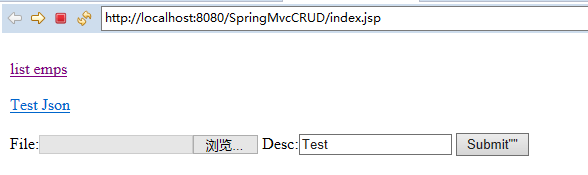
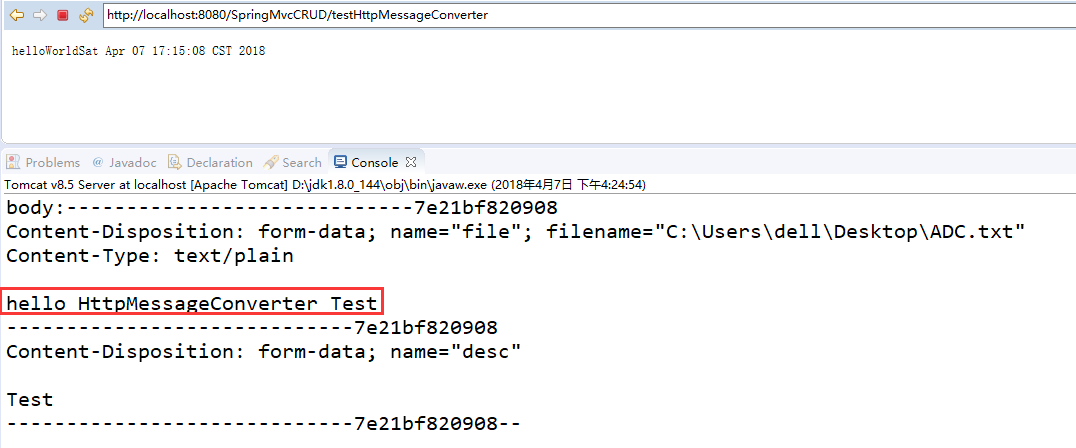
3.效果
四:案例--下载--处理方法
1.请求
<a href="testResponseEntity">Test ResponseEntity</a>
2.处理方法
 package com.spring.it.json;

 import java.io.IOException;

 import java.io.InputStream;

 import java.util.Collection;

 import java.util.Date;

 import javax.servlet.ServletContext;

 import javax.servlet.http.HttpSession;

 import org.springframework.beans.factory.annotation.Autowired;

 import org.springframework.http.HttpHeaders;

 import org.springframework.http.HttpStatus;

 import org.springframework.http.ResponseEntity;

 import org.springframework.stereotype.Controller;

 import org.springframework.web.bind.annotation.RequestBody;

 import org.springframework.web.bind.annotation.RequestMapping;

 import org.springframework.web.bind.annotation.ResponseBody;

 import com.spring.it.dao.EmployeeDao;

 import com.spring.it.enties.Employee;

 @Controller

 public class ReturnJsonHander {

     @Autowired

     private EmployeeDao employeeDao;

     @ResponseBody

     @RequestMapping(value="/testJson")

     public Collection<Employee> testJson() {

         return employeeDao.getAll();

     }

     @ResponseBody

     @RequestMapping(value="/testHttpMessageConverter")

     public String testHttpMessage(@RequestBody String body) {

         System.out.println("body:"+body);

         return "helloWorld"+new Date();

     }

     @RequestMapping("/testResponseEntity")

     public ResponseEntity<byte[]> testResponseEntity(HttpSession session) throws Exception{

         byte[] body=null;

         ServletContext context=session.getServletContext();

         InputStream in=context.getResourceAsStream("/file/ADC.txt");

         body=new byte[in.available()];

         in.read(body);

         HttpHeaders headers=new HttpHeaders();

         headers.add("Content-Disposition", "attament;fileName=ADC.txt");

         HttpStatus status=HttpStatus.OK;

         ResponseEntity<byte[]> response=new ResponseEntity<>(body,headers,status);

         return response;

     }

 }
3.效果
浏览器上:

020 SpringMVC返回Json的更多相关文章
- 【Spring学习笔记-MVC-3.1】SpringMVC返回Json数据-方式1-扩展
<Spring学习笔记-MVC>系列文章,讲解返回json数据的文章共有3篇,分别为: [Spring学习笔记-MVC-3]SpringMVC返回Json数据-方式1:http://www ...
- 【Spring学习笔记-MVC-4】SpringMVC返回Json数据-方式2
<Spring学习笔记-MVC>系列文章,讲解返回json数据的文章共有3篇,分别为: [Spring学习笔记-MVC-3]SpringMVC返回Json数据-方式1:http://www ...
- 【Spring学习笔记-MVC-3】SpringMVC返回Json数据-方式1
<Spring学习笔记-MVC>系列文章,讲解返回json数据的文章共有3篇,分别为: [Spring学习笔记-MVC-3]SpringMVC返回Json数据-方式1:http://www ...
- SpringMVC返回Json,自定义Json中Date类型格式
http://www.cnblogs.com/jsczljh/p/3654636.html —————————————————————————————————————————————————————— ...
- 配置SpringMVC返回JSON遇到的坑
坑一:官方网站下载地址不明朗,最后找了几个下载地址:http://wiki.fasterxml.com/JacksonDownload Jackson2.5下载地址:jackson2.5.0.jar ...
- SpringMVC返回JSON数据时日期格式化问题
https://dannywei.iteye.com/blog/2022929 SpringMVC返回JSON数据时日期格式化问题 博客分类: Spring 在运用SpringMVC框架开发时,可 ...
- spring入门(七)【springMVC返回json串】
现在多数的应用为了提高交互性多使用异步刷新,即在不刷新整个页面的情况下,只刷新局部,局部刷新用得最多就是ajax,ajax和后台进行交互的数据格式使用的最多的是JSON,这里简单描述,在springm ...
- springmvc返回json字符串中文乱码问题
问题: 后台代码如下: @RequestMapping("menuTreeAjax") @ResponseBody /** * 根据parentMenuId获取菜单的树结构 * @ ...
- SpringMVC返回JSON方案
SpringMVC已经大行其道.一般的,都是返回JSP视图.如果需要返回JSON格式,我们大都掌握了一些方法. 在ContentNegotiatingViewResolver之前,一般使用XmlVie ...
随机推荐
- luogu 1064 金明的预算方案
01背包 变形,有主附件的背包内则更改决策 original: 1) 不选 2)选,f[j-w[i]]+v[i] now : 1)不选 2)选主 3)主 附1 4)主 附2 ...
- Activity Window View WindowManager关系&Touch事件分发机制
http://www.cnblogs.com/linjzong/p/4191891.html https://www.cnblogs.com/kest/p/5141817.html https://b ...
- oracle修改日期格式
查看默认的日期格式 select * from v$nls_parameters; 更改 alter session | system (范围) set xxxx=“yyyy-mm-dd” ;
- pl/sql Devloper 关键字转为大写
英文版: peferences-editor-keyword case -uppercase 中文版:
- 【Mysql sql inject】【入门篇】SQLi-Labs使用 part 2【12-14】
这几关主要是考察POST形式的SQLi注入闭合 ## Less-12 - POST - Error Based- Double quotes- String ### 1)知识点 主要考察报错注入中的双 ...
- springboot系列十四、自定义实现starter
一.starter的作用 当我们实现了一个组建,希望尽可能降低它的介入成本,一般的组建写好了,只要添加spring扫描路径加载spring就能发挥作用.有个更简单的方式扫描路径都不用加,直接引入jar ...
- 百度AI—人脸在线比对
首先访问百度AI网站:https://cloud.baidu.com/,按照下图的指示点开到应用管理的页面. 穿件完成之后到管理中可以查看到对应的 添加工具类: using System; using ...
- tomcat apr
背景 前面也提过了,这次是在linux下的实验.不要信广告,要看疗效.其实起不了都大作用. 转载 开始安装~ 1)安装apr tar zxvf apr-1.4.2.tar cd ...
- python闭包的理解说明
什么是闭包: 闭包(closure)是函数式编程的重要的语法结构.函数式编程是一种编程范式 (而面向过程编程和面向对象编程也都是编程范式).在面向过程编程中,我们见到过函数(function):在面向 ...
- Ex 6_18 硬币有限的兑换问题_第七次作业
子问题定义: 定义一个二维数组b,其中b[i][j]表示前i个币种是否能兑换价格j,表示第i个币种的面值,第i个币种的使用有两种情况,若使用,则b[i][j]=b[i-1][j-],若不使用,则b[i ...