
ML: 聚类算法R包-对比
测试验证环境
数据: 7w+ 条,数据结构如下图:
> head(car.train)

   DV    DC     RV   RC   SOC   HV   LV HT LT                                 Type TypeName

1 379 85.09   0.00  0.0 62.99 3.99 0.00 12  0 10f689e8-e6cc-47a3-be5a-dbc3833428ef    EV200

2 379 85.09 370.89 59.9 63.99 4.01 0.00 12  0 10f689e8-e6cc-47a3-be5a-dbc3833428ef    EV200

3 379 85.09   0.00  0.0 64.99 4.01 0.00 12  0 10f689e8-e6cc-47a3-be5a-dbc3833428ef    EV200

4 379 85.09   0.00  0.0 66.00 4.03 1.55 12 11 10f689e8-e6cc-47a3-be5a-dbc3833428ef    EV200

5 379 85.09   0.00  0.0 67.00 4.03 0.00 12  0 10f689e8-e6cc-47a3-be5a-dbc3833428ef    EV200

6 379 85.09   0.00  0.0 68.00 4.05 0.00 13  0 10f689e8-e6cc-47a3-be5a-dbc3833428ef    EV200
机器配置:

R version:
> version

               _

platform       x86_64-w64-mingw32

arch           x86_64

os             mingw32

system         x86_64, mingw32

status

major          3

minor          2.5

year           2016

month          04

day            14

svn rev        70478

language       R

version.string R version 3.2.5 (2016-04-14)

nickname       Very, Very Secure Dishes
R包性能对比
全局函数及参数设置
##----------------------全局设置-------------------------------

remove(list=ls())

space_path <- c("E:\\RScore\\kmeans\\")

setwd(space_path)

Sys.setlocale(category = "LC_ALL",local="chinese")

##table 行列转换函数

tblView <- function (tbl)

{

  ##install.packages("tidyr")

  library(tidyr)

  df <- as.data.frame(tbl)

  df <- spread(data = df, key = Var2, value = Freq)

  datatable(df)

}

## 公共函数:数据读写及计算

source("core.R",encoding="utf-8")

teld.ml.init()

##训练样本

car.train <- teld.ml.rQuery("D_Cluster")

newdata <- car.train[1:8]
stats::kmeans
source code:
> ################################################stats::kmeans######################################

> startTime <- Sys.time();

>

> library(stats)

> kc <- kmeans(x=newdata, centers = 13)

> #plot(newdata[,c("DV","DC")],col=kc$cluster)

> tbl <- table(car.train$TypeName,kc$cluster)

> tblView(tbl)

>

> ##耗时间

> endTime <- Sys.time()

> difTime <- difftime(endTime,startTime,units = "secs")

> print(paste0("stats::kmeans total time:", difTime))

[1] "stats::kmeans total time:0.195545196533203"
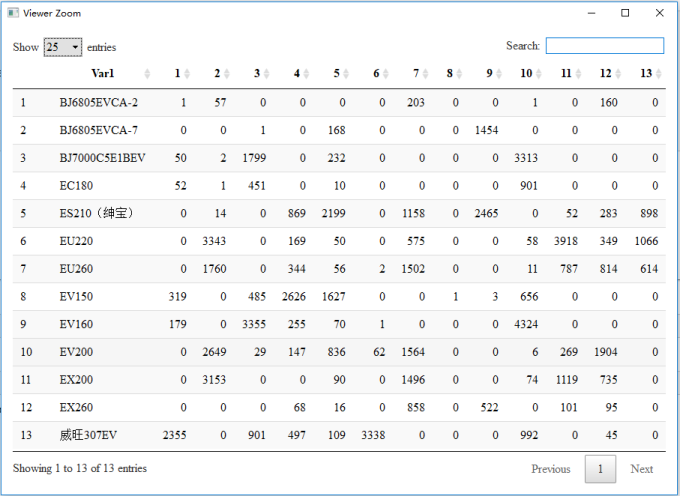
stats::kmeans total time:0.195545196533203, result view:
fpc::kmeansruns
source code:
> ################################################fpc::kmeansruns######################################

> startTime <- Sys.time();

>

> library(fpc)

> kc1 <- kmeansruns(data = newdata,krange = 1:15,critout = TRUE)

2  clusters  9394.437

3  clusters  185919.7

4  clusters  482630.4

5  clusters  414875.3

6  clusters  376338

7  clusters  334493.6

8  clusters  303976.7

9  clusters  279036.3

10  clusters  432009.9

11  clusters  363074.8

12  clusters  405784.7

13  clusters  397422.8

14  clusters  371842.5

15  clusters  408561.7

Warning messages:

1: Quick-TRANSfer stage steps exceeded maximum (= 3507150)

2: Quick-TRANSfer stage steps exceeded maximum (= 3507150)

3: Quick-TRANSfer stage steps exceeded maximum (= 3507150)

> tbl<- table(car.train$TypeName,kc1$cluster)

> tblView(tbl)

>

> ##耗时间

> endTime <- Sys.time()

> difTime <- difftime(endTime,startTime,units = "secs")

> print(paste0("fpc::kmeansruns total time:", difTime))

[1] "fpc::kmeansruns total time:107.454074859619"
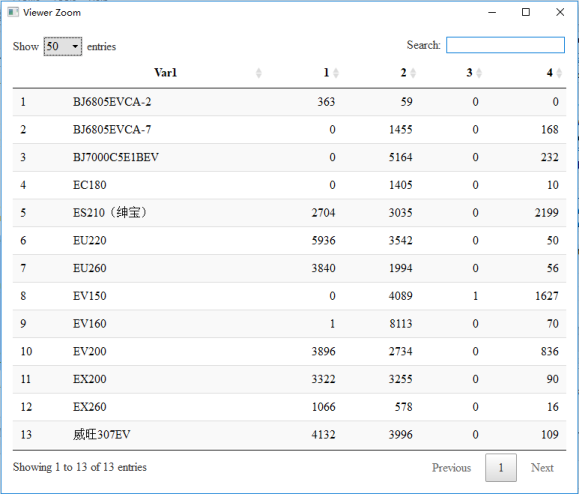
[1] "fpc::kmeansruns total time:107.454074859619" result view:
cluster::pam
source code
> ################################################cluster::pam######################################

>

> library(cluster)

> cPam <- pam(x=newdata,k=13)

Error in pam(x = newdata, k = 13) :

  have 70143 observations, but not more than 65536 are allowed
Error: 待确认
fpc::pamk
source code
> ################################################fpc::pamk######################################

>

> library(fpc)

> fPamk <- pamk(newdata,krang=1:15)

Error in pam(sdata, k, diss = diss, ...) :

  have 70143 observations, but not more than 65536 are allowed
Error: 待确认
stats::hclust
source code:
################################################fpc::pamk######################################

>

> library(fpc)

> fPamk <- pamk(newdata,krang=1:15)

Error in pam(sdata, k, diss = diss, ...) :

  have 70143 observations, but not more than 65536 are allowe
Error: 待确认
mclust::Mclust
source code:
> ################################################mclust::Mclust######################################

> library(mclust)

> EM<-Mclust(newdata)

Error in hcVVV(data = c(379, 379, 379, 379, 379, 379, 379, 379, 379, 379,  :

  NAs in foreign function call (arg 13)

In addition: Warning message:

In hcVVV(data = c(379, 379, 379, 379, 379, 379, 379, 379, 379, 379,  :

  NAs introduced by coercion to integer range
Error: 待确认
cluster::fanny
source code:
> ################################################cluster::fanny######################################

> library(cluster)

> fannyz=fanny(newdata,13,metric="SqEuclidean")

Error in fanny(newdata, 13, metric = "SqEuclidean") :

  long vectors (argument 5) are not supported in .Fortran
Error: 待确认
e1071::cmeans
source code:
> ################################################e1071::cmeans######################################

> startTime <- Sys.time();

>

> library("e1071")

> eCm<-cmeans(newdata,15)

> tbl <- table(car.train$TypeName,eCm$cluster)

> tblView(tbl)

>

> ##耗时间

> endTime <- Sys.time()

> difTime <- difftime(endTime,startTime,units = "secs")

> print(paste0("stats::kmeans total time:", difTime))

[1] "stats::kmeans total time:8.7237401008606"
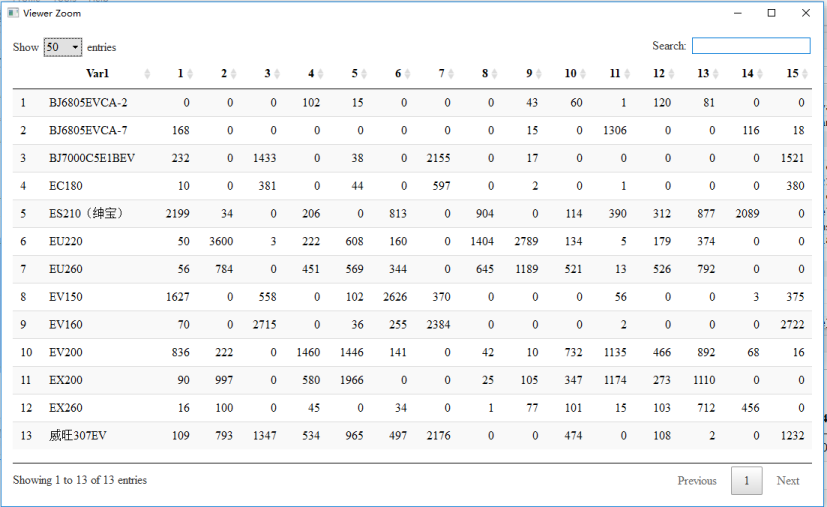
[1] "stats::kmeans total time:8.7237401008606" result view:
待验证
ML: 聚类算法R包-对比的更多相关文章
- ML: 聚类算法R包 - 模型聚类
模型聚类 mclust::Mclust RWeka::Cobweb mclust::Mclust EM算法也称为期望最大化算法,在是使用该算法聚类时,将数据集看作一个有隐形变量的概率模型,并实现模型最 ...
- ML: 聚类算法R包-层次聚类
层次聚类 stats::hclust stats::dist R使用dist()函数来计算距离,Usage: dist(x, method = "euclidean", di ...
- ML: 聚类算法R包-模糊聚类
1965年美国加州大学柏克莱分校的扎德教授第一次提出了'集合'的概念.经过十多年的发展,模糊集合理论渐渐被应用到各个实际应用方面.为克服非此即彼的分类缺点,出现了以模糊集合论为数学基础的聚类分析.用模 ...
- ML: 聚类算法R包-网格聚类
网格聚类算法 optpart::clique optpart::clique CLIQUE(Clustering In QUEst)是一种简单的基于网格的聚类方法,用于发现子空间中基于密度的簇.CLI ...
- ML: 聚类算法R包-K中心点聚类
K-medodis与K-means比较相似,但是K-medoids和K-means是有区别的,不一样的地方在于中心点的选取,在K-means中,我们将中心点取为当前cluster中所有数据点的平均值, ...
- ML: 聚类算法R包 - 密度聚类
密度聚类 fpc::dbscan fpc::dbscan DBSCAN核心思想:如果一个点,在距它Eps的范围内有不少于MinPts个点,则该点就是核心点.核心和它Eps范围内的邻居形成一个簇.在一个 ...
- ML: 聚类算法-K均值聚类
基于划分方法聚类算法R包: K-均值聚类(K-means) stats::kmeans().fpc::kmeansruns() K-中心点聚类(K-Medoids) ...
- ML: 聚类算法-概论
聚类分析是一种重要的人类行为,早在孩提时代,一个人就通过不断改进下意识中的聚类模式来学会如何区分猫狗.动物植物.目前在许多领域都得到了广泛的研究和成功的应用,如用于模式识别.数据分析.图像处理.市场研 ...
- 【转】利用python的KMeans和PCA包实现聚类算法
转自:https://www.cnblogs.com/yjd_hycf_space/p/7094005.html 题目: 通过给出的驾驶员行为数据(trip.csv),对驾驶员不同时段的驾驶类型进行聚 ...
随机推荐
- DRBD常用管理篇
在DRBD进入使用阶段之后,要经常查看它的工作状态,通过这些状态来判断DRBD运行情况. 1) 使用drbd-overview命令观察状态 最为简便的方式就是运行drbd-ove ...
- Oracle查看表或者视图的定义语句
查看表的定义 SELECT DBMS_METADATA.GET_DDL('TABLE','TABLE_NAME') FROM DUAL; 查看视图的定义语句 SELECT DBMS_METADATA. ...
- menson 使用方法
参考:http://mesonbuild.com/Running-Meson.html#configuring-the-source https://github.com/google/googlet ...
- ndoe.js 和npm私有仓库的搭建
下载nodejs的压缩包 网址:https://nodejs.org/en/ 下载以tar.xz结尾的包例如:node-v8.9.4-linux-x64.tar.xz 上传包到制定的目录 可以用lrz ...
- 【leetcode】345. Reverse Vowels of a String
problem 345. Reverse Vowels of a String class Solution { public: string reverseVowels(string s) { , ...
- fixed不能罩住下面的内容
fix的优先级并不是最高的,所以要设置z-index,比它下面的元素高就能遮住了
- 51Nod 1459:迷宫游戏(最短路)
1459 迷宫游戏 基准时间限制:1 秒 空间限制:131072 KB 分值: 0 难度:基础题 收藏 关注 你来到一个迷宫前.该迷宫由若干个房间组成,每个房间都有一个得分,第一次进入这个房间, ...
- A Spy in the Metro(UVA 1025 ACM/ICPC World Finals2003)
---恢复内容开始--- 题意:有n(2<=n<=50)个车站,从左到右编号为1~n,有M1辆列车从第1站向右开,还有M2辆列车从第N站向左开.在时刻0,间谍从第1站出发,目的是在时刻T( ...
- HDU 2023 求平均成绩
Time Limit:1000MS Memory Limit:32768KB 64bit IO Format:%I64d & %I64u Submit Status Practice HDU ...
- mvc core2.1 Identity.EntityFramework Core 导航状态栏(六)
之前做的无法 登录退出,和状态,加入主页导航栏 Views ->Shared->_Layout.cshtml <div class="navbar-collapse col ...